Posted on Leave a comment

.NET 6 is now in Ubuntu 22.04

Richard Lander

.NET 6 is now included in Ubuntu 22.04 (Jammy) and can be installed with just apt install dotnet6. This change is a major improvement and simplification for Ubuntu users. We’re also releasing .NET with Chiseled Ubuntu Containers, a new small and secure container offering from Canonical. These improvements are the result of a new partnership between Canonical and Microsoft.

Here’s the commands to install the .NET 6 SDK on Ubuntu 22.04:

sudo apt update
sudo apt install dotnet6

We’re also announcing that .NET 6 is available with Chiseled Ubuntu Containers. Our friends at Canonical have developed a new chisel approach for making ultra-small container images. We’re very excited about it. The Chiseled Ubuntu image is 100MB smaller than the Ubuntu images you’ve been using until now!

Here’s the command to pull the new ASP.NET Chiseled image:

docker pull mcr.microsoft.com/dotnet/nightly/aspnet:6.0-jammy-chiseled

We also updated our dotnetapp and aspnetapp samples so that you can try out .NET with Chiseled Ubuntu Containers.

These new container images significantly improve security posture:

  • Ultra-small images (reduced size and attack surface)
  • No package manager (avoids a whole class of attacks)
  • No shell (avoids a whole class of attacks)
  • Non-root (avoids a whole class of attacks)

To top that off, Canonical and Microsoft are committed to working together to ensure that new .NET releases are available with new Ubuntu releases and that they work well together. This includes security updates and secure delivery of container images.

We’re really excited that .NET 6 is available in Ubuntu 22.04 and that Canonical chose to work with us as their launch partner for Chiseled Ubuntu images. This is what Canonical had to say about the project.

“Ubuntu now has an end-to-end story from development to production with ultra-small supported container images, starting with the .NET platform”, said Valentin Viennot, Product Manager at Canonical. “We think it’s a huge improvement for both our communities; collaborating with the .NET team at Microsoft has enabled us to go above and beyond”.

Canonical and Microsoft

Several months ago, folks at Canonical and Microsoft started working together with the goal of making Ubuntu an even better environment for .NET devs.

We had two main goals in mind:

  • Simplify using .NET on Ubuntu.
  • Shorten the supply chain between Canonical and Microsoft.

We’ve known for years that many .NET devs use Ubuntu. After we got talking, it became obvious that there was a fair bit we could do to make that experience better. Let me tell you what we’ve delivered.

.NET in APT

You can now install .NET 6 with APT, built by Canonical via source-build. These packages are available with Ubuntu 22.04 (Jammy) and later. It’s a great reason to upgrade to Jammy!

Note: Please checkout this advisory on using packages.microsoft.com on Ubuntu 22.04 now that .NET 6 is included in Ubuntu.

There are multiple packages:

I’ll show you how to install these images using Docker (same model applies elsewhere):

rich@kamloops:~$ docker run --rm -it ubuntu:jammy
root@7d4dfca0ef55:/# apt update && apt install -y dotnet6
root@7d4dfca0ef55:/# dotnet --version
6.0.108

In case that doesn’t work, you need the following source registered, in /etc/apt/sources.list:

deb http://archive.ubuntu.com/ubuntu/ jammy-updates universe

Canonical and Microsoft will be working together to ensure that these packages are updated on the monthly .NET team release schedule. This includes Microsoft sharing CVE information (descriptions and code) with Canonical ahead of public releases. Similarly, Canonical will share security information in the other direction.

Notes:

  • We’re currently missing Arm64 builds. Those will be coming soon. Both companies are strong proponents of Arm64.
  • .NET 7 builds are not yet available, and likely won’t be until .NET 7 GA.
  • .NET SDK workloads are not available in packages (for any Linux distro). Also, the .NET MAUI workloads isn’t supported on Linux.

.NET in Chiseled Ubuntu Containers

You can now use .NET in Chiseled Ubuntu Containers. Chiseling delivers the smallest container footprint while still being the Ubuntu you know and trust. It is similar to conventional distroless, with a tool that is customized for slicing .deb packages.

These images are 100MB smaller than the Ubuntu images we’ve offered until now and don’t include a root user!

We’re offering three layers of Chiseled Ubuntu container images, for Arm64 and x64, for .NET 6 and 7:

  • mcr.microsoft.com/dotnet/nightly/runtime-deps:6.0-jammy-chiseled
  • mcr.microsoft.com/dotnet/nightly/runtime:6.0-jammy-chiseled
  • mcr.microsoft.com/dotnet/nightly/aspnet:6.0-jammy-chiseled

Note: The images will be offered in our nightly repos while the chiseled offering is in preview. We’ll make another announcement when they are supported in production. It will be sometime this year, but we haven’t picked a timeframe, since we’ve been focused on basic enablement.

Canonical is also publishing Chiseled Ubuntu container images for .NET, that include the new APT packages, via Docker Hub:

  • https://hub.docker.com/r/ubuntu/dotnet-deps
  • https://hub.docker.com/r/ubuntu/dotnet-runtime
  • https://hub.docker.com/r/ubuntu/dotnet-aspnet

Let’s take a look at the size win. All of the following sizes are uncompressed (on-disk, not registry/wire size).

First, the runtime-deps layer.

  • Ubuntu 22.04 (Jammy): 112MB
  • Chiseled Ubuntu 22.04 (Jammy): 12.9MB

And on the other end of the spectrum, the aspnet layer.

  • Ubuntu 22.04 (Jammy): 213MB
  • Chiseled Ubuntu 22.04 (Jammy): 104MB

That’s a truly amazing difference! The folks at Canonical have figured out how to drop 100MB of binaries and other content from these images. When we first started talking, we had no idea we’d be talking about this large of a difference!

Close readers will notice that chiseled aspnet is smaller than the existing runtime-deps layer. That’s shockingly good.

It’s reasonable to ask what Alpine looks like. It’s a newer distro designed to be super small and componentized from the start. Alpine is 9.84MB for runtime-deps:6.0-alpine and 100MB for aspnet:6.0-alpine. Those are impressive numbers, again uncompressed. That’s the key reason why Alpine is so popular (and why we’ve published .NET images for it for years).

Alpine is great (and we’re also friends with those folks), but it isn’t for everyone and every app since it uses musl, which is a different (and incompatible) libc variant. That’s only important if your app includes native libraries. If it doesn’t (and most .NET apps don’t), you don’t need to worry about this detail. The .NET product itself is happy running with either musl or glibc and every PR on dotnet/runtime tests for both.

Putting this in perspective, this is really great news if you use Ubuntu for development and always wished for a small Ubuntu to deliver into production. You now have a straightforward path from dev box to cloud without any distro-compatibility surprises. It’s amazing (and quite surprising) to see Ubuntu in the same ballpark as Alpine. Kudos to the Canonical folks on a great engineering accomplishment.

It’s also worth mentioning that Chainguard is looking at minimal container images towards a secure future. That project is run out of the distroless GitHub org. We’re watching that project and glad to see more interest in small and more secure container images. We believe that minimal + non-root container images are the future.

Like our Alpine images, we’ve chosen not to include ICU. It would likely double the size of the image. That means that we’ve enabled globalization invariant mode. For some apps, that’s fine, and the size win is great. For others, it is a deal breaker. We may need to adjust this part of the plan depending on the feedback. We’ve documented the pattern to add ICU into your images.

Let me demo these images a bit to drive the point home on how (intentionally) limited these images are.

% docker run --rm mcr.microsoft.com/dotnet/nightly/runtime-deps:6.0-jammy-chiseled-amd64
docker: Error response from daemon: No command specified.
See 'docker run --help'.

Let’s try again.

% docker run --rm mcr.microsoft.com/dotnet/nightly/runtime-deps:6.0-jammy-chiseled-amd64 bash
docker: Error response from daemon: failed to create shim task: OCI runtime create failed: runc create failed: unable to start container process: exec: "bash": executable file not found in $PATH: unknown.

Huh? What’s up? They don’t work! That’s the point. These are appliance-like container images. They are stripped down to the minimum. They are only intended to do what you design them to do. That’s the aspect that makes them more secure. If this experience is uncomfortable, you can always use the regular Ubuntu images. We’ll continue to offer them. They are not going away.

We’re not offering a chiseled SDK image. It wasn’t obvious that there was a strong need. In fact, a chiseled SDK image could be hard to use for some scenarios. You can continue to use the existing Jammy SDK image: mcr.microsoft.com/dotnet/sdk:6.0-jammy. If there is a need for a chiseled SDK image, we’ll be happy to reconsider.

Using chiseled container images

For most apps, there won’t be any notable difference in using these new container images, in terms of what your Dockerfile looks like.

We made updated our samples to use these new containers images:

I’ll show you how easy this is with dotnetapp.

The Dockerfile is barely different.

FROM mcr.microsoft.com/dotnet/sdk:7.0-jammy AS build
WORKDIR /source # copy csproj and restore as distinct layers
COPY *.csproj .
RUN dotnet restore --use-current-runtime # copy and publish app and libraries
COPY . .
RUN dotnet publish -c Release -o /app --use-current-runtime --self-contained false --no-restore # final stage/image
FROM mcr.microsoft.com/dotnet/nightly/runtime:7.0-jammy-chiseled
WORKDIR /app
COPY --from=build /app .
ENTRYPOINT ["dotnet", "dotnetapp.dll"]

Only the final FROM statement really differs from our standard Ubuntu Dockerfile.

I’ll now build the sample:

rich@MacBook-Air-2 dotnetapp % pwd
/Users/rich/git/dotnet-docker/samples/dotnetapp
rich@MacBook-Air-2 dotnetapp % docker build -t dotnetapp-chiseled -f Dockerfile.chiseled .
rich@MacBook-Air-2 dotnetapp % docker images | grep dotnetapp-chiseled
dotnetapp-chiseled latest bf7e125bd182 20 seconds ago 90.5MB

Note: I didn’t use any .NET trimming features. Certainly, this image could be made smaller.

Let’s launch the container:

rich@MacBook-Air-2 dotnetapp % docker run --rm dotnetapp-chiseled 42 42 ,d ,d 42 42 42 ,adPPYb,42 ,adPPYba, MM42MMM 8b,dPPYba, ,adPPYba, MM42MMM
a8" `Y42 a8" "8a 42 42P' `"8a a8P_____42 42
8b 42 8b d8 42 42 42 8PP""""""" 42 "8a, ,d42 "8a, ,a8" 42, 42 42 "8b, ,aa 42, `"8bbdP"Y8 `"YbbdP"' "Y428 42 42 `"Ybbd8"' "Y428 .NET 7.0.0-preview.7.22375.6
Linux 5.10.104-linuxkit #1 SMP PREEMPT Thu Mar 17 17:05:54 UTC 2022 OSArchitecture: Arm64
ProcessorCount: 4
TotalAvailableMemoryBytes: 3.83 GiB

And then, let’s try to break in:

rich@MacBook-Air-2 dotnetapp % docker run --rm --entrypoint bash dotnetapp-chiseled
docker: Error response from daemon: failed to create shim task: OCI runtime create failed: runc create failed: unable to start container process: exec: "bash": executable file not found in $PATH: unknown.
rich@MacBook-Air-2 dotnetapp % docker run --rm --entrypoint apt dotnetapp-chiseled install -y bash curl
docker: Error response from daemon: failed to create shim task: OCI runtime create failed: runc create failed: unable to start container process: exec: "apt": executable file not found in $PATH: unknown.

My “red team” skills are failing me. Note that docker exec would have the same result.

I’ll now describe chiseled images in a bit more detail now that you’ve seen them in action.

Chiseled Ubuntu Containers

Chiseled Ubuntu Containers are the Canonical take on the distroless concept, originally popularized by Google. With the original implementation, a distro is stripped bare and only necessary packages are installed. Chiseling takes this one step forward by installing only the directories and files in each package that are necessary.

The other challenge with the original implementation was that it wasn’t necessarily supported by any party. Chiseled Ubuntu Containers are a first-class Canonical deliverable. That means you can use ultra-small container images and be supported as a Canonical customer.

Hats off to Google for getting us all started down this path.

As stated earlier, there is a lot of value to this approach:

  • Ultra-small images (reduced size and attack surface)
  • No package manager (avoids a whole class of attacks)
  • No shell (avoids a whole class of attacks)

Chiseled Ubuntu Containers are currently in preview. We’ll make a separate announcement when they are stable and supported in production.

Non-root images

We’ve configured all of the new .NET Chiseled Ubuntu Containers with a non-root user. The images do not include the root user or include root-elevating commands like sudo or su. That means that it is not possible to exercise capabilities and operations that require root.

Non-root images are an additional security mitigation beyond removing a shell (like bash). Non-root images are logically separate and complementary to running a daemon as rootless. Every reduction in privilege helps.

If you need access to privileged resources, you can add the root user within your Dockerfile. You are not prevented from that, but then that’s a specific security decision you’d be making.

Chiseled images are appliance-like and are not general-purpose. We felt that they offered us an opportunity to finally deliver non-root images. That’s informing our policy going forward. Appliance-like images will be delivered as non-root and general-purpose ones will be delivered as per the policy of the base image (which might be configured with the root user). However, this project with Canonical has inspired us to look at a middle-ground option, of offering non-root-capable images.

Secure supply chain

Canonical already has secure processes in place for directly delivering Ubuntu Virtual Machine images to Azure for customers to use. It occurred to us that Canonical could do the same thing with the Ubuntu container base images that we use to build Ubuntu-based .NET images (regular and Chiseled). That’s what we’re now using, instead of pulling from Docker Hub. We now have what’s effectively a zero-distance supply chain for all Canonical assets with known custody/provenance throughout.

We’re doing something similar with sharing CVE fixes. We have a shared private virtual mono repo for sharing monthly patches. It’s also shared with Red Hat. It means we can work together on getting the correct fixes in place at the right time in a coordinated way.

.NET container images are not yet signed, but that’s coming relatively soon. We’re regularly working to improve our security-focused capabilities.

Support

Canonical and Microsoft have been working together to give you a better experience. This includes support. You can report issues in the familiar .NET repos like dotnet/core and dotnet/runtime. If you want commercial support, you should start with Canonical support. Canonical is the best position to support Ubuntu packages. Canonical may contact Microsoft to assist with resolving issues, as needed.

Security researchers that find vulnerabilities in Canonical-provided .NET packages are still eligible for the Microsoft .NET Bounty Program.

Microsoft continues to maintain .NET packages in its packages.microsoft.com feed for Ubuntu and we intend to continue that going forward. For most users, we recommend using the dotnet6 packages that come with Ubuntu Jammy+. That’s what I’ll be doing. It’s also the same guidance we have for Red Hat users.

Note: Please checkout this advisory on using packages.microsoft.com on Ubuntu 22.04 now that .NET 6 is included in Ubuntu.

There are two main reasons to continue to use the Microsoft packages:

  • You specifically want .NET builds from Microsoft, not any other vendor.
  • The Microsoft packages target later .NET SDK feature bands (like 6.0.4xx) while source-build tracks 6.0.1xx. That’s more relevant for Windows users, but might be important for some Linux users.

The new packages are available for .NET 6+ and Ubuntu 22.04+. Previous .NET and Ubuntu versions are not supported (with the new packages). You must use the existing packages.microsoft.com feed to use .NET on earlier Ubuntu versions. Separately, earlier .NET versions are not supported on Ubuntu 22.04 because they do not support OpenSSL v3.

What’s Next?

We have identified a number of opportunities to make it easier for Canonical to consume .NET source. We’re going to focus on those in the immediate term. These improvements will also benefit other users who build and distribute .NET from source.

We recently setup a distro-maintainer group for .NET. Canonical is a member of that group. We have already started discussing potential source-build improvements within that forum. Other distros (that build .NET from source) are welcome to join. Contact [email protected] for more information.

Canonical is starting out with support for x64 and will quickly add .NET packages for Arm64. It’s an exciting time in the industry with multiple mainline chip architectures to support. Ubuntu and .NET both have a long history of supporting multiple architectures.

Closing

.NET has been open source for just over 5 years now. A partnership with Canonical was felt out of grasp during the early days of our project on GitHub. We’ve learned a lot about how to structure an OSS project so that it is a candidate for inclusion in a Linux distro. This is thanks to our other partners who have taught us a lot, particularly Fedora and Red Hat. Looking back, it is easy to see that open source, trust, and industry relationships are even more important now than they were when we started. We’re excited and honored to be working with Canonical.

Posted on Leave a comment

Microsoft Dev Box preview now available

Many IT organizations must choose between giving developers the flexibility they need to be productive and keeping developer workstations managed and secure. Supply chain challenges have led to developers waiting weeks or months to get the hardware they need, forcing them to use aging hardware or unsecured personal devices. At the same time, hybrid work has forced IT to open access to corporate and on-premises resources to developers around the world. With access to sensitive source code and customer data, developers are increasingly becoming the target of more sophisticated cyberattacks.

Today, we’re excited to announce the preview of Microsoft Dev Box is now available to the public. Microsoft Dev Box is a managed service that enables developers to create on-demand, high-performance, secure, ready-to-code, project-specific workstations in the cloud. Sign in to the Azure portal and search for “dev box” to begin creating dev boxes for your organization.

Focus on code—not infrastructure

GIF showing a developer deploying a new Dev Box from a Dev Box pool.

With Microsoft Dev Box, developers can focus on writing the code only they can write instead of trying to get a working environment that can build and run the code. Dev boxes are ready-to-code and preconfigured by the team with all the tools and settings developers need for their projects and tasks. Developers can create their own dev boxes whenever they need to quickly switch between projects, experiment on a proof-of-concept, or kick off a full build in the background while they move on to the next task.

Microsoft Dev Box supports any developer IDE, SDK, or tool that runs on Windows. Developers can target any development workload that can be built from Windows including desktop, mobile, IoT, and web applications. Microsoft Dev Box even supports building cross-platform apps thanks to Windows Subsystem for Linux and Windows Subsystem for Android. Remote access gives developers the flexibility to securely access dev boxes from any device, whether it’s Windows, MacOS, Android, iOS, or a web browser.

Tailor dev boxes to the needs of the team

Diagram showing the high-level workflow of Microsoft Dev Box and how IT admins, dev leads, and developers interact with the service.

With Microsoft Dev Box, developer teams create and maintain dev box images with all the tools and dependencies their developers need to build and run their applications. Developer leads can instantly deploy the right size dev box for specific roles in a team anywhere in the world, selecting from 4 vCPU / 16GB to 32 vCPU / 128GB SKUs to scale to any size application. By deploying dev boxes in the closest Azure region and connecting via the Azure Global Network, dev teams ensure a smooth and responsive experience with gigabit connection speeds for developers around the world.

Using Azure Active Directory groups, IT admins can grant access to sensitive source code and customer data for each project. With role-based permissions and custom network configurations, developer leads can give vendors limited access to the resources they need to contribute to the project—eliminating the need to ship hardware to short-term contractors and helping keep development more secure.

Centralize governance and management

Screenshot showing Dev Boxes being managed along with other devices from Microsoft Endpoint Manager.

Developer flexibility and productivity can’t come at the expense of security or compliance. Microsoft Dev Box builds on Windows 365, making it easy for IT administrators to manage dev boxes together with physical devices and Cloud PCs through Microsoft Intune and Microsoft Endpoint Manager. IT admins can set conditional access policies to ensure users only access dev boxes from compliant devices while keeping dev boxes up to date using expedited quality updates to deploy zero-day patches across the organization and quickly isolate compromised devices. Endpoint Manager’s deep device analytics make it easy to audit application health, device utilization, and other critical metrics, giving developers the confidence to focus on their code knowing they’re not exposing the organization to any unnecessary risk.

Microsoft Dev Box uses a consumption-based compute and storage pricing model, meaning organizations only pay for what they use. Automated schedules can warm up dev boxes at the start of the day and stop them at the end of the day while they sit idle. With hibernation, available in a few weeks, developers can resume a stopped dev box and pick up right where they left off.

Get started now

Microsoft Dev Box is available today as a preview from the Azure Portal. During this period, organizations get the first 15 hours of the dev box 8vCPU and 32 GB Memory SKU for free every month, along with the first 365 hours of the dev box Storage SSD 512 GB SKU. Beyond that, organizations pay only for what they use with a consumption-based pricing model. With this model, organizations are charged on a per-hour basis depending on the number of Compute and Storage that are consumed.
To learn more about Microsoft Dev Box and get started with the service, visit the Microsoft Dev Box page or find out how to deploy your own Dev Box from a pool.

Posted on Leave a comment

Announcing Project OneFuzz framework, an open source developer tool for finding and fixing bugs at scale

Microsoft is dedicated to working with the community and our customers to continuously improve and tune our platform and products to help defend against the dynamic and sophisticated threat landscape. Earlier this year, we announced that we would replace the existing software testing experience known as Microsoft Security and Risk Detection with an automated, open-source tool as the industry moved toward this model. Today, we’re excited to release this new tool called Project OneFuzz, an extensible fuzz testing framework for Azure. Available through GitHub as an open-source tool, the testing framework used by Microsoft Edge, Windows, and teams across Microsoft is now available to developers around the world.

Fuzz testing is a highly effective method for increasing the security and reliability of native code—it is the gold standard for finding and removing costly, exploitable security flaws. Traditionally, fuzz testing has been a double-edged sword for developers: mandated by the software-development lifecycle, highly effective in finding actionable flaws, yet very complicated to harness, execute, and extract information from. That complexity required dedicated security engineering teams to build and operate fuzz testing capabilities making it very useful but expensive. Enabling developers to perform fuzz testing shifts the discovery of vulnerabilities to earlier in the development lifecycle and simultaneously frees security engineering teams to pursue proactive work.

Microsoft’s goal of enabling developers to easily and continuously fuzz test their code prior to release is core to our mission of empowerment. The global release of Project OneFuzz is intended to help harden the platforms and tools that power our daily work and personal lives to make an attacker’s job more difficult.

Recent advancements in the compiler world, open-sourced in LLVM and pioneered by Google, have transformed the security engineering tasks involved in fuzz testing native code. What was once attached—at great expense—can now be baked into continuous build systems through:

  • Crash detection, once attached via tools such as Electric Fence, can be baked in with asan.
  • Coverage tracking, once attached via tools such as iDNA, Dynamo Rio, and Pin can be baked in with sancov.
  • Input harnessing, once accomplished via custom I/O harnesses, can be baked in with libfuzzer’s LLVMFuzzerTestOneInput function prototype.

These advances allow developers to create unit test binaries with a modern fuzzing lab compiled in: highly reliable test invocation, input generation, coverage, and error detection in a single executable. Experimental support for these features is growing in Microsoft’s Visual Studio. Once these test binaries can be built by a compiler, today’s developers are left with the challenge of building them into a CI/CD pipeline and scaling fuzzing workloads in the cloud.

Project OneFuzz has already enabled continuous developer-driven fuzzing of Windows that has allowed Microsoft to proactively harden the Windows platform prior to shipment of the latest OS builds. With a single command line (baked into the build system!) developers can launch fuzz jobs ranging in size from a few virtual machines to thousands of cores. Project OneFuzz enables:

  • Composable fuzzing workflows: Open source allows users to onboard their own fuzzers, swap instrumentation, and manage seed inputs.
  • Built-in ensemble fuzzing: By default, fuzzers work as a team to share strengths, swapping inputs of interest between fuzzing technologies.
  • Programmatic triage and result deduplication: It provides unique flaw cases that always reproduce.
  • On-demand live-debugging of found crashes: It lets you summon a live debugging session on-demand or from your build system.
  • Observable and Debug-able: Transparent design allows introspection into every stage.
  • Fuzz on Windows and Linux OSes: Multi-platform by design. Fuzz using your own OS build, kernel, or nested hypervisor.
  • Crash reporting notification callbacks: Currently supporting Azure DevOps Work Items and Microsoft Teams messages

Project OneFuzz is available now on GitHub under an MIT license. It is updated by contributions from Microsoft Research & Security Groups across Windows and by more teams as we grow our partnership and expand fuzzing coverage across the company to continuously improve the security of all Microsoft platforms and products. Microsoft will continue to maintain and expand Project OneFuzz, releasing updates to the open-source community as they occur. Contributions from the community are welcomed. Share questions, comments, and feedback with us: [email protected]

To learn more about Microsoft Security solutions visit our website.  Bookmark the Security blog to keep up with our expert coverage on security matters. Also, follow us at @MSFTSecurity for the latest news and updates on cybersecurity.

Posted on Leave a comment

New features in Red Hat CodeReady Studio 12.13.0.GA and JBoss Tools 4.13.0.Final for Eclipse 2019-09

JBoss Tools 4.13.0 and Red Hat CodeReady Studio 12.13 for Eclipse 2019-09 are here and waiting for you. In this article, I’ll cover the highlights of the new releases and show how to get started.

Installation

Red Hat CodeReady Studio (previously known as Red Hat Developer Studio) comes with everything pre-bundled in its installer. Simply download it from our Red Hat CodeReady Studio product page and run it like this:

java -jar codereadystudio-<installername>.jar

JBoss Tools or Bring-Your-Own-Eclipse (BYOE) CodeReady Studio requires a bit more.

This release requires at least Eclipse 4.13 (2019-09), but we recommend using the latest Eclipse 4.13 2019-09 JEE Bundle because then you get most of the dependencies pre-installed.

Once you have installed Eclipse, you can either find us on the Eclipse Marketplace under “JBoss Tools” or “Red Hat CodeReady Studio.”

For JBoss Tools, you can also use our update site directly:

http://download.jboss.org/jbosstools/photon/stable/updates/

What’s new?

Our main focus for this release was improvements for container-based development and bug fixing. Eclipse 2019-06 itself has a lot of new cool stuff, but I’ll highlight just a few updates in both Eclipse 2019-06 and JBoss Tools plugins that I think are worth mentioning.

Red Hat OpenShift

OpenShift Container Platform 4.2 support

With the new OpenShift Container Platform (OCP) 4.2 now available (see the announcement), even if this is a major shift compared to OCP 3, Red Hat CodeReady Studio and JBoss Tools are compatible with this major release in a transparent way. Just define your connection to your OCP 4.2 based cluster as you did before for an OCP 3 cluster, and use the tooling!

CodeReady Containers 1.0 Server Adapter

A new server adapter has been added to support the next generation of CodeReady Containers 1.0. Although the server adapter itself has limited functionality, it is able to start and stop the CodeReady Containers virtual machine via its crc binary. Simply hit Ctrl+3 (Cmd+3 on OSX) and type new server, which will bring up a command to set up a new server.

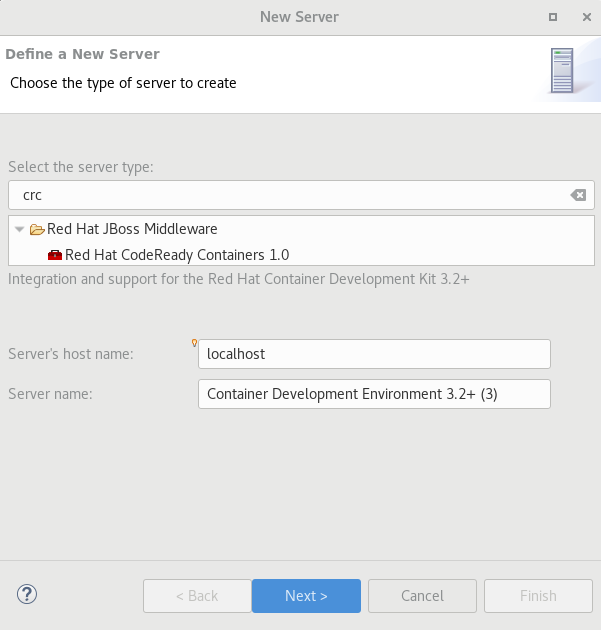
crc server adapter

Enter crc in the filter textbox.

You should see the Red Hat CodeReady Containers 1.0 server adapter.

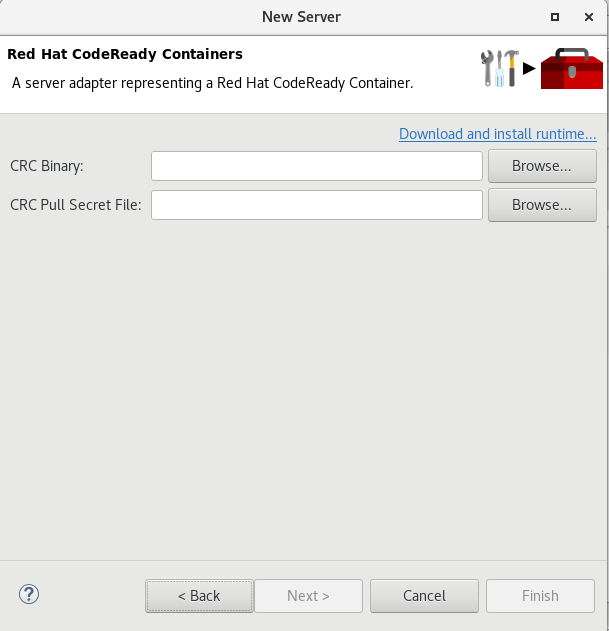
Select Red Hat CodeReady Containers 1.0 and click Next.

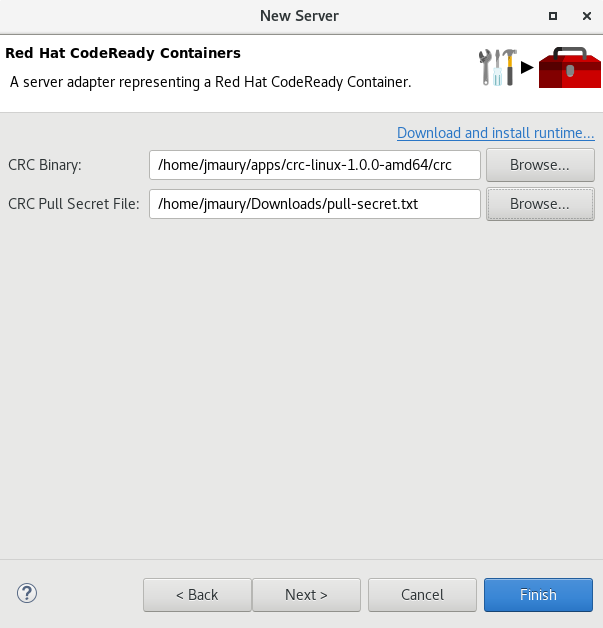
All you have to do is set the location of the CodeReady Containers crc binary file and the pull secret file location, which can be downloaded from https://cloud.redhat.com/openshift/install/crc/installer-provisioned.

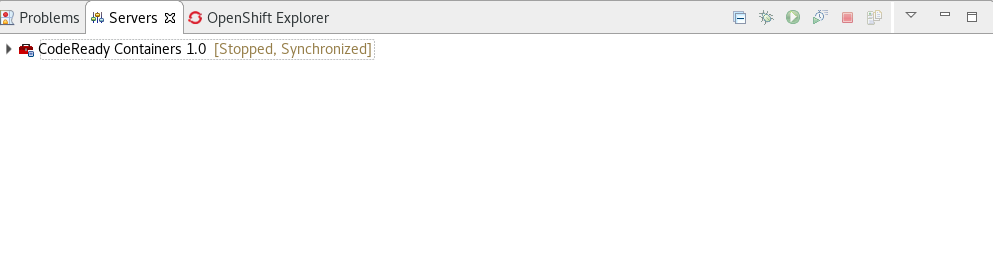
Once you’re finished, a new CodeReady Containers server adapter will then be created and visible in the Servers view.

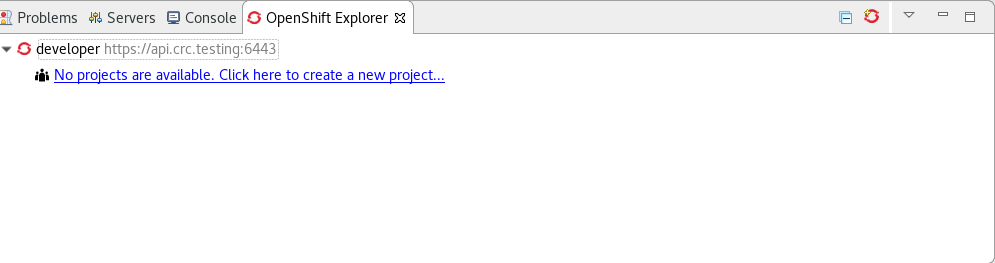
Once the server is started, a new OpenShift connection should appear in the OpenShift Explorer view, allowing the user to quickly create a new Openshift application and begin developing their AwesomeApp in a highly replicatable environment.

Server tools

Wildfly 18 Server Adapter

A server adapter has been added to work with Wildfly 18. It adds support for Java EE 8 and Jakarta EE 8.

EAP 7.3 Beta Server Adapter

A server adapter has been added to work with EAP 7.3 Beta.

Hibernate Tools

Hibernate Runtime Provider Updates

A number of additions and updates have been performed on the available Hibernate runtime providers.

The Hibernate 5.4 runtime provider now incorporates Hibernate Core version 5.4.7.Final and Hibernate Tools version 5.4.7.Final.

The Hibernate 5.3 runtime provider now incorporates Hibernate Core version 5.3.13.Final and Hibernate Tools version 5.3.13.Final.

Platform

Views, Dialogs and Toolbar

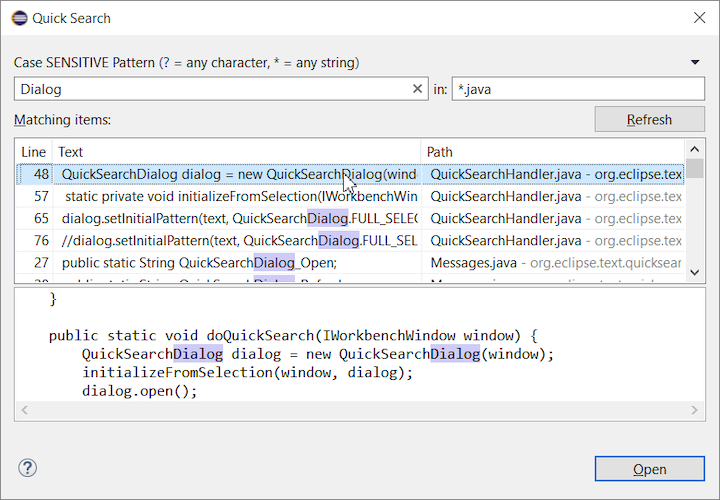
The new Quick Search dialog provides a convenient, simple and fast way to run a textual search across your workspace and jump to matches in your code. The dialog provides a quick overview showing matching lines of text at a glance. It updates as quickly as you can type and allows for quick navigation using only the keyboard. A typical workflow starts by pressing the keyboard shortcut Ctrl+Alt+Shift+L (or Cmd+Alt+Shift+L on Mac). Typing a few letters updates the search result as you type. Use Up-Down arrow keys to select a match, then hit Enter to open it in an editor.

Save editor when Project Explorer has focus

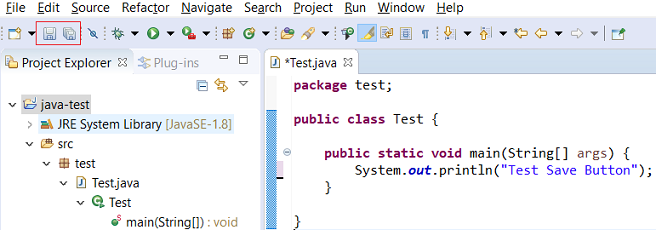
You can now save the active editor even when the Project Explorer has focus. In cases where an extension contributes Saveables to the Project Explorer, the extension is honored and the save action on the Project Explorer will save the provided saveable item instead of the active editor.

“Show In” context menu available for normal resources

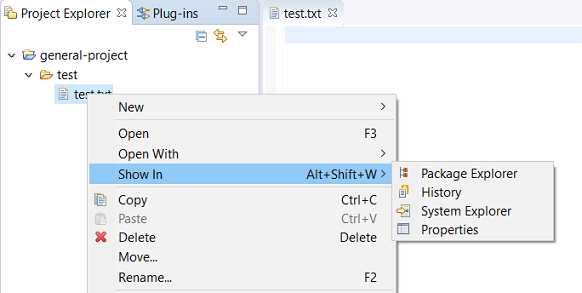
The Show In context menu is now available for an element inside a resource project on the Project Explorer.

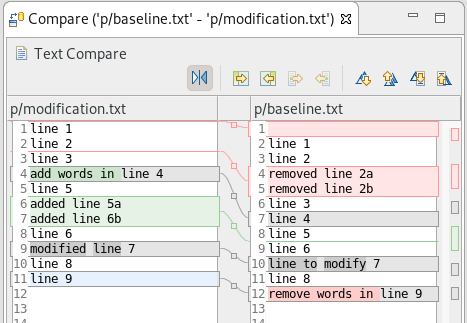
Show colors for additions and deletions in Compare viewer

In simple cases such as a two-way comparison or a three-way comparison with no merges and conflicts, the Compare viewer now shows different colors, depending on whether text has been added, removed, or modified. The default colors are green, red, and black, respectively.

The colors can be customized through usual theme customization approaches, including using related entries in the Colors and Fonts preference page.

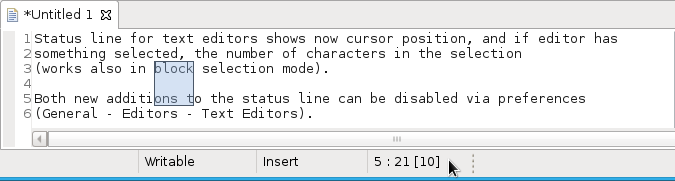
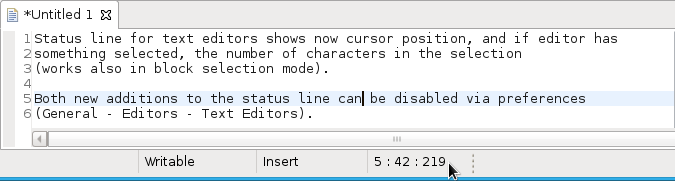
Editor status line shows more selection details

The status line for Text Editors now shows the cursor position, and when the editor has something selected, it shows the number of characters in the selection as well. This also works in the block selection mode.

These two new additions to the status line can be disabled via the General > Editors > Text Editors preference page.

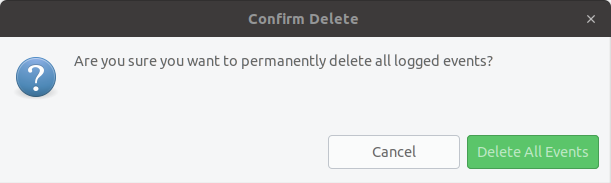
Shorter dialog text

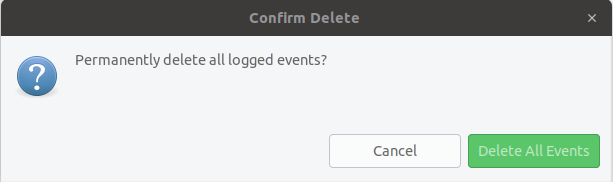
Several dialog texts have been shortened. This allows you to capture important information faster.

Previously:

Now:

Close project via middle-click

In the Project Explorer, you can now close a project using middle-click.

Debug

Improved usability of Environment tab in Launch Configurations

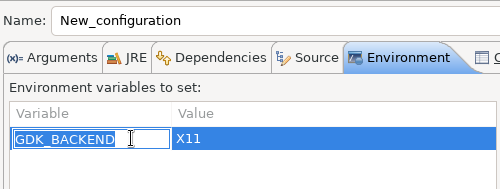
In the Environment tab of the Launch Configuration dialog, you can now double-click on an environment variable name or value and start editing it directly from the table.

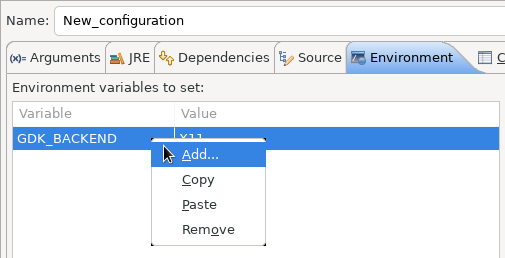
Right-clicking on the environment variable table now opens a context menu, allowing for quick addition, removal, copying, and pasting of environment variables.

Show Command Line for external program launch

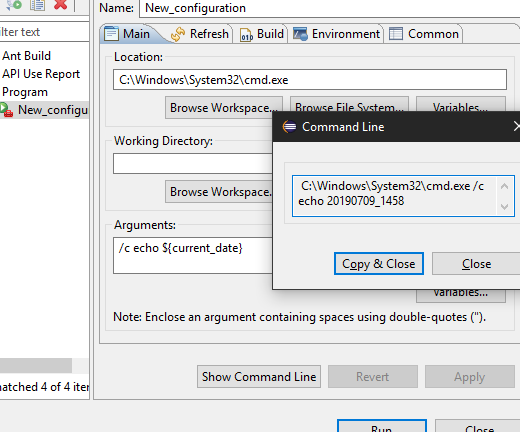
The External Tools Configuration dialog for launching an external program now supports the Show Command Line button.

Preferences

Close editors automatically when reaching 99 open editors

The preference to close editors automatically is now enabled by default. It will be triggered when you have opened 99 files. If you continue to open editors, old editors will be closed to protect you from performance problems. You can modify this setting in the Preferences dialog via the General > Editors > Close editors automatically preference.

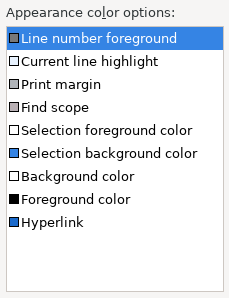
In-table color previews for Text Editor appearance color options

You can now see all the colors currently being used in Text Editors from the Appearance color options table, located in the Preferences > General > Editors > Text Editor page.

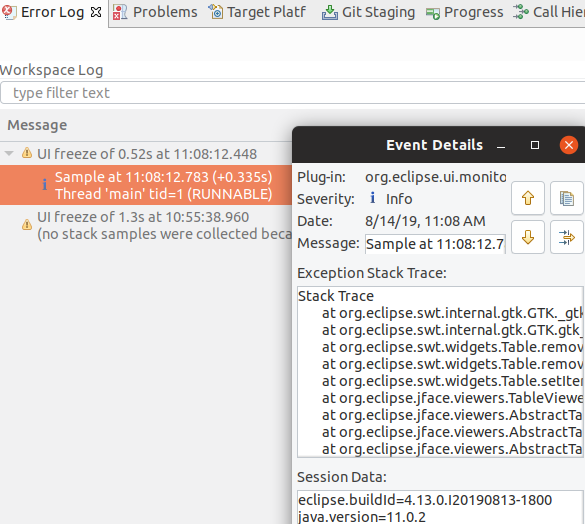
Automatic detection of UI freezes in the Eclipse SDK

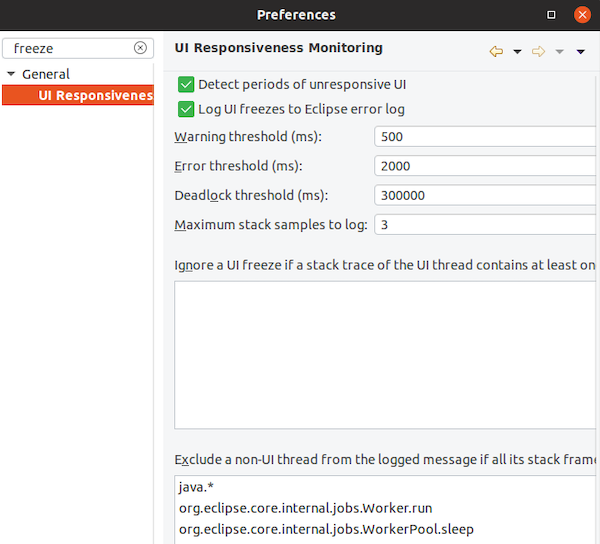
The Eclipse SDK has been configured to show stack traces for UI freezes in the Error Log view by default for new workspaces. You can use this information to identify and report slow parts of the Eclipse IDE.

You can disable the monitoring or tweak its settings via the options in the General > UI Responsiveness Monitoring preference page as shown below.

Themes and Styling

Start automatically in dark theme based on OS theme

On Linux and Mac, Eclipse can now start automatically in dark theme when the OS theme is dark. This works by default, that is on a new workspace or when the user has not explicitly set or changed the theme in Eclipse.

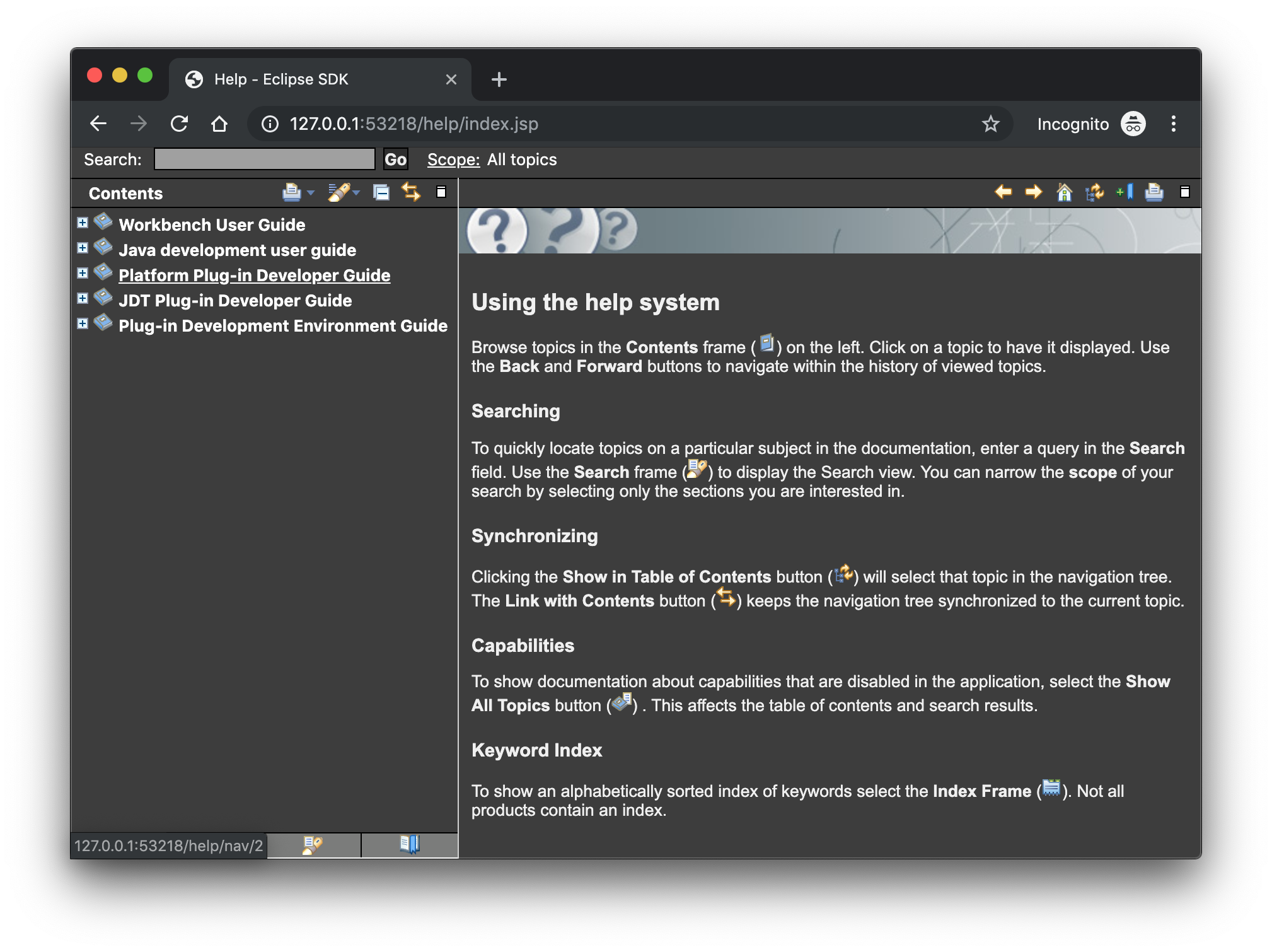
Display of Help content respects OS theme

More and more operating systems provide a system-wide dark theme. Eclipse now respects this system-wide theme setting when the Eclipse help content is displayed in an external browser. A prerequisite for this is a browser that supports the prefers-color-scheme CSS media query.

As of the time of writing, the following browser versions support it:

  • Firefox version 67
  • Chrome version 76
  • Safari version 12.1

Help content uses high-resolution icons.

The Help System, as well as the help content of the Eclipse Platform, the Java Development Tooling, and the Plug-in Development Environment, now uses high-resolution icons. They are now crisp on high-resolution displays and also look much better in the dark theme.

Improved dark theme on Windows

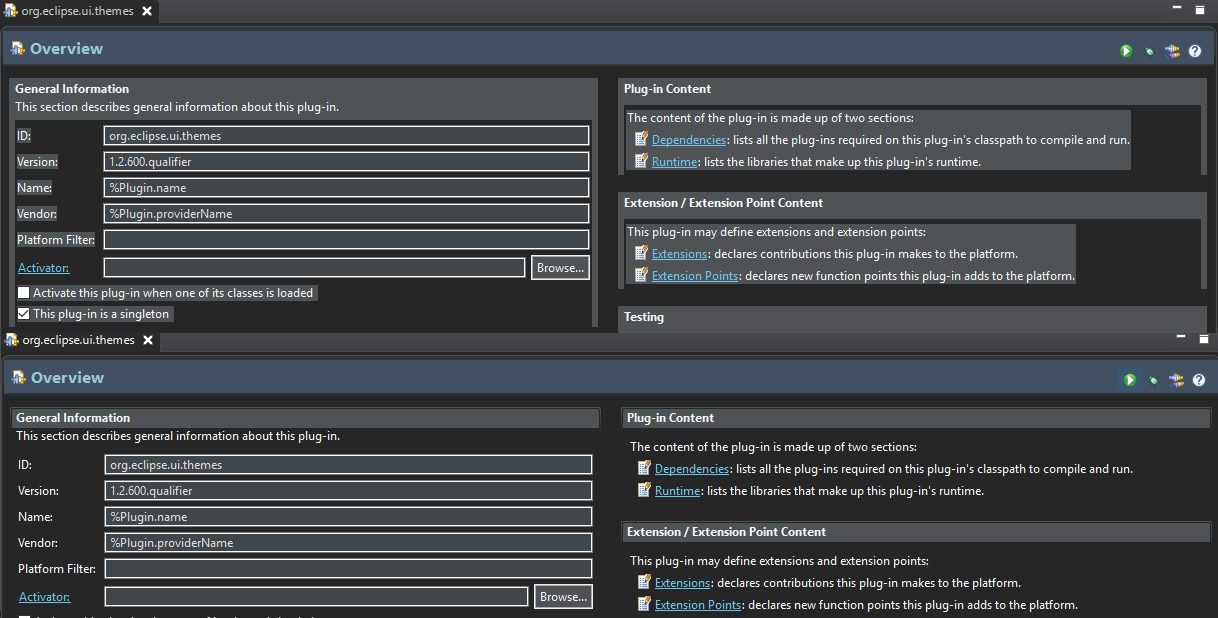
Labels, Sections, Checkboxes, Radio Buttons, FormTexts, and Sashes on forms now use the correct background color in the dark mode on windows.

General Updates

Interactive performance

Interactive performance has been further improved in this release and several UI freezes have been fixed.

Show key bindings when command is invoked

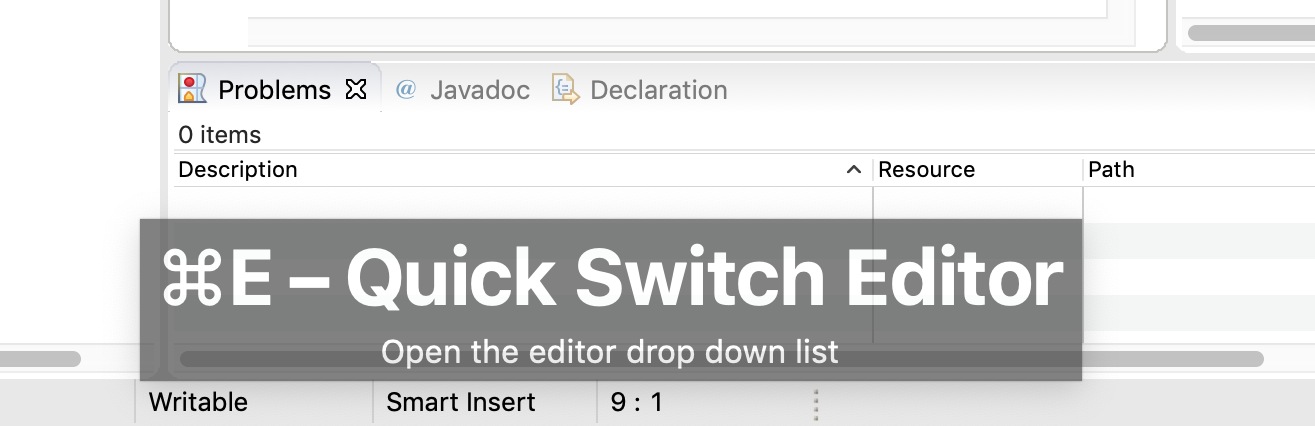
For presentations, screencasts, and learning purposes, it is very helpful to show the corresponding key binding when a command is invoked. When the command is invoked (via a key binding or menu interaction) the key binding, the command’s name and description are shown on the screen.

You can activate this in the Preferences dialog via the Show key binding when command is invoked checkbox on the General > Keys preference page. To toggle this setting quickly, you can use the Toggle Whether to Show Key Binding command (e.g., via the quick access).

Java Developement Tools (JDT)

Java 13 Support

Java 13 is out, and Eclipse JDT supports Java 13 for 4.13 via Marketplace.

The release notably includes the following Java 13 features:

  • JEP 354: Switch Expressions (Preview).
  • JEP 355: Text Blocks (Preview).

Please note that these are preview language features; hence, the enable preview option should be on. For an informal introduction of the support, please refer to Java 13 Examples wiki.

Java Views and Dialogs

Synchronize standard and error output in console

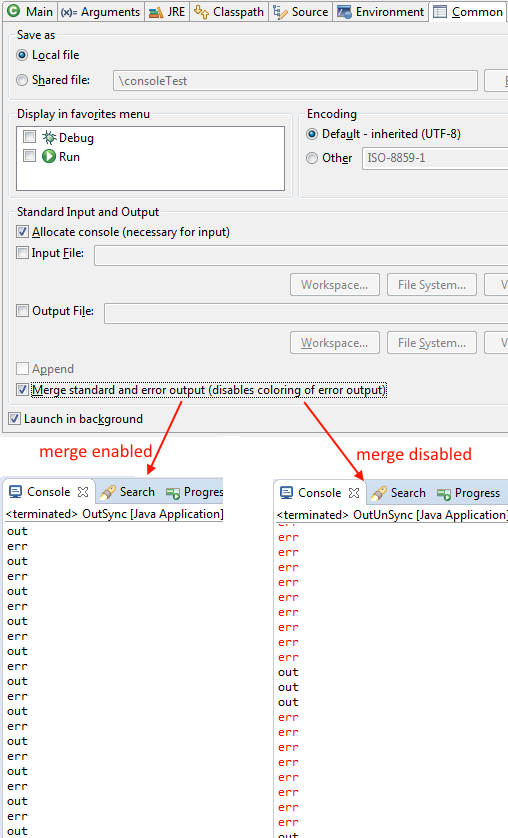
The Eclipse Console view currently can not ensure that mixed standard and error output is shown in the same order as it is produced by the running process. For Java applications, the launch configuration Common tab now provides an option to merge standard and error output. This ensures that standard and error output is shown in the same order it was produced but also disables the individual coloring of error output.

Java Editor

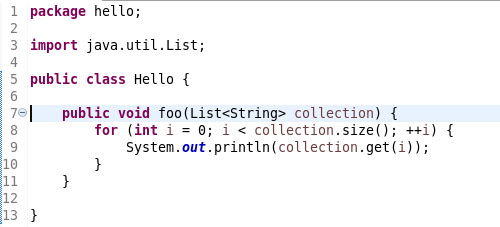
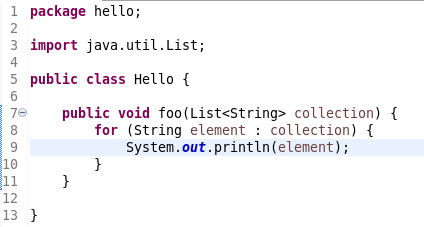
Convert to enhanced ‘for’ loop using Collections

The Java quickfix/cleanup Convert to enhanced ‘for’ loop is now offered on for loops that are iterating through Collections. The loop must reference the size method as part of the condition and if accessing elements in the body, must use the get method. All other Collection methods other than isEmpty invalidate the quickfix being offered.

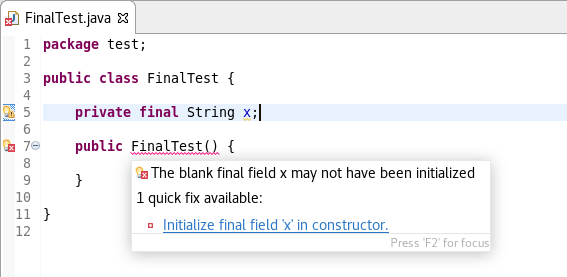
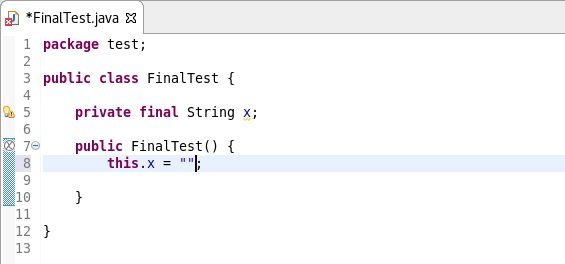
Initialize ‘final’ fields

A Java quickfix is now offered to initialize an uninitialized final field in the class constructor. The fix will initialize a String to the empty string, a numeric base type to 0, and, for class fields, it initializes them using their default constructor if available or null if no default constructor exists.

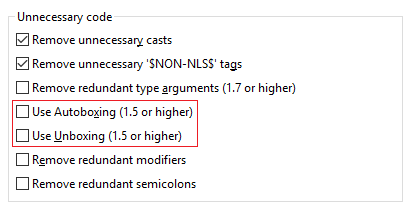
Autoboxing and Unboxing

Use Autoboxing and Unboxing when possible. These features are enabled only for Java 5 and higher.

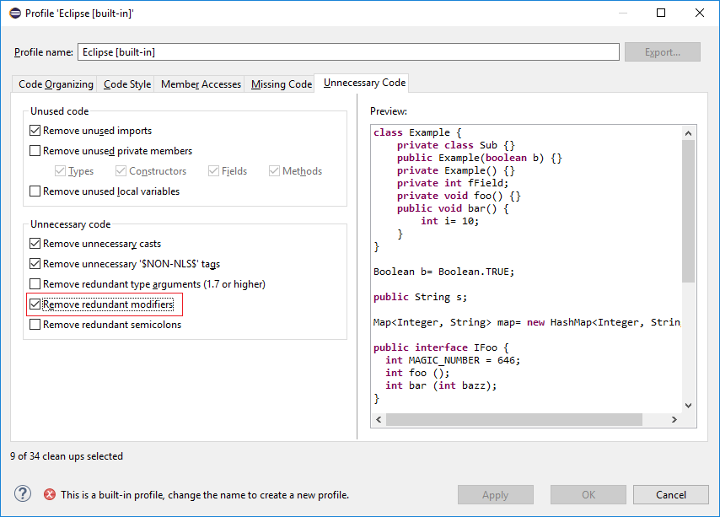
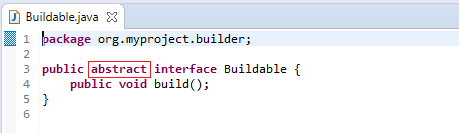
Improved redundant modifier removal

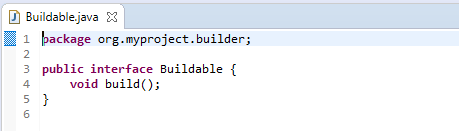
The Remove redundant modifier now also removes useless abstract modifier on the interfaces.

For the given code:

You get this:

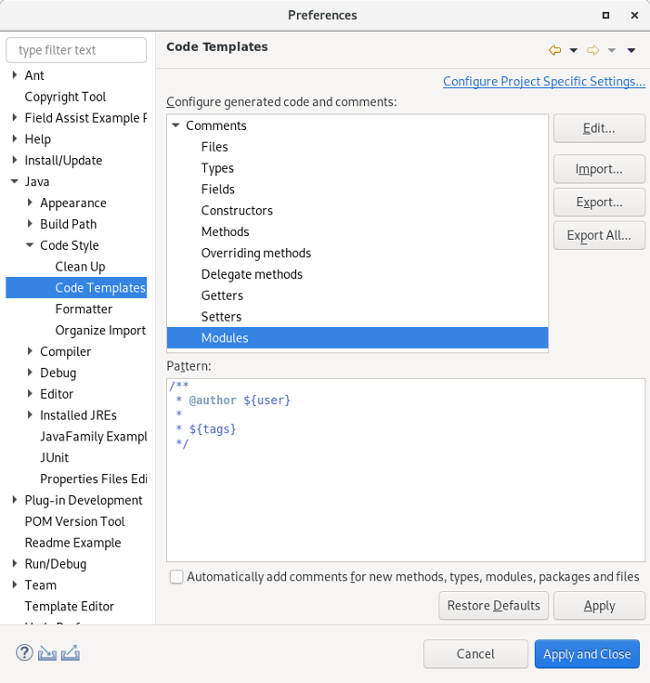
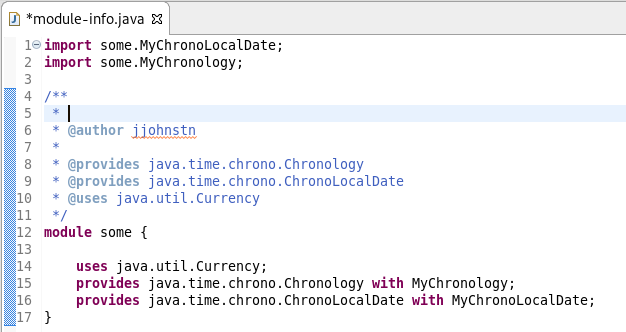
Javadoc comment generation for module

Adding a Javadoc comment to a Java module (module-info.java) will result in automatic annotations being added per the new module comment preferences.

The $(tags) directive will add @uses and @provides tags for all uses and provides module statements.

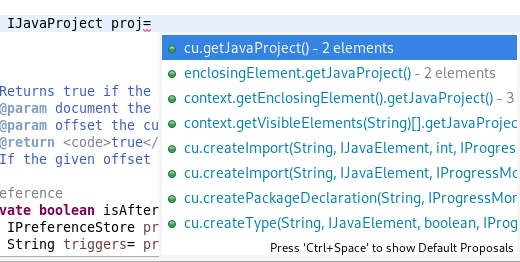
Chain Completion Code Assist

Code assist for “Chain Template Proposals” will be available. These will traverse reachable local variables, fields, and methods, to produce a chain whose return type is compatible with the expected type in a particular context.

The preference to enable the feature can be found in the Advanced sub-menu of the Content Assist menu group (Preferences > Java > Editor > Content Assist > Advanced).

Java Formatter

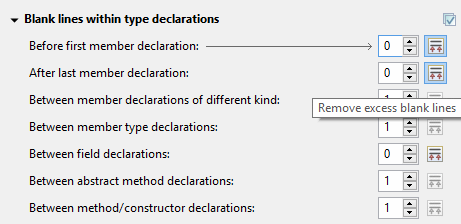
Remove excess blank lines

All the settings in the Blank lines section can now be configured to remove excess blank lines, effectively taking precedence over the Number of empty lines to preserve setting. Each setting has its own button to turn the feature on, right next to its number control. The button is enabled only if the selected number of lines is smaller than the Number of empty lines to preserve; otherwise, any excess lines are removed anyway.

Changes in blank lines settings

There’s quite a lot of changes in the Blank lines section of the formatter profile.

Some of the existing subsections and settings are now phrased differently to better express their function:

  • The Blank lines within class declarations subsection is now Blank lines within type declaration.
  • Before first declaration is now Before first member declaration.
  • Before declarations of the same kind is now Between member declarations of different kind.
  • Before member class declarations is now Between member type declarations.
  • Before field declarations is now Between field declarations.
  • Before method declarations is now Between method/constructor declarations.

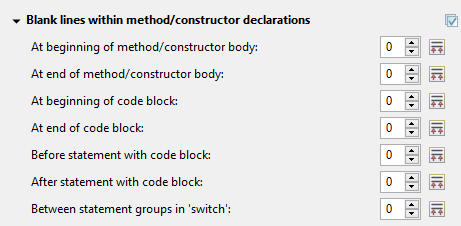
More importantly, a few new settings have been added to support more places where the number of empty lines can be controlled:

  • After last member declaration in a type (to complement previously existing Before first member declaration setting).
  • Between abstract method declarations in a type (these cases were previously handled by Between method/constructor declarations).
  • At end of method/constructor body (to complement previously existing At beginning of method/constructor body setting).
  • At beginning of code block and At end of code block.
  • Before statement with code block and After statement with code block.
  • Between statement groups in ‘switch.’

Most of the new settings have been put in a new subsection Blank lines within method/constructor declarations.

JUnit

JUnit 5.5.1

JUnit 5.5.1 is here and Eclipse JDT has been updated to use this version.

Debug

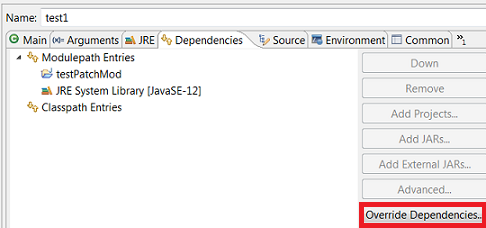
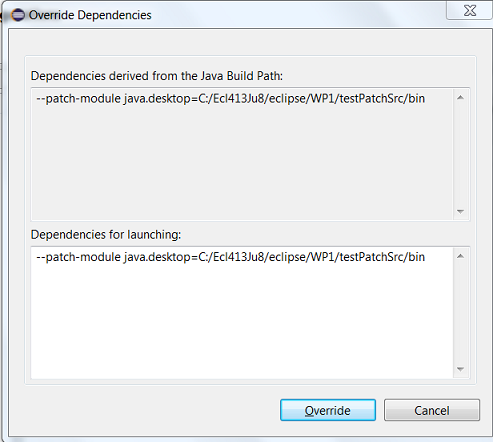
Enhanced support for –patch-module during launch

The Java Launch Configuration now supports patching of different modules by different sources during the launch. This can be verified in the Override Dependencies…​ dialog in the Dependencies tab in a Java Launch Configuration.

Java Build

Full build on JDT core preferences change

Manually changing the settings file .settings/org.eclipse.jdt.core.prefs of a project will result in a full project build, if the workspace auto-build is on. For example, pulling different settings from a git repository or generating the settings with a tool will now trigger a build. Note that this includes timestamp changes, even if actual settings file contents were not changed.

For the 4.13 release, it is possible to disable this new behavior with the VM property: -Dorg.eclipse.disableAutoBuildOnSettingsChange=true. It is planned to remove this VM property in a future release.

And more…​

You can find more noteworthy updates in on this page.

What is next?

Having JBoss Tools 4.13.0 and Red Hat CodeReady Studio 12.13 out we are already working on the next release for Eclipse 2019-12.

Share

The post New features in Red Hat CodeReady Studio 12.13.0.GA and JBoss Tools 4.13.0.Final for Eclipse 2019-09 appeared first on Red Hat Developer.

Posted on Leave a comment

What’s new in Red Hat Dependency Analytics

We are excited to announce a new release of Red Hat Dependency Analytics, a solution that enables developers to create better applications by evaluating and adding high-quality open source components, directly from their IDE.

Red Hat Dependency Analytics helps your development team avoid security and licensing issues when building your applications. It plugs into the developer’s IDE, automatically analyzes your software composition, and provides recommendations to address security holes and licensing problems that your team may be missing.

Without further ado, let’s jump into the new capabilities offered in this release. This release includes a new version of the IDE plugin and the server-side analysis service hosted by Red Hat.

Support for Python applications

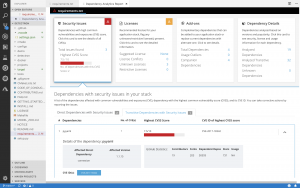
Along with Java (maven) and JavaScript (npm), Dependency Analytics now offers its full set of capabilities for Python (PyPI) applications. From your IDE, you can perform the vulnerability and license analysis of the “requirements.txt” file of your Python application, incorporate the recommended fixes, and generate the stack analysis report for more details.

Software composition analysis based on current vulnerability data

An estimated 15,000 open source packages get updated every day. On average, three new vulnerabilities get posted every day across JavaScript (npm) and Python (PyPi) packages. With this new release, the server-side analysis service hosted by Red Hat automatically processes the daily updates to open source packages that it is tracking. The hosted service also automatically ingests new vulnerability data posted to National Vulnerability Database (NVD) for JavaScript and Python packages. This allows the IDE plugin and API calls to provide source code analysis based on current vulnerability and release data.

Analyze transitive dependencies

In addition to the direct dependencies included in your application, Dependency Analytics now leverages the package managers to discover and add the dependencies of those dependencies, called “transitive” dependencies, to the dependency graph of your application. Analysis of your application is performed across the whole graph model and recommendations for fixes are provided across the entire set of dependencies.

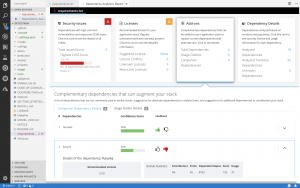
Recommendations about complementary open source libraries

With this release, Dependency Analytics looks to recommend high-quality open source libraries that are complementary to the dependencies included in your application. The machine learning technology of the hosted service collects and analyzes various statistics on GitHub to curate a list of high-quality open source libraries that can be added to the current set of dependencies to augment your application. You can provide your feedback about the add-on libraries by clicking on the “thumbs-up” or “thumbs-down” icons shown for each recommendation. Your feedback is automatically processed to improve the quality of the recommendations.

IDE plugin support

The Dependency Analytics IDE plugin is now available for VS Code, Eclipse Che, and any JetBrains IDE, including IntelliJ and PyCharm.

We will continuously release new updates to our Dependency Analytics solution so you can minimize the delays in delivery of your applications due to last-minute security and licensing related issues.

Stay tuned for further updates; we look forward to your feedback about Dependency Analytics.

Share

The post What’s new in Red Hat Dependency Analytics appeared first on Red Hat Developer.

Posted on Leave a comment

Microsoft introduces new cloud experiences and developer tools for all creators at Microsoft Build

Company releases new AI-driven collaboration and hybrid-cloud innovations across Microsoft 365 and Microsoft Azure

REDMOND, Wash. — May 6, 2019 — Monday at Microsoft Build 2019, Microsoft Corp.’s annual developer conference, the company showcased new technologies for developers of all kinds to create intelligent and productive solutions. Microsoft customers and partners, including Starbucks, J.P. Morgan, Kroger, Spatial, Epic Games and others, are showcasing new solutions that deliver more intelligent, customer-centric experiences.

Announcements include new collaboration and productivity services across apps and the web as well as AI capabilities in Microsoft 365 to further address the changing nature of work. In addition, Microsoft is delivering new open source technologies and developer tools in Azure and Windows. Microsoft’s trusted, extensible cloud platforms — spanning infrastructure, data, AI and mixed reality, productivity and collaboration, business applications, and gaming — bring together a global collective of developers and technology capabilities toward creating breakthrough new experiences for organizations and individuals. In his opening keynote, Microsoft CEO Satya Nadella outlined the company vision and developer opportunity across Microsoft Azure, Microsoft Dynamics 365 and Power Platform, Microsoft 365, and Microsoft Gaming.

“As computing becomes embedded in every aspect of our lives, the choices developers make will define the world we live in,” said Satya Nadella, CEO, Microsoft. “Microsoft is committed to providing developers with trusted tools and platforms spanning every layer of the modern technology stack to build magical experiences that create new opportunity for everyone.”

Microsoft 365: the world’s productivity cloud

Microsoft 365 delivers integrated, secure productivity experiences for everyone — from the largest companies to small businesses and from knowledge workers to Firstline Workers. Foundational to Microsoft 365, Microsoft Graph is one of the most comprehensive graphs of organizational activity available. It securely maps the relationships between people, information and activities within the context of an organization to show connection points and insights to improve the ways people work, and work together.

Today’s news includes:

  • Today we are creating new opportunities for developers to build on Microsoft Graph, with the general availability of Microsoft Graph data connect. Microsoft Graph data connect is a service that helps organizations bring together productivity data from the Microsoft Graph with their own business data securely and at scale using Azure Data Factory. This balances customers’ demands for a new class of insight-powered applications — those driven by at-scale datasets — with IT administrators’ needs to consider the challenges inherent to moving and managing significant amounts of organizational data.
    • Microsoft Graph data connect is now generally available as a feature in Workplace Analytics and as a standalone SKU for independent software vendors (ISVs).
  • To give people and teams new ways to create together, today we are announcing Fluid Framework. This is a new web-based platform and componentized document model for shared interactive experiences. Fluid will break down the barriers of the traditional document as we know it and usher in the beginning of the free-flowing canvas. Fluid is expected to be available to developers later this calendar year through a software development kit. Also, later this year we expect to deliver the first Microsoft 365 experiences powered by Fluid. Its capabilities include:
    • Enabling content, e.g., from the web or productivity apps, to be deconstructed and reconstructed into modular components so people can more easily create together.
    • Delivering high-performance, multiperson, co-authoring experiences at speeds not yet achieved in the industry.
    • Creating room for intelligent agents to work alongside humans to co-author, fetch content, provide photo suggestions, identify experts, translate data and more.
  • Today we’re announcing new features for the next version of Microsoft Edge that address some of the fundamental frustrations with browsers today, including:
    • IE mode — addressing the more than 60% of businesses using multiple browsers today, IE mode integrates Internet Explorer directly into the new Microsoft Edge via a tab. This allows businesses to run legacy Internet Explorer-based apps in a modern browser.
    • Privacy tools — additional privacy controls allowing customers to choose from three levels of privacy in Microsoft Edge: Unrestricted, Balanced and Strict. Depending on which option you pick, Microsoft Edge adjusts how third parties can track you across the web, giving customers more choice and transparency for a more personalized experience.
    • Collections — addressing the information overload customers feel with the web today, Collections allows you to collect, organize, share and export content more efficiently and with Office integration.
    • These features and more will begin to roll out over time as we get closer to the broader launch of the next version of Microsoft Edge.
  • Today we announced our vision for the future of intelligent agents. This new approach is focused on building powerful conversational interfaces from data and machine learning instead of from rules, intent and code. We envision a world where every organization has an agent, just like today where every organization has a website. And, the experience is completely natural with multiturn dialog, spanning multiple domains and, importantly, working across multiple agents. With the addition of the Semantic Machines team we’re accelerating our work here. This technology is going to be integrated into our conversational experiences going forward, including Cortana, and made available to developers in the Microsoft Bot Framework and Azure Bot Service.

More information on today’s news across Microsoft 365, including more detail on new developer tools from Windows, Office and Microsoft Teams, can be found at this blog post.

New open source technologies and developer tools to create intelligent apps from cloud to edge

Azure Kubernetes Service (AKS) is one of the fastest-growing services in Azure used by global companies like ASOS to manage cloud app container infrastructure at scale, providing greater reliability and flexibility. At Build, Microsoft is delivering several new features and capabilities to power and safeguard Kubernetes workloads:

  • Kubernetes Eventdriven Autoscaling (KEDA) is an open source component that supports deployment of serverless event-driven containers on Kubernetes created in collaboration with Red Hat. Now in public preview, KEDA presents a new hosting option for Azure Functions that can be deployed as a container in Kubernetes clusters, bringing the Azure Functions programming model and scale controller to any Kubernetes implementation, both in the cloud or on-premises with OpenShift.
  • Azure Policy for AKS applies at-scale enforcements and helps safeguard AKS clusters in a centralized, consistent manner. Azure Policy blocks any violations happening at runtime and performs compliance assessments on all existing clusters for up-to-date visibility across the environment.

Quantum is an exciting new frontier for developers. Microsoft designed Q# specifically for quantum programming, delivering an approachable, high-level programming language with a native-type system for qubits, operators and other abstractions. At Build, Microsoft is open sourcing Q# compilers and simulators to grow the community of Q# developers and unlock new opportunities for partners and startups to enhance their offerings for their own businesses.

Developers spend most of their day toggling between applications, services and tools. To help streamline, Microsoft has brought the world’s most-used enterprise identity system — Azure Active Directory (Azure AD) to GitHub. This enables GitHub Enterprise customers to gain the benefits of Azure AD identity management and security, along with synchronization of accounts across systems. Developers can now also use their existing GitHub account, including Azure Portal and Azure DevOps, to sign in to Azure. This update enables GitHub developers to go from repository to deployment with just their GitHub account.

Supporting and managing the exponential growth in application data and building a foundation for AI capabilities is an essential element to developing any modern cloud application. The new Hyperscale (Citus) option in Azure Database for PostgreSQL joins Azure SQL Database Hyperscale to enable developers to build highly scalable, low-latency applications using their existing skills. Azure Database Hyperscale significantly scales out compute, storage and memory resources as needed, allowing developers to focus on building app experiences without worrying about performance and scale limitations. Azure is the only cloud that lets developers scale across multiple engines — both proprietary SQL databases and open source databases such as PostgreSQL.

Developing solutions to secure the election process

We believe technology can play a critical role in securing elections and that technology companies have a responsibility to support them. Today Microsoft is announcing two new solutions aimed at addressing the security of voting systems around the world:

  • ElectionGuard is a free, open source software development kit, developed in partnership with Galois, that provides security and public verifiability for elections, as well as guidance and tools to build more accessible voting systems. Microsoft is asking developers around the world to build on and integrate ElectionGuard into existing and new voting systems. The ElectionGuard SDK will be available this summer on GitHub, and Microsoft has partnered with several leading election technology providers to pilot this service in preparation for future elections.
  • Microsoft is also announcing Microsoft 365 for Campaigns. This new service, also available in June, will provide the high-end security capabilities of our Microsoft 365 Business offering to political parties and campaigns, initially those for federal office in the United States. It will do so in a streamlined way and at a low price, preconfigured to optimize for the unique operating environments campaigns face, including their fast pace and high-security-risk profile. Microsoft 365 for Campaigns builds on the AccountGuard threat-detection and nation-state attack notification service we announced in 2018 and simplifies security for political organizations by providing specialized wizards that campaigns can use to easily and efficiently harden their security posture from the ground up. Interested campaigns can sign up by visiting https://m365forcampaigns.microsoft.com.

Deepening our investments in partners

Partners are critical to developing solutions that meet customers’ industry-specific needs, and Microsoft is committed to supporting them. Since introducing Microsoft’s first co-sell program that brings the global scale of Microsoft’s sales force to our partner community, nearly 3,000 ISVs running on Azure have generated over $5 billion in revenue in the past 12 months. The original program is designed to help enterprise customers in their digital transformation by introducing relevant solutions from Azure-based ISV partners. Today Microsoft is announcing two expansions to this program:

  • Expanding co-sell to Microsoft 365, Dynamics 365 and Power Platform to create deeper collaboration in selling line-of-business applications.
  • Expanding sales incentives to Microsoft channel partners when they resell eligible ISV solutions through Microsoft’s cloud solution provider (CSP) program. For all ISVs, small and large, this effectively offers “channel as a service” to accelerate customer acquisition through one of the world’s largest distribution channels.

With the introduction of transactable seat-based SaaS capabilities for AppSource and Azure Marketplace, Microsoft will provide customers in over 141 countries with faster access to innovation from partners through Microsoft’s cloud marketplaces or through its worldwide reseller channel.

Microsoft (Nasdaq “MSFT” @microsoft) enables digital transformation for the era of an intelligent cloud and an intelligent edge. Its mission is to empower every person and every organization on the planet to achieve more.

For more information, press only:

Microsoft Media Relations, WE Communications, (425) 638-7777, [email protected]


Note to editors: For more information, news and perspectives from Microsoft, please visit the Microsoft News Center at http://news.microsoft.com. Web links, telephone numbers and titles were correct at time of publication, but may have changed. For additional assistance, journalists and analysts may contact Microsoft’s Rapid Response Team or other appropriate contacts listed at https://news.microsoft.com/microsoft-public-relations-contacts.