Posted on Leave a comment

How Microsoft helps prevent cybersecurity attacks in schools

Each year, hundreds of K-12 schools in the U.S. alone experience cyberattacks, including 408 schools that publicly disclosed them in 2020, up 18% from the previous year, according to the K-12 Cybersecurity Resource Center1

Fulton County Schools, the fourth-largest school system in Georgia, has learned just how valuable it is to put a top-notch security system in place. To defend against threats, Dr. Emily Bell, Fulton County Schools’ Chief Information Officer (CIO), implemented robust planning that involved educating and communicating with school leaders and staff about cybersecurity. Microsoft resources were a part of their well-rounded cybersecurity strategy.

“As a Chief Information Officer, it is incumbent upon me to make sure that my leadership is aware of our cybersecurity incident response process,” said Dr. Bell. “I also want to educate district leaders on our cyber insurance coverage and what that means.”

Fulton County Schools relied on Microsoft Defender for Office 365 to keep all its devices and technology safe and secure, and to help prevent disruptions to student learning.

Microsoft solutions addressing cybersecurity concerns

Bad actors are constantly looking for vulnerabilities in educational IT networks. So, Fulton County Schools’ leaders knew that choosing a security system reliable enough to cover its large network of 95,000 students and 107 schools was crucial. They had tried other tools and systems but realized they needed more. After evaluating the Microsoft 365 A5 educational license security capabilities, they decided to use it across the district to monitor, detect, and mitigate potential threats.

Microsoft Defender, which is included in the A5 license, protects all Office 365 applications against advanced threats. It also includes the tools to address cybersecurity risks from ransomware, malware, phishing, and compromised credentials. Distributed denial-of-service (DDoS) attacks are also a main concern in Internet security because they try to disrupt the normal traffic of a server, service or network by using a flood of Internet traffic to overwhelm it or its surrounding infrastructure. Given these high-level benefits, Dr. Bell knew that Microsoft security would provide a complete solution, so the district put it into place.

How a possible threat showed the strength of Microsoft tools

A recent occurrence highlighted just how important and useful Microsoft security tools were to Fulton, as well as the need for ongoing communication with leadership if a threat gets reported.

That’s exactly what happened at Fulton. A threat was reported to the district superintendent at the same time as it was reported to Dr. Bell.

To reassure district leadership, including the superintendent, Dr. Bell and her team demonstrated how situations are handled behind the scenes at the appropriate level of urgency based on assessed risk. This helped to instill confidence in how Fulton addresses the kind of threats that schools across the country inevitably get in the age of the Internet.

Dr. Bell showed leadership that within a single 30-day period alone, they had seen 39 ransomware attempts, all contained and eradicated; 712 malware attempts, all blocked; 983 compromised credentials, mitigated by automated disabling of accounts; and 254,255 phishing attempts, of which nearly 89% were not delivered. The success in preventing all these attempts was key to helping ensure that students could continue to learn without disruption. 

“What was reported to the superintendent never even rose to the level of ‘incident.’ We had a report, then we found, contained, and eradicated the threat, and nothing came of it,” said Dr. Bell. “It turned out to be a fire drill for us.”

Identifying, containing, and eradicating threats

Because support from many departments is critical to keeping things running smoothly, Dr. Bell has also put together a task force of leaders from many departments to help mitigate risk around the clock.

Fulton also has an ongoing partnership with Forsyte I.T. Solutions, which helps Fulton deploy Microsoft’s advanced security features in the district’s Microsoft 365 A5 subscription.

Teams including the security partners and the task force follow specialized checklists developed to contain and eradicate each specific kind of risk. And once a threat is detected, the stages to address it include triage, containment, eradication, recovery, post-incident activities, and finally, closure.

Fulton’s task force and partnerships now help to foster communication and understanding, so when a department is impacted everyone who needs to know is kept in the loop about the threat, how it may affect them, and what’s expected of them—avoiding unnecessary panic. Ultimately, all of these actions help prevent a threat from getting far enough along to take learning time away from students.

Although not every district is as large as Fulton and might not face as many cybersecurity threats, districts of all sizes are facing security disruptions. Having the infrastructure and bandwidth to avoid shutdowns and slowdowns is imperative in the service of keeping students on track with their educational progress. 

“It’s important for districts to have a cyber response plan and to educate their leadership on that plan, and perhaps create a cyber task force, because attacks happen every day,” said Dr. Bell. “Every district needs to evaluate their own risk and develop plans that are specific to their most likely cyberattacks.”

Read more about Fulton’s success story and find out how Microsoft tools and devices can support safety and security at your school, anytime and anywhere.


1 Thousands of School Websites Went Down in a Cyberattack. It’ll Happen Again, Experts Say | EdWeek 
Posted on Leave a comment

Accelerating learning for students with limited internet access

Driving equity with online-ready, not online-dependent devices

Providing continuity of learning in low and intermittent connectivity scenarios

Millions of students have limited access to the internet at home, leaving them struggling to access interactive online lessons and forcing them to find offline workarounds on devices lacking storage for video and other resources. Today, devices and education technology tools are more integrated into education than ever before, and learning opportunities happen not just at school, but at home and everywhere in between. In this landscape, the ability to work online and offline is key so that learning can continue regardless of a student’s ability to connect to the internet.

In the third in a series of Accelerate Learning Kits from Microsoft Education, “Accelerating Learning for Students with Limited Internet Access,” the authors compare how Microsoft Windows 11 devices and Chromebooks support offline access to educational content and material. Their finding: when comparing based on factors such as access to learning content, accessibility, on-device storage, and the ability to create and edit content, they found that Windows 11 devices provide a better experience for learners than the equivalent experiences on Google Chrome OS.

In a study conducted by Michigan State University in 2020, researchers found that students who have no home access or rely upon cell phone data plans have the digital skills equivalent of a three-year deficit when compared to their peers with home internet access1.

According to UNICEF, up to 1.3 billion children and young people worldwide have no access to internet at home2. This issue disproportionately affects students of color, those living in poverty, and in rural communities. Additionally, a 2020 study by Michigan State University found that students who have limited or no internet access at home can fall up to three years behind classmates with full access, have a lower grade point average, score lower on college admissions tests like the SAT, and are less likely to pursue a college degree.3 This highlights the importance of ensuring that students have equitable access to tools and that there’s flexibility for those who may not have consistent access to the internet outside of school. 

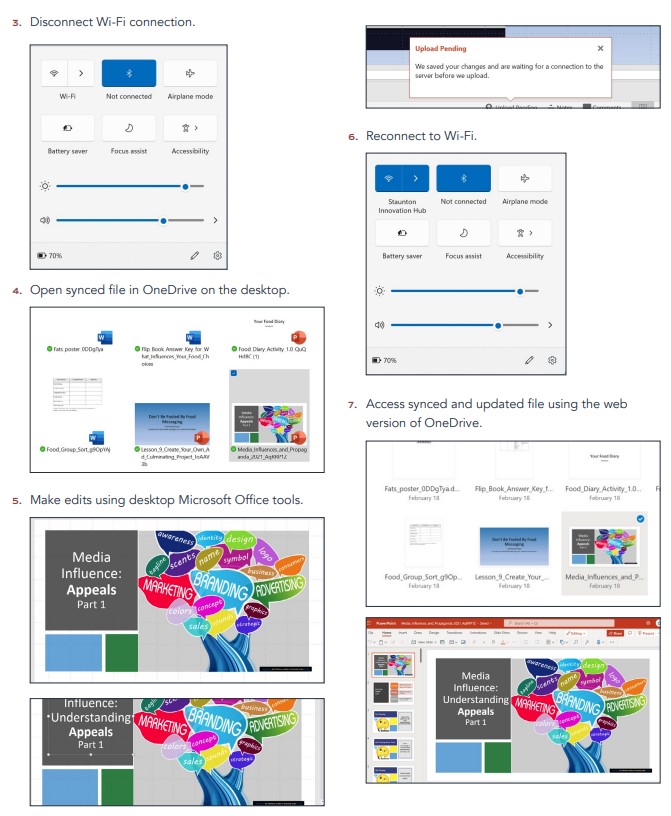
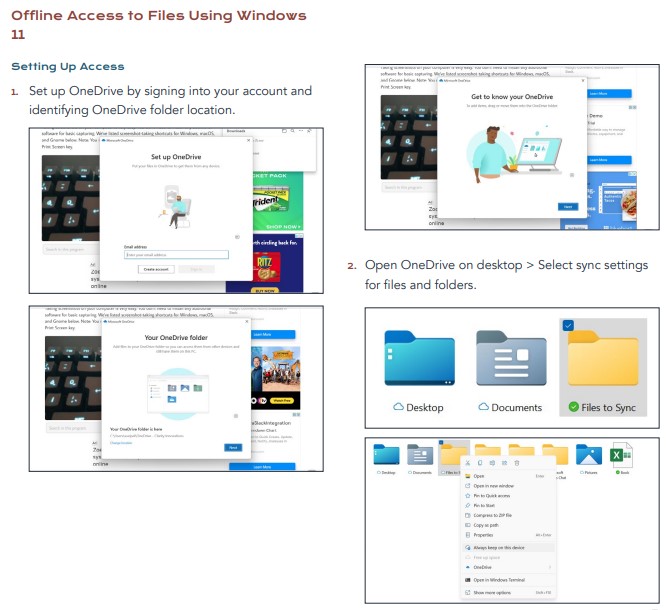
For the latest Microsoft learning kit comparing Windows 11 devices and Chromebooks, researchers created a learning scenario in which they used identical versions of a presentation to compare the process a student would complete to access and edit learning materials while disconnected from the internet. This included setting up offline access to the file, disconnecting the internet connection, opening and making changes to the presentation, and then reconnecting and accessing the updated online file. The comparison of the Windows 11 and Chromebook processes can help educators see some of the benefits Windows 11 devices deliver for students, including simpler and faster setup of offline capabilities.

Demonstration of the first two steps in the process of setting up offline access to files: 1. Setting up OneDrive 2. selecting sync settings for folders.

Steps 3-7 in the process of setting up offline access to files: 3. Disconnecting Wi-Fi connection 4. Opening synced file in OneDrive 5. Making changes to a presentation 6. Reconnecting to Wi-Fi 7. Accessing synced and updated file.

Evaluators noted that in the side-by-side test, Microsoft Office was a faster, easier, and richer experience for students than the comparable solution. Beyond simply editing and saving files, students with limited online access can benefit from using the built-in flexibility of features such as translation and Accessibility Checker, which work online or offline.

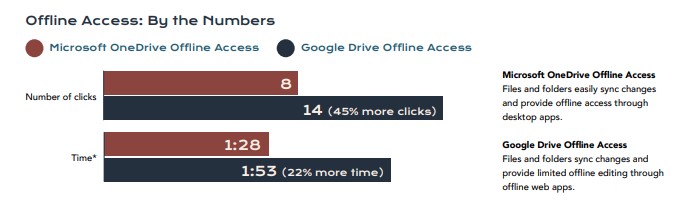
Bar graph that demonstrates the ease of offline access using Microsoft OneDrive, which takes 8 clicks and approximately 1:28 minutes to set up, vs. Google Drive offline access, which takes 14 clicks and 1:53 to set up.

Since schools made the unexpected and rapid shift to online instruction in 2020, existing inequities in connectivity have highlighted the challenges of making sure that all students can participate in digital learning. Microsoft Education is committed to developing solutions to advance equity in learning. And the built-in, accessible, equitable, easy-to-use tools in the Microsoft Office suite provide students the opportunity to focus on learning and explore their academic interests without having to worry about connectivity.

Want to learn more?

The learning kit “Accelerating Learning for Students with Limited Internet Access” is available now, and contains the comparative paper as well as an abstract and an infographic. You can also explore two other Microsoft Education Accelerate Learning Kits: “Checking for Accessibility” and “Accelerate Learning with Workplace Math Skills.”  Stay tuned for the next kit in the series, which will be shared soon!


1 Broadband and Student Performance Gaps

2 The Learning Passport

3 Broadband and Student Performance Gaps

Posted on Leave a comment

Shift to new Microsoft Learn Educator Center aims to help teachers grow professionally

Investing in teachers’ growth to help them be more effective is key to improving student learning. The reason: teacher quality has more impact on students than any school education program or policy does, and in fact, teacher effectiveness is the largest factor influencing student outcomes, outside of family background1.

To transform education, it’s critical that all teachers, leaders, and staff have the ability and capacity to continually evolve their methods and adopt new technologies as lifelong learners. Microsoft education has developed many resources for educators and other school staff, whether they are classroom teachers, school leaders, or in other roles. 

With the shift to the new Microsoft Learn Educator Center, we have taken the opportunity to refine the professional growth offerings we have available for educators and school leaders. We strive to support them in becoming proficient in Microsoft technologies, and in learning more innovative classroom skills through fun, guided, hands-on content specific to their role and goals.

Beginning on July 1, 2022, the Microsoft Innovative Educator badge will be retired. In its place, we’ll have a new set of educator learning opportunities to help you and your colleagues grow your skills—and work towards the Microsoft Innovative Educator Expert program.

Microsoft Educator 

(Starting July 1, 2022)

If an educator or school leader is new to Microsoft teaching and learning tools, this learning path we have curated will help get you started. Focused on best practice and some basics for facilitating a blended or hybrid learning environment, this is the first step in a professional growth journey. To unlock this badge, successfully complete this online through the Microsoft Learn Educator Center, or through one of our training partners in an instructor-led setting.

Start Learning Path

Microsoft Advanced Educator

(Starting October 1, 2022)

Once an educator or school leader has earned the Educator badge and is ready to go deeper into Microsoft tools in teaching and learning, successful completion of two learning paths will unlock the Advanced Educator badge.

To experience all the toolsets and features that Teams has for supporting an inclusive and accessible learning environment, begin with Master Microsoft Teams for any learning environment.

Navigate through the 21st Century Learning Design learning path to see how skills such as collaboration, self-regulation, skilled communication, problem solving, knowledge construction and the use of Information and communications technology (ICT) for learning can be embedded into lessons to ensure that students are successful in their future roles.  By successfully completing this learning path, you will be prepared to take the Microsoft Certified Educator Exam.

(Note: This is an annual badge and there will be new criteria each year for educators and school leaders to earn their annual Microsoft Advanced Educator badge).

Start Master Microsoft Teams

Start 21st Century Learning Design

Microsoft Innovative Educator Expert (MIEE)

Are you an educator who is striving to find new ways to engage your students and colleagues? (By “educator” we mean either a classroom teacher, a school leader, a professional learning specialist/trainer, an instructional aide, a curriculum specialist, or anyone who impacts teaching and learning in their role). If so, and you’d like to connect with a global, professional learning community of other educators just like yourself who are constantly pushing the boundaries of how learning functions in the classroom, we would love to have you as a part of our Microsoft Innovative Expert (MIE) community!

MIE Experts will be selected by the regional Microsoft representative based on the quality of the responses to the self-nomination form, the level of innovation and use of Microsoft tools described in the learning activity, and the level of detail describing how becoming a part of the program will impact both teaching and student learning.

Start MIEE Learning

1Aaronson et al., 2007; Jordan et al., 1997

Posted on Leave a comment

How Immersive Reader helped one student with dyslexia gain the confidence to succeed in school and life

Thanks to the evolution of education technology, more students with learning difficulties are finding accommodations that help them thrive in the classroom and in life.

That was the experience of Elle-Mae (Elle) Taylor. The third-year student at a United Kingdom university learned during her first year there that she had dyslexia, but it was prior to that when she discovered Immersive Reader, a digital learning tool from Microsoft that helped address some of the challenges she was having in school. The tool not only improved her confidence and well-being as her learning-related stress declined, but also opened more possibilities for her future, including her options for higher education and perceptions about career choice.

“What Immersive Reader did was give me the ability to be on the same level as everyone else,” she says. It “helped me address certain challenges and made me more successful.”

Elle’s journey toward discovering her full potential as someone who just needed the right tools, techniques, and attention to improve her reading and writing shows how greater awareness and accessible technologies can make a big impact in students’ learning and broader lives, including people without learning differences. In the U.S. alone, 2.5 million students have learning disabilities—such as dyslexia, dysgraphia, and dyscalculia—that can affect their academic performance and progress and can contribute to emotional struggles. That grows significantly when including students in the United Kingdom and entire world. But assistive technology can also support how students feel about their learning and performance in areas where they struggle.

Some of Elle’s earlier school memories include being treated as less capable than others. She had messy handwriting and trouble with things like expressing her thoughts clearly in writing exams, so her educators encouraged her to focus less on academics and more on sports and performing arts. Though talented in the arts, she had a more academic career in mind and wondered if her love of technology—which she excelled at and found innovative and creative—could somehow intersect with that. She became a student eager to learn and perform better but discouraged by what felt like a lack of support and solutions.

This persisted in part because a diagnosis of dyslexia eluded Elle until she attended university. Though she’d always known it took her more time to process certain work, it wasn’t among the most common struggles she’d heard were tied to dyslexia, such as seeing or writing jumbled words on a page.

Things changed when Elle was introduced to Immersive Reader, which happened when she started using a computer for her studies during the latter part of high school, known as the “Sixth form” in the United Kingdom.  Her school’s accessibility services department made her aware of the tool, which she says changed the course of her life forever.

Immersive reader supports diverse learning styles.

Elle became able to recognize her mistakes and refine her work using a variety of Immersive Reader features that she learned about over time. She used a page color feature that changes the background color of the page and line focus to allow users to better concentrate on one sentence of text at a time, and the Read Aloud function, which uses text-to-speech to help users hear what their writing sounds like. These and other features helped her better understand online texts she had to read for school and tackle sentence structure. Previously, when she had to hand-write for homework and exams, she’d have to spend extra time thinking through how. But features such as Dictation in Word allowed her to write essays by speaking them into her computer, which made it easier to get ideas down and then check for accuracy and clarity by hearing it with Read Aloud.

Immersive Reader also helped Elle’s self-expression. “It really transformed the success of my essays. I came out of A-Levels [Advanced Level Qualifications] getting the highest mark you can get,” she says. This reshaped her future. “When I started getting better grades, I was able to go to a really good university.” 

That gave Elle easier access to the learning disability assessment she needed to reveal dyslexia. “When I had my dyslexia assessment, I was told that my reading and writing was really good, so it was almost like I had been overcoming a lot of the challenges by myself.”

Elle’s career outlook changed course. Because she could use assistive technology like Immersive Reader while taking courses on data and information systems, she was able to explore more options and pursue technology as she’d hoped. And her increased confidence “led me to be able to apply for other types of jobs in tech or business,” Elle says. She applied for an internship at Microsoft, hoping to learn and do more within the realm of using technology to increase student accessibility and equity.

Now, Elle is thriving as a Microsoft intern and still uses Immersive Reader to check emails before sending, and in other small ways in everyday life. At Microsoft, Elle has been involved in a variety of work. She has presented with the Microsoft Education Team to help customers determine which Microsoft Education solutions, including the accessibility tools, could benefit them.  She has also founded a TechHer Coding Day, ensuring the day was accessible, to provide resources and guidance aimed at encouraging more women and non-binary students to pursue a career in technology.

“I think it can help in so many ways,” Elle says of Immersive Reader, including alleviating pressure on students who “are so stressed and exhausted” these days. “It could help any student. I don’t think they need to have dyslexia or another learning difficulty,” says Elle. “I think if more students knew about it, they would use it.”

With Microsoft’s built-in learning tools, students everywhere can have the assistive technology they need. Learn more about how Microsoft learning tools might benefit your students.

Posted on Leave a comment

Educators: Join us at ISTELive ‘22 June 26-29

Mark your calendars! ISTELive, a conference that brings educators, leaders, and industry reps together, returns June 26-29 in New Orleans, Louisiana, and we at Microsoft can’t wait to connect with our global community.

This year’s conference attendees will share the latest EdTech designed to help bridge the equitable education gap—and we sure have a lot in store.

Our expert-led sessions will cover a range of topics, so whether you’re looking for accessible reading fluency tools, resources to support social and emotional learning, or want to take a deeper dive into gamified learning, there’s plenty to explore.

Check out the full schedule to start planning your ISTE experience and get a first look at the latest product news and Teams updates that you can find at the event!

Where to Find Us

Visit the Microsoft Booth #1417 for interactive demos

Here, you will find our Microsoft Learn Educator Theatre and interactive demo stations where you can connect with product experts and get hands-on experience with top classroom tools like Minecraft: Education Edition, Microsoft MakeCode, Office 365, and more!

Visit the Microsoft Content Room (Room 265/6) for content sessions 

Drop by the Microsoft Content Room (Room 265/6) to hear from educators who use Microsoft solutions to transform learning. With over 20 sessions to choose from, you’ll have your pick of engaging content that will leave you inspired and excited for the next school year. Here’s a sneak peek at just a few sessions:

Tuesday, June 28, 2022, 8:30–9:25 AM CST

Critical Thinking and The Web: Why search is the most important skill we are not teaching

In this session, learn why the process of searching for information, and then validating it, has become an international crisis. Find out how you can help students and teachers perform a well-executed search that is followed by a framework for validating that information. This could be one of the most important sessions you attend.

Presenter: Holly Clark from the Infused Classroom

Wednesday, June 29, 2022, 8:30–9:25 AM CST

A Statewide Approach to K-12 Computer Science with ‘Coding in Minecraft’ (Prodigy Learning)

North Carolina has partnered with Microsoft and Prodigy Learning to provide all middle school students in the state access to the award-winning ‘Coding in Minecraft’ computer science credential solution. Join this interactive discussion to learn about this coordinated statewide approach to Computer Science to using Minecraft as an immersive innovative solution!

Presenters: Dr. Mary Hemphill from North Carolina Department of Public Instruction, Andrew Flood from Prodigy Learning

Wednesday, June 29, 2022, 9:30–10:25 AM CST

Inclusion, Accessibility, Culture, Language & More: Meet the Needs of All Learners with Flipgrid

Learn how to leverage built-in Flipgrid features to connect, engage, empower, and amplify your community.

Presenters: Yaritza Villalba, Fely Garcia Lopez, Elizabeth Schmuhl, Virginia Nguyen from Flipgrid

(Pro tip: Attend one of the above sessions and you’ll walk away with one of our exclusive fanny packs!)

Spotlight on Solutions Sessions

Sit in on conferences highlighting how school leaders and experts found answers to challenges in their communities with the assistance of Microsoft tools.

Hurricanes, Floods, and Pandemics, Oh My! How digital transformation allowed one school district to beat the odds

Presented by Stephen Taylor and Jeff Pittman from Onslow County School District

Monday, June 27, 2022, 11:00 AM–12:00 PM CST

Learn how one North Carolina school district stayed the course of digital transformation despite facing multiple natural disasters before the COVID-19 pandemic. You’ll also hear how the school’s consistent use of Microsoft Teams implemented greater student achievement.

5 Things Every Microsoft Educator Should Know About Hyperdocs

Presented by Holly Clark from the Infused Classroom and Lisa Highfill from HyperDocs

Tuesday, June 28, 2022, 11:00 AM–12:00 PM CST

Discover the five things to know and understand about HyperDocs to create powerful blended learning experiences with Microsoft Word, PowerPoint and Teams. Watch student work come to life while working inside of a HyperDoc.

Celebrate the MIE Community 

We know our Microsoft Innovative Educator (MIE) Community has been working incredibly hard, and your ability to adapt and innovate is nothing short of extraordinary. Join us for the MIE Community Celebration honoring our 2021-22 class of US MIE Experts and Incubator School Leaders, Microsoft Learning Consultants, and Microsoft Global Training Partners.

Sunday, June 26, 2022, 6:30–9:30 PM CST

Riverview Room at 600 Decatur St. 4th Level

FlipFest: An Ultimate Celebration of YOU

Kick off your ISTELive experience with an evening full of fun and community building, and an exclusive sneak peek at what’s coming next for Flipgrid. Register in advance—the first 250 sign-ups will get access to digital swag!

Monday, June 27, 2022, 7:00–9:00 PM CST

River City Ballroom at 1380 Port of New Orleans Place

With so many different offerings this year, make sure you add your favorite Microsoft content sessions to your tailored conference program here. And don’t forget to follow along on Twitter, Instagram, Facebook and LinkedIn to stay in the know during the conference.

ISTELive ‘22 is all about sharing inspiration, reimagining what’s possible with technology, and achieving more together.

See you in New Orleans!

Posted on Leave a comment

White paper: Higher education faculty are the new knowledge workers

“Knowledge workers,” as defined in 1959 by Peter Drucker, are “those who generate value through their minds rather than through their muscles, and their labour would be both dynamic and autonomous.” In knowledge work industries, workers need to have a range of technological, social, emotional, and higher cognitive skills, and often require training on a regular basis to keep their skills updated. 

In the last of a series of four whitepapers created by The Economist and sponsored by Microsoft, the authors note the correlation between knowledge work and higher education. In the whitepaper, called “Leveraging technology to humanise the learning experience: Key lessons higher education can learn from ‘knowledge worker’ companies,” the authors also suggest best practices that education institutions can implement from knowledge work to better engage and connect with students.

Although educators and students aren’t typically referred to as “knowledge workers,” there are many parallels between the way information is created, stored, and shared in higher education organizations and in traditional knowledge-focused industries. Therefore, the way these knowledge-focused industries have technologically adapted to increasingly hybrid work is highly applicable to higher education, where more hybrid courses are being offered to accommodate ongoing pandemic-related safety concerns and provide greater flexibility for students to be remote.

Workers in many industries have leveraged innovations in technology to complete their tasks effectively away from traditional office settings, and a high percentage of them expect that some of the flexibility regarding where and when they do their work will continue. Of course, the experience of connecting and collaborating with one another is important as well, so managers and executives are trying to find the “sweet spot” between allowing remote work and creating opportunities for in-person interaction.

In higher education, a similar phenomenon is taking place: students crave the experience of campus life but also enjoy and expect the flexibility provided by a hybrid combination of synchronous and asynchronous classes. In recent years, faculty and staff have become proficient in strategies and digital tools used to create remote learning environments, but they also see the need for additional training and guidance to maximize the tools and techniques used for hybrid instruction.

“The data over the last 40 years—and what we can see into the next 20 and 40 years—shows [that] the number-one way to be successful in this economy will be to be an agile learner.” – Rachel Romer Carlson, CEO of Guild

According to Julian Birkinshaw, professor of strategy and entrepreneurship at London Business School, some of the best learning is interwoven and embedded with workplace experience. Managers often embed training into regular workplace tasks, and to be successful, workers need to be agile and open to ongoing learning. Therefore, a valuable skill that will help students be successful in the present and future is being a lifelong learner. To prepare their students for the future, universities must help build students’ durable and non-durable skillsets and cultivate a learner’s mindset.

Technology has an immense ability to personalize and humanize learning, but to realize this potential, it’s key to upskill instructors and faculty. When institutions invest in both technology and training for their faculty, instructors often feel more confident using and innovating with digital tools, which can create opportunities for more connection with students.

Among the most promising and exciting innovations that can be applied both in industry and education are AI powered chatbots. The power of artificial intelligence can automate mundane tasks like answering questions while still providing a human feel. In education, AI and analytics can also create personalized learning options for individual students.

“Tools from big tech companies, such as enterprise collaboration and productivity platforms, should be used to scaffold increasingly digital campuses in much more innovative and comprehensive ways.” – Dr. David Conrad Kellermann, Senior Lecturer, School of Mechanical and Manufacturing Engineering, University of New South Wales

Along with advanced applications that use AI and machine learning, successful hybrid learning requires a tech stack of common software. “Tools from big tech companies, such as enterprise collaboration and productivity platforms, should be used to scaffold increasingly digital campuses in much more innovative and comprehensive ways,” says Dr. David Conrad Kellermann, Senior Lecturer at the School of Mechanical and Manufacturing Engineering at the University of New South Wales. Despite the availability of these tools, many higher education institutions aren’t yet making use of them. This is limiting the schools’ ability to modernize collaboration, gather useful data, and engage students in a personal way.

Hiring and onboarding workers virtually has been one of the biggest challenges for businesses. Colleges and universities have struggled with the similar challenge of attempting to demonstrate school culture and create a sense of belonging in online student orientations. In both cases, a mix of technology and in-person meetings can help. Initial introductions and group events can be held via virtual meeting applications, while campus tours can be recreated through video, virtual reality, or in-person gatherings for those who want and are able to attend.

Burnout is another challenge faced by both knowledge workers and students who work and learn remotely. There is truly no substitute for in-person connection, and living life behind a screen can take a toll. Experts note that a primary reason for this is that when we work, learn, and live in the same place, it’s harder to unplug.

Experts recommend that business and education leaders recognize that mental health is as important as physical health, and that they implement strategies to promote well-being. This can mean breaking work into “sprints”, limiting or automating administrative or repetitive tasks, and ensuring opportunities for conversation and feedback. These approaches are effective for business leaders and educators too, especially when assisted by technology.

Hybrid working and learning may present challenges for knowledge worker companies and higher education institutions, but it can also provide opportunities to create balance and flexibility. When workers and learners can complete tasks and accomplish their goals on their own terms, productivity and well-being are likely to increase. Of course, establishing community and empowering creative collaboration is as important in education as it is in industry, so technology that humanizes interaction and personalizes experiences provides the greatest benefit.

Want to read more from the whitepaper? “Leveraging technology to humanise the learning experience: Key lessons higher education can learn from ’knowledge worker’ companies,” is available now.

Posted on Leave a comment

Tune in to Microsoft Education’s weekly podcast for school leaders

As a school leader, many difficult choices fall on your shoulders, and building a strong peer network for support can be a challenge. The good news is that you’re never truly alone but are part of a global community of leaders facing similar challenges and working to find solutions. It’s just a matter of uncovering them.

We’d like to make that easier, so Microsoft Education has created a weekly podcast, Leading Innovation, that brings together school leaders to discuss what we’re thinking, saying, and doing to guide our schools. Our podcast will help give voice to leaders through a platform that’s ideal for sharing challenges and triumphs, and will focus on the small, actionable steps leaders can take now to effectively work toward larger goals.

Meet our hosts, then read below to learn more about what’s upcoming and how to listen:

Jamie Trujillo
Jamie is a 20-year veteran of the technology industry. He serves as the Chief Information Officer for GOAL Academy, where he is directly responsible for leading technology efforts and enabling digital transformation across the school—with a passion to prepare students for a life centered around technology.

Frank Chiappone
Frank is a Sr. Product Marketing Manager at Microsoft with a focus on school leaders and IT audiences. He loves to go deep on how institutions undertake digital transformation, the challenges they face in implementing and driving technology adoption in the classroom, and how Microsoft can best deliver innovation to help institutions around the world enable student success.

Dina Ghobashy
Dina currently champions schoolwide education transformation and manages school leader strategy and programs at Microsoft. Dina possesses a broad background in technology and its effective application to transform teaching and learning. She is passionate about achieving positive social impact through education and she sees technology as a catalyst for realizing this vision.

Episodes of Leading Innovation air on Mondays and feature real-world educators sharing insights, strategies, and ideas about what’s working in their schools and what’s not. From tackling “innovation fatigue”—the overwhelm and exhaustion tied to rapid technology adoption in the classroom—to overcoming budget limitations, here’s a peek at the discussions from some of our recent episodes:

  • What Every School Leader Needs to Know About Managing Innovation Fatigue
    In the premiere episode of Leading Innovation, we kick things off with a discussion about the need for school leaders to share ideas and strategies. Then, we dive into the challenge of managing the “innovation fatigue” that is being felt in school and classroom environments. Find out how some school leaders are using data to rebalance school priorities and reduce teacher burnout while maximizing student achievement.
  • The New School Leadership Challenge: Inspiring and Energizing Teachers Without Adding to Their Stress
    This episode tackles a challenge that has risen to the very top of every school leader’s priority list: talent management. As teaching becomes more demanding and the pool of talent shrinks, how do leaders inspire and energize teachers without becoming a source of the stress that is burning them out? Hint: Open communication is key.
  • Five Practices That Enable School Leaders to See What Matters Most for Teachers’ and Students’ Success
    In this episode, we introduce five practices that give school leaders the ability to see what teachers and students need most to achieve their academic goals—at any point in the school term. Join us to learn the what, why, and how of putting these practices to work.
  • How School Leaders Can Connect With Teachers and Students When It Doesn’t Matter… So We Can Connect With Them When It Does
    We all know that meaningful connections between administrators and teachers are required for effective learning, but the pandemic disrupted the traditional face-to-face connections educators rely on in schools. As our podcast guest, instructional coach Kimberly Moyer, explains, “We need to continually look for creative ways to build those bridges to our students. It doesn’t matter if it’s face to face or using technology; it’s all about relationships.” Tune in to this episode for techniques to connect with teachers and students when the stakes are low—including through resources such as Microsoft Teams and the Microsoft Showcase School program—to maintain those critical connections when it counts most.
  • How Exceptional School Leaders Create Cultures That Work Around Budget and Resource Constraints
    For many schools and school leaders, budget constraints and limited resources are the big barriers to greater student performance. In this episode we talk with a school leader who transcended extreme budget limitations, using solutions such as free Microsoft 365 Education A1 licenses, to create a model school that attracted interest from around the globe. Our guest, Paramjeet Kaur Dhillon, the Founder Principal of Kamla Nehru Public School in Phagwara, India, offers empowering insights: “When it comes to finances, I have budget constraints. But when it comes to human resources, we are bountiful. Our resources are the culture of the school. Our resources are the attitude which we possess. Our resource is the will to change the world of our students.”

Upcoming episodes will explore topics including why technology hasn’t disrupted education as predicted, how to find inspiration when you aren’t inspired, and how to cultivate and measure culture within a school.

Tune in to Microsoft Education’s Leading Innovation podcast to listen to these episodes and more, and tweet us your thoughts about the latest episode using the tags @MicrosoftEDU, @DinaMGhobashy, @GOALACADEMY, @frankchip2, and @BAMRadioNetwork.

Posted on Leave a comment

Looking back at Bett 2022: In-person inspires and energizes

A few weeks ago (March 23-25), members of the Microsoft Education team took our first trip as a group in over two years, to Bett UK, the largest education conference in the world. After such a long time away from the energy and excitement of seeing colleagues, partners, and educators gathering to connect and share information, it was an incredible feeling to be together in person at the massive ExCeL center in London once more.  

There were differences, to be sure. Due to ongoing safety considerations, our team’s numbers were significantly smaller than in past years. But those in person, along with the support of many others back home worked together to present demos, keynotes, trainings, and dozens of meetings. The education community came out in large numbers as well: Bett management reports that 22,600 people attended over the course of the three days and that 30 percent of the audience were educator leaders, one of the highest representations of leaders ever at a Bett event.  

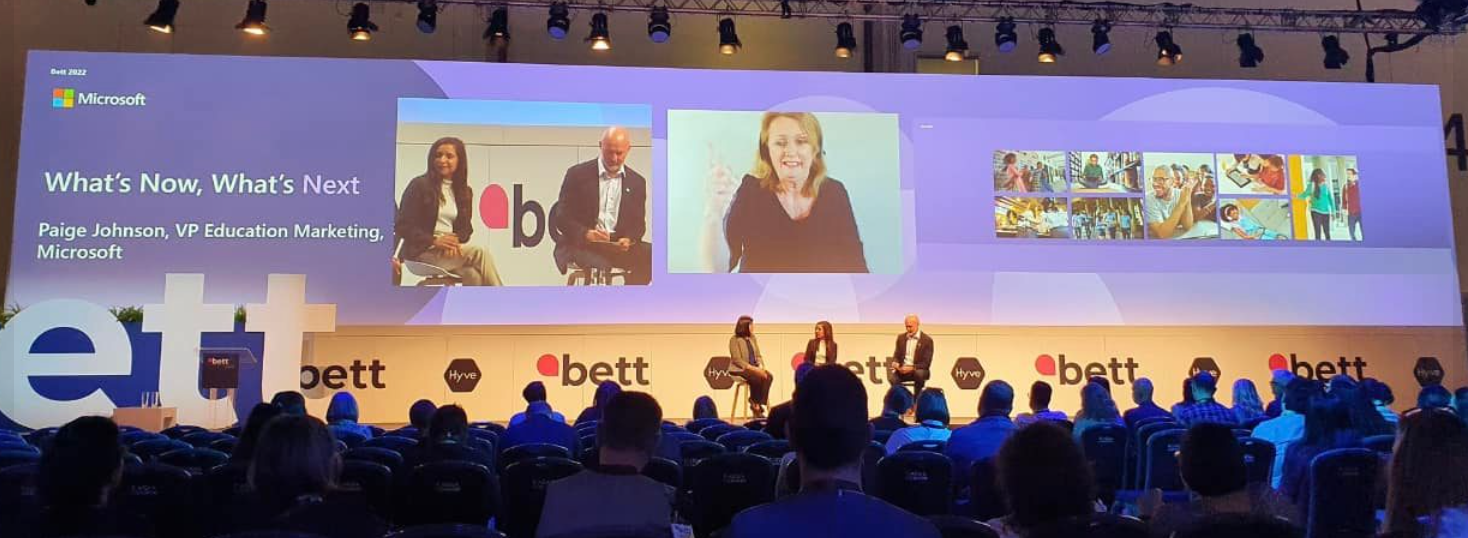
The overall theme of our content and events was focused on supporting educators in their efforts to drive equity and accelerate learning. Our many representatives and presenters shared these messages in a variety of ways from the keynote address, “What’s now, what’s next,” that packed the Bett Arena, to sixteen different sessions across eight Bett Theatres covering topics designed for teachers, education leaders, and IT professionals. These sessions were primarily presented by educators who shared real-world case studies and examples of using Microsoft Education products in their classrooms. Audience favorite topics included “Elevate your digital transformation and build community by collaborating with Microsoft,” “Learning from what works: How Microsoft Showcase Schools are preparing students for tomorrow,” and “Fostering well-being and engagement with Microsoft education solutions.“ 

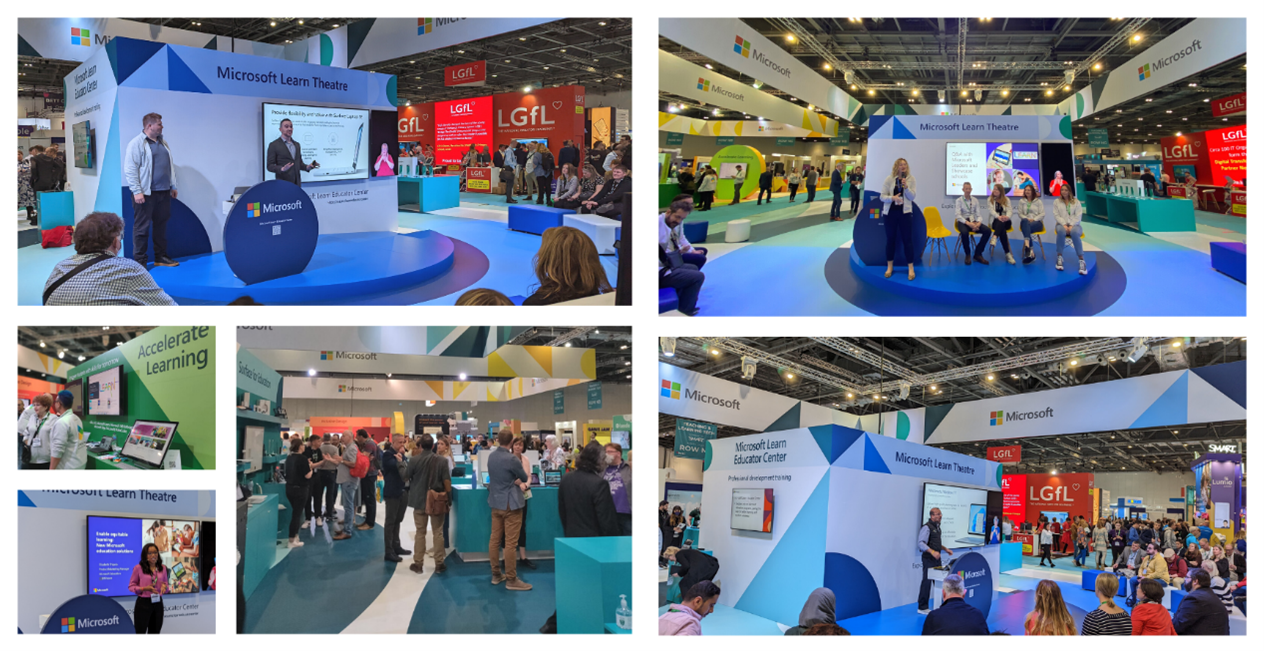
Our booth was a bustling hub of activity, with opportunities to get hands-on experience with Minecraft: Education Edition, MakeCode, and the newest devices for learning. Our teams guided thousands of people through the features of our new and updated literacy tools, Reading Coach and Reading Progress, shared tips and insights for making the most of Windows 11 and Windows 11 SE for education, and introduced educators to some of the incredible professional development opportunities in the Microsoft Learn Educator Center

Higher education was represented with “Ahead,” a space dedicated to higher education. Microsoft Education presented a keynote “Accelerating learning to help all learners engage, keep up, and get ahead,” and hosted several other opportunities for higher education leaders to connect, learn, and network. 

Esports was a big draw this year as well, and our Minecraft takeover tournament generated a standing-room-only crowd. And speaking of esports, I was honored to be asked to take part in a panel discussion, “Esports, the vehicle to develop future-ready skills” with some of the UK’s best-known esports personalities. It was an excellent way to introduce more educators to the promise of engaging learners with games that build skills.  

These are only a few examples of the types of experiences presented at Bett: there were also opportunities for teachers to get certified in different areas by Prodigy Learning, face-to-face meetings with school customers and product partners, and more demonstrations of devices and learning tools than you can count. 

After two years (and a postponement of 2 months), without an in-person Bett, the energy in the exhibition hall felt even more electric and the people felt even friendlier than in years past. Perhaps that’s partly because we all have been craving the opportunity to gather and connect, but it’s also because, after the challenges of those past years, the community of teachers, education leaders, and education technology providers shares a single-minded focus: to provide each learner with what they need to reach their academic and social potential inside and outside the classroom.  

To everyone who worked with us to make this event possible, and to all of the visitors who stopped by our booth and attended our sessions, a huge “THANK YOU!!” Your commitment to students and to the education industry is inspiring. I can’t wait to see you all again next year, mark your calendars for March 29-31, 2023!

Posted on Leave a comment

How data and AI are changing the world of education

Why data and AI are the next step in education

Digital systems around the world generate a staggering 2.5 quintillion bytes of new data every day.1 While this information is generally stored in large data silos where it can be easily accessed by users, industries have been harvesting their data for years to make themselves more efficient and effective.

Artificial Intelligence (AI) enables data holders to transform a passive resource into a powerful catalyst for accelerated growth. For instance, when the state of Nebraska realized that it was spending approximately 655,000 staff hours per year to collect data reports from every school in the territory—an effort that yielded surprisingly few benefits—the Nebraska Department of Education set out to build a Statewide Longitudinal Data System that would allow information to flow in near-real-time from hundreds of sources and deliver actionable insights to state, district, and school leaders; administrators; and educators.

Despite the noticeable positive impact, until recently, the education sector had been relatively slow to embrace digitalization and the use of data and AI to accelerate learning. However, COVID-19 created an urgent need for education systems to use their data to gain visibility into who was engaging in remote learning and where education was taking place. Education leaders the world over were motivated to take decisive action and schools began to make the transition to online learning as quickly as possible.

“Throughout the COVID-19 response we understood clearly the importance of having data in order to measure the impact of this unprecedented disruption to education,” observed Stefania Giannini, Assistant Director-General for Education at UNESCO.

Today, many institutions have settled into a blended or hybrid learning model and want to see what other benefits their digital framework can offer. Using cloud technology enables them to gain visibility and accelerate the impact of teaching and learning systems.

Microsoft Teams employs data analytics for faster results

Education Insights, a feature in Microsoft Teams for Education, is a great example of this. It uses data analytics to keep educators informed of students’ engagement, learning progress, and well-being. A wide range of built-in digital apps and tools allows teachers to interact with learners on the platform and gain an overview of how well they are progressing, both at the class and individual levels.

One such tool is Reading Progress, a literacy solution that enables students to record themselves while reading aloud. The program makes a note of all the words that are challenging to the reader and provides visual aids and additional reading exercises to help them improve. Best of all, Reading Progress saves teachers hours of time spent evaluating students one at a time. It also allows teachers to take a personalized approach to teaching by addressing each student’s needs individually.

“Given the power and centrality of literacy in conferring future outcomes, we are very proud of Reading Progress, and we are excited to continue to build on it and do even more,” said Steve Liffick, Vice President Modern Life and Learning.

Understanding how data and AI works

Among the key benefits of cloud technology are that it allows institutions to retain full ownership of their student data as well as receive expert support from partner technology companies on how to integrate security protocols and create governing policies around that data. Last year, UNESCO’s member states adopted the first-ever global agreement on the ethics of AI. The document outlines a framework for the ethical use of AI including a chapter that is specifically focused on the ethics of AI in education.

UNESCO has been at the forefront of the international response to the global education crisis since the beginning, launching the Global Education Coalition in early 2020. The platform brought together more than 175 members from the UN family, civil society, academia, and the private sector to protect the right to education during the pandemic and beyond. Members are united under the coalition’s three flagships: connectivity, teachers, and gender. “We’ve noticed that in many countries girls have been left behind,” said Stefania. “Filling the gender gap is something that UNESCO has been focusing on since the beginning of the pandemic.”

“In order to ensure that all children are able to receive the benefits of education analytics and AI, all children have to participate in digital learning” observes Paige Johnson, Vice President, Microsoft Education Marketing. “As long as some children are still operating in the analog world, you risk creating Big Data systems that leave those children out of the thinking and the work.”

Another aspect to consider is that in order to benefit from big data systems, all students must take part in digital learning—otherwise, education leaders run the risk of excluding certain learners from the data and the solutions such learning enables. This is why equipping every student with a digital device is the first step to implementing a successful data and AI strategy.

Helsinki was the first capital city to recognize the importance of having a digitalization strategy for education. In 2016, city officials set out to make Helsinki the most impactful place for learning in the world. Working with Microsoft, the city’s Education Division used Azure to build a powerful AI hub capable of enhancing teaching and learning across a wide range of pedagogical use cases. The team’s primary focus was to create a personalized learning experience for each of their students, all while improving learning outcomes and placing an emphasis on well-being.

Open Education Analytics brings data and AI to every system

Open Education Analytics is an open source program created by Microsoft to support every education system’s unique journey with data and AI. The program was launched as a response to the urgent need for visibility into what was happening with education systems at the onset of the pandemic, especially as those systems moved more and more to digital learning platforms. “We realized in that moment that we needed to accelerate our support for our customers’ data and AI journeys,” said Maria Langworthy, Principal Program Manager at Microsoft.

The four components that make up the Open Education Analytics program are a set of open-source technical resources, a comprehensive curriculum on data engineering and data science training, Microsoft’s principles for responsible AI, and a global community of education systems developing shared use cases.

Each pillar is designed to solve specific challenges to digitalization and to empower education systems to navigate their way forward. As Maria noted, “It’s not just data and a lot of dashboards. It’s about how you use this data to make better decisions, to better utilize your resources to really push learning progress.”

Leveraging data with EMIS

“Our goal with Microsoft Education Data and AI programs is to meet every education system where they are today and to help them move forward, [in order] to better leverage the data that they have using our modern data and AI services,” said Louise Macquet, EMIS Cloud Business Development Lead, Microsoft MEA.

The Education Management Information System (EMIS) is designed to enable education systems to effectively collect, store, manage and report their data. 

It does this through an open-source common data model for education that provides systematic consistency for data and supports education systems to develop applications and integrators more quickly to operate across multiple systems more easily. “The common data model was developed by Microsoft and founding partners to eliminate data silos for a connected engaged platform producing efficient and real-time data,” explained Louise.

In order to empower education leaders across the world to accelerate the digital transformation of their systems and achieve meaningful impact in education, Microsoft created the Leaders in Digital Transformation of Education program. Join the program today and sign up for the Data and AI Accelerator to harness the power of your student learning data in real time for optimal results.

https://techjury.net/blog/how-much-data-is-created-every-day/#gref

Posted on Leave a comment

What’s new in Microsoft Teams for education

By Abby Schilbach Posted on

Happy 2021! We’re excited to share the latest updates in December to the Teams experience:

  1. See the latest features available in Teams, including Breakout Rooms
  2. Apply policies with the Microsoft Teams for Education policy wizard, available on January 7
  3. Allow school leaders, substitutes, and other approved individuals to join a class with the Classroom Drop-in app
  4. Join Public preview to get early access to some of the latest Teams features
  5. Use Moodle and Teams together with the mConnect app
  6. Sign up for the live Microsoft Teams for Education event to get ready and learn the best practices for hybrid learning

Let’s dive in!

1) See the latest features available in Teams, including Breakout Rooms
Virtual Breakout Rooms
As the meeting organizer, you can divide your online class into smaller groups to facilitate discussions, brainstorming, and more. A breakout room can be created in a Teams meeting or a Teams channel meeting, giving you greater flexibility depending on how you and your class meet. As the organizer you can easily jump in between breakout rooms, deliver announcements to all breakout rooms at once, and bring everyone back to the main meeting at any time. Any files from the breakout rooms can be shared in the main meeting and are available afterwards in the meeting chat.

If you’re looking for helpful resources to learn more and get started:

  1. Check out the main breakout rooms blog
  2. Get the breakout rooms quick start guide for educators (PDF)
  3. Watch the Tips from the Team breakout rooms video
  4. Visit the breakout rooms support page to learn more

New languages supported for real-time translation in live events
Translate Japanese, Korean, French, French-Canadian, Spanish, Spanish-Mexican, Traditional Chinese, Swedish, Dutch, Italian, Hindi-Indian, Portuguese-Brazilian, and Russian into up to 50 different languages. Learn more

Check out all the latest features available in Teams here.

2) Apply policies with the Microsoft Teams for Education policy wizard, available on January 7
With remote and hybrid learning on online platforms, it’s more important than ever to help keep your school community safe. With the new Microsoft Teams for Education policy wizard, available school IT admins can now easily apply education tailored policies for a safe learning environment.

The policy wizard allows the IT admin to quickly and easily apply the most relevant set of policies for students at a global (Org-wide default) level and apply a custom policy set to a group of educators and staff tailored to their needs. Expected availability, along with more details, will be available on January 7th.

3) Allow school leaders, substitutes, and other approved individuals to join a class with the Classroom Drop-in app
Often times school leaders, substitute instructors, evaluators, TAs, and more individuals need to check in on or become a temporary teacher for a class. With the new Classroom Drop-in app template for Microsoft Teams, school leaders can set up “drop ins” to add a user to a Team without the need to bother IT or the instructor. The dropped in user can then check in on conversation, assignments, grades, class meetings and more!

IT administrators can setup and install the Classroom Drop-in app from GitHub and then make it available to leaders within their organization. Once installed and configured, leaders can begin setting up drop-ins right away.

To learn more, join us for a webinar on January 12 at 8am PST. Sign up at https://aka.ms/DropInWebinar

Install and use the Classroom Drop-in app to allow school leaders, substitute instructors, evaluators, TAs, to check in on or become a temporary teacher for a class

Install and use the Classroom Drop-in app to allow school leaders, substitute instructors, evaluators, TAs, to check in on or become a temporary teacher for a classInstall and use the Classroom Drop-in app to allow school leaders, substitute instructors, evaluators, TAs, to check in on or become a temporary teacher for a class

4) Join Public Preview to get early access to the latest Teams features
Microsoft Teams Public Preview is now available to help you and your school get early access to the latest Teams features. After an IT Admin enabled policy via a policy setting, individuals in the school can set your Teams client to switch on the public preview mode and try Together mode and Large Gallery (7×7) on the web and live reactions in Teams meetings. Watch how to join in this quick tip video.

5) Use Moodle and Teams together with the mConnect app
Now with the mConnect app by Skooler, you can bring all the richness of Moodle inside Teams to organize your courses and use Teams to learn and work together. The mConnect app allows you to:

  • Have one workspace with access to Moodle courses, topics, assignments, and calendar in Teams
  • Stay organized with collaborative Learning tabs in Teams channels
  • Save time and be more in control with automated team and membership creation

Learn more about the mConnect app here.

6) Sign up for the live Microsoft Teams for Education event to get ready and learn the best practices for hybrid learning
Join us and get ready for hybrid learning and teaching with Microsoft Teams. Microsoft Teams for Education experts will share common scenarios, use cases, and answer your questions live. Topics include how to use your favorite apps in Teams, driving student engagement, inclusion, and accessibility, Microsoft Teams with your LMS, and more:

  1. Tuesday Jan 26, 8am-12pm PST – IT Pro & Leaders
  2. Wednesday Jan 27, 8am-12pm PST – Teaching & Learning

Join us and sign up at https://aka.ms/TeamsEduEvent.

This post was originally published on this site.