Posted on Leave a comment

New to Microsoft 365 in April—new tools to streamline compliance and make collaboration inclusive and engaging

This month, we released new features and services in Microsoft 365 to help you meet your compliance requirements, manage security policies, and reach more audiences with your content.

Here’s a look at what’s new in April.

Assess and reduce risk and protect sensitive data

We’re releasing new solutions designed to help you assess your compliance risk and manage policies to protect sensitive data both inside and outside of your organization.

Manage sensitive and high-risk data—Today, we announced the availability of several new compliance capabilities to give you more control over data privacy across your organization. Compliance Manager now allows you to create custom risk assessments of any application used by your organization. Office 365 Advanced Message Encryption enables admins to revoke and expire encrypted emails. Additionally, the new data investigation capability in the Office 365 Security and Compliance Center enables you to search for high-risk content, such as phishing emails and leaked sensitive data, and take actions to remediate risks.

Screenshot of the Exchange admin center.

Address data residency needs with Multi-Geo Capabilities in Office 365Multi-Geo Capabilities now enables customers to control where SharePoint Team sites and Office 365 Groups content are stored at rest, in addition to Exchange and OneDrive data. Multi-Geo Capabilities helps multinational companies address their regional, industry-specific, or organizational data residency requirements in Office 365 by enabling them to control where each employee’s Office 365 content is stored at rest. Contact your Microsoft representative for more information.

Deploy security policies tailored to your organization’s security needsSecurity Policy Advisor is a new service that uses behavior-based analysis to help IT admins quantify the risks and benefits of applying a tailored policy and then monitor policy health over time. Admins can also deploy policies with one click and easily update or even roll back policies. Together, these capabilities help IT admins streamline their workflow and manage across their policies. This service is now available as a preview for all organizations with Office 365 ProPlus. To get started, administrators can visit the Office client management portal.

Image of Recommendations for targeted users in Microsoft Office Client.

Improve your security posture with Azure AD Password Protection—Earlier this month, we announced that Azure AD Password Protection is now generally available. Azure AD Password Protection proactively helps users avoid choosing weak and vulnerable passwords, lowering the risk of being compromised by a password spray attack. To get started, sign in to the Azure Portal with a global administrator account.

Screenshot of a banned password list in Microsoft Azure.

Reach and engage more people

New capabilities help you connect with more people and create more engaging content across multiple languages.

Connect and engage both inside and outside of your organization with Microsoft Kaizala—Earlier this month, we announced that Microsoft Kaizala, a simple and secure work management and messaging app, is rolling out to Office 365 customers globally and will become part of Microsoft Teams over the next 12–18 months. Kaizala enables you to securely connect and engage with large groups outside your organization’s directory—including contract workers, vendors, partners, and customers—using a phone number-based identity for easy onboarding and a simple mobile user experience. You can download Microsoft Kaizala today from the iOS and Android stores.

Screenshot of Microsoft Kaizala.

Break down language barriers with multi-language support for Editor in PowerPoint—Receive suggestions on grammar, word choice, and conciseness regardless of which languages are included on your slides. Editor in PowerPoint even supports multiple languages on the same slide—perfect for all-hands, global presentations, lesson plans, and inclusive learning. Multi-language support for Editor in PowerPoint will begin rolling out to Office Insiders this month.

Animated screenshot of multi-language support utilized on a Microsoft PowerPoint slide.

Other updates

  • IT administrators can now determine the level of diagnostic and related data that Office sends to Microsoft to help ensure your Office apps are up to date, secure, and performing as expected.
  • A new Mini toolbar in OneNote now appears above text when content is highlighted with contextual formatting tools for faster editing.
  • There are now nearly 350 new icons to choose from when you insert an icon throughout Office 365, including new categories like accessibility, holidays, and process.
  • We released new 3D guidelines in Office 365 to help designers and professionals create custom 3D objects that are compatible with the Office ecosystem.
Posted on Leave a comment

Helping IT reduce costs, increase security and boost employee productivity

Today, we’re announcing several new Microsoft 365 enhancements to help IT reduce costs, increase security, and boost employee productivity.

Here’s a quick summary:

  • Windows Virtual Desktop is now in public preview, providing the best virtualized Microsoft 365 experience across devices.
  • Microsoft Defender Advanced Threat Protection (ATP) now supports Mac, extending Microsoft 365 advanced endpoint security across platforms.
  • The new Microsoft Threat and Vulnerability Management (TVM) capability in Microsoft Defender ATP will help detect, assess, and prioritize threats across endpoints.
  • Office 365 ProPlus will now include the Microsoft Teams app, enabling a new way to work.
  • We’re reducing the time it takes to apply Windows 10 feature updates, making it easier to deploy and service Windows 10.
  • We’re enhancing Configuration Manager and Microsoft Intune with new insights and deployment options to make it easier to manage your devices across platforms.
  • Microsoft 365 admin center is now generally available.

Virtualize Windows 10 and Office 365 on Azure with Windows Virtual Desktop—now in public preview

Today, we’re happy to announce the public preview of Windows Virtual Desktop. Windows Virtual Desktop is the only service that delivers simplified management, multi-session Windows 10, optimizations for Office 365 ProPlus, and support for Remote Desktop Services (RDS) environments in a shared public cloud. With Windows Virtual Desktop, you can deploy and scale your Windows desktops and apps on Azure in minutes, with built-in security and compliance.

For more information about Windows Virtual Desktop or how to get started with the public preview, read the full announcement and watch the new Mechanics video.

Address risks and protect more of your Microsoft 365 devices and endpoints with Microsoft Defender ATP—now in public preview

New today, we’re extending support for our Microsoft Defender threat protection platform to Mac. And because we’re extending support beyond the Windows ecosystem, we’re renaming the platform from Windows Defender Advanced Threat Protection (ATP) to Microsoft Defender Advanced Threat Protection (ATP). Starting today, Microsoft Defender ATP customers can sign up for a public preview. For more information, visit our Tech Community blog.

We’re also announcing Threat and Vulnerability Management (TVM), a new capability within Microsoft Defender ATP, designed to empower security teams to discover, prioritize, and remediate known vulnerabilities and misconfigurations exploited by threat actors. Using TVM, customers can evaluate the risk-level of threats and vulnerabilities and prioritize remediation based on signals from Microsoft Defender ATP. TVM will be available as a public preview for Microsoft Defender ATP customers within the next month. Learn more about it in our Tech Community blog.

Today’s security announcements are an important milestone in our Microsoft 365 endpoint security journey. For more details, check out Rob Lefferts’s post on the Microsoft Security blog.

Enable a new way to work with Office 365 ProPlus and Teams—starting in March

Starting in March, new installs of Office 365 ProPlus will include the Teams app by default. As a “hub for teamwork,” Teams combines chat, voice, video, files, meetings, and calls into a single, integrated experience.

In addition, the default installation for ProPlus will now be 64 bit, enabling better reliability and more effective use of newer PC hardware. If you have earlier 32-bit installs, a soon-to-be-released in-place upgrade from 32-bit to 64-bit Office 365 ProPlus will allow you to upgrade the Office apps without uninstalling and reinstalling.

Reducing the time required for Windows 10 feature updates—starting with version 1709

We made important changes to the Windows update process. Starting with Windows 10 version 1709, devices are updating up to 63 percent faster. Additionally, with the release of Windows 10 version 1703, we’ve seen a 20 percent reduction in operating system and driver stability issues.

Simplify and modernize management with Configuration Manager and Intune

Configuration Manager current branch offers CMPivot for real-time queries and updates to management insights that help with co-management readiness. What’s more, you can now take advantage of new deployment options, including phased deployments and configuring known-folder mapping to OneDrive.

Mobile Device Management (MDM) Security Baselines are now in preview in Intune. These baselines are a group of Microsoft-recommended configuration settings that increase your security posture and operational efficiency and reduce costs. We’re also announcing several new Intune capabilities for unified endpoint management across devices and platforms.

Check out What’s new in Microsoft Intune and Configuration Manager for more detailed information on our broad unified endpoint management investments.

Manage Microsoft 365 with a new admin center—rolling out now

We’re also announcing the that the new Microsoft 365 admin center, previously in preview, will become the default experience for all Microsoft 365 and Office 365 admins. Admin.microsoft.com is your single entry point for managing your Microsoft 365 services and includes new features like guided setup experiences, improved groups management, Multi-Factor Authentication (MFA) for admins, and more.

For more information on this new release, check out the detailed post on the Microsoft 365 Tech Community blog.

More at Microsoft Ignite: The Tour in Amsterdam

We’re sharing more on each of these announcements this week at Microsoft Ignite: The Tour in Amsterdam. I’ll be there to co-present a session with Jeremy Chapman on “Simplifying IT with Windows 10 and Office 365 ProPlus.” You’ll have a chance to learn more from many of my colleagues in the teamwork, modern desktop, and security sessions. I hope to see you there!

Editor’s note 3/21/2019:
Blog post was updated to correct information regarding Configuration Manager current branch.

Posted on Leave a comment

New to Microsoft 365 in March: tools to enable teamwork, enhance security in the workplace

This month, we released new features in Microsoft 365 to help you boost teamwork, save time, and streamline your IT management.

Here’s a look at what’s new in March.

Collaborate more easily

New features and services give you more ways to collaborate with colleagues and LinkedIn connections across platforms.

Boost meeting productivity and meet compliance obligations with Microsoft Teams updates—Last week at Enterprise Connect, we announced several new features in Teams including the ability to improve the effectiveness of remote meetings by replacing your background during video chats and increasing inclusivity with live captions & subtitles during Teams meetings. We also announced the generally availability of live and on-demand events in Microsoft 365, which enable you to deliver compelling communications to up to 10,000 employees, customers, and partners. We also announced new compliance capabilities in Teams such as Data Loss Prevention (DLP) in chats and conversations to help you keep information secure and meet your obligations.

Animated image showing customizable backgrounds utilized in Teams.

Improve whiteboard ideation and collaboration—Two new intelligent inking features in the Microsoft Whiteboard Windows 10 app help improve the collaborative ideation experience. Now, you can easily capture a picture of a physical whiteboard and convert it to digital ink in the Whiteboard app using ink grab. Additionally, the new ink beautification feature can help increase the readability of jotted notes by analyzing handwriting and automatically replacing it with more legible strokes. Together, these intelligent inking features decrease the time spent on managing content, so you can spend more time collaborating on a digital whiteboard. Both are now available in the Whiteboard Windows 10 app.

Animated image demonstrating ideation and collaboration in Microsoft Whiteboard.

Work seamlessly with first-degree LinkedIn connections—When you securely connect your LinkedIn account with your Office 365 account, you can now view others’ LinkedIn profiles in Outlook on the web, and in OneDrive and SharePoint in Office 365, and see relevant insights about the people you’re working with, both inside and outside your organization. Now rolling out to Targeted Release customers is the ability to send emails to and coauthor documents with many of their first-degree LinkedIn connections.

To get started, type a connection’s name in the To or Cc field when composing a new message or sharing a document in Outlook on the web, OneDrive, SharePoint, Word Online, PowerPoint Online, and Excel Online.

Animated image showing a user finding LinkedIn profile information in Outlook on the web.

Create more engaging content and get more done

New Word, Excel, PowerPoint, and Outlook on the web features help you create beautiful content and save you time.

Make your presentations stand out with 3D objects on your Mac—Create stunning visuals and engaging content on your Mac with 3D embedded animations in Word, Excel, and PowerPoint. Improve comprehension and retention, increase engagement, and entertain audiences with content that seemingly comes to life. Select scenes and insert 3D models from a vast library of free content and rotate 3D objects to tell your story from every angle. 3D objects on Mac will start rolling out to Insiders next month.

Animated image showing 3D animation in PowerPoint on Mac.

Prepare for and schedule meetings faster with new intelligent features in Outlook on the web—Powered by Microsoft artificial intelligence (AI), Outlook on the web will now help you prepare for meetings by showing you relevant information you might need. It will also automatically suggest that you create a meeting directly from an email conversation and show you available days and times for people you include in a meeting invite. These features will begin rolling out to Outlook on the web users in the next few weeks.

Image showing a Deep Dive on a Meeting Card in Outlook My calendar.

Enhance security and streamline IT management

New capabilities help you better protect your organization and streamline IT management.

Ensure a healthy security posture with updates to Microsoft Defender Advanced Threat Protection (ATP)—Last week, we announced that we’re extending our endpoint protection platform to support additional operating systems with Microsoft Defender Advanced Threat Protection (ATP) for Mac, available now in limited preview. With this expansion, we’re also renaming the Windows Defender ATP platform to Microsoft Defender ATP. We also announced that we’re making Threat and Vulnerability Management (TVM) capabilities available in Microsoft Defender ATP to discover, prioritize, and remediate threats and vulnerabilities—preview coming soon.

Image showing the Windows Defender Security Center dashboard.

Access your security and investigation tools in the new Microsoft 365 security center—The Microsoft 365 security center is a new unified security experience that provides your security professionals with a dedicated workspace to manage and take advantage of the comprehensive security capabilities of Microsoft Threat Protection. The Microsoft 365 security center is now generally available. Get started with features and capabilities such as Secure Score, Advanced Hunting, and security alerts by visiting security.microsoft.com.

Image of the Microsoft 365 security center dashboard.

Manage your Microsoft 365 services with the new Microsoft 365 admin center—Last week, we announced that the new Microsoft 365 admin center will begin rolling out as the default experience for all Microsoft 365 and Office 365 admins. The Microsoft 365 admin center is designed to serve as a single entry point for managing services across Windows 10, Office 365, and Enterprise Mobility + Security (EMS) in a more powerful, efficient, and personalized way.

Image of the Microsoft 365 admin center dashboard.

Other updates

  • Now, when opening links to Office 365 documents from the Word, Excel, PowerPoint, or Outlook desktop apps, you will have the option to open them directly in the desktop apps instead of the web.
  • Teams users can now add a Yammer tab to a Teams channel that loads a specified group or topic feed from Yammer.
  • Microsoft Forms Pro, our new enterprise survey solution to professionally distribute surveys, is now available in public preview.
  • OneNote now supports syncing edits of files embedded in your notebooks, eliminating the need to save copies of embedded files.
  • The custom policies feature in Azure Active Directory B2C is now generally available and gives you more control over identity experiences to help you deliver personalized user journeys in your customer-facing applications.
Posted on Leave a comment

Wales to become one of the first countries in the world to give schools free access to Microsoft 365

Wales is helping nearly half a million young people improve their digital skills by becoming one of the first countries in the world to give all local authority schools free access to Microsoft 365.

The Welsh Government will pay for all 1,521 “maintained” schools to have access to programs such as Word, Excel and PowerPoint, in a bid to boost the use of technology among pupils and reduce costs for families and headteachers.

As part of the £1.2 million investment, which is expected to benefit around 467,000 young people, all teachers and students will be able to download and install the latest version of Office 365 ProPlus on up to five personal devices. Pupils can then collaborate and continue learning at home using the same programs as they do in the classroom.

Kirsty Williams, Minister for Education, said: “I’m proud to say we’re one of the first countries in the world to take this progressive approach to providing schools with this software. Through our curriculum reforms we want all learners to have relevant high-level digital, literacy and numeracy skills, and access to these applications is an important step towards achieving that.

“This will reduce the burden on schools to pay for their own licensing fees and also ensure all our schools have the same level of access to the digital tools they need to progress these skills in our learners. This is vital as we aim to reduce the attainment gap and increase standards in our schools.”


The deal also includes Minecraft: Education Edition, which contains Code Builder. This version of the popular block-building game will allow teachers and students to learn coding using Tynker and Microsoft MakeCode, and supports the Welsh Government’s Cracking the Code plan to encourage coding in every part of the country.

Users will be able to securely access Office 365 ProPlus in Welsh or English via the government’s Hwb digital learning platform, which is available to all maintained schools and actively used by more than 85%.

Online versions of the software will continue to be available through Hwb for use in public spaces such as libraries.

Cindy Rose, Chief Executive of Microsoft UK, said: “The introduction of Office 365 will be transformational for both teachers and pupils, empowering them to collaborate more effectively, saving time and generating better learning outcomes. Equally, Office 365 provides students with valuable skills to help them obtain employment following school.

“Additionally, the accessibility tools built into Office 365 will mean all students gain the confidence to contribute to learning discussions. Similarly, with Minecraft: Education Edition, students will develop computational thinking skills in an immersive and classroom-friendly format that sparks creativity and innovation. This agreement ensures Wales retains its position as a world leader in digital education delivery.”


The Office deal comes just days after the Welsh Government announced that Flipgrid, the social and personal learning program used by millions of teachers in more than 180 countries, will also be available to schools in Wales via Hwb.

Flipgrid lets teachers see and hear from every pupil in their class by posting questions to online discussion boards, called grids. Students answer by creating short videos but can practice and perfect their response before posting, helping to increase confidence and improve public speaking.

The move to make Office 365 ProPlus and Flipgrid available to schools will support the Welsh Government’s Digital Competence Framework (DCF), which was launched in 2016 and aims to help people develop the skills that will help them thrive in an increasingly digital world.

According to the US Department of Labor, 65% of today’s students will end up working in jobs that don’t exist yet, and more than 500,000 highly-skilled workers will be needed to fill digital roles by 2022 – three times the number of UK computer science students who graduated in the past 10 years. Just 5% of computer scientists are female, while people returning to work and those from black and minority ethnic backgrounds are also vastly underrepresented within the sector.

The DCF aims to tackle this issue by setting out the digital skills to be attained by students aged between three and 16, including communication, collaboration, creativity, data, problem solving and online behaviour.

Tags: , , , , ,

Posted on Leave a comment

Public preview of Windows Virtual Desktop now available

Last September, we announced Windows Virtual Desktop and began a private preview. Since then, we’ve been hard at work developing the ability to scale and deliver a true multi-session Windows 10 and Office 365 ProPlus virtual desktop and app experience on any device.

Today, we move to the next phase and announce the public preview of Microsoft Windows Virtual Desktop. Now, all customers can access this service—the only service that delivers simplified management, a multi-session Windows 10 experience, optimizations for Office 365 ProPlus, and support for Windows Server Remote Desktop Services (RDS) desktops and apps. With Windows Virtual Desktop, you can deploy and scale your Windows desktops and apps on Azure in minutes and enjoy built-in security.

Through our private preview, we had the chance to work closely with customers and partners to help shape this new service. It has been rewarding to see the results so far—a great example being at X5 Music Group, a Warner Music Group company.

“Within the music industry, we have to access, manage, and store large volumes of complex metadata securely. Windows Virtual Desktop is a great way of bringing data-heavy applications into our cloud platform without the need to rewrite the application. Windows Virtual Desktop also provides several additional benefits, such as making it really easy to scale the number of users while minimizing the attack surface of our applications.”
—Klas Broman, CTO and Developer Lead, X5 Music Group

As we start public preview, we’ll continue listening and taking feedback, to ensure we’re meeting your needs as we head toward general availability in the second half of calendar year 2019.

With the end of extended support for Windows 7 coming up in January 2020, we also understand some customers need to continue to support Windows 7 legacy applications as they migrate to Windows 10. To support this need, you’ll soon be able to use Windows Virtual Desktop to virtualize Windows 7 desktops with free Extended Security Updates (ESU) until January 2023. This support provides a comprehensive virtualization solution for Windows 7 alongside your Windows 10 and Windows Server desktops and apps.

Solutions to extend Windows Virtual Desktop

In November 2018, we acquired FSLogix, a next-generation app-provisioning platform that reduces the resources, time, and labor required to support desktop and app virtualization. FSLogix technologies enable faster load times for non-persistent users accessing Outlook or OneDrive. FSLogix technology will support both client and server RDS deployments—helping on-premises customers more easily migrate to Windows Virtual Desktop and providing a great solution for customers in hybrid scenarios.

Windows Virtual Desktop will also be extended and enriched by leading partners in the following ways:

  • Citrix can extend Windows Virtual Desktop capabilities with their Citrix Cloud services.
  • Through our partnership with Samsung, Windows Virtual Desktop will provide highly mobile Firstline Workers access to a full Windows 10 and Office 365 ProPlus experience with Samsung DeX.
  • Software and service providers will extend Windows Virtual Desktop to offer targeted solutions in the Azure marketplace.
  • Microsoft Cloud Solution Providers (CSPs) will deliver end-to-end desktop-as-a-service (DaaS) offerings and value-added services to their customers.

Access to Windows Virtual Desktop

To deploy and manage your virtualization environment, you just need to set up an Azure subscription. You can choose the type of virtual machines (VMs) and storage you want to suit your environment. You can optimize costs by taking advantage of Reserved Instances (up to 72 percent discount) and by using multi-session Windows 10.

For users accessing the Windows 10 and Windows 7 desktops and apps, there’s no additional cost if you’re an existing Microsoft 365 F1/E3/E5, Windows 10 Enterprise E3/E5, or Windows VDA customer. For Windows Server desktops and apps, there’s no additional cost if you’re an existing Microsoft RDS Client Access License (CAL) customer.

Get started with the public preview of Windows Virtual Desktop

Windows Virtual Desktop is comprised of the Windows desktops and apps you’re delivering to users and the management solution hosted as a service on Azure by Microsoft. During public preview, desktops and apps can be deployed on VMs in any Azure region, and the management solution and data for these VMs will reside in the United States (US East 2 region). This may result in data transfer to the United States while you test the service in public preview.

We’ll start to scale out the management solution and data localization to all Azure regions starting at general availability. For more information on getting started, considerations for optimal deployment guidance, and to provide feedback as you preview the service, please visit the Windows Virtual Desktop preview page.

Posted on Leave a comment

From Microsoft Ignite in Amsterdam: New Microsoft 365 enhancements to reduce costs, increase security and boost productivity

Today, we’re announcing several new Microsoft 365 enhancements to help IT reduce costs, increase security, and boost employee productivity.

Here’s a quick summary:

  • Windows Virtual Desktop is now in public preview, providing the best virtualized Microsoft 365 experience across devices.
  • Microsoft Defender Advanced Threat Protection (ATP) now supports Mac, extending Microsoft 365 advanced endpoint security across platforms.
  • The new Microsoft Threat and Vulnerability Management (TVM) capability in Microsoft Defender ATP will help detect, assess, and prioritize threats across endpoints.
  • Office 365 ProPlus will now include the Microsoft Teams app, enabling a new way to work.
  • We’re reducing the time it takes to apply Windows 10 feature updates, making it easier to deploy and service Windows 10.
  • We’re enhancing Configuration Manager and Microsoft Intune with new insights and deployment options to make it easier to manage your devices across platforms.
  • Microsoft 365 admin center is now generally available.

Virtualize Windows 10 and Office 365 on Azure with Windows Virtual Desktop—now in public preview

Today, we’re happy to announce the public preview of Windows Virtual Desktop. Windows Virtual Desktop is the only service that delivers simplified management, multi-session Windows 10, optimizations for Office 365 ProPlus, and support for Remote Desktop Services (RDS) environments in a shared public cloud. With Windows Virtual Desktop, you can deploy and scale your Windows desktops and apps on Azure in minutes, with built-in security and compliance.

For more information about Windows Virtual Desktop or how to get started with the public preview, read the full announcement and watch the new Mechanics video.

Address risks and protect more of your Microsoft 365 devices and endpoints with Microsoft Defender ATP—now in public preview

New today, we’re extending support for our Microsoft Defender threat protection platform to Mac. And because we’re extending support beyond the Windows ecosystem, we’re renaming the platform from Windows Defender Advanced Threat Protection (ATP) to Microsoft Defender Advanced Threat Protection (ATP). Starting today, Microsoft Defender ATP customers can sign up for a public preview. For more information, visit our Tech Community blog.

We’re also announcing Threat and Vulnerability Management (TVM), a new capability within Microsoft Defender ATP, designed to empower security teams to discover, prioritize, and remediate known vulnerabilities and misconfigurations exploited by threat actors. Using TVM, customers can evaluate the risk-level of threats and vulnerabilities and prioritize remediation based on signals from Microsoft Defender ATP. TVM will be available as a public preview for Microsoft Defender ATP customers within the next month. Learn more about it in our Tech Community blog.

Today’s security announcements are an important milestone in our Microsoft 365 endpoint security journey. For more details, check out Rob Lefferts’s post on the Microsoft Security blog.

Enable a new way to work with Office 365 ProPlus and Teams—starting in March

Starting in March, new installs of Office 365 ProPlus will include the Teams app by default. As a “hub for teamwork,” Teams combines chat, voice, video, files, meetings, and calls into a single, integrated experience.

In addition, the default installation for ProPlus will now be 64 bit, enabling better reliability and more effective use of newer PC hardware. If you have earlier 32-bit installs, a soon-to-be-released in-place upgrade from 32-bit to 64-bit Office 365 ProPlus will allow you to upgrade the Office apps without uninstalling and reinstalling.

Reducing the time required for Windows 10 feature updates—starting with version 1709

We made important changes to the Windows update process. Starting with Windows 10 version 1709, devices are updating up to 63 percent faster. Additionally, with the release of Windows 10 version 1703, we’ve seen a 20 percent reduction in operating system and driver stability issues.

Simplify and modernize management with Configuration Manager and Intune

Configuration Manager current branch offers CMPivot for real-time queries and updates to management insights that help with co-management readiness. What’s more, you can now take advantage of new deployment options, including phased deployments and configuring known-folder mapping to OneDrive.

Mobile Device Management (MDM) Security Baselines are now in preview in Intune. These baselines are a group of Microsoft-recommended configuration settings that increase your security posture and operational efficiency and reduce costs. We’re also announcing several new Intune capabilities for unified endpoint management across devices and platforms.

Check out What’s new in Microsoft Intune and Configuration Manager for more detailed information on our broad unified endpoint management investments.

Manage Microsoft 365 with a new admin center—rolling out now

We’re also announcing the that the new Microsoft 365 admin center, previously in preview, will become the default experience for all Microsoft 365 and Office 365 admins. Admin.microsoft.com is your single entry point for managing your Microsoft 365 services and includes new features like guided setup experiences, improved groups management, Multi-Factor Authentication (MFA) for admins, and more.

For more information on this new release, check out the detailed post on the Microsoft 365 Tech Community blog.

More at Microsoft Ignite: The Tour in Amsterdam

We’re sharing more on each of these announcements this week at Microsoft Ignite: The Tour in Amsterdam. I’ll be there to co-present a session with Jeremy Chapman on “Simplifying IT with Windows 10 and Office 365 ProPlus.” You’ll have a chance to learn more from many of my colleagues in the teamwork, modern desktop, and security sessions. I hope to see you there!

Editor’s note 3/21/2019:
Blog post was updated to correct information regarding Configuration Manager current branch.

Posted on Leave a comment

New Microsoft 365 and business applications technologies enable government to modernize for the mission

Our government agencies have a unique opportunity to deliver massive impact on the lives of U.S. citizens – an impact that can be accelerated and emboldened by technology innovation. However, these same agencies are challenged to modernize and keep pace with the changing technology landscape, while simultaneously reducing costs, protecting data and meeting stringent compliance regulations. To ensure the government can achieve its critical, mission-driven work, and improve citizen services, hundreds of CIOs and top decision-makers from federal, state and local government agencies are turning to secure cloud infrastructure, which can seamlessly enable operations efficiencies, and provide services that are faster, more reliable and more secure.

Government is taking a Cloud Smart approach

Right now, we’re seeing the evolution across U.S. government from a Cloud First approach – with an emphasis on just getting everything in the cloud – to a Cloud Smart approach – with a focus on embracing modern capabilities and equipping agencies with the technology tools needed in accordance with their mission needs. The recently revised Federal Cloud Computing Strategy is the first cloud policy update in seven years. We believe it constitutes more than labelling and is the right way forward to make the most of the incredible possibilities of cloud in advancing agencies’ missions. In recent years, commercial technology has increasingly found a foothold in the government market and Cloud Smart embraces best practices from both the federal government and the private sector. Cloud Smart is about equipping agencies with the tools, knowledge and flexibilities they need to not only move to cloud, but to fully embrace the potential of its many value-added capabilities such as Platform-as-a Service (PaaS) and Artificial Intelligence.

Securely enabling the mission end to end

All government cloud offerings are not the same, and Microsoft is committed to supporting the needs of government across all branches and levels enabling them with capabilities that support the advancement of their mission from end to end. We’ve built the most trusted, comprehensive cloud for government which includes Azure Government, Microsoft 365 Government, and Dynamics 365 Government.

Government organizations across the United States increasingly are turning to our powerful cloud offerings to modernize – becoming more productive, collaborative and efficient all while protecting sensitive data and privacy. Microsoft is delivering them the right capabilities where they are needed, when they are needed as the sole provider with offerings that span infrastructure, platform and software capabilities and services (IaaS, PaaS and SaaS) designed to meet government’s unique compliance needs.

To make it easier for agencies to efficiently modernize quickly and accelerate the speed in which they achieve a return on their cloud investments, Microsoft has worked with our government customers to achieve the most certifications of any cloud provider with more than 91 compliance certifications supported at every level of government to help them achieve their necessary requirements. We also invest $1 billion dollars per year on security and much of that goes to ensuring we deliver our customers the most trusted cloud platform.

Today, we’re announcing several advances across our landscape of comprehensive government cloud solutions, demonstrating our commitment to the unique needs of our customers and further differentiating our offerings:

Microsoft Teams is now available across all government cloud environments

Since launching Microsoft 365 Government last year, we’ve continually made investments to empower government with the newest tools for mobile productivity and secure collaboration, bringing together the best of Office 365, Enterprise Mobility + Security (EMS), and Windows 10 to meet agencies’ complex compliance and security requirements.

Today, we’re announcing Microsoft Teams, a product core to our vision for delivering intelligent and modern collaboration and communications, is now available in our Government Community Cloud (GCC) High and Department of Defense (DoD) environments exclusively for the U.S. government and its partners. This means Teams is now available across all our government cloud environments including GCC.

Microsoft Teams’ chat-based workspace enables teams of government professionals to be more productive by giving them a single and secure location that brings together everything they need including chats, meetings, calls, files, and tools. Integrated access through this hub for teamwork across multiple Office 365 services enables agencies to leverage their current investments and improves collaboration by providing central file sharing, co-authoring and many more functions making it possible for government customers to better deliver against their mission.

Introducing Microsoft Power Platform and Dynamics 365 Customer Engagement for Government

Today we’re also announcing the availability of both Microsoft Power Platform (March 2019) and Dynamics 365 Customer Engagement (April 2019) for government professionals. These two new products will enable government to unlock new capabilities and features in three core areas: new business applications; new intelligent capabilities infused throughout; and transformational new application platform capabilities.

Once agencies have the infrastructure for harnessing data, they also need a layer atop that data that enables them to get insights easily. Microsoft Power Platform for Government is a system that will allow them to take three key actions on data: analyze, act, and automate. The system uses Power BI, PowerApps, and Flow working together to help anyone, regardless of technical ability, to make data-driven decisions. Joining Power BI, PowerApps and Flow standalone apps are now generally available for government agencies and their partners in GCC. PowerApps and Flow general availability will also land in Dynamics 365, Microsoft 365 and Office 365 in spring 2019.

We are also offering Dynamics 365 Government Customer Engagement for GCC High. This means agencies can now access customer service, contact centers, correspondence management, grants management, task management, mission planning and even more purpose-built cloud applications than they were able to previously.

New Microsoft 365 Government security and mobile enhancements

Recently we introduced Outlook Mobile for our GCC High and DoD customers. This update means the architecture of Outlook mobile now meets the security and compliance needs of Office 365 U.S. GCC High and DoD customers. Now government employees have advanced capabilities across email, search, and calendar from their mobile devices, so they can focus on what’s important and get more done for their citizens.

Coming soon, government agencies using Office 365 Threat Intelligence in GCC will gain new capabilities that automate investigation and remediation of cyber threats  to help them reduce the burden on their IT security teams and decrease response times. This is the latest addition to comprehensive set of Microsoft 365 Government tools designed to help government protect, detect and respond to cyberattacks.

Continuing our investments in government innovation, security and compliance

Microsoft is helping customers across the full spectrum of government, from the state and local level, to every military branch and all federal cabinet departments. We currently serve nearly 10 million U.S. government cloud professionals across more than 7,000 government entities diligently meeting their unique needs by deliver the highest levels of security and compliance.

Microsoft enables the digital transformation of government by offering effective, modern, enterprise-class cloud capabilities. Our government customers are driven by critical missions, and we are committed to helping them evolve their IT modernization efforts with innovative and trusted cloud, productivity and mobility solutions. As government agencies face a range of new challenges in meeting their missions, we are committed to enabling them to work smarter, with agility and confidence – using technology that can unlock the opportunities ahead. Learn more about how government agencies are using Microsoft cloud technology here.

Tags: , , , ,

Posted on Leave a comment

Now is the time to make the shift to Microsoft 365

As we shared on January 14, 2019, the end of support for Windows 7 is less than a year away. Many of you are well on your journey to migrate to Window 10 and Office 365, as they provide the most productive, secure, and cost-effective experience for users and IT departments. More than half of commercial devices are on Windows 10, which shows great momentum.

We are here to help you every step of the way. The Modern Desktop Deployment Center provides detailed step-by-step migration guidance. We are seeing 99.9 percent application compatibility with Windows 7, giving you confidence to upgrade or buy new Windows 10 devices. The Desktop App Assure program provides dedicated engineering resources to help you remediate any application compatibility issues you might have.

Security remains our biggest priority, and Windows 10 provides the most secure experience. For those of you who aren’t able to migrate all of your apps and devices to Windows 10 by the January 14, 2020, end of support date and need additional time to make the transition, we’ve got you covered with new options:

  • As we announced in September 2018, we will provide Extended Security Updates for Windows 7.
  • Microsoft Windows Virtual Desktop (coming soon) will provide a Windows 7 device with free Extended Security Updates through January 2023, giving you more options to support legacy apps as you transition to Windows 10.
  • As a final resource those of you with legacy Windows 7 devices, Extended Security Updates will be available for purchase starting April 1, 2019. They will be sold on a per-device basis for eligible customers and the price will increase each year.

In addition, Office 365 ProPlus will be supported on devices with active Windows 7 Extended Security Updates through January 2023. This means that customers who purchase the Windows 7 Extended Security Updates will be able to continue to run Office 365 ProPlus.

Please reach out to your partner or Microsoft account team for more details or download our FAQs for additional information. Now is the time to shift to Microsoft 365.

Posted on Leave a comment

National Bank of Canada reinvents workplace, empowers employees with Microsoft 365

Logo of the National Bank of Canada.


Profile picture of Ron Markezich.National Bank of Canada—one of Canada’s leading integrated financial groups—set out to increase collaboration, speed up decision-making, and improve business results by reinventing their way of working. National Bank redesigned its headquarters, introducing open floor plans with no offices. All employees across business units can work together to deliver on strategic objectives, including the bank’s executives. But they didn’t just transform the physical environment, they embarked on a journey of digital transformation empowering their employees to drive innovation with Microsoft 365 technologies.

The way National Bank encouraged all 23,000 employees to adopt these transformative digital tools is a fascinating example of innovative “low touch” change management. It was also confirmation of how empowering Microsoft cloud technologies really are. When National Bank began its cloud journey with Microsoft 365, a survey revealed most people were content with the existing workplace. Despite their satisfaction with the status quo, employees embraced the new tools because they valued them, not because they were required.

Denis Rousseau, Modern Workplace program leader at National Bank, tells the story:

We had a vision to transform how people work. By giving employees the highly secure tools from Microsoft 365, they have access to any information on any device, from anywhere, so they can work the way they want. To encourage adoption, we treated employees the way we treat our customers, using internal marketing, peer influencers, self-learning, and corporate social media to motivate everyone to download Office apps from our portal.

With no formal directive, in just nine months 80 percent of the company had adopted new tools and were changing how they collaborate. And it only took six months for more than half of our workforce to adopt Microsoft Teams. As we transition into a cloud-first, mobile-first environment, we proved that people can work productively from anywhere with Microsoft 365.

Continuing this digital workplace transformation, National Bank plans to incorporate intelligent search and artificial intelligence (AI) services next. I’m excited to see how National Bank continues to reinvent productivity and agility in the banking industry.

Posted on Leave a comment

New to Microsoft 365 in February: advancing security and empowering a modern workplace

This month, we released several new capabilities to help you stay ahead of threats, create a more productive workplace, and keep you in the flow of work.

Here’s a look at what’s new in February.

Stay ahead of threats and collaborate securely

New features and services help you better manage a complex threat landscape and communicate and collaborate securely.

Extend your security team’s capability with Microsoft Threat Experts—Our new managed threat-hunting service, called Microsoft Threat Experts, helps you proactively hunt and prioritize threats to get the most out of Windows Defender Advanced Threat Protection (ATP). The service provides access to world-class experts who can help you work through tough investigation challenges with the new Ask a Threat Expert button. Go to your Windows Defender ATP settings to apply for the public preview.

Image of a PC showing the Windows Defender Security Center.

Empower healthcare professionals to securely communicate and collaborate—This month, we announced new capabilities in Microsoft Teams that enable secure messaging and collaboration workflows for healthcare organizations. Priority notifications enable clinicians to focus on urgent messages to manage patient care. In addition, the ability to integrate FHIR-enabled electronic health records (EHR) data with Teams enables clinicians to securely access patient records, chat with other team members, and even start a video meeting—all in one hub for teamwork. These capabilities are now in private preview; visit the Microsoft 365 and health page and partner site to learn more about how Teams and Microsoft 365 can empower your healthcare teams.

Image of three phones showing a clinician getting a message in Teams.

Move confidently to the modern desktop and cloud with Desktop App Assure and Microsoft FastTrack—Our new service from Microsoft FastTrack, Desktop App Assure, provides app compatibility services for Windows 10 and Office 365 ProPlus. FastTrack also now offers guidance on how to configure Exchange Online Protection, Office 365 Advanced Threat Protection, Office 365 Message Encryption, and Data Loss Prevention policies. These services are now globally available to eligible customers with more than 150 seats at no additional cost. Sign in to Microsoft FastTrack and complete a Request for Assistance form to get started.

Get security alerts for your Microsoft account on your phone—Receive security notifications for important events on your personal Microsoft account now via the Microsoft Authenticator app. When you receive a push notification, you can quickly view your account activity and take actions to protect your account if needed. Microsoft Authenticator can also be used to add two-step verification to your account for added security. To get started, download the Microsoft Authenticator app and add your personal account.

Image of two phones showing a password being changed in Microsoft Authenticator.

Manage tasks and capture data with ease

New features expand capabilities to easily access all your apps and files, capture and convert data, and add context to your tasks.

Jump into your work quickly with the new Office app for Windows 10—The new, free Office app provides a simple experience to get started with and get the most out of Office. Anyone who signs in with a work, school, or personal Microsoft Account can use it to quickly access all the apps available to them and their most relevant files and documents. Organizations can also take advantage of the ability to integrate third-party apps, enable users to search for documents and people across the organization, and customize the experience with their own branding. The Office app can be downloaded from the Microsoft Store, requires a current version of Windows 10, and works with any Office 365 subscription, Office 2019, Office 2016, and Office.

Image of a tablet showing new Office apps for Windows 10.

Add data to Excel directly from a photo—Using the Excel app, you can take a picture of a printed data table on your Android device and automatically convert the picture into a fully editable table in Excel. This new image recognition functionality eliminates the need for you to manually enter hardcopy data. This capability is starting to roll out for the Excel Android app with iOS support coming soon.

Animated image of an Android phone snapping a picture and gathering Excel data from the image.

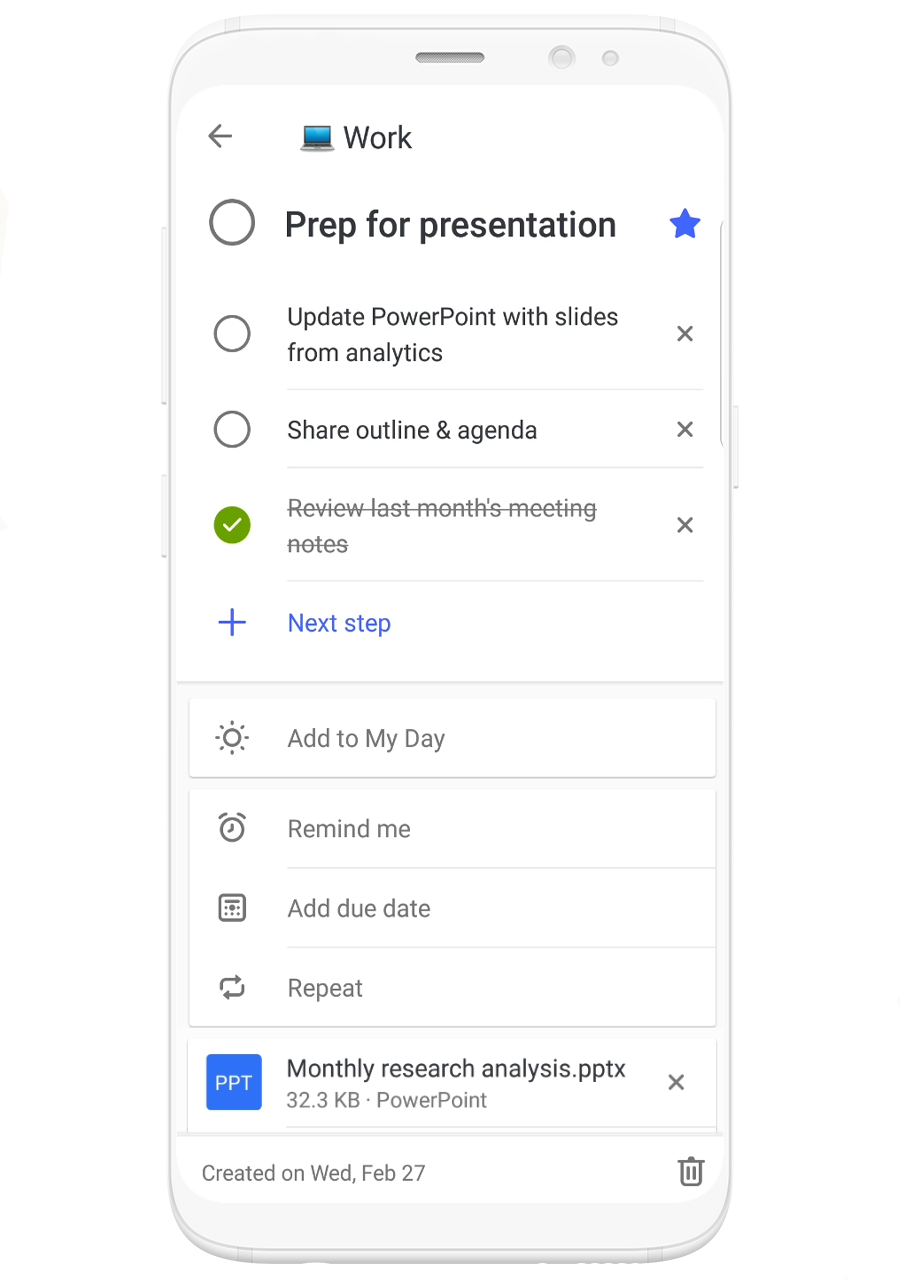
Quickly add photos and files to tasks in Microsoft To-Do—Attach files and photos to help make tasks more actionable with added context. This highly requested feature is now available on all platforms and syncs across your devices, so you can take your new file-attached tasks on the go.

Image of a phone using Microsoft To-Do to schedule prep time for a presentation.

Other updates

  • New one-time passcodes (OTP) from Azure Active Directory (Azure AD) make sharing and collaboration seamless for any user with any account.
  • Azure AD now supports automated user provisioning from Workday, enabling fast and efficient identity creation, so employees can access their Microsoft 365 apps and all other critical resources on day one.
  • Starting this month, the Teams desktop app will be installed along with the rest of the Office 365 ProPlus apps for all new installs.
  • Updates to the SharePoint Migration Tool make it even easier to bring your information to the cloud, with improvements like the ability to migrate web parts, pages, and site navigation.