
.NET 7 is now available in Fedora Linux. This article briefly describes what .NET is, some of its recent and interesting features, how to install it, and presents some examples showing how it can be used.
.NET 7
.NET is a platform for building cross platform applications. It allows you to write code in C#, F#, or VB.NET. You can easily develop applications on one platform and deploy and execute them on another platform or architecture.
In particular, you can develop applications on Windows and run them on Fedora Linux instead! This is one less hurdle if you want to move from a proprietary platform to Fedora Linux. It’s also possible to develop on Fedora and deploy to Windows. Please note that in this last scenario, some Windows-specific application types, such as GUI Windows applications, are not available.
.NET 7 includes a number of new and exciting features. It includes a large number of performance enhancements to the runtime and the .NET libraries, better APIs for working with Unix file permissions and tar files, better support for observability via OpenTelemetry, and compiling applications ahead-of-time. For more details about all the new features in .NET 7, see https://learn.microsoft.com/en-us/dotnet/core/whats-new/dotnet-7.
Fedora Linux builds of .NET 7 can even run on the IBM Power (ppc64le) architecture. This is in addition to support for 64-bit ARM/Aarch64 (which Fedora Linux calls aarch64 and .NET calls arm64), IBM Z (s390x) and 64-bit Intel/AMD platforms (which Fedora Linux calls x86_64 and .NET calls x64).
.NET 7 is a Standard Term Support (STS) release, which means upstream will stop maintaining it on May 2024. .NET in Fedora Linux will follow that end date. If you want to use a Long Term Support (LTS) release, please use .NET 6 instead. .NET 6 reaches its end of Life on November 2024. For more details about the .NET lifecycle, see https://dotnet.microsoft.com/en-us/platform/support/policy/dotnet-core.
If you are looking to set up a development environment for developing .NET applications on Fedora Linux, take a look at https://fedoramagazine.org/set-up-a-net-development-environment/.
The .NET Special Interest Group (DotNetSIG) maintains .NET in Fedora Linux. Please come and join us to improve .NET on Fedora Linux! You can reach us via IRC (#fedora-devel) or mailing lists ([email protected]) if you have any feedback, questions, ideas or suggestions.
How to install .NET 7
To build C#, F# or VB.NET code on Fedora Linux, you will need the .NET SDK. If you only want to run existing applications, you will only need the .NET Runtime.
Install the .NET 7 Software Development Kit (SDK) using this command:
sudo dnf install -y dotnet-sdk-7.0
This installs all the dependencies, including a .NET runtime.
If don’t want to install the entire SKD but just want to run .NET 7 applications, you can install either the ASP.NET Core runtime or the .NET runtime using one of the following commands:
sudo dnf install -y aspnetcore-runtime-7.0
sudo dnf install -y dotnet-runtime-7.0
This style of package name applies to all versions of .NET on all versions of Fedora Linux. For example, you can install .NET 6 using the same style of package name:
sudo dnf install -y dotnet-sdk-6.0
To make certain .NET 7 is installed, run dotnet –info to see all the SDKs and Runtimes installed.
License and Telemetry
The .NET packages in Fedora Linux are built from fully Open Source source code. The primary license is MIT. The .NET packages in Fedora Linux do not contain any closed source or proprietary software. The Fedora .NET team builds .NET offline in the Fedora Linux build system and removes all binaries present in the source code repositories before building .NET. This gives us a high degree of confidence that .NET is built from reviewed sources.
The .NET packages in Fedora Linux do not collect any data from users. All telemetry is disabled in the Fedora builds of .NET. No data is collected from anyone running .NET and no data is sent to Microsoft. We run tests to verify this for every build of .NET in Fedora Linux.
“Hello World” in .NET
After installing .NET 7, you can use it to create and run applications. For example, you can use the following steps to create and run the classic “Hello World” application.
Create a new .NET 7 project in the C# language:
dotnet new console -o HelloWorldConsole
This will create a new directory named HelloWorldConsole and create a trivial C# Hello World that prints hello world.
Then, switch to the project directory:
cd HelloWorldConsole
Finally, build and run your the application:
dotnet run
.NET 7 will build your program and run it. You should see a “Hello world” output from your program.
“Hello Web” in .NET
You can also use .NET to create web applications. Lets do that now.
First, create a new web project, in a separate directory (not under our previous project):
dotnet new web -o HelloWorldWeb
This will create a simple Hello-World style application based on .NET’s built-in web (Empty ASP.NET Core) template.
Now, switch to that directory:
cd HelloWorldWeb
Finally, build and run the application:
dotnet run
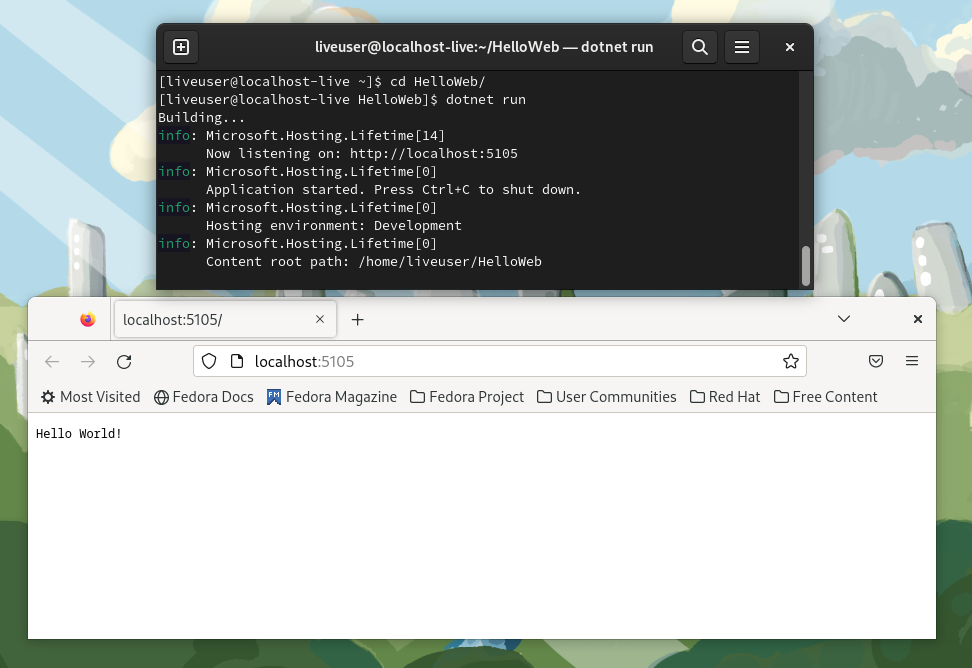
You should see output like the following that shows the web application is running.
Building…
info: Microsoft.Hosting.Lifetime[14]
Now listening on: http://localhost:5105
info: Microsoft.Hosting.Lifetime[0]
Application started. Press Ctrl+C to shut down.
info: Microsoft.Hosting.Lifetime[0]
Hosting environment: Development
info: Microsoft.Hosting.Lifetime[0]
Content root path: /home/omajid/temp/HelloWorldWeb
Use a web browser to access the application. You can find the URL in the output at the “Now listening on:” line. In my case that’s http://localhost:5105:
firefox http://localhost:5105
You should see a “Hello World” message in your browser.
Using .NET with containers
At this point, you have successfully created, built and run .NET applications locally. What if you want to isolate your application and everything about it? What if you want to run it in a non-Fedora OS? Or deploy it to a public/private/hybrid cloud? You can use containers! Let’s build a container image for running your .NET program and test it out.
First, create a new project:
dotnet new web -o HelloContainer
Then, switch to that project directory:
cd HelloContainer
Then add a Dockerfile that describes how to build a container for our application.
FROM fedora:37
RUN dnf install -y dotnet-sdk-7.0 && dnf clean all
RUN mkdir /HelloContainer/
WORKDIR /HelloContainer/
COPY . /HelloContainer/
RUN dotnet publish -c Release
ENV ASPNETCORE_URLS="http://0.0.0.0:8080"
CMD ["dotnet" , "bin/Release/net7.0/publish/HelloContainer.dll"]
This will start with a default Fedora Linux container, install .NET 7 in it, copy your source code into it and use the .NET in the container to build the application. Finally, it will set things up so that running the container runs your application and exposes it via port 8080.
You can build and run this container directly. However, if you are familiar with Dockerfiles, you might have noticed that it is quite inefficient. It will re-download all dependencies and re-build everything on any change to any source file. It produces a large container image at the end which even contains the full .NET SDK. An option is to use a multi-stage build to make it faster to iterate on the source code. You can also produce a smaller container at the end that contains just your application and .NET dependencies.
Overwrite the Dockerfile with this:
FROM registry.fedoraproject.org/fedora:37 as dotnet-sdk
RUN dnf install -y dotnet-sdk-7.0 && dnf clean all FROM registry.fedoraproject.org/fedora:37 as aspnetcore-runtime
RUN dnf install -y aspnetcore-runtime-7.0 && dnf clean all FROM dotnet-sdk as build-env
RUN mkdir /src
WORKDIR /src
COPY *.csproj .
RUN dotnet restore
COPY . .
RUN dotnet publish -c Release -o /publish FROM aspnetcore-runtime as app
WORKDIR /publish
COPY --from=build-env /publish .
ENV ASPNETCORE_URLS="http://0.0.0.0:8080"
EXPOSE 8080
ENTRYPOINT ["dotnet", "HelloContainer.dll"]
Now install podman so you can build and run the Dockerfile:
sudo dnf install -y podman
Build the container image:
podman build -t hello-container .
Now, run the container we just built:
podman run -it -p 8080:8080 hello-container
A note about the arguments. The port is configured with the -p flag so that port 8080 from inside the container is available as port 8080 outside too. This allows you to connect to the application directly. The container is run interactively (-it) so you can see the output and any errors that come up. Running interactively is usually not needed when deploying an application to production.
Finally, connect to the container using a web browse. For example:
firefox http://localhost:8080
You should see a “Hello World” message.
Congratulations! You now have a .NET application running inside a Fedora container!
Conclusion
This was a whirlwind overview of .NET 7 in Fedora Linux and covers building and running an application using plain Fedora RPM packages as well as creating an application for a .NET application using only Fedora Linux.
If you have an interest in using or improving .NET on Fedora Linux, please join us!