Posted on Leave a comment

Dolby Atmos isn’t on the Apple TV 4K yet, but it is a must for home theater fans

At last year’s September iPhone release event, Apple also unveiled the Apple TV 4K, supporting the latest video technologies like Dolby Vision and HDR10 —but minus Dolby Atmos. AppleInsider delves into Atmos versus surround sound, and what you can expect when support comes in the fall.

[embedded content]

AppleInsider purchased the Apple TV 4K immediately after release. I’ve enjoyed watching 4K movies on my theatre system, but Dolby Atmos surround sound has been absent. Dolby Atmos allows sound engineers to place sound “objects” in 3D space, with reproduction of that sound seemingly coming from that direction.

Apple TV on entertainment center

Because of the lack of Atmos, I constantly switched back and forth between the Apple TV 4K and my Xbox One X, which supports Atmos. I can’t imagine that I’m the only one who would do this, after hearing Atmos in action.

Apple promised Atmos would arrive in a future update, and now that WWDC 2018 has come and gone, we know support is coming to the Apple TV 4K with tvOS 12, this September.

So, as a result, the iTunes Store has yet to get movies updated with the feature. To compare Atmos and surround sound, we’re going to head over to Netflix and try out “The Punisher,” which we know for sure supports Atmos on our Xbox One X.

Dolby Atmos upper speakers

Dolby Atmos upper speakers

With the Netflix app on the Xbox One X, the film is HDR instead of Dolby Vision. So, for picture quality alone the Apple TV 4K will beat out the Xbox One X, and is going to be able to support up to 12 bits of color and up to 10,000 nits of brightness in addition to Atmos, when support finally rolls out.

While you’re watching a YouTube video, it’s hard to give the full effect of Dolby Atmos versus a surround sound system. We’ll use our Zoom H6 Recorder and get close to the Atmos speakers so you can hear what kind of sounds they put out, and hopefully that’ll give you a good idea of what you can expect on the Apple TV 4K.
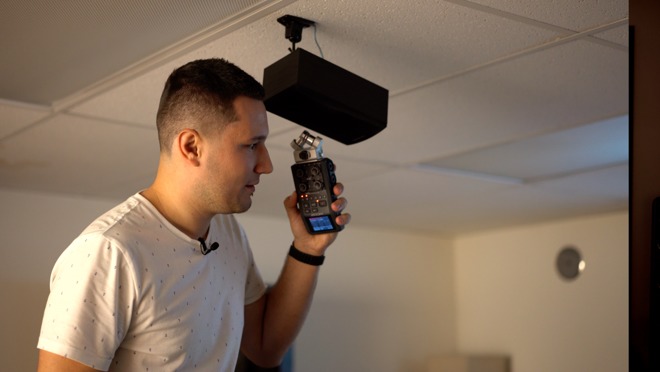
The Dolby Atmos definitely adds another layer of depth. You can hear breathing sounds from above when there’s a first person view scene in the show. Completely different sounds are coming from the other speakers, so Atmos definitely adds to the experience.

I just heard some crows in the woods, and it’s interesting because I didn’t hear that from the rear speakers, or from the front. I only heard it from the upper channel of the Atmos speakers, just like if you were actually in the woods, and you’re hearing the crows above you.

In another scene, we heard a stabbing sound from only the center channel and the Atmos speakers, while the front and rear speakers played background music.

There was also some shooting scenes, where we would hear gunshots from either the front left, front right, right left and rear right speakers, depending on where the gunshots came from in the show, just like you would hear if you were on-set or immersed in the action.

If anything happens above you, like a drone or helicopter making a low pass above you, instead of everything happening on a flat plane with stereo separation, the Atmos system models that pass, and regulates the sound from the different channels to better simulate that fly-over.

It’s very clever how they’re mapping the sound, and it really adds to the experience. Dolby Atmos will be a great addition to the Apple TV 4K —when it arrives. Fortunately, if you have a big iTunes movie library, you’ll be ready —like it did with HD videos to 4K, Apple also announced that once Atmos goes live, any eligible titles you’ve previously purchased will be automatically upgraded for free!

So we’re glad Apple is adding this, and I definitely think that this will help Apple sell more Apple TV 4K’s, as well as more movies on iTunes. It will be the only player that can play from Amazon. Netflix, and iTunes on one box.

Posted on Leave a comment

Apple, Oprah Winfrey sign multi-year deal for TV programming


Apple and Oprah Winfrey have teamed in a long-term partnership to develop programming and original content for what will likely become Apple’s streaming video service.

There is almost nothing known about what will be published. Apple’s statement on the matter is short, only saying that “Winfrey and Apple will create original programs that embrace her incomparable ability to connect with audiences around the world.”

Winfrey had her own television channel, OWN, that is run by her own Harpo Studios, in conjunction with Discovery, Inc. She sold the majority of her stake in the network to Discovery in December 2017, but is still the CEO of the network.

In February 2015, OWN was available to over 70 percent of the US households with cable or satellite service.

The terms of the deal are unknown. The content will likely be tied to the ongoing efforts Apple has undertaken to develop video content —few of which have borne any fruit as of yet, with the released ones not being particularly successful.

In August of 2017, Apple was said to be investing $1 billion in unique content and programming. Apple’s rumored budget is roughly what Amazon spent in 2013 when it launched its first original shows. It’s still, however, about half what HBO spent in 2016, making it unlikely that the company will directly tackle industry stalwarts, at least at first.

Since then, Apple also reportedly provided a blank check to Drake for his own shows and movies, and signed a deal with “Star Trek” and “Battlestar Galactica” reboot alum Ronald D. Moore for a new space drama. It is also reportedly paying $5 million per episode on a ten-episode season of “Amazing Stories,” a revival of the Amblin Television and NBCUniversal science fiction anthology.

Reese Witherspoon’s Hello Sunshine studio is linked to three projects tied to Apple. The first show is as of yet untitled, but features Witherspoon and Jennifer Aniston in a drama based on morning show production.

The second show is development of Nichelle Tramble Spellman’s “Are You Sleeping,” with the “Serial” podcast creator onboard in an advisory role, and Octavia Spencer starring. The third is a sketch comedy show starring Kristen Wiig.

More recently, Apple signed a deal with “La La Land” writer and director Damien Chazelle, and another with “The Big Sick” writers Kumail Nanjiani of “Silicon Valley” and Emily V. Gordon.

These are all thought to be part of a broader $1 billion investment in original programming, which is considerable but still a lower investment than those of its competitors, such as Netflix’s reported $7 billion on original content for 2018.

Other efforts are in progress, and AppleInsider is chronicling them all in a comprehensive list.

Posted on Leave a comment

First details emerge about new batch of Intel processor security flaws

Details of the first of the second wave of Spectre-style vulnerabilities in Intel processors has been published earlier than expected, with the “LazyFP” vulnerability potentially allowing an attacker to access sensitive data, such as cryptographic keys.

Part of a secondary collection of processor vulnerabilities discovered following the Spectre and Meltdown disclosures, LazyFP (CVE-2018-3665) was originally found by researchers working for Amazon and Cyberus Technology earlier this year. As part of the process of responsible disclosure, details of the flaw were provided to Intel and other related firms, with a release to the public scheduled after a defined period of time had taken place.

In May, it was reported Intel had successfully negotiated with researchers to delay the release by a few weeks, but wanted to push it further back, potentially until July. According to Cyberus, the embargo was set to lift in August, but rumors of the vulnerability forced an earlier disclosure, possibly to try and pressure Intel and other vendors to work faster in creating and implementing a solution.

While the LazyFP whitepaper explaining the issue is being withheld, following a request by Intel, some details about how the vulnerability works have been issued.

LazyFP centers around the use and abuse of the Floating Point Unit (FPU), and associated registers in the processor. To enable multitasking, the FPU needs to be able to store its state in order to switch between tasks.

Using what is described by Intel as a “Lazy FP state restore technique,” the restoration of an FPU’s state can be delayed until an instruction operating on it is executed by a new process. “Eager FPU switching” saves the state on a context switch without any delay, whereas the “lazy” version is an optimized way that accounts for processes that don’t use the FPU all the time.

While the details of the attack are not explained, it is suggested it is based on the manipulation of the FPU and how it holds data while the Lazy FP technique is used.

According to Intel’s advisory report on the vulnerability, it has a severity rating of “moderate,” and is described as affecting “Intel Core-based microprocessors,” but not specific models. There is also no mention of which operating systems are affected by the vulnerability.

It is unknown if Apple has been affected by the flaw, but as all current Macs and MacBooks use Intel processors and have done for a number of years, it is still plausible. Apple usually posts details about the vulnerabilities it fixes in its software on its security updates page, but there doesn’t appear to be a reference to the latest disclosure as of yet.

Revealed in January, the Meltdown and Spectre chip flaws in Intel and ARM-based processors allowed the creation of a number of exploits in systems using the components. All Mac and iOS devices were found to be affected by the issue, but Apple advised at the time it had already mitigated the issues for current operating system versions, and was working to develop other fixes.

The more recent batch of eight similar security flaws were found to be caused by the same design-related issue, and includes four classified by Intel as “high risk.” While seven of the eight are thought to have the same impact as Spectre, the eighth is thought to be a greater threat against enterprise systems, in being able to allow attackers to exploit a virtual machine to attack the host.

Posted on Leave a comment

Apple rolls out second developer beta for watchOS 4.3.2


Apple has made available the second beta of watchOS 4.3.2 to developers for testing, two days after the company released the second betas for iOS 11.4.1, tvOS 11.4.1, and macOS 10.13.6.

Code for the latest beta can be downloaded from the Apple Developer Center, as well as through an over-the-air update on Apple Watch units enrolled into the testing program. The public version of the beta release is usually provided a few days after the developer variants.

The second watchOS 4.3.2 beta replaces the first beta that used build number 15U5053b.

As with the betas of Apple’s other operating systems, the small incremental version change suggests the update includes bug fixes and performance enhancements, rather than any new features. It is likely this is due to the upcoming release of watchOS 5, currently undergoing its own beta testing and expected to ship this fall.

AppleInsider is currently testing out all of the new betas released this week, including the iOS 11.4.1, tvOS 11.4.1, and macOS 10.13.6 releases from Monday, to find what features are included, if any.

AppleInsider, and Apple itself, strongly advise against installing beta release software on mission-critical hardware, due to the potential loss of data that can occur.

Posted on Leave a comment

macOS Mojave will include ‘Plug & Play’ support for HTC Vive Pro headset


Apple will make it easy for owners of the HTC Vive Pro to use their virtual reality headset with their Mac, with the company advising it has worked directly with HTC and Valve to add support for the peripheral to macOS Mojave.

Announced during the Metal for VR presentation during WWDC 2018 last week, spotted by Road to VR, Karol Gasinski of Apple’s GPU Software Architecture Team confirmed the support for the HTC Vive Pro, adding it will be “plug-and-play” with macOS 10.14.

“We’ve been working very closely with both Valve and HTC to make sure Vive Pro is supported in SteamVR runtime on macOS,” Gasinski advised.

The HTC Vive Pro uses a pair of 1440 by 1600 AMOLED displays with a pixel density of 615 ppi, a 37-percent increase in pixel density and a 78-percent increase in resolution compared to the previous Vive headset. The headset also includes stereo cameras mounted to the front, allowing it to be used in mixed reality applications, and also supports SteamVR Tracking System 2.0, which can increase the available space the headset can be tracked within.

Support for VR headsets was included in macOS High Sierra, alongside similar changes enabling the use of external graphics card enclosures to improve the graphical power of the connected Mac. Last year, Valve launched SteamVR for macOS, extending the framework from PC to work with compatible Macs, and simplifying development for games to work across both platforms.

Under Metal 2, Apple’s graphics architecture builds on top of the existing version of Metal, with features including GPU-controlled pipelines, accelerated machine learning training, and improved processing of ray-triangle intersections for rendering. More importantly, Metal 2 also includes specialized support for Mac systems using external GPUs and for VR headsets.

Apple’s push to adopt Metal 2 has come under fire from developers, after it was revealed OpenGL and OpenCL will be depreciated in macOS Mojave. Apple confirmed in developer documentation that the older cross-platform graphics technologies will be gradually phased out, which could cause issues for multi-platform development, as well as for older OpenGL-based games to remain functional in future macOS releases.

Though the additional support for the HTC Vive Pro was made during WWDC, it isn’t included within the initial betas of macOS 10.14 provided to developers. It is likely that support will be included in a future developer beta build, ahead of the operating system’s expected release in the fall.

Posted on Leave a comment

Father’s Day Deals: 2018 Apple iPads for $299; lowest prices ever on 13″ MacBook Pros; up to $1,300 off 15″ models

Shoppers looking for a last minute Father’s Day gift can snap up Apple’s newest 2018 iPad with Apple Pencil support for just $299. Apple authorized resellers are also knocking up to $230 off current 13″ MacBook Pros —and time is running out to grab a closeout 15″ MacBook Pro at up to $1,300 off.

2018 iPad with Apple Pencil support for $299

Discounts on Apple devices are heating up just in time for Father’s Day — and B&H is bringing back the popular cash rebate on the 2018 iPad, bringing the price down to $299.00 for the 32GB model in Space Gray. This $30 instant discount on the Wi-Fi tablet is in addition to free shipping to the contiguous U.S. for easy delivery to your doorstep. And unlike other big box retailers, B&H Photo will not collect sales tax on orders shipped outside New York and New Jersey (Colorado and Vermont residents, see here), saving many shoppers over $50 compared to buying from the Apple Store.

To snap up the deal, simply use one of the pricing links in this post or in our 2018 iPad Price Guide. This offer is available for a limited time only and is set to end on June 13 at 11:59 p.m. Eastern.

32GB iPad deals

  • 32GB iPad in Space Gray (Wi-Fi Only) | P/N: MR7F2LL/A
    On sale for $299.00
    ($30 off + no tax outside NY & NJ*)
    *B&H will not collect sales tax on orders shipped outside NY & NJ. CO and VT residents, see here.

Add an Apple Pencil

Take advantage of all the 2018 iPad has to offer by tacking on an Apple Pencil for $99.99 at B&H. Use it to take notes, draw, or even mark up emails on compatible iPads.

Tack on AppleCare

You can easily add an AppleCare+ extended protection plan to this iPad for $69 by selecting the AppleCare+ option immediately after you press the “Add to Cart” button on B&H’s website.

13″ MacBook Pros on sale from $1,199

Apple’s current 13-inch MacBook Pro is also on sale leading up to Father’s Day. From the standard model for $1,174.00 with coupon code APINSIDER to a loaded config with an upgraded processor, 16GB of memory and 1TB of storage for $2,399.00 (reg. $2,599) with the same code, Dad is sure to love a new laptop.

In addition to the savings, Apple authorized resellers Adorama and B&H Photo will not collect sales tax on orders shipped outside New York and New Jersey (Colorado and Vermont residents, see here), making the deals listed below $200 to $400 cheaper for many shoppers compared to buying from the Apple Store. Shipping is also free to the contiguous U.S., making it easy to send the gift directly to Dad.

Top picks can be found below, while a full list of deals are available in our Mac Price Guides.

13″ MacBook Pro with function keys

13-inch MacBook Pro with Touch Bar

  • 13″ (3.1GHz 8GB 256GB) in Space Gray | P/N: MPXV2LL/A
    On sale for $1,599.00 | B&H
    ($200 off + no tax outside NY & NJ*)
  • 13″ (3.1GHz 8GB 256GB) in Silver | P/N: MPXX2LL/A
    On sale for $1,599.00 | B&H
    ($200 off + no tax outside NY & NJ*)

    13″ (3.5GHz 8GB 256GB) in Space Gray | P/N: Z0UM-MPXV24
    On sale for $1,969.00 with coupon code APINSIDER | Adorama
    ($130 off + no tax outside NY & NJ**)

    13″ (3.5GHz 16GB 512GB) in Space Gray | P/N: Z0UN-MPXW30
    On sale for $2,269.00 with coupon code APINSIDER | Adorama
    ($230 off + no tax outside NY & NJ**)
    **Price with promo code APINSIDER. Adorama will not collect sales tax on orders shipped outside NY & NJ.
    *B&H will not collect sales tax on orders shipped outside NY & NJ. CO and VT residents, see here.

Add AppleCare

You can easily tack on an AppleCare+ extended protection plan to these Mid 2017 13-inch MacBook Pros for $269 by selecting the AppleCare option immediately after you press the “Add to Cart” button on the respective reseller’s website.

Last chance for many closeout 15″ MacBook Pro deals

As supplies grow increasingly limited on closeout Late 2016 15-inch MacBook Pros, Apple authorized resellers are knocking $800 to $1,300 off several upgraded models. Pick up a Radeon 460 system with 512GB of storage for just $2,099.00 after an $800 instant rebate. Or opt for a 2.7GHz, Radeon 455 config with 1TB of storage for $2,199.00 with coupon code APINSIDER, a discount of $1,200 off MSRP. These deals also include free shipping to the contiguous U.S. —and both Adorama and B&H will not collect sales tax on orders shipped outside New York and New Jersey (Colorado and Vermont residents, see here).

To compare the savings to deals on 2017 models, it would cost $500 more for a Mid 2017 15-inch MacBook Pro with 1TB of storage, according to our 2017 15″ MacBook Pro Price Guide. If you’re open to a 2016 model, these are the lowest prices available on a 15-inch MacBook Pro with Touch Bar.

Closeout 15″ MacBook Pro deals

  • 15″ MacBook Pro (2.7GHz 16GB 512GB Radeon 460) in Space Gray | P/N: Z0SH0004X
    On sale for $2,099.00 * | B&H
    ($800 off + no tax outside NY and NJ)
  • 15″ MacBook Pro (2.9GHz 16GB 1TB Radeon 455) in Space Gray | P/N: Z0SH-MLH424
    On sale for $2,199.00 with coupon code APINSIDER | Adorama
    ($1,200 off + no tax outside NY and NJ**) – Hot deal!
  • 15″ (2.9GHz 16GB 1TB Radeon 460) in Space Gray | MLH52LL/A
    On sale for $2,499.00
    ($1,000 off + no tax outside NY & NJ*)
  • 15″ (2.9GHz 16GB 2TB Radeon 460) in Silver | Z0T60004B
    On sale for $2,999.00
    ($1,300 off + no tax outside NY & NJ*)
    **Price with promo code APINSIDER. Adorama will not collect sales tax on orders shipped outside NY & NJ.
    *B&H will not collect sales tax on orders shipped outside NY & NJ. CO and VT residents, see here.

Add AppleCare+

You can easily tack on an AppleCare+ extended protection plan to these 15″ MacBook Pros for the discounted rate of $349 at Adorama. Alternatively, B&H is selling AppleCare for the 15″ MacBook Pro for $379, with the option to add the protection plan available in cart.

Additional Apple Deals

AppleInsider and Apple authorized resellers are also running a handful of additional exclusive promotions this month on Apple hardware that will not only deliver the lowest prices on many of the items, but also throw in discounts on AppleCare, software and accessories. These deals are as follows:

See if there is a Mac, iPad, Apple Watch or Certified Used iPhone deal that will save you $100s by checking out prices.appleinsider.com and deals.appleinsider.com.

Posted on Leave a comment

Testing the speed of iOS 11 versus iOS 12 on the iPhone 6 and iPad Mini 2

Apple made some big speed improvement claims regarding iOS 12 on older devices, like as some apps launching twice as fast, and CPU ramp-speed increasing across not just older devices, but also newer ones as well. AppleInsider puts the claims to the test.

[embedded content]

If your device supports iOS 11 that means you’ll be able to run iOS 12. That means that if you have devices like the iPhone 5s and iPad mini 2 reaching back to September 2013, you’re set!

We already pitted Apple’s flagship iPhone X running iOS 11 against one running the first developer beta of iOS 12, but for this one, we wanted to see how much of an improvement we’ll get with older devices.

For our iPhone test we used the iPhone 6, along with the oldest tablet to support iOS 12, the iPad Mini 2. The iPad Mini 2 uses the same A7 processor as the iPhone 5s so there are performance parallels.

iOS 12 benchmarks

Starting from completely shutdown, iOS 12 launches about two seconds quicker on the iPad mini 2 than on iOS 11. Moving around on the home screen it’s also much smoother and more responsive.

Last year’s iOS 11 is almost unbearable to use with consistent stuttering and slowdowns. Opening up the camera app the launch speeds are similar between the two operating systems.

We launched Geekbench 4, and the CPU test finished with a similar score of 1295 single core and 2179 multi-core in iOS 11.4 and 1293 single core, 2203 multi-core in the iOS 12 beta.

iPad mini 2 benchmarks

The GPU compute benchmark finished with slightly higher score of 591 in iOS 12 vs. 588 in iOS 11.4. Our iPhone X running iOS 12 scored 17,198, over 20% faster than 14,314 in iOS 11.4.

We tested three games starting with “Angry Birds 2” which took 19 seconds to launch in iOS 12 and 31 seconds running iOS 11.4. Next was “Pokemon Go” which took 39 seconds to launch with either OS. Asphalt 8 was the last game we tested, taking 32 seconds with both versions of iOS.

At this time we started to notice a trend where the Apps starts to launch quicker on iOS 12, almost instantly after we tap on it, where it takes a few moments longer with iOS 11.4. This could be a result of the faster CPU step-up Craig Federighi mentioned in his presentation.

We see this once more moving on to the native news app, iOS 12 is more responsive but oddly news loads faster under iOS 11 taking 8 seconds vs 12.

The next 5 apps, iBooks and Books, the Appleinsider app, Amazon Prime Video, Google Drive, and YouTube all launch about one second faster under iOS 12. Finishing off with “TV,” iOS 11.4 takes 5 seconds longer to launch versus iOS 12 —11 seconds vs 6.

TV app launch times on iPad mini 2

We then wanted to see if iOS 12 had an improvement in RAM management, which could result in more apps staying opened in the background.

We ran through all the apps once more. Both OS versions managed to keep each app open until we go back to “Pokemon Go” which had to be reloaded under both OS.

iPhone 6

Moving onto our iPhone 6, iOS 11.4 managed to launch 6 seconds quicker. The newer iOS 12 was slightly smoother and more responsive, but nowhere near the subjective difference we saw with the less powerful iPad mini 2.

iPhone 6 boot times on iOS 12

Apple’s Camera app opened slightly quicker in iOS 12.

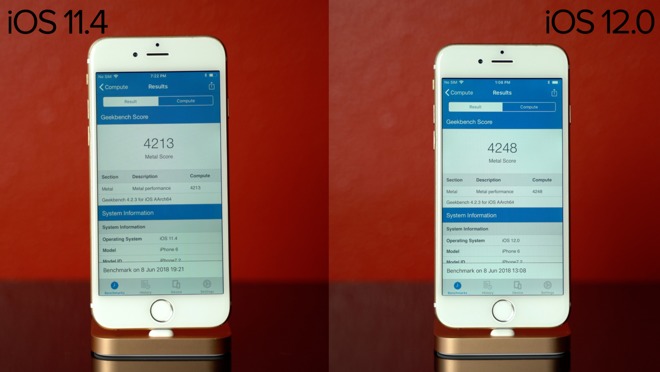
Once again, our Geekbench 4 CPU and GPU scores were almost the same under both versions of iOS. The CPU test resulted in 1560 Single core and 2686 multi-core in iOS 11.4, 1545 single core and 2722 multi-core in iOS 12. GPU results were 4213 in iOS 11.4 and 4248 in iOS 12.

iPhone 6 benchmarks on iOS 12

“Angry Birds” once again launched much quicker under iOS 12, taking 40 seconds compared to 41. iOS 11 launched “Pokemon Go” about 1 second faster, and launched “Asphalt 8” about 4 seconds faster. The iOS 12 beta also managed to launch News, Books, and the Appleinsider app slightly faster.

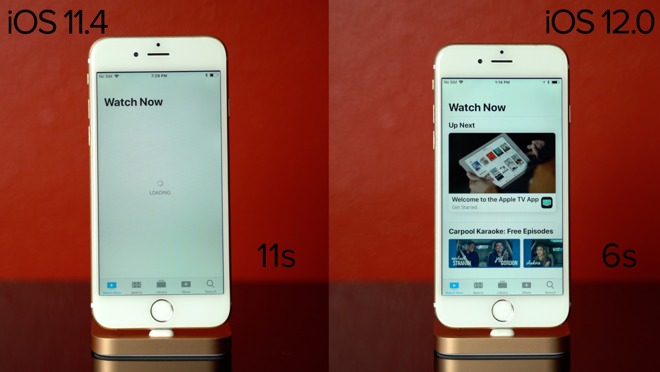
Amazon Prime Video, Google Drive, and the YouTube app were a bit faster under iOS 12, where the App Store took two seconds longer to launch with the latest OS. And to finish off, the TV app once again took 5 seconds longer using iOS 11.4.

TV app launch times on iPhone 6

To check RAM management, once again we re-launched each app and the results were the same, both keeping all apps but just one game open in the background.

This first iOS 12 beta breathed new life into our iPad mini 2, which was almost unbearable to use under OS 11. If you’re someone with an older iOS device the ultimate release of iOS 12 is great news, and we applaud Apple for their focus on performance and not dropping compatibility for older devices.

The results were a bit mixed with our iPhone 6 but very impressive with our iPad mini 2. Keep in mind this is the first beta release, and performance typically improves leading up to the official release.

Posted on Leave a comment

90+ new changes & features in macOS Mojave


Video

Apple’s forthcoming update to the Mac is full of new features to explore. We’ve taken a deep dive on macOS Mojave, the successor to macOS High Sierra, to find over 90 changes and new features for users.

macOS Mojave

In Mojave, the most show-stopping features include Stacks for the desktop, major improvements to Quick Look, a more powerful Finder, beefed up screen captures, Dark Mode, and (coming in 2019) the ability to port iOS apps over to the Mac. For a close focus on these top features, check out our recent hands-on. Then, read on for every change, big and small, in macOS Mojave.

[embedded content]

Desktop

  • Stacks
  • Dark Mode
  • Dynamic Desktop

Quick Look

  • Use MarkUp
  • Trim videos
  • Trim audio
  • Rotate/crop images

Finder

  • Gallery view
  • New sidebar
  • Quick Actions
  • Full metadata
  • New “Keep folders on top on desktop” option
  • App recents in dock

Preferences

  • New Accent Color option under General
  • Random screensaver option now a checkbox
  • Removed mouse options for Mission Control shortcuts
  • Software Update section in Preferences
  • New advanced auto update options
  • iCloud News option
  • iCloud Stocks option
  • iCloud Home option
  • Twitter login removed
  • FaceBook login removed
  • Allow platform switching to control your computer under accessibility
  • New Typing tab under Switch Control accessibility
  • Improvements to the international keyboard

Screen Capture

  • New easy-to-use menu
  • New screen recording options
  • Can set timer for video
  • Can show cursor clicks in videos
  • Customize screenshot save location
  • Thumbnail animates to lower corner
  • Share without saving a copy

Continuity Camera

  • Scan photos or documents with your iPhone
  • Take photos from iPhone
  • Insert into folder in Finder
  • Insert right into documents

Group FaceTime

  • Slightly updated UI
  • (Removes + button, switches to all vs missed on top instead of audio/video.

New Apps

  • Redesigned Xcode 10
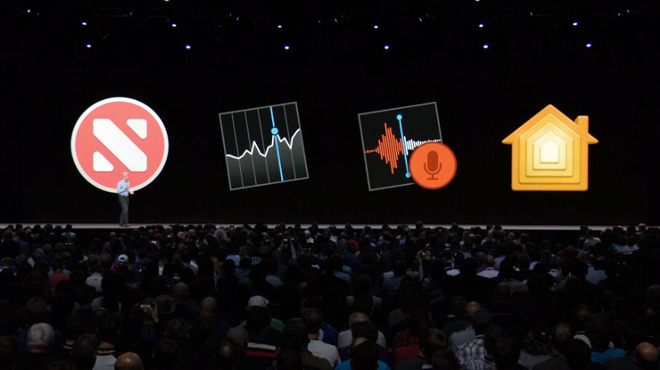
  • News app is new to macOS
  • Stocks is new app to macOS
  • Voice Memos is new app to macOS
  • Home is new app to macOS
  • HomeKit support on macOS

Siri

  • Siri can now handle HomeKit requests
  • Can find saved passwords
  • Knows about food
  • Knows about celebrities
  • Knows about motorsports

Mac App Store

  • Redesigned Mac App Store
  • New Discover, Create, Work, Play, Develop tabs
  • Editor curation and stories
  • View purchases under Account
  • Removed developer name from purchased apps
  • macOS software updates removed from App Store

Security

  • Mojave requires apps to get your approval before accessing the camera or microphone
  • Enhanced tracking prevention
  • Automatic strong password suggestion
  • Flags passwords frequently used

Safari

  • Favicons in Safari tabs
  • View reused passwords in Safari preferences
  • View password details
  • Easily change password in Safari preferences
  • AirDrop passwords from Safari
  • Bock pop-up windows removed from preferences
  • Plugin Section of Websites in Preferences removed
  • One-time security code AutoFill

Photos

  • Levels and curves swap spots

Books

  • iBooks renamed Apple Books

Mail

  • Emoji picker in Mail
  • Suggested folders
  • Move to button in nav bar

DVD player

  • New Icon
  • 64-bit
  • Re-written in AppKit
  • Supports Touch Bar
  • New UI

System

  • Core ML 2
  • Metal 2
  • UIKit frameworks (2019)
  • UI language parity
  • W3C web driver
  • OpenType-SVG fonts
  • Improved CSS color support
  • APFS for fusion drives and hard drives
  • Faster wake from sleep
  • Automator shortcuts I Touch Bar
  • Redesigned Lock Screen
  • New save panel
  • New open panel

For more on Apple’s latest updates, check out our hands-on with over 65 changes in watchOS 5.

Apple’s macOS Mojave was revealed at WWDC18 alongside iOS 12, watchOS 5, and tvOS 12.

All of Apple’s latest updates are set to be released later this fall. Stay connected with AppleInsider as we delve through the releases in the weeks and months to come.

Posted on Leave a comment

Apple isn’t doomed because it didn’t release new Macs and iPads at WWDC


Editorial

WWDC is winding down for another year, and once again, there was no new hardware. But, Apple’s focus on software at WWDC is neither new, nor unexpected —and doesn’t mean that Apple has abandoned anybody.

Tim Cook at June 4 2018 keynote presentation

The latest WWDC is in its last hours, and developers have started winging their way back home with a pile of mandates and improvements by Apple in tow. AppleInsider was there virtually and actually, as you’re aware at this point. We’re aware of the panic about no new hardware —but it isn’t that big a deal for reasons both historical and current.

We got macOS Mojave…

Mojave finally gets nods back to the old, and practically antique, OS8 and OS9 appearance manager. The new Dark Mode spans the entire operating system, and will be a sight to behold when more developers take advantage of the hooks that Apple has provided.

Dark Mode in macOS Mojave

Other improvements include the Home app and HomeKit support, even better privacy enhancements to Safari which will likely annoy Google and Facebook, desktop Stacks and a lot more quality of life improvements.

Yeah, Apple’s left some iron behind again. Because of Metal 2, if your Mac is older than 2012, you’re probably out of luck.

We already know that more will get lost next year. In the next desert-named operating system in 2019, it will ditch 32-bit apps and probably OpenGL for good.

The times, they are a changin’. Again.

… and iOS 12

In many ways, iOS 12 feels like wish fulfillment for iPhone users. It brings along a lot of new features designed on making life with the iPhone easier, as well as promises of extra speed and a more smooth experience. Memoji, like Animoji, may not be everybody’s cup of tea, but it will sell phones as the TrueDepth camera inches down the iPhone product line.

Between Screen Time, an Apple Music refresh, more security features, App Limits and a lot more, we’re hard-pressed to pick out a favorite. So far, they’re all pretty good.

All around, iOS 12 seems like a good addition for iPhones and iPads new and old. While we still don’t recommend using it on a daily device right now because of crashes and data loss, it is very solid as first betas go. We have been very pleased with what we’ve seen for performance and features.

The aluminum gorilla in the room

But, there was no hardware. This shouldn’t come as a big surprise, though.

In 2017, Apple knew the iPhone X was going to be a big deal. So it looks to us like Apple chose to roll out the rest of the year’s hardware earlier so both that new gear including the iMac Pro and HomePod, and the later OLED iPhone X, could shine on the company’s own terms.

Minus the single 2017 hardware bonanza, and the reveal of the iPhone a decade ago, WWDC has never been a day of mass hardware roll-outs. Again, minus 2017, it has been a show that has had some hardware, mostly to keep the developers up to date with what they need to support going forward.

Portent of the future

Speaking about telling developers what to expect in the future, Apple previewed the fruits of project “Marzipan” at WWDC. Instead of a straight emulation layer, it turned out to be a framework and API for porting over iPad apps to the Mac.

WWDC 2018 iOS on Mac

While I’m certain that this can be used for good or evil, skillfully or poorly, it isn’t a regression. I also believe that it is an early step for migrating at least some of the Mac line to ARM, as the porting friction reduces even further as the technology is finally released to developers in full in 2019.

But, like we said on the AppleInsider Podcast on Friday, this reveal of what is rumored to be called Marzipan is about step two of a twenty step process.

Whether or not this shift is good or bad for any individual user varies. If you’re a macOS loyalist, you won’t care. If you’re first and foremost an Apple Intel hardware fan, this is less positive.

Regardless of when it happens, it will likely start with the Mac mini and MacBook Air, or their equivalents. It will migrate upwards only as Intel falls unacceptably further behind, or when the majority of the high-end user base demands it —whichever comes first.

There will be some pain-points, like there was the last two times we did this in hardware from 68K to PowerPC and PowerPC to Intel, and once in software from MacOS 9 to MacOS X. Apple handled it well, both with and without Steve Jobs, and there is no reason to believe that they won’t do just as well this time around.

Hardware’s day is coming

There was a lot of info doled out, and more is yet to come as the new documents are studied, and the betas evolve further. This week was the developer’s week, but there are signs that new hardware is coming not just in the short term, but the long term as well.

Apple is very much beholden to its hardware partners, especially Intel —at least for now. As we have to keep saying, it is (mostly) on Intel why the MacBook Pro doesn’t yet support 32GB of RAM, and also why Apple’s powerful portable wasn’t updated just yet.

Apple bailed on the MacWorld Expo back in the day because it wanted to control the narrative and schedule of releases, without being beholden to release at the shows. WWDC is now no different —there’s no reason to release hardware to a captive and rapt audience assembled for other reasons, when they can do what they want to do, or have to do, on their own schedule.

We know that there are iOS devices coming very soon, because international regulatory agencies have told us so.

Apple has done something uncharacteristic regarding hardware for so-called “Pros,” no matter how nebulous that term is —they’ve said that the Mac Pro is coming twice now, and now we know that will come in 2019.

Intel continues the plod forward, releasing faster and faster processors even as it misses internal deadlines by years sometimes. Its a reasonable guess that Apple is waiting for Cannon Lake for the MacBook Pro —and we’ve already spoken about the rest of the line even before the WWDC began.

Obviously, you’re welcome to add to the “churn” from one platform to another based on what you need personally. But, Apple hardware releases are coming soon, and it’s never been more clear.

Claiming that Apple is doomed because they didn’t roll out new gear at WWDC is disingenuous and ignorant of history.

Posted on Leave a comment

Amazon’s Fire TV Cube aimed squarely at Apple TV 4K


Amazon on Thursday revealed the Fire TV Cube, its latest media streamer, poised to intensify competition with the Apple TV 4K.

Amazon Fire TV Cube

The Cube effectively merges the existing Fire TV with an Echo speaker. Users can not only issue typical Alexa voice commands, but control video playback as well as compatible receivers, soundbars, and cable and satellite boxes. Some devices and services support voice-based search and/or channel-changing.

Some example commands range from “Alexa, turn on the TV” or “turn up the volume” to things like “play ‘This is Us’,” “open Netflix,” or “tune to CNN.” A physical remote is included as well.

People with Alexa-compatible security cameras can use the Cube to view live feeds.

On a technical level the Cube is little different from the Fire TV apart from its speaker and microphones, though storage is doubled to 16 gigabytes, and an Ethernet adapter is bundled rather than sold separately.

Amazon Fire TV Cube

There are some limitations. Sleep timers won’t work until “later this year,” Amazon says, and there’s no timeline for when Bluetooth sync, multi-room music, and Alexa calling and messaging will be added.

On paper the product is largely on par with the Apple TV 4K, and offers some advantages, primarily the ability to talk to it without a remote or holding down a button. Like the Fire TV though, it continues to support only HDR10 for high dynamic range, whereas the Apple TV 4K offers that and Dolby Vision.

Both the Fire TV and Fire TV Cube offer Dolby Atmos surround sound. Apple has promised Atmos support for months, but will only implement it with this fall’s tvOS 12.

The Cube ships June 21, and can be pre-ordered for $119.99 by the general public, or $89.99 by Prime members.