Posted on Leave a comment

Notes for iOS 17 has a right-to-left typing problem

Apple Notes

Users of the iOS Notes app may encounter issues when typing in some right-to-left languages, with iOS 17 not properly handling cursor movement when typing in the app.

The cursor’s movement while text is being typed is pretty well known to computer and mobile device users. Though there are often differences in how the cursor acts for typing left-to-right text or right-to-left versions depending on the language, the actions the cursor takes during that typing is almost universal across platforms and apps.

However, there appears to be a bug in the way that the cursor responds to typing for some languages that rely on reading text from right to left. Raised by an AppleInsider contributor and also spotted on X in a complaint to Apple Support, the cursor is not functioning properly for some right-to-left languages in the Notes app, including Arabic and Hebrew.

In languages that work from the left of the page to the right, the cursor tends to appear towards the right of the passage, or of the most recently typed word. In right-to-left languages, the cursor is supposed to change behavior, so that it can be better placed with text going towards the left of the page.

In AppleInsider’s testing using Hebrew, the bug in Notes has the cursor pinned to the right-hand side of the text string instead of the left. While typing straight without edits, sentences and words come out normally, but you’re typing blind when it comes to the cursor position.

If you attempt to add a word to the middle of an already typed sentence, the new word will appear on the right-hand side at the start of the sentence. Backspacing is also a problem since the cursor is treated as if it’s on the right margin.

For the affected users, the issue effectively means they have to get the sentence right the first time, or suffer problems trying to edit afterward.

It is unclear how many languages are affected by the issue, nor how many users are directly affected, nor if there are specific circumstances that can cause the problem to occur.

For the moment, Apple Support does have at least one English-language report on social media of there being a problem with typing in Notes, so there is an awareness of an issue.
Posted on Leave a comment

How to merge albums of the same person or pet in Photos for iOS 17

Merging photo collections together

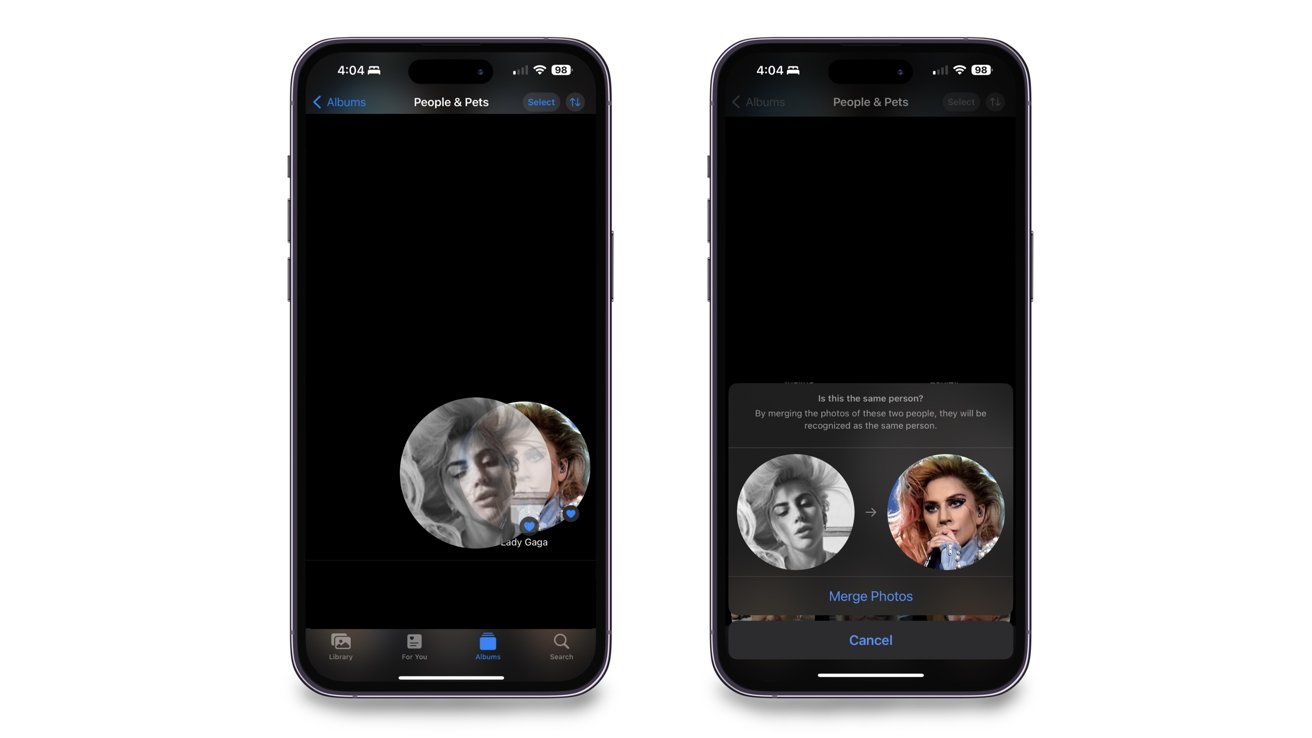
Sometimes the Photos app separates the same person or pet into two different collections, but you can merge them without having to individually drag each photo over. Here’s how to do so in iOS 17.

Throughout people’s lives, physical features tend to change and they may look slightly different than they previously did. Due to this, the Photos app may think it’s another person when it’s not.

While this is not game-changing, it’s annoying to have multiple albums of the same person. You may want to combine the albums to tidy up your Photos app and make it less cluttered.

Merging two albums of the same person is simple to do, and once you complete it, your Photos app will look more organized than before.

Two (or more) become one

Merging two albums is as easy as dragging and dropping. Here’s how you can merge them efficiently.

How to merge two albums of people or pets in Photos for iOS 17

  1. Open the Photos app
  2. Tap on Albums from the bottom menu
  3. Scroll down until you see the People, Pets & Places section, and tap on the People & Pets collection
  4. Find the two People or Pet collections you want to merge
  5. Drag one collection over the other
  6. Confirm that you want to merge them
Merging collections together via drag-and-drop

Merging collections together via drag-and-drop

Once you confirm the merge, all the photos from one collection will go into the other. The collection will then take the name of the person you merged into.

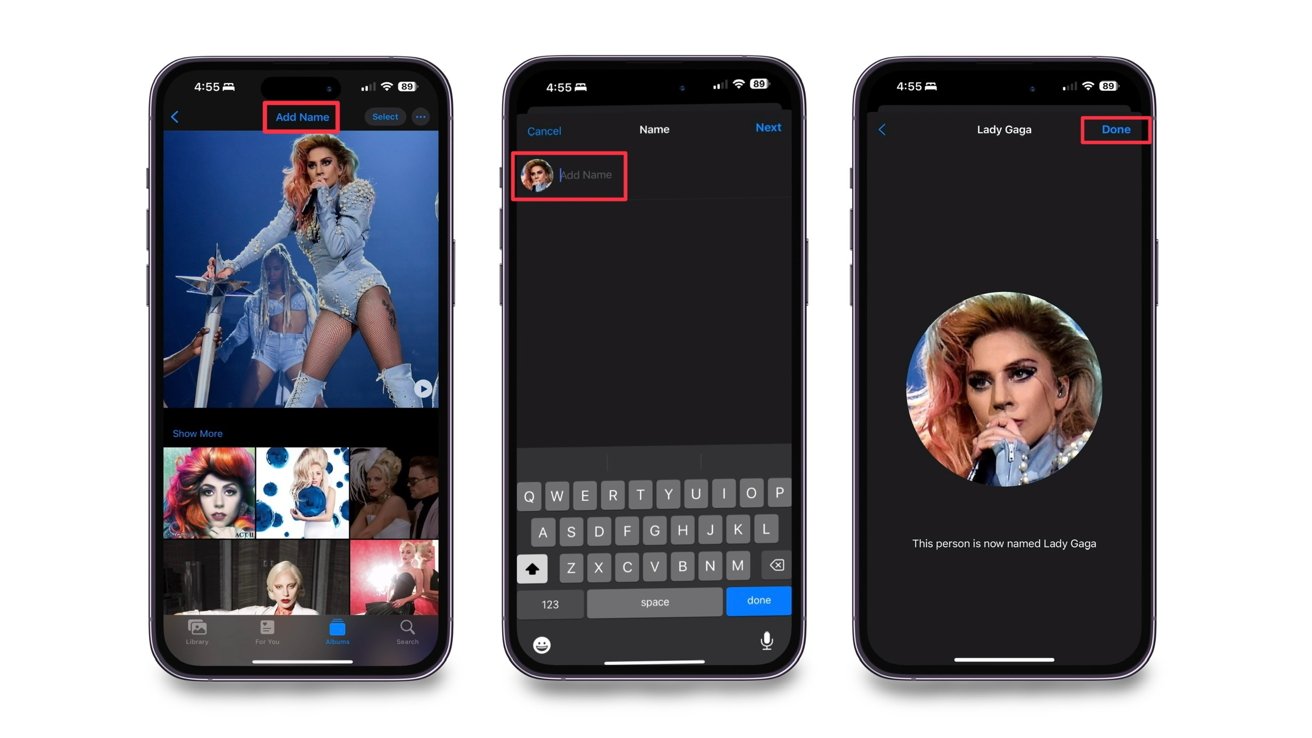
There is also another way you can merge two albums via the person’s name. Here’s how to complete it.

How to merge two albums of people or pets in Photos for iOS 17 by name

  1. Find one of the collections of the person you want to merge
  2. Tap on Add Name at the top
  3. Type in the same name as the other collection
  4. Confirm the name change and the two albums will merge into one collection
Merging collections via renaming

Merging collections via renaming

No matter which way you decide to merge the two collections, both will provide you with the same outcome of eliminating multiple collections based on one person.

Undoing a merge

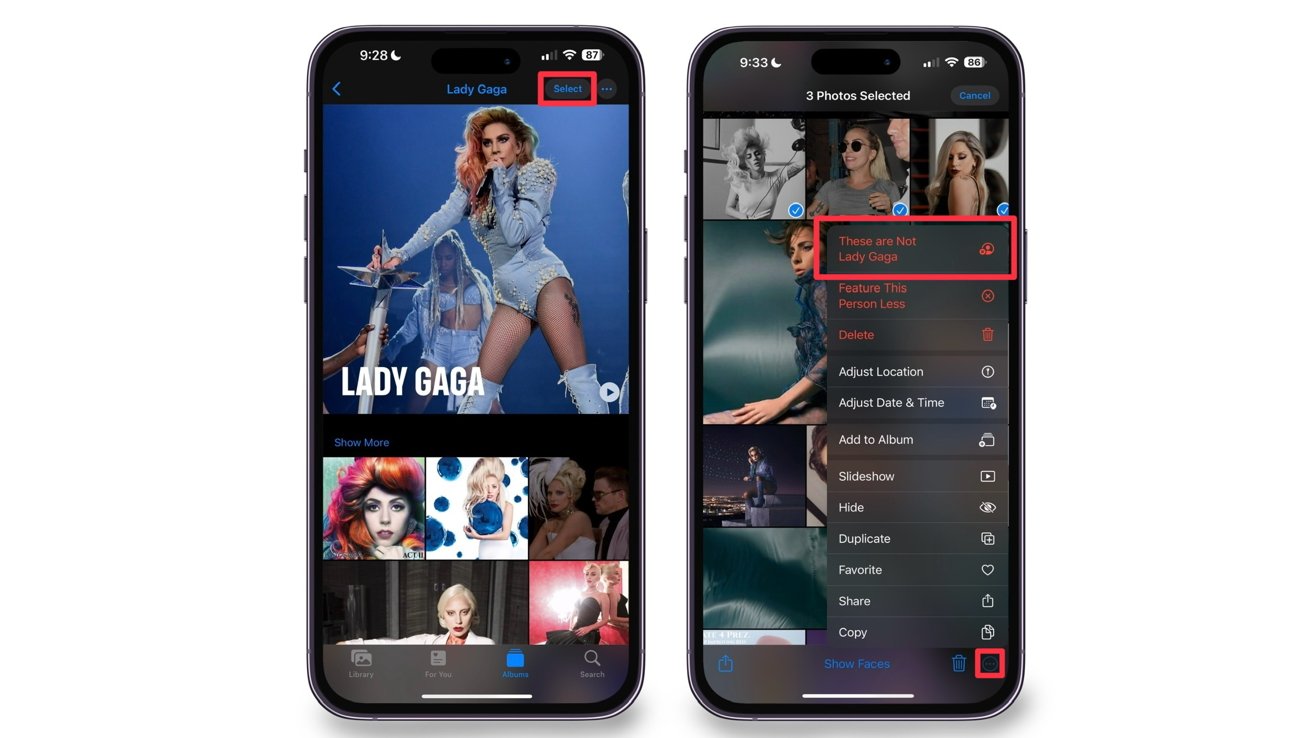
If you accidentally merge the wrong people, you must go into the collection and manually select the photos that should not be there. This is how you remove them.

  1. Tap on Select in the upper right of the screen
  2. Select the image(s) of the person that shouldn’t be in the collection
  3. Tap on the three dots in the lower right of the screen
  4. Select “These are Not [Person’s Name]”
Removing unwanted people from a collection

Removing unwanted people from a collection

Once you select that these photos are not who the collection is dedicated to, the photos will automatically be taken out of it.

Clean up your Photos app

No matter who it is, merging two collections that consist of the same people or pet will clean up your Photos app and make it a little more organized.

Posted on Leave a comment

Get Apple’s new USB-C AirPods Pro 2 for $199.99, a $50 discount off retail

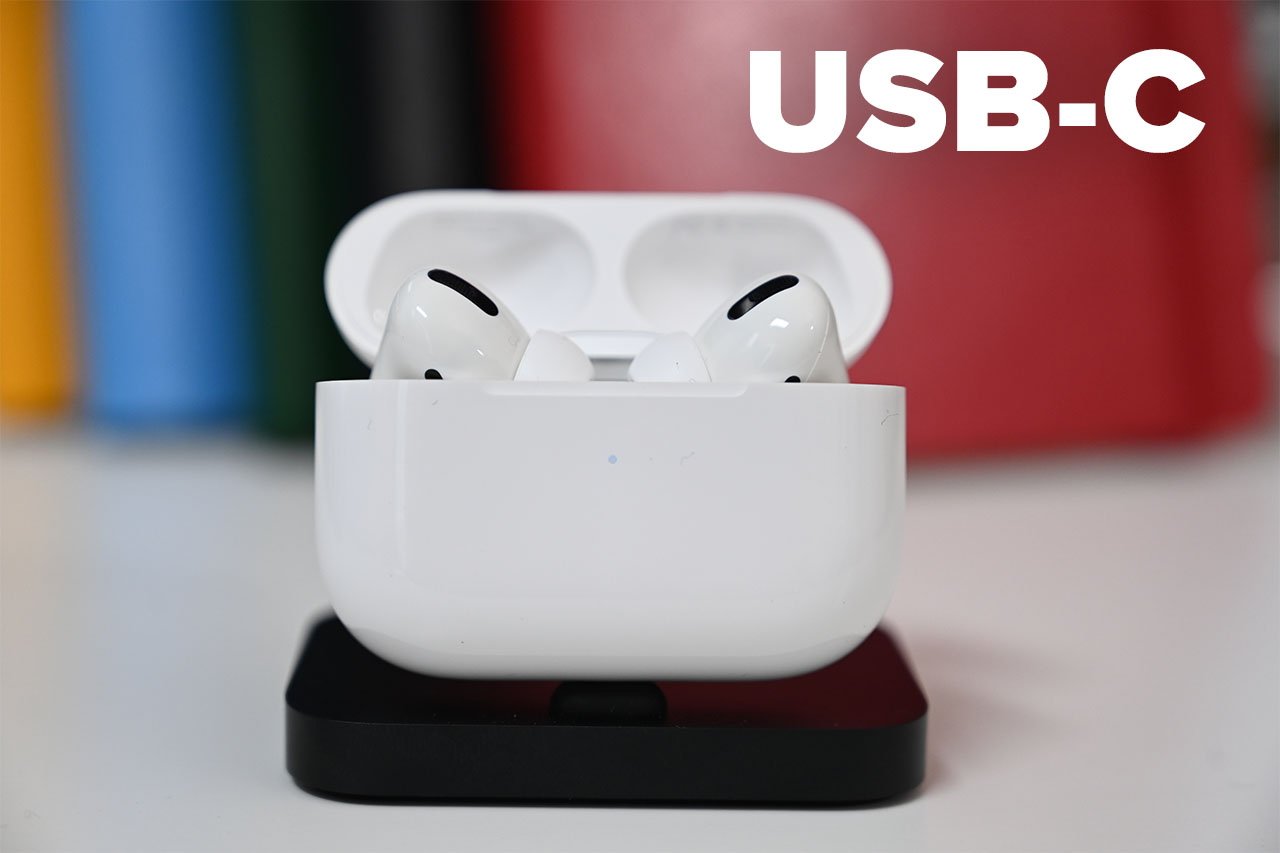
Apple may have just released AirPods Pro 2 with a USB-C charging case, but a price war has already erupted, driving the cost down to $199.99.

You can pick up the latest AirPods Pro 2 with USB-C at Amazon.com and BestBuy.com for $199.99, reflecting a $50 price cut off the regular $249 price.

Whether you’re looking for lossless audio for the upcoming Apple Vision Pro or simply want the convenience of a USB-C charging port, this 2023 release matches the $199 price we’ve been seeing on what is now the last-gen model with a Lightning charging port.

If you’re looking for the best Apple Watch deal on the new Ultra 2, Amazon also has a double-digit discount going on, bringing the cost down to $779 on select styles.

More offers saving you money around the web

Best Apple prices

The AppleInsider Price Guide is home to hundreds of additional markdowns on Apple hardware. Here are a few of our favorite picks:

Posted on Leave a comment

Apple uses hidden watermarks on iPhone 15 boxes to verify authenticity

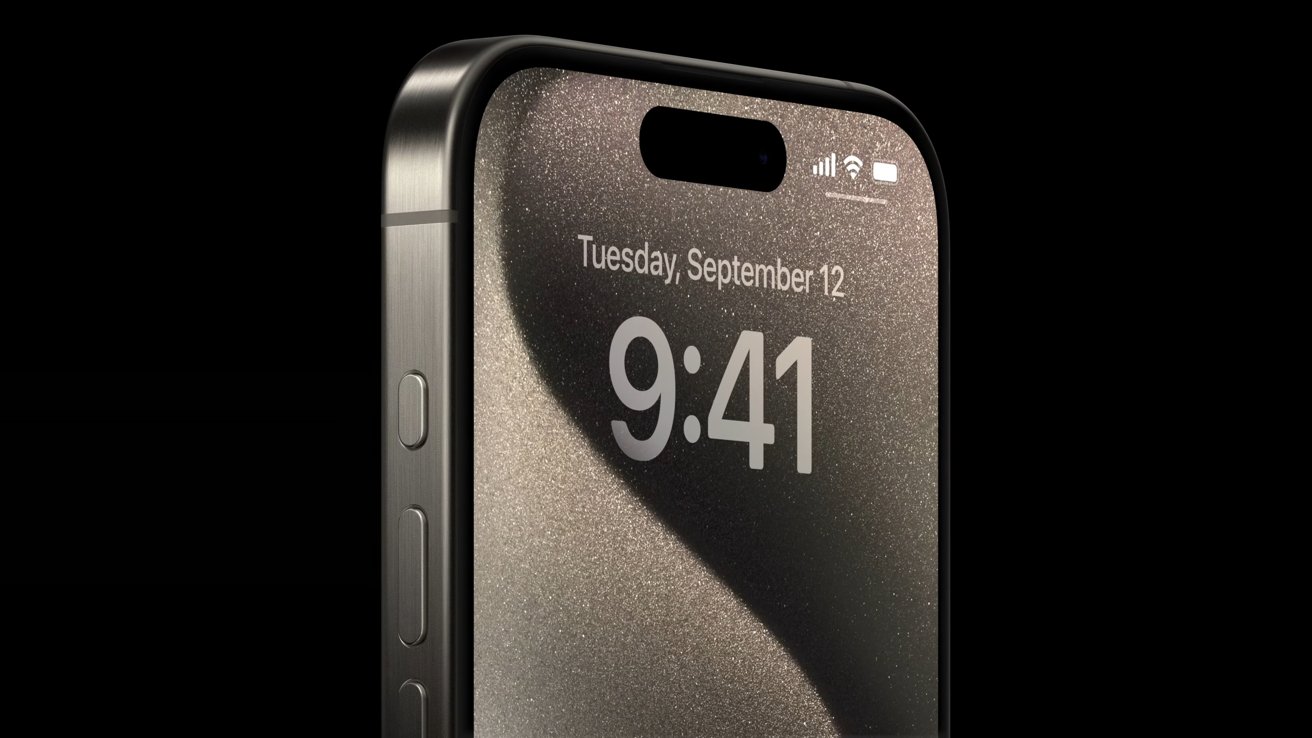
iPhone 15 Pro

Extra precautions have been taken for iPhone 15 boxes that give retail employees and buyers a new way to verify the device is real — but you’ll need a UV light.

Scammers attempt to sell fake iPhones by using convincing replicated device packaging. Apple has added a new invisible watermarking system in an attempt to eliminate this practice.

A leaker known as Majin Bu on X shared a video initially posted on Weibo by user @Pengnone. The video shows someone shining a UV light on the iPhone 15 box to reveal watermarks and a QR code that helps verify device authenticity.

There is some concern that scammers will be able to replicate this watermark. It seems the QR code may be what makes this system more secure since it likely contains a system-verifiable code that scammers won’t easily copy.

Customers buying from big retailers won’t need to worry about device authenticity. However, the resale market and smaller vendors have more opportunities for scams.

When in doubt, check the device serial number and ensure it matches what’s on the box. Also, check the box for problems or manipulation that might signify a scam.

The iPhone 15 lineup is available for pre-order and arrives in-store Friday, September 22. Many device configurations have already sold out, so scammers will likely be active during the big release day.

Posted on Leave a comment

iPhone 15 users can see battery cycle count & more in Settings

Battery chart showing MagSafe charging all day

Apple quietly added the ability to see additional battery data in iPhone 15 Settings, including the current cycle count.

First reported by 9to5Mac, an X post from Inverse editor Ray Wong showed off a screenshot of the new battery section. It shows information like the battery manufacture date, the first time it was powered on, and the current cycle count.

Of the parameters shown here, users will benefit most from the current cycle count. With this data point and the battery health percentage, users will have more insight into how much their internal battery has aged.

These new features could be tied to specific hardware components, like a new power management processor. Otherwise, it isn’t clear why they won’t appear on older iPhones at a later date.

AppleInsider continues to recommend to avoid overthinking charging habits. Use cables with proper safety certification, stick to MagSafe instead of Qi if wireless charging is used, and just charge your device as needed. Anything else, for the average user, is overkill.

Posted on Leave a comment

iPhone 15 has new battery health controls to prevent charging past 80%

iPhone 14 Pro Max at 100%

iPhone 15 users looking to prolong their battery health a little further have a new option — an 80% charging hard limit.

This isn’t the usual Optimized Battery Charging setting that stops the iPhone from charging once it hits 80%, then resumes charging to 100% to finish just before the user wakes up. Instead, the iPhone will never charge past 80%.

Charging a battery is relatively efficient and uniform from 0% to 80%, but that last 20% generally takes more energy and produces more heat. This leads some users to consciously try to float their battery between 40% and 80% at all times to prolong battery health.

Now, users no longer need to monitor charging and can have it stop at 80% automatically. However, AppleInsider continues to recommend users stick with Optimized Battery Charging and avoid this new setting.

There is very little to gain from stopping an iPhone from charging past 80%. Instead, the user will suffer from not having access to the full potential of the battery capacity while only salvaging a few more weeks of battery health.

Posted on Leave a comment

New iPhone camera features and limitations detailed by Apple executives

iPhone 15 Pro Max Telephoto camera

The iPhone 15 lineup has several new camera features, but third-party apps will be needed for maximum creative control. Two Apple executives explain the decision process behind the updates.

Apple’s philosophy behind the iPhone camera and the app that controls it is simple — get out of the way. The company has designed its app and camera functionality to remain uncluttered and straightforward while providing just enough control for enthusiasts.

Two Apple executives detail the thoughts behind iPhone 15 camera features and the camera app in an interview with PetaPixel. Jon McCormack, Vice President of Camera Software Engineering, and Maxime Veron, Senior Director of iPhone Product Marketing, provide some insight.

“It really is, in my mind, all about allowing people to go chase their vision and this goes from the harried parent of a toddler where their vision is, ‘can I get my kid in frame as they take their first step’ all the way through to a pro or a creative who has got a very specific artistic vision in mind and want to get there as quickly as possible,” McCormack says. “Behind the big red button the thing you’re worrying about is the frame and the moment because honestly, that’s the most inspiring part of any photograph or any video.”

Most iPhone users just want great photos and videos with a button press, without all the fuss of individual settings. More is available in the app and settings but doesn’t take up precious viewfinder space.

Distinctions between photo and video

The iPhone 15 Pro and iPhone 15 Pro Max have multiple focal lengths users can choose by tapping the 1x button in the camera app. This selection isn’t just a simple crop but something designed with neural networks controlling many aspects at capture to optimize for that setting.

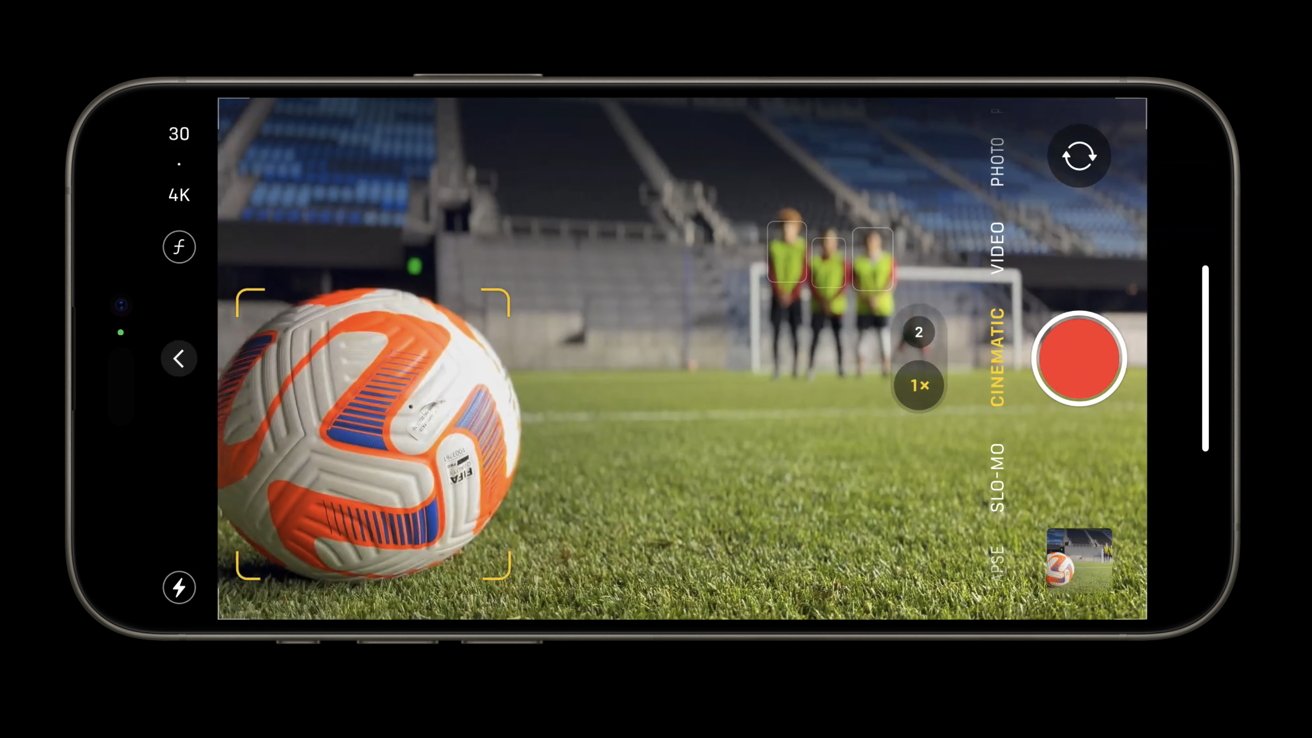
iPhone Camera app Cinematic Video controls

iPhone Camera app Cinematic Video controls

Focal length selection is limited to photo modes and won’t show up in video. This is due to the nature of photo processing versus video.

“When you’re shooting [photos], we gather a bunch of data to let you keep shooting and then sort of keep processing in the background, so we have more time and this is just something we can’t do in video,” McCormack explains.

The executive also details how exposure is chosen when filming with ProRes Log.

“We go for a middle-ground exposure,” McCormack says. “When you go into log, there’s no tone mapping so you can have much more precise control over what your exposure is.”

ProRes and external SSD

Speaking of ProRes video, videographers can use the USB 3.0 speeds to shoot ProRes directly to an external SSD. However, there are some limitations to this.

Apple only allows direct recording to an external SSD when using ProRes. Other formats will record directly to the iPhone’s storage and will require transfer off later or a lengthy iCloud sync.

The 4K 60Hz ProRes video setting is only available when external storage is connected.

24MP is the new 12MP

Apple set 24MP HEIF as the new default camera output for multiple reasons. Not only is it an efficient file size, but it offers more control while processing images.

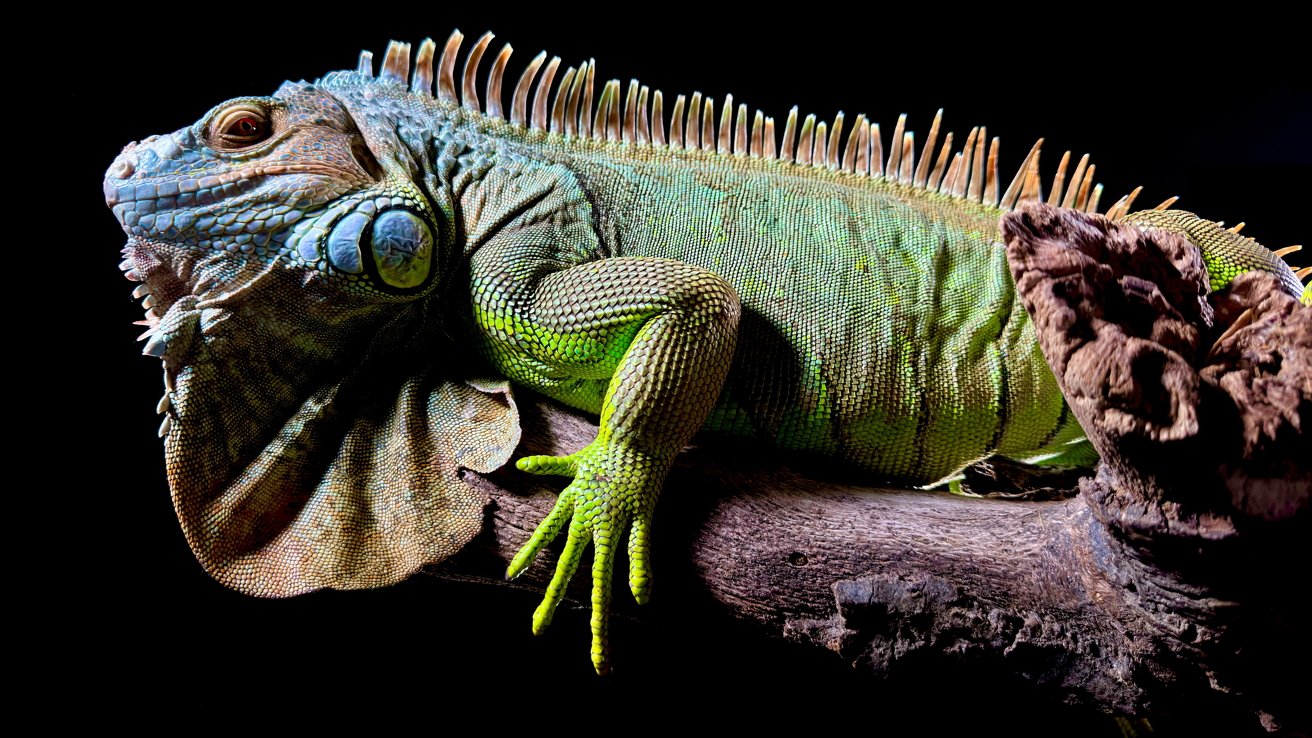
High resolution and contrast from the 48MP sensor

High resolution and contrast from the 48MP sensor

“You get a little bit more dynamic range in the 24-megapixel photos,” McCormack explains. “Because when shooting at 24-megapixels, we shoot 12 high and 12 low — we actually shoot multiple of those — and we pick and then merge.”

When shooting a 48MP image, the iPhone has to rely on an extended dynamic range algorithm instead, providing less exposure data. So, the dynamic range should be wider in 24MP images.

Third-party apps for the enthusiasts

Apple’s approach to building the Camera app keeps the UI simple and distraction-free. Users can open the app, tap the shutter, and know they are getting the best photo at that moment without hassle.

“Our approach to computational photography and videography is really, really unique,” Veron adds. “For the vast majority of our customers, we just aim to process everything in the background so that the process is invisible and out of the way so that people can take great photos and videos and capture beautiful, true-to-life moments in one click.”

Anyone who wants more control, like a focus slider or video waveform, can look to third-party apps. Apple expects anyone looking for more control or settings have a solution in the App Store.

Posted on Leave a comment

Cook justifies Apple’s advertising on X as a ‘town square’ for the Internet

Apple CEO Tim Cook [CBS Sunday Morning]

Elon Musk’s X is too important to stop Apple’s advertising on the platform, according to Tim Cook, with the Apple CEO touching on political equality and environmental efforts.

Following less than a week after Apple’s “Wonderlust” iPhone 15 event, the Sunday broadcast of CBS Sunday Morning had a feature about Tim Cook and Apple, covering a wide range of topics from the environment to social equality.

Opening with environmental issues, Cook starts by denying Apple does any virtue signaling with its projects. “We want the hard work,” Cook claims, referring to initiatives that make business sense.

“I want to see that it pencils out because I want other people to copy it and I know they’re not going to copy a decision that’s not a good economic decision,” Cook insists.

“It can be done, and it can be done in a way that others can replicate, which is very important for us. We want to be the ripple in the pond, we want people to look at this and say I can do that too’ or I can do half of that.’ We want people to look at this and rip it off.”

Equality and X

After discussing a solar project in Texas and visiting an Apple campus in the state, the interview turns to Cook’s political commentary about equality. It touches on how Texas promotes business-friendly climate, the state has pursued anti-abortion and anti-trans and gay legislation.

When pressed about Cook’s commitment to equality and the state of Texas politics clashing with those views, Cook explains that there will always be instances where Apple is operating where the company and the government have differences in opinion.

“But I’m telling you from our heart, we believe in treating everyone with dignity and respect, And that’s how we show up as a company,” Cook says. “We believe in being a part of the community and trying to advocate for change, rather than pulling the moat up and going away.”

The interview then shifts to Twitter, now known as X, as the ADL has accused Elon Musk of helping promote antisemitic content on the platform.

Asked on whether Apple is reconsidering advertising on X following these incidents, Cook says it’s “something that we ask ourselves. Generally, my view is Twitter’s an important property. I like the concept that it’s there for discourse and there is a town square. There’s also some things that I don’t like.”

Pressed in the interview, Cook calls antisemitism “abhorrent, just point blank, there’s no place for it.” When asked if it’s something Apple is evaluating, Cook adds “it’s something we constantly ask ourselves.”

Posted on Leave a comment

New malware strain stealing business data from Intel Macs

Malware called “MetaStealer” is being used by hackers to attack businesses and to steal data from Intel-based Macs, with techniques including posing as legitimate app installers.

Malware attacks against macOS continue to be a problem, with users being coerced into opening executables being the main reason the attacks are successful. In a report detailing a family of macOS “infostealers” referred to as “MetaStealer,” security researchers explain how it works by tricking users into opening disk images.

According to Phil Stokes of SentinelOne, MetaStealer attackers are targeting businesses running macOS systems. By pretending to be fake clients, victims are socially engineered into running the malicious payloads on their Mac.

Many samples supplied to SentinelOne reveal that the disk image file holding the payload was often given names that could be of interest to business users. This ranges from names for presentations, a “Concept A3 full menu with dishes and translations to English,” and “Conract for paymen & confidentiality agreement Lucasprod” [sic], to the names of installers for Adobe products like Photoshop.

It is believed that targeting business users directly is an unusual move for malware users, as it is typically distributed in mass ways, such as in fake torrents.

The effort to achieve an installation is also made harder for hackers by a number of ways. Since the disk image contains the bare minimum content to exist beyond the payload, the file also tends to not include an Apple Developer ID string, nor use code signing at all, nor ad-hoc signing.

These create extra obstacles, namely that attackers have to somehow convince the would-be victim to override Gatekeeper and OCSP. All of the collected samples are single-architecture Intel x86_64 binaries, so while they would be usable on Intel Macs directly, they would need to use Rosetta to run on Apple Silicon Macs.

While users should be vigilant and use caution when opening questionable files sent by others, or downloaded from unofficial sources, Apple has already introduced some protective measures. As part of XProtect update x2170, Apple includes a detection signature that impacts some versions of MetaStealer.

SentinelOne has also released a list of Indicators of Compromise, intended for use by IT and security teams working for enterprise, which follows below.

Indicators of Compromise

MetaStealer Droppers

  • AdobeOfficialBriefDescription.dmg 00b92534af61a61923210bfc688c1b2a4fecb1bb
  • Adobe Photoshop 2023 (with AI) installer.dmg 51e8eaf98b77105b448f4a0649d8f7c98ac8fc66
  • Advertising terms of reference (MacOS presentation).dmg 4da5241119bf64d9a7ffc2710b3607817c8df2f
  • AnimatedPoster.dmg c2cd344fbcd2d356ab8231d4c0a994df20760e3e
  • CardGame.dmg 5ba3181df053e35011e9ebcc5330034e9e895bfe
  • Conract for paymen & confidentiality agreement Lucasprod.dmg dec16514cd256613128b93d340467117faca1534
  • FreyaVR 1.6.102.dmg d3fd59bd92ac03bccc11919d25d6bbfc85b440d3
  • Matrix.dmg 3033c05eec7c7b98d175df2badd3378e5233b5a2
  • OfficialBriefDescription.app.zip 345d6077bfb9c55e3d89b32c16e409c508626986
  • P7yersOfficialBriefDescription 1.0.dmg 35bfdb4ad20908ac85d00dcd7389a820f460db51
  • PDF.app.zip aa40f3f71039096830f2931ac5df2724b2c628ab
  • TradingView.dmg e49c078b3c3f696d004f1a85d731cb9ef8c662f1
  • YoungClass brief presentation Mac 20OS.zip 3161e6c88a4da5e09193b7aac9aa211a032526b9
  • YoungSUG(Cover references,tasks,logos,brief)\YoungSUG_Official_Brief_Description_LucasProd.dmg 61c3f2f3a7521920ce2db9c9de31d7ce1df9dd44

Network Communications – IPs

  • 13[.]114.196[.]60
  • 13[.]125.88[.]10

Network Communications – Domains

  • api.osx-mac[.]com
  • builder.osx-mac[.]com
  • db.osx-mac[.]com

Developer ID

  • Bourigaultn Nathan (U5F3ZXR58U)

Mach-O Binaries — Intel x86_64

  • 0edd4b81fa931604040d4c13f9571e01618a4c9c
  • 13249e30a9918168e79cdb0f097e4b34fbbd891f
  • 13bcebdb4721746671e0cbffbeed1d6d92a0cf6c
  • 1424f9245a3325c513a09231168d548337ffd698
  • 148bc97ff873276666e0c114d22011ec042fb9b9
  • 15c377eb5a69f93fa833e845d793691a623f928c
  • 166ff1cd47a45e47721bb497b83cc84d8269b308
  • 1b3ce71fa42f4c0c16af1b8436fa43ac57d74ce9
  • 1cc66e194401f2164ff1cbc8c07121475a570d9f
  • 1df31db0f3e5c381ad73488b4b5ac5552326baac
  • 1df8ff1fe464a0d9baaeead3c7158563a60199d4
  • 1e5319969d6a53efc0ec1345414c62c810f95fce
  • 291011119bc2a777b33cc2b8de3d1509ed31b3da
  • 2c567a37c49af5bce4a236be5e060c33835132cf
  • 33a5043f8894a8525eeb2ba5d80aef80b2a85be8
  • 34c7977e20acc8e64139087bd16f0b0a881b044f
  • 3589dd0d01527ca4e8a2ec55159649083b0c50a8
  • 35c3b735949151aae28ebf16d24fb32c8bcd7e6b
  • 35e14d8375f625b04be43019ccb8be57656b15cf
  • 394501f410bd9cb4f4432a32b17348cdde3d4157
  • 47620d2242dfaf14b7766562e812b7778a342a48
  • 57c2302c30955527293ed90bfaf627a4132386fb
  • 65de53298958b4f137c4bd64f31f550dd2199c36
  • 70625f621f91fd6b1a433a52e57474316e0df662
  • 78e8f9a93b56adc8e030403ba5f10f527941f6ae
  • 80c83e659c63c963f55c8add4bf62f9bec73d44e
  • 816fdf1fd9cf9aff2121d1b59c9cca38b5e4eb9d
  • 86eb7c6a4d4bec5abeb6b44e0506ab0d5a96235d
  • 8dfeda030bd3b38592b29d633c40e041d5f3331d
  • 8ec57c1b1b5409cadb99b050c3c41460d4c7fea8
  • 8f211c0ef570382685d024cc8e6e8acd4a137545
  • 90d7f8acf3524fcb58c7d7874a5b6e8194689b1a
  • 92b178817a6c9ad22f10b52e9a35a925a3dc751b
  • a54c9906d41b04b9daf89c2e6eb4fdd54d0eae39
  • a8724eb5f9f8f4607b384154f0c398fce207259e
  • b51d7482d38dd19b2cb1cd303e39f8bddf5452ac
  • bd6b87c6f4f256fb2553627003e8bce58689d1d8
  • bdd4ce8c2622ddcf0888e05690c8b3d1a8c83dae
  • be1ac5ed5dfd295be15ba5ed9fbb69f10c8ec872
  • c37751372bb6c970ab5c447a1043c58ce49e10a5
  • c4d9272ef906c7bf4ccc2a11a7107d6b7071537b
  • c5429b9b4d1a8e147f5918667732049f3bd55676
  • caf4fb1077cea9d75c8ae9d88817e66c870383b5
  • cf467ca23bdb81e008e7333456dfceb1e69e9b8a
  • cfa56e10c8185792f8a9d1e6d9a7512177044a8b
  • d7de135a03a2124c6e0dfa831476e4069ebfba24
  • dbf0983b29a175ebbcf7132089e69b3999adeca7
  • dfd5adb749cbc5608ca915afed826650fcb0ff05
  • e5cfc40d04ea5b1dac2d67f8279c1fd5ecf053f6
  • f6f09ecc920eb694ed91e4ec158a15f1fb09f5dd
  • f93dd5e3504fe79f7fcd64b55145a6197c84caa2
  • f97e22bad439d14c053966193fdfdec60b68b786
  • fce7a0c00bfed23d6d70b57395e2ec072c456cba
Posted on Leave a comment

Automated fraud protections tuned up to make Apple Savings withdrawals easier

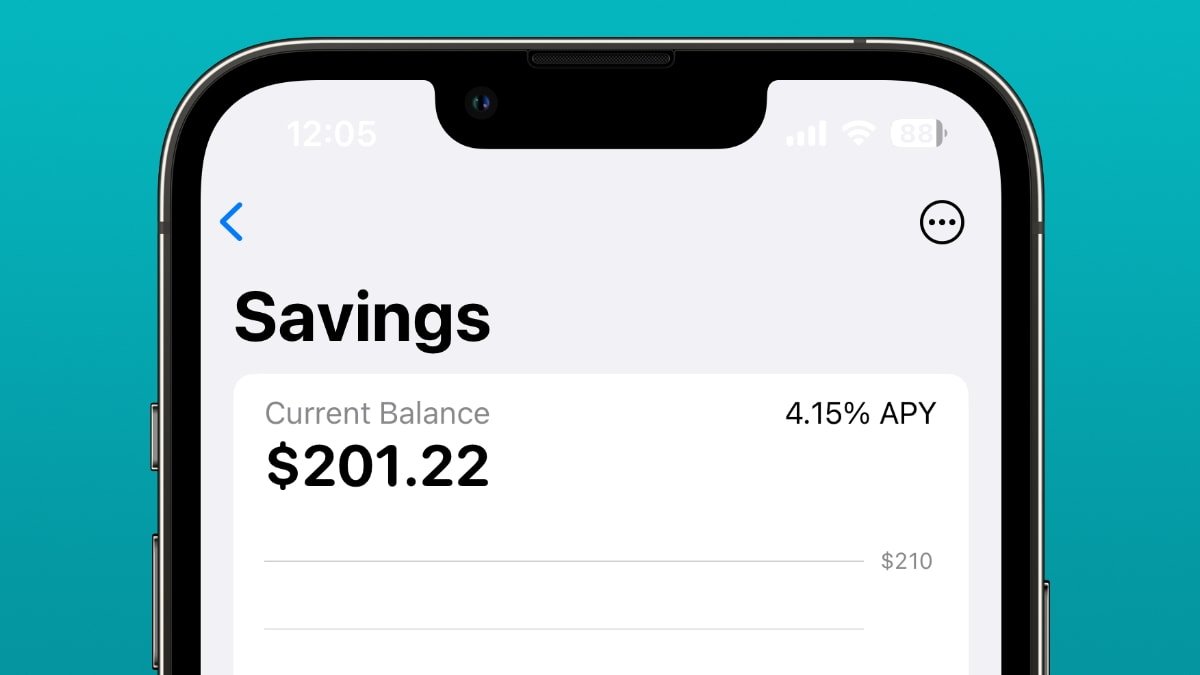
Apple’s first savings account for customers

After a tumultuous period between Apple and Apple Card partner Goldman Sachs involving Apple Savings customer withdrawals, the issues appear to be mostly solved with loosened anti-fraud protections.

Shortly after Apple Savings launched, there were a flurry of customers complaining that it was difficult or impossible to extract money from the high-interest savings account. It’s been relatively quiet on that front for months — but apparently Goldman Sachs has resolved at least some of the systemic issues leading to problems.

The report on late Friday by The Information claims that the automated fraud detection systems are now less likely to flag transactions with small volumes to an outside account. Furthermore, Goldman Sachs has also reduced the number of days it says a transaction should take, and is said to be communicating with consumers better if there are issues, instead of not telling customers at all, and allowing time to tick by instead.

An Apple Savings customer representative cited in the report says that transfers shouldn’t take weeks or months, but if they are, the system, has flagged a large transfer because the bank is being cautious about unauthorized users. This is said to be alleviated some by a three-way call between the call center, the customer, and the bank selected to take the withdrawal.

After the April launch, the saga started with a report in June. Nathan Thacker said that he’d been trying to withdraw $1,700 from his Apple Savings account to his JPMorgan Chase account since May 15. However, upon calling Goldman Sachs’ customer service department, he was told that the money would be in his account in a few more days.

The money was finally posted to his account on June 1, more than two weeks after he initiated the transfer.

Thacker wasn’t the only one who has noticed issues, either. Some customers said that upon initiating the transfer, the money seemingly vanishes. The disappeared money didn’t show up in either their Apple account or the bank account they were trying to move it to.

In another example, a man from Minnesota had attempted to transfer $10,000 from his Apple account to a U.S. bank on May 16. The money was flagged for security review, leaving it in limbo until the review was finished.

Goldman Sachs went on record at the time saying that most customers do not see any delays. The ones that do, however, see them because of behind-the-scenes processes that have been put in place to protect customers’ accounts.

New accounts, such as those opened by Apple Card owners, may trigger anti-money-laundering alerts. The transfers must then be manually approved. On average, these delays take about five days.

Delays were longer for those who transferred money to an account that differed from the account the money originally came from.

Still, despite this, Apple Savings has done quite well for itself. The first week of Apple Savings proved Apple’s ecosystem strength with more than 240,000 new accounts being created and nearly $1 billion in deposits being made.

It’s not clear how strong the relationship between Apple and Goldman Sachs is, beyond contractually. Reportedly, Goldman Sachs is looking for an exit on the Apple Card and Apple Savings deal.