Posted on Leave a comment

Announcing Flock to Fedora 2026 (14-16 June): Join Us in Prague!

Banner image for the Flock to Fedora 2026 conference. The image shows Colúr, the animated mascot of Flock, holding a megaphone. The "Flock" logo appears with "Prague, Czech Republic" and "June 14 - 16, 2026" written below the Flock logo.

The official dates and location are set for Flock to Fedora 2026, the premier annual conference for Fedora Project contributors. The event will take place from 14-16 June 2026, in Prague, Czechia.

For Flock 2026, we are returning to the Vienna House by Wyndham Andel’s Prague, located at:

Stroupeznickeho 21
Prague, 150 00
Czech Republic

While all three days will be full conference days, the arrangement of the schedule will change slightly in 2026. Sunday, 14 June, will be designated as Day 0, featuring workshops, team meetups, and hands-on contributor sessions. The main conference activities, including streamed content, the opening keynote, and other sessions, are scheduled for Monday, 15 June, and Tuesday, 16 June.

Coordinated Scheduling with DevConf CZ

Following community feedback from last year, Flock 2026 has been scheduled to align more closely with DevConf.CZ. The conference will conclude just before DevConf.CZ begins in Brno (18-20 June 2026). This compressed travel schedule is intended to make it easier for community members who wish to attend both events.

Call for Proposals & Conference Themes

The Call for Proposals (CFP) for Flock 2026 will open in early December 2025 and close shortly after FOSDEM 2026 (31 January – 1 February). Speaker confirmations are scheduled to be sent in March 2026.

For Flock 2026, we are taking a more focused approach to session content. The Fedora Council, FESCo, and the Mindshare Committee are shaping key themes for the CFP. All presentation and workshop submissions should align with one of these themes. More details will be shared when the CFP opens.

Planning for Flock 2026

Here is what you need to know to plan your attendance:

  • Registration: Conference registration is scheduled to open in January 2026.
  • Sponsorship: Is your company or organization interested in sponsoring Flock 2026? Our sponsorship prospectus for Flock 2026 is now available on the Flock 2026 website. Organizations interested in supporting Flock and the Fedora community are encouraged to review the prospectus and contact the organizing team with any questions.
  • Hotel Block: A discounted block of rooms is arranged at the conference hotel. More information about the discounted hotel block can be found on the Flock website.
  • Travel Day & Connections: 17 June is designated as a free travel day between Flock to Fedora 2026 and DevConf.CZ. Frequent bus and train connections are available for travel between Prague and Brno.
  • Sponsored Travel: We intend to offer sponsored travel again for Flock to Fedora 2026. More details will follow in December 2025.

Get Involved & Ask Questions

The official Flock to Fedora 2026 Matrix room, #flock:fedoraproject.org, is the best place to connect with organizers and other community members. We encourage you to join the channel for the latest updates and to ask any questions you may have.

Flock to Fedora 2026 web site

A Note on Our Flock to Fedora 2026 & 2027 Plans

We recognize that returning to the same city and venue for a second consecutive year is a departure from Flock’s tradition. This decision was made intentionally with two key goals in mind.

First, by working with a familiar venue, our organizing team can optimize its processes and plan further in advance. This stability for Flock to Fedora 2026 will give us more opportunity to improve our internal processes and explore new ways to incorporate community input into the design of Fedora’s flagship contributor conference.

Second, this allows us to plan for a significant change in 2027. The Flock organizing team is committed to exploring new locations for Flock 2027, with a particular focus on regions outside of North America and Europe. We acknowledge the travel difficulties many of our contributors in regions like LATAM and APAC face. We learned valuable lessons from past planning cycles and are eager to achieve this goal, while also recognizing that unforeseen circumstances can impact our plans. We will work with community members in these regions to explore possible options and conduct thorough research on pricing and availability for 2027.

We look forward to seeing you in Prague for Flock 2026, 14-16 June.

— The Flock to Fedora Planning Team

Posted on Leave a comment

Contribute to Fedora 39 Upgrade, Virtualization, and Cloud Test Day

Fedora test days are events where anyone can help make certain that changes in Fedora work well in an upcoming release. Fedora community members often participate, and the public is welcome at these events. If you’ve never contributed to Fedora before, this is a perfect way to get started.

There are three test days occurring in the next two weeks covering three topics:

  • Tuesday October 03, is to test the Fedora Cloud
  • Thursday October 05 , is to test the Fedora Upgrade
  • Monday October 09 , is to test Virtualization

Come and test with us to make Fedora 39 even better. Read more below on how to do it.

Fedora Cloud test day

Fedora Linux 39 is coming close to the release date and the Fedora Cloud SIG would like to get the community together to find and squash some bugs.

The test day will occur on Tuesday October 03. This event will test Fedora Cloud Base content. See the wiki page for links to the Beta Cloud Base Images. We have qcow, AMI, and ISO images ready for testing.

Upgrade test day

As we come closer to Fedora Linux 39 release dates, it’s time to test upgrades. This release has a lot of changes and it becomes essential that we test the graphical upgrade methods as well as the command line methods.

This test day will happen on Thursday, October 05. It will test upgrading from a full updated F37 and F38 to F39 for all architectures (x86_64, ARM, aarch64) and variants (WS, cloud, server, silverblue, IoT). See this wiki page for information and details.

Virtualization test day

This test day will happen on Monday, October 09 and will test all forms of virtualization possible in Fedora. The test day will focus on testing Fedora or your favorite distro inside a bare metal implementation of Fedora running Boxes, KVM, VirtualBox and whatever you have. The general features of installing the OS and working with it are outlined in the test cases which you will find on the results page.

How do test days work?

A test day is an event where anyone can help make certain that changes in Fedora work well in an upcoming release. Fedora community members often participate, and the public is welcome at these events. Test days are the perfect way to start contributing if you not in the past.

The only requirement to get started is the ability to download test materials (which include some large files) and then read and follow directions step by step.

Detailed information about all the test days are on the wiki page links provided above. If you are available on or around the days of the events, please do some testing and report your results.

Posted on Leave a comment

Video content creation with Kdenlive

Fedora Linux packages a suite of graphical software for content creators. This article introduces a use case and suggestions for creating tutorial videos with Kdenlive.

Plan tutorial

A question that you need to address is whether text and images are appropriate to share your knowledge. If you create resources for learners of graphical software, a tutorial video is something to consider.

Review abstract and draft script

An abstract in content writing helps reviewers look for key points of your tutorial. Depending on your workflow, you can submit this abstract to reviewers for comments, questions, or updates.

Once an abstract of the tutorial video is agreed upon by the reviewers, a video script is created and works like a manuscript for your tutorial. Break down process steps into each sequence. Check this link for an example.

Screen recording

Use your preferred recording tool that comes with the desktop environment or enable the ‘Screen Grab’ option in Kdenlive in the ‘View’ menu. Alternatively, you can install OBS Studio.

Kdenlive can process various container formats. You should transcode to a high-quality lossless matroska file (.mkv) that ensures high quality and compression ratio.

Installation

Kdenlive supports Linux, Mac, Windows and FreeBSD, which encourages collaboration among content creators. If you are Linux users, go to the packager manager of your distro to install Kdenlive. If you use Fedora Linux, we recommend the Fedora Linux RPM version or Flatpak.

Set up Kdenlive

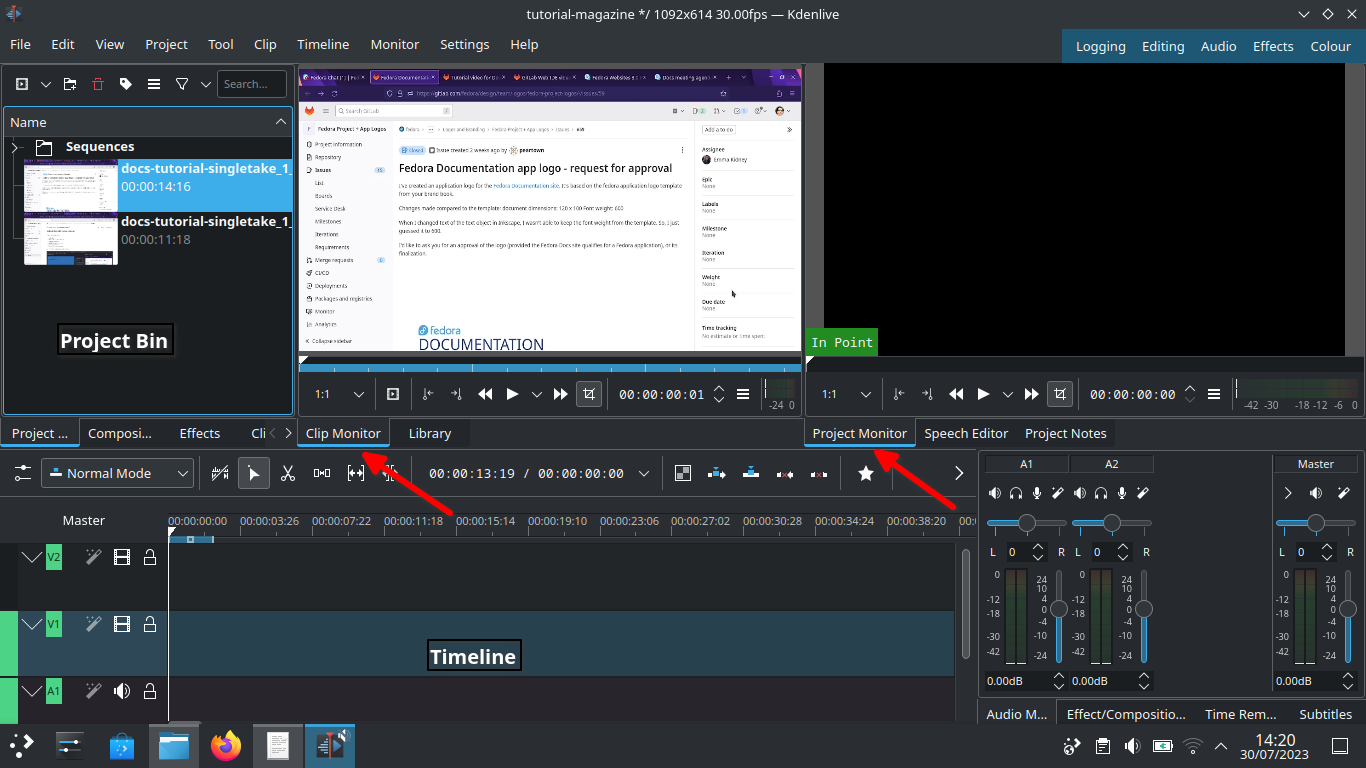
Let’s start with Kdenlive’s user interface and focus on three sections – Project bin, Monitors and Timeline.

Kdenlive user interface

Project bin

Load video clips into Project Bin on the upper left. The Project Bin lists all the clips that are associated with your project. You can drag and drop the clips onto Project Bin.

Monitors

Clip Monitor on the left window displays the unedited clip that is currently selected in The Project Bin. If you have loaded multiple takes of the same scene (process steps), you need to know which one you’re going to choose and edit. If you changed your mind during editing processes, that’s no problem. You can move around a sequence with timeline and tracks after the initial cut.

The Project Monitor is a place to watch your edited footage.

Timeline

Timeline is a place for all selected clips you edit. Drag and drop the clips directly on to the Timeline from the Project Bin.

Editing processes

Cut and stitch

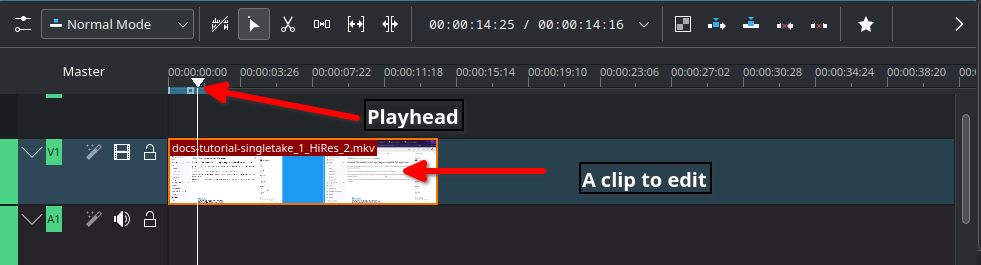
Timeline cursor, also known as playhead, indicates the position of clips you are working on and previewing in the Project Monitor.

Timeline

The initial cut means editing on a scene by scene basis until you’re ready to stitch tracks together into a complete piece.

Cut when;
– Delayed, boring or repetitive part was recorded. This happens often when recording a scene for loading apps or waiting for rendering on web browser
– Transition pieces when a scene starts and ends
– Trim off a few frames before you tidy up
– Ensure basic continuity – let it flow!

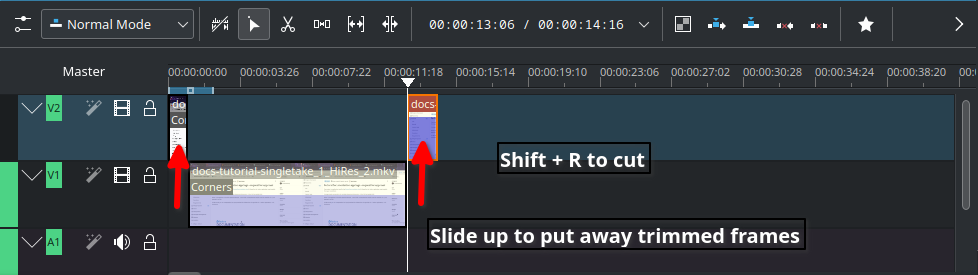
In Timeline, video tracks (V2, V1) are cascaded up whereas audio tracks (A1, A2) are cascaded down as default.

Slide up trimmed video track and stitch frames you want to keep. Delete trimmed frames when you’re sure you don’t need them.

Cut

Timeline works like chef’s chopping board and takes time for new users to get familiar with it. Check the upstream documentation on this link.

Text effects with Titles

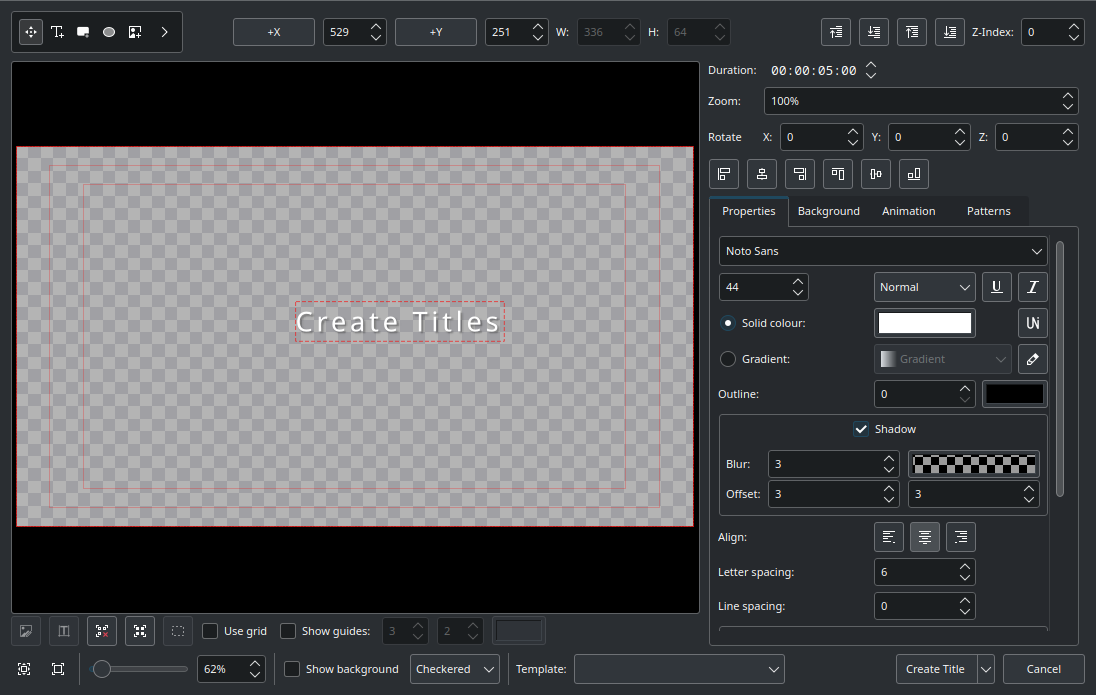
Titles are text elements that you can overlay to the timeline. To create Titles, right-click in the The Project Bin and open the Titles window as shown below. Select ‘Create Title’ to save it. Drag and drop the Title to the video track 2 in timeline. Check this link for more information.

Titler

Sound effects

Ambient music could jazz up your video tutorial for the audience.

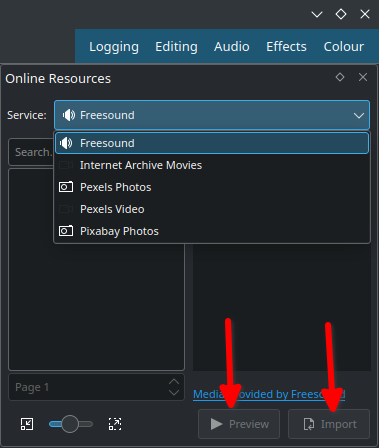
Go to top left corner of the Project Bin and select the arrow to list options. Select ‘Online Resources’. At the top right, ‘Service’ drop-down menu, choose ‘Freesound’. Select ‘Preview’ to play back and import to download and overlay to A1 audio track.

Sound

Transition and finishing touch

Text and sounds effects will blend well if tracks have transitions. Check this link for fine-tuning your final cut video.

Rendering

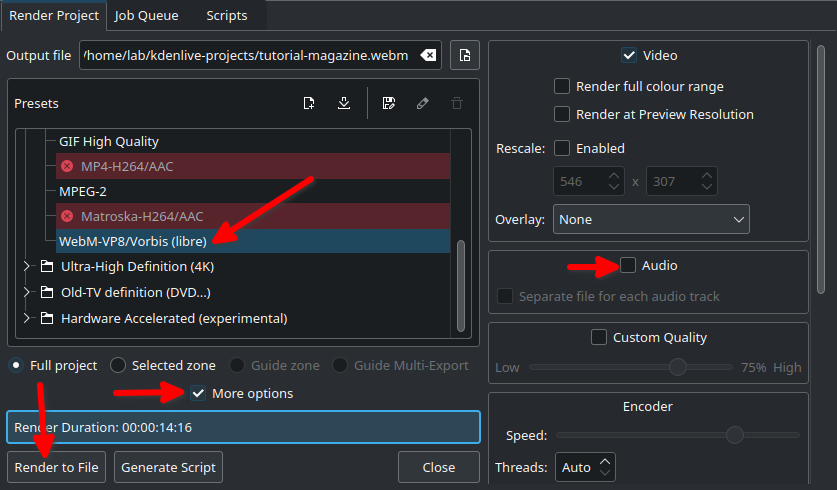
In the Render dialogue box (Ctrl + Return) on Project Bin, choose WebM as output file, select ‘More options’ to de-select the Export Audio option, and select ‘Render to File’ to save the clip.

Rendering

WebM offers good compression and output.

Rendering speed is dependent on the number of CPU cores in your computer. If you work with high quality footage and visual effects in a computer with low-end CPU and RAM, adapt your workflow with proxy clips and use script for rendering.

Share your tutorial video

PeerTube is a video sharing platform that runs on GNU/Linux infra, and Open Source/Free Software. Just like Vimeo or YouTube, you can embed your content to your documentation site from PeerTube.

Credits and acknowledgements

Big thanks to Seth Kenlon who provided me with a great deal of inspiration from his publication in Opensource.com and Kdenlive workshop.

Kdenlive Version 23.04.2 was used for this article.

Posted on Leave a comment

What’s new in Fedora Workstation 38

Fedora Workstation 38 is the latest version of the leading-edge Linux desktop OS, made by a worldwide community, including you! This article describes some of the user-facing changes in this new version of Fedora Workstation. Upgrade today from GNOME Software, or use dnf system-upgrade in a terminal emulator!

GNOME 44

Fedora Workstation 38 features the newest version of the GNOME desktop environment. GNOME 44 features subtle tweaks and revamps all throughout, most notably in the Quick Settings menu and the Settings app. More details about can be found in the GNOME 44 release notes.

File chooser

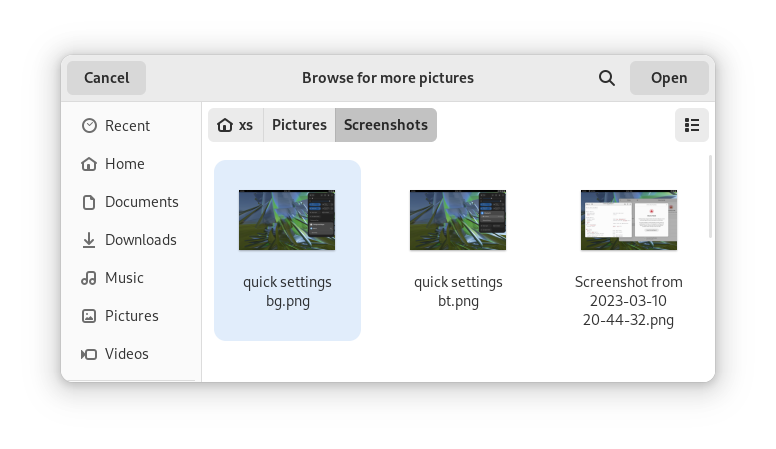
Most of the GNOME applications are built on GTK 4.10. This introduces a revamped file chooser with an icon view and image previews.

GTK 4.10's new file chooser, showing the icon view with image previews.
Icon view with image previews, new in GTK 4.10

Quick Settings tweaks

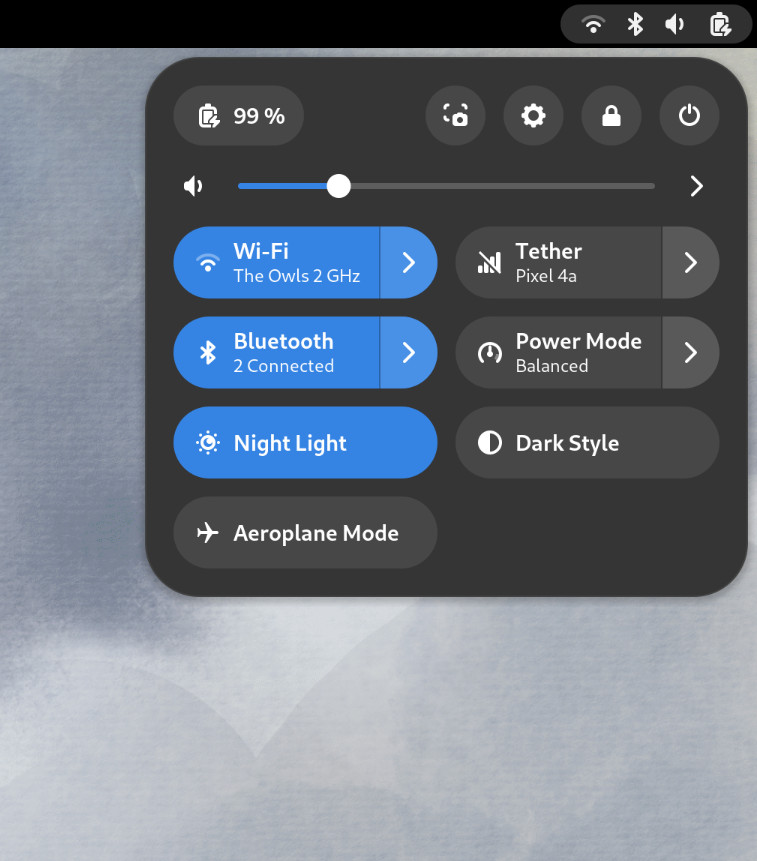
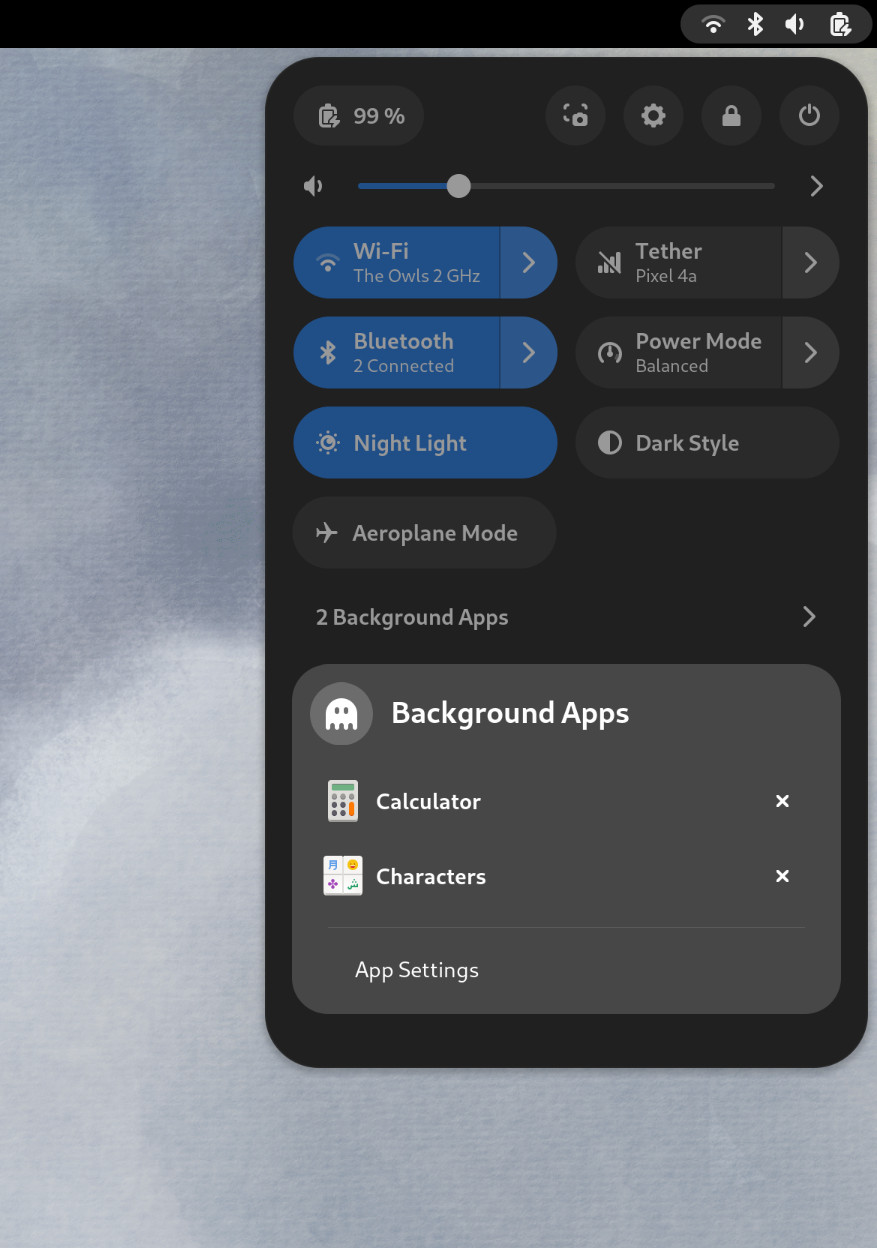
For GNOME 44 There have been a number of improvements to the Quick Settings menu. The new version includes a new Bluetooth menu, which introduces the ability to quickly connect and disconnect known Bluetooth devices. Additional information is available in each quick settings button, thanks to new subtitles.

The Bluetooth menu can now be used to connect to known devices

Also in the quick settings menu, a new background apps feature lists Flatpak apps which are running without a visible window.

Background Apps lets you see sandboxed apps running without a visible window and close them

Core applications

GNOME’s core applications have received significant improvements in the new version.

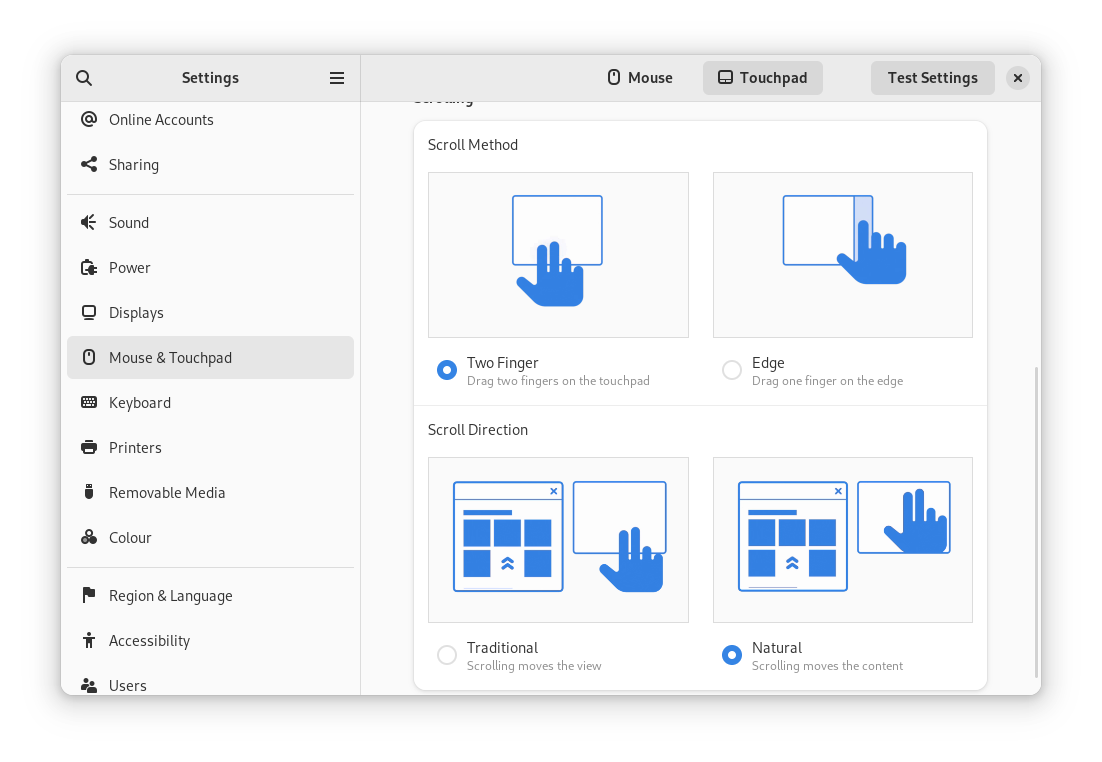
Settings has seen a round of updates, focused on improving the experience in each of the settings panels. Here are some notable changes:

  • Major redesigns of Mouse & Touchpad and Accessibility significantly improves usability.
  • Updated Device Security now uses clearer language.
  • Redesigned sound now includes new windows for the volume mixer and alert sound.
  • You can now share your Wi-Fi credentials to another device through a QR code.
The Mouse & Touchpad panel in the GNOME Settings app, showing the Touchpad settings.
The revamped Mouse & Touchpad panel in Settings

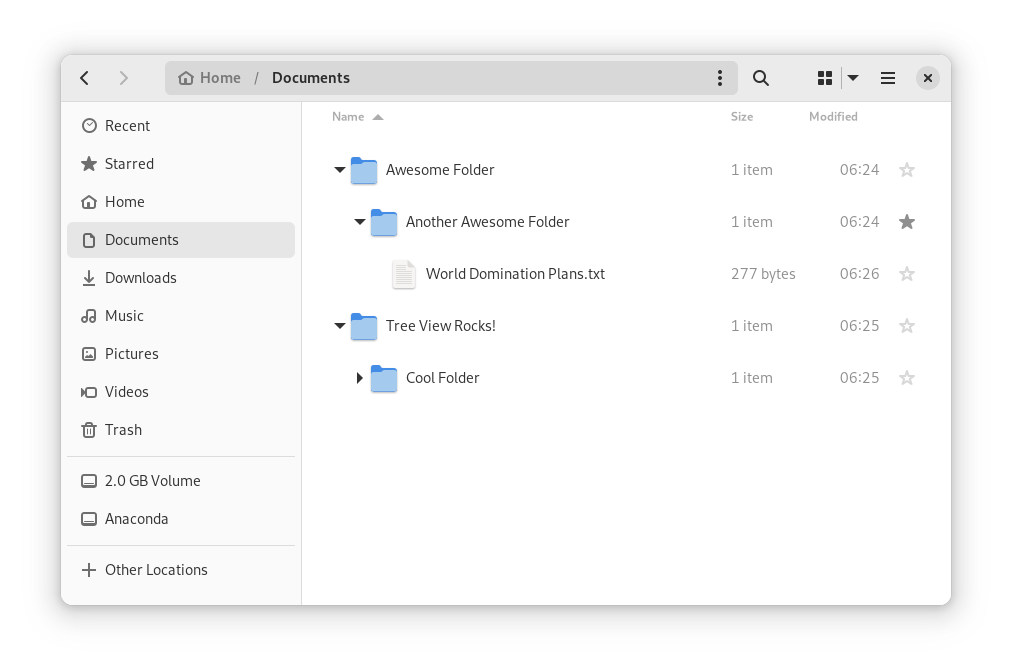
In Files, there is now an option to expand folders in the list view.

The tree view can be turned on in Files’ settings

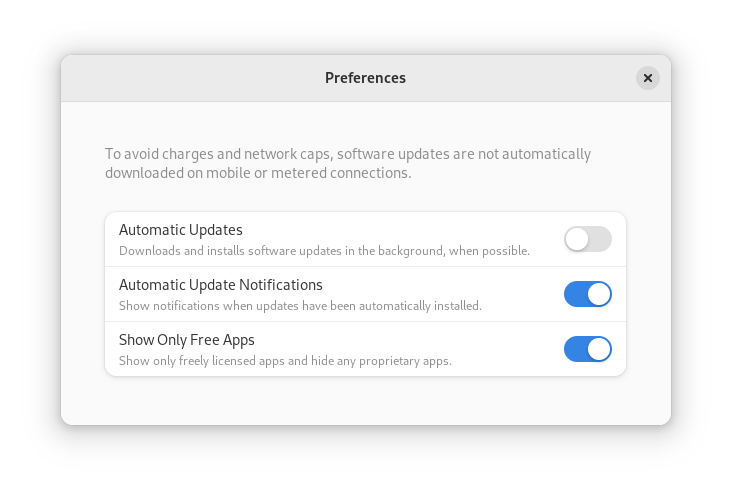
GNOME Software now automatically checks for unused Flatpak runtimes and removes them, saving disk space. You can also choose to only allow open source apps in search results.

In Contacts, you can now share a contact through a QR code, making it super easy to share a contact from your desktop to your phone!

Third-party repositories

Fedora’s third-party repositories feature makes it easy to enable a selection of additional software repos. Previous versions included a filtered version of Flathub, which included a small number of apps. For Fedora 38, filtering of Flathub content no longer occurs. This means that the third party repos now provide full access to all of Flathub.

The third party repos must still be manually enabled, and individual repositories may be disabled from the GNOME Software settings. If you want to keep proprietary apps from showing up in your search results, you can also do that in GNOME Software’s preferences menu.

You are in control.

Under-the-hood changes throughout Fedora Linux 38

Fedora Linux 38 features many under the hood changes. Here are some notable ones:

  • The latest Linux kernel, version 6.2, brings extended hardware support, bug fixes and performance improvements.
  • The length of time that system services may block shutdown has been reduced. This means that, if a service delays your machine from powering off, it will be much less disruptive than in the past.
  • RPM now uses the Rust-written Sequoia OpenGPG parser for better security.
  • The Noto fonts are now the default for Khmer and Thai. The variable versions of the Noto CJK fonts are now used for Chinese, Japanese, and Korean. This reduces disk usage.
  • Profiling will be easier from Fedora 38, thanks to changes in its default build configuration. The expectation is that this will result in performance improvements in future versions.

Also check out…

Official spins for the Budgie desktop environment and Sway tiling Wayland compositor are now available!

Posted on Leave a comment

Fedora Project at FOSDEM 2023

Fedora Project will be present at FOSDEM 2023. This article describes this gathering and a few of the events on the agenda. I assume if you are reading the Fedora Magazine, you already know what FOSDEM is, but I’ll start with a small intro anyway.

Define FOSDEM

FOSDEM is the biggest event in the known universe for free/libre and open-source developers and enthusiasts.

Many good people from around the world meet and discuss common topics and define the future of F/LOSS. The event is held in Brussels at the beginning of February. Some of us, who are coming from a bit warmer countries, are calling it FrOSDEM, because it’s usually freezing 🙂

Why attend?

If you are a contributor already or you want to start doing good with your skills for the F/LOSS universe, this event is a must. 

I know everyone has their reason for visiting, but I’ll share the most common ones:

  • You meet the people creating and supporting the products that power the Internet that you already use.
  • If you are a contributor already, you have a chance to meet with your team and people using your product.
  • You learn so much new stuff quickly.
  • You enlarge your horizons by looking at something outside your bubble. If you are a fan of Fedora, go and learn more about Security or Javascript.
  • You have a chance to talk to others with the same passion as yours and even become friends for life. A good friend is always a commodity!
  • You achieve your daily steps goal because the ULB campus is enormous, and you will have to move a lot to get to the room you would like to visit.
  • You have a chance to volunteer and help the community if this is what drives you.
  • You attend an event with a great Code of Conduct.

Fedora at FOSDEM 2023

It’s a tradition for the Fedora Project team to be there to present some of our work from the last year and to allow you to share your feedback on what we do well and how we can improve.

Meet, greet, and see our community in action

One of the most extraordinary things at FOSDEM, which I deliberately didn’t mention in the previous section, is the project booths. In almost every building, you will see people behind a branded table, ready to talk to you about their project, its values, and its mission.

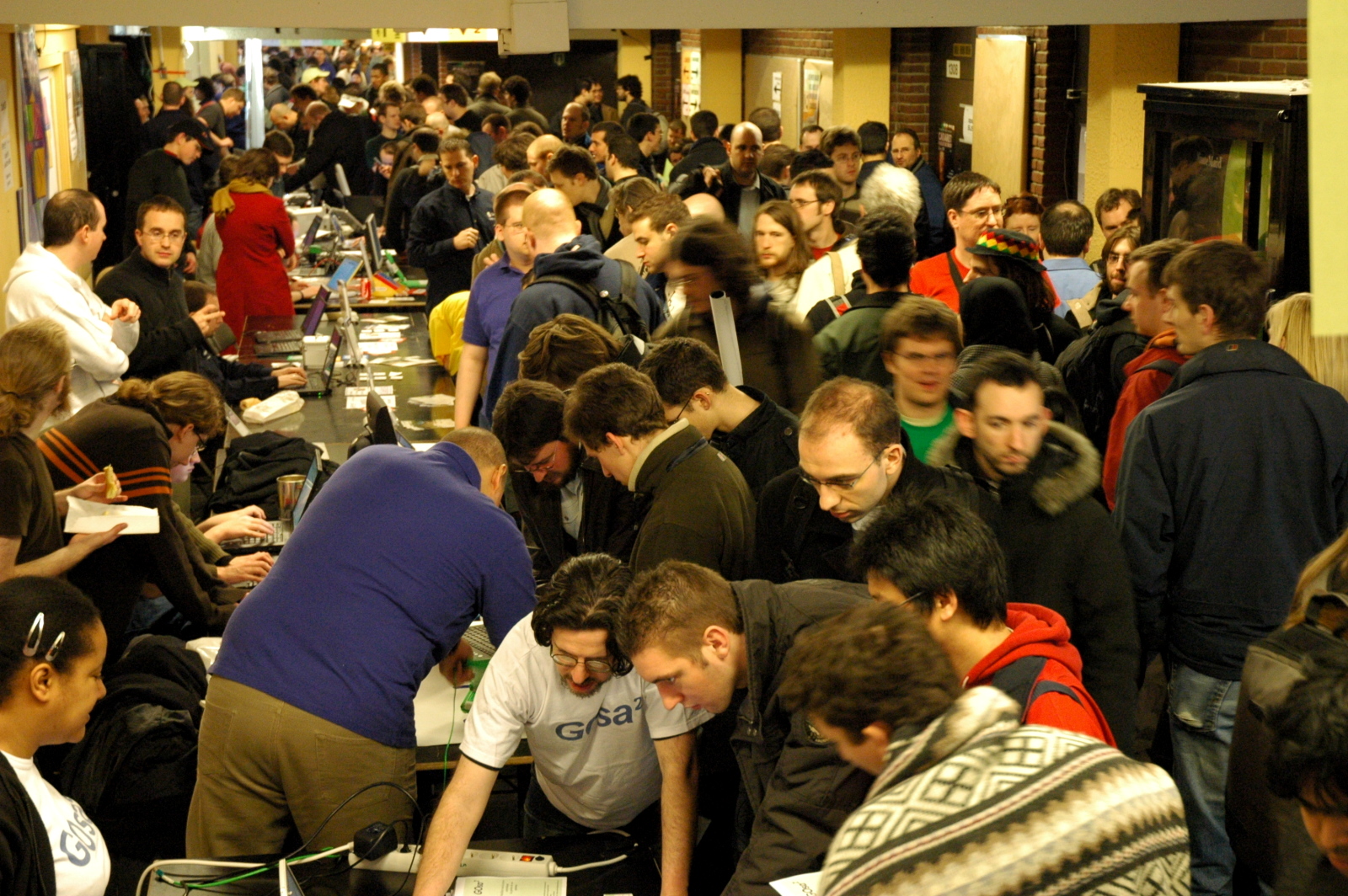
People at the Fedora booth looking at something.
Image by Francesco Crippa under Attribution 2.0 Generic (CC BY 2.0)

 I have to mention the goodies here, as well. You will return home with many items from your favorite projects. Be sure to continue supporting them further.  

We at Fedora will be happy to welcome you to our booth as well. You can talk to the community members, give us constructive feedback, and see some of the things we prepared.

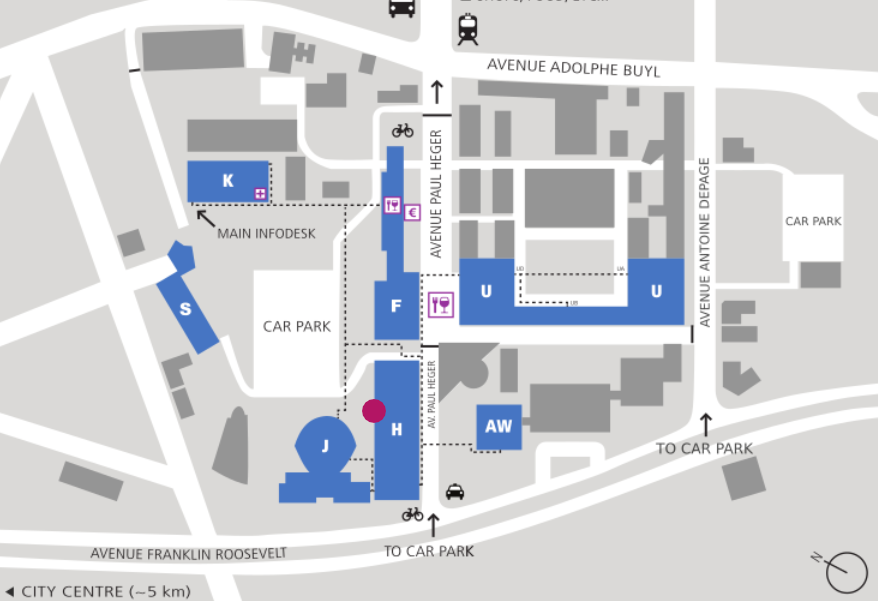
Our booth location is in building H, alongside the rest of the Linux Distros.

Map of the ULB campus with a mark of the building H, where the Fedora Project booth will be
Building H, ULB Campus.

Stop by and say hi in your language! We are looking forward to talking to you!

We want to share what makes our work exceptional

At each FOSDEM we have a good number of talks related to what we do at Fedora. I am listing only some of them to make it enjoyable for you to browse the agenda and discover the rest yourself.

1: Fedora CoreOS – Your Next Multiplayer Homelab Distro

Using Fedora CoreOS in a Selfhosted Homelab to setup a Multiplayer Server

Speakers

Akashdeep Dhar
 Objective Lead for Fedora Websites & Apps, Fedora Council
 Software Engineer, Red Hat Community Platform Engineering

Sumantro Mukherjee
 Elected Representative, Fedora Council
 Software Quality Engineer, Red Hat

Intro

Fedora CoreOS is an essential, monolithic, automatically updating operating system optimized for running containers. It focuses on offering the best container host for executing containerized workloads securely and at scale. We will show a case study of setting up Fedora CoreOS as a self-hosted Homelab distribution for globally accessible (using secure network tunneling) multiplayer servers for video games (namely Minecraft, Valheim, etc.).

When and Where

Saturday, Feb-4 at the Containers devroom from 11:30 to 12:00


2: Creative Freedom Summit Retrospective

Speakers

Emma Kidney

Part of Red Hat’s Community Platform Engineering team since 2021. 
Designer at Red Hat’s Community Design Team. 

Jess Chitas 

Part of Red Hat’s Community Platform Engineering team.
Creator of Fedora’s mascot – Colúr, and Fedora Brand Guidelines Booklet.

Intro

The Creative Freedom Summit is a virtual event focused on promoting Open Source tools, spreading knowledge of how to use them, and connecting creatives across the FOSS ecosystem. The summit’s accomplishments and shortcomings will be examined in light of the event’s first year and potential changes for the following years.

When and Where

Sunday, Feb-5 at the Open Source Design Dev Room from 14:30 to 14:55


Where to find more related talks?

Our wiki page is a good start, but FOSDEM’s schedule catalog is even better. One life hack: select a good 30 min slot, go through all the rooms which might get your attention, and create a personal schedule in your favorite calendar app. Make sure you have a backup plan because some rooms might be fully occupied, and you cannot enter.

I want to interest you in a challenge

If you know more than I do about FOSDEM 2023 and have already prepared your schedule, share a single paragraph comment about your FOSDEM plan and list a few of your favorite talks. You will help the community understand the greatness of the event and find more reasons to make the trip to frosty Brussels.

See you there!

Posted on Leave a comment

Welcome to our new Fedora Community Action and Impact Coordinator

Great news, Fedora Friends! I am excited to announce that we have completed our search for a new Fedora Community Action and Impact Coordinator (FCAIC). He joins the Open Source Program Office (OSPO) team at Red Hat to work with the Fedora Community today. Please give a warm welcome to Justin W. Flory (he/him).

If you’re a contributor to Fedora, you may have already worked with Justin on a variety of teams and projects. Although I couldn’t possibly list them all in one post, Justin’s Fedora contribution highlights include co-founding CommOps, the Diversity, Equity and Inclusion (D.E.I.) Team, and Mindshare Committee. More contribution highlights include former editor-in-chief of the Fedora Magazine and Community Blog, former Council Member, leading the Marketing team, contributing as a packager, and traveling to events and conferences worldwide as a Fedora Ambassador. He has attended many Flocks: organizing workshops, presenting sessions, and coordinating informal socials like the international candy swap. Most recently Justin presented “5 Lessons Learned from 5 years of Fedora’s D.E.I. Events” at Nest with Fedora 2022.

Justin is new to Red Hat, joining us after seven years of involvement with the Fedora Community. He was first introduced to Fedora as a high school student and later through Open@RIT at the Rochester Institute of Technology (formerly the FOSSBox and FOSS@MAGIC). Justin’s most recent role was at UNICEF’s Office of Innovation supporting and mentoring startup companies across the world in open sourcing their innovations. He mentored 23 companies from 19 countries on community strategies for their Open Source products. Of those, fourteen achieved global recognition as Digital Public Goods (like Fedora Linux). Additionally, he also designed a fixed-term Open Source mentoring program for startup companies and developer communities to follow best practices and industry standards on launching Open Source communities.

Justin’s extensive experience with supporting Open Source community building, program management, and involvement with the Fedora Project makes him an excellent fit for this position. I am excited to work with him as both a colleague on the OSPO team at Red Hat and as a Fedora contributor. Feel free to reach out to Justin with your congratulations, but give him a bit to get up to speed with his new FCAIC duties. 

Congratulations, Justin!

Posted on Leave a comment

Fedora Job Opening: Community Action and Impact Coordinator (FCAIC)

It is bittersweet to announce that I have decided to move on from my role as the Fedora Community Action and Impact Coordinator (FCAIC). For me, this role has been full of growth, unexpected challenges, and so much joy. It has been a privilege to help guide our wonderful community through challenges of the last three years. I’m excited to see what the next FCAIC can do for Fedora. If you’re interested in applying, see the FCAIC job posting on Red Hat Jobs and read more about the role below. 

Adapting to Uncertain Times

When I applied back in 2019, a big part of the job description was to travel the globe, connecting with and supporting Fedora communities worldwide. As we all know, that wasn’t possible with the onset of COVID-19 and everything that comes with a pandemic. 

Instead, I learned how to create virtual experiences for Fedora, connect with people solely in a virtual environment, and support contributors from afar. Virtual events have been a HUGE success for Fedora. The community has shown up for those events in such a wonderful way. We have almost tripled our participation in our virtual events since the first Release Party in 2020. We have more than doubled the number of respondents to the Annual Contributor Survey over last year’s turnout. I am proud of the work I have accomplished and even more so how much the community has grown and adapted to a very challenging couple of years.

What’s next for me

As some of you may know, I picked up the Code of Conduct (CoC) work that my predecessor Brian Exelbierd (Bex) started for Fedora. After the Fedora Council approved the new CoC, I then got started on additional pieces of related work: Supplemental Documentation and Moderation Guidelines. I am also working on expanding the small Code of Conduct Committee(CoCC) to include more community members. As a part of the current CoCC, I have helped to deal with the majority of the incidents throughout my time as FCAIC. 

Because of my experience with all this CoC work, I will be moving into a new role inside of Red Hat’s OSPO: Code of Conduct Specialist. I will be assisting other Community Architects (like the FCAIC role) to help roll out CoC’s and governance around them, as well as collaborating with other communities to develop a Community of Practice around this work. I am excited and determined to take on this new challenge and very proud to be a part of an organization that values work that prioritizes safety and inclusion. 

What’s next for Fedora

This is an amazing opportunity for the Fedora community to grow in new and exciting ways. Every FCAIC brings their own approach to this role as well as their own ideas, strengths, and energy. I will be working with Matthew Miller, Ben Cotton, and Red Hat to help hire and onboard the new Fedora Community Action and Impact Coordinator. I will continue as FCAIC until we hire someone new, and will help transition them into the role. Additionally, I will offer support, advice, and guidance as others who have moved on have done for me. I am eager to see who comes next and how I can help them become a success. And, as I have for years prior to my tenure as FCAIC, I will continue to participate in the community, albeit in different ways. 

This means we are looking for a new FCAIC! Do you love Fedora? Do you want to help support and grow the community full time? This is the core of what the FCAIC does. The job description has a list of the primary job responsibilities and required skills- but that is just a taste of what is required and what it is to support the Fedora community full time. Day-to-day work includes working with the Mindshare Committee, managing the Fedora budget, and being a part of many other teams and in many places. You should be ready and excited to write about Fedora’s achievements, policies, as well as generate strategies to help the community succeed. And, of course, there is event planning and support (Flock, Nest, Hatch, Release Parties, etc). It can be tough work, but it is a lot of fun and wonderfully rewarding to help Fedora thrive. 

How to apply

Do you enjoy working with people all over the world, with a variety of skills and interests? Are you good at setting long term goals and seeing them through to completion? Can you set priorities, follow through, and know when to say “no” in order to focus on the most important tasks for success? Are you excited about building not only a successful Linux distribution, but also a healthy project? Is Fedora’s mission deeply important to you? If you said “yes” to these questions, you might be a great candidate for the FCAIC role. If you think you’re a great fit, please apply online, or contact Marie Nordin, or Jason Brooks.

Posted on Leave a comment

Comparison of Fedora Flatpaks and Flathub remotes

In the previous article in this series, we looked at how to get started with Fedora Flatpaks and how to use it. This article compares and contrasts between the Fedora Flatpaks remote and the Flathub remote. Flathub is the de-facto standard Flatpak remote, whereas Fedora Flatpaks is the Fedora Project’s Flatpak remote. The things that differ between the remotes include but are not limited to their policies, their ways of distribution, and their implementation.

Goals and motivation

Fedora Flatpaks and Flathub share the same goals but differ in motivation. The goal is to make applications accessible in their respective field, maximize convenience and minimize maintenance.

Fedora Flatpaks’s motivation is to push RPMs that come directly from the Fedora Project and make them accessible throughout Fedora Linux regardless of the versions, spin, etc. So, in theory, it would be possible to get the latest and greatest applications from the Fedora Project without needing to upgrade to the latest version of Fedora Linux. Of course, it’s always advisable to keep everything up-to-date.

Flathub’s motivation is to simply make applications and tools as accessible as possible regardless of the distribution in use. Hence, all tools are available on GitHub. Filing issues for applications provided by Flathub is the same as filing issues on any project on GitHub.

Packages

Fedora Flatpaks and Flathub create Flatpak applications differently. First and foremost, Fedora Flatpaks literally converts existing RPMs to Flatpak-compatible files where developers can then easily bundle as Flatpak and redistribute them. Flathub, on the other hand, is more open when it comes to how developers bundle applications.

Types of packages published

Fedora Flatpaks only publishes free and open source software, whereas Flathub publishes free and open source software as well as proprietary software. However, Flathub plans to separate proprietary applications from free and open source applications, as stated by a recent blog post from GNOME.

Sources

Flathub is open with what source a Flatpak application (re)uses, whereas Fedora Flatpaks strictly reuses the RPM format.

As such, Flathub has tons of applications that reuse other package formats. For example, the Chrome Flatpak reuses the .deb package, the UnityHub Flatpak reuses the AppImage, the Spotify Flatpak reuses the Snap package, the Android Studio Flatpak uses a tar.gz archive, etc.

Alternatively, Flathub also compiles directly from source. Sometimes from a source archive, from running git clone, etc.

Number of applications

Fedora Flatpaks has fewer applications than Flathub. To list the applications available from a remote, run flatpak remote-ls --app $REMOTE. You can go one step further and get the number of applications by piping to wc -l:

[Terminal ~]$ flatpak remote-ls --app fedora | wc -l
86
[Terminal ~]$ flatpak remote-ls --app flathub | wc -l
1518

Here, at the time of writing this article, we can see that Flathub has 1518 applications available, whereas Fedora Flatpaks has only 86.

OSTree and OCI formats

Implementations are quite different too. Both Fedora Flatpaks and Flathub use Flatpak to help you install, remove, and manage applications. However, in terms of how these applications are published, they fundamentally work differently. Flathub uses the OSTree format to publish applications, whereas Fedora Flatpaks uses the OCI format.

OSTree format

OSTree (or libostree) is a tool to keep track of system binaries. Developers consider OSTree as “Git for binaries” because it is conceptually analogous to git. The OSTree format is the default format for Flatpak, which Flathub uses to publish packages and updates.

When downloading an application, OSTree checks the differences between the installed application (if installed) and the updated application, and intelligently downloads and changes the differences while keeping everything else unchanged, which reduces bandwith. We call this process delta updates.

OCI format

Open Container Initiative (OCI) is an initiative by several organizations to standardize certain elements of containers. Fedora Flatpaks uses the OCI format to publish applications.

This format is similar to how Docker works, which makes it fairly easy to understand for developers who are already familiar with Docker. Furthermore, the OCI format allows the Fedora Project to extend the Fedora Registry, the Fedora Project’s Docker registry, by creating Flatpak applications as Docker images and publishing them to a Docker registry.

This avoids the burden and complications of having to use additional tools to maintain an additional infrastructure just to maintain a Flatpak remote. Instead, the Fedora Project simply reuses the Fedora Registry, to make maintenance much easier and manageable.

Runtimes

Flatpak runtimes are core dependencies where applications reuse these dependencies without duplicating data, also known as “deduplication”. Runtimes may be based on top of other runtimes, or built independently.

Flathub decentralizes these runtimes, meaning runtimes are only available for specific types of applications. For example GTK applications use the GNOME runtime (org.gnome.Platform), Qt applications use the KDE runtime (org.kde.Platform), almost everything else uses the freedesktop.org runtime (org.freedesktop.Platform). The respective organizations maintain these runtimes, and publish them on Flathub. Both the GNOME and KDE runtimes are built on top of the freedesktop.org runtime.

Fedora Flatpaks, on the other hand, uses one runtime for everything, regardless the size of the application. This means, installing one application from Fedora Flatpaks will download and install the whole Fedora runtime (org.fedoraproject.Platform).

Conclusion

In conclusion, we can see that there are several philosophical and technical differences between Fedora Flatpaks and Flathub.

Fedora Flatpaks focuses on fully taking advantage of the existing infrastructure by providing more to an average user without using more resources. In contrast, Flathub strives to make distributing/publishing applications and using them as painless as possible for the developers and for users.

Both remotes are quite impressive with how rapid they improved in very little time. We hope both remotes get better and better, and become the standard across the majority of desktop Linux distributions.

Posted on Leave a comment

FedoraShareYourScreen week (F35)

The Fedora Project, through the Marketing team, is happy to announce the first FedoraShareYourScreen week!

We know that even though the stock look of Fedora Linux is awesome, most people love to tweak and adapt their systems to their own workflow. We want to see how your Fedora Linux desktop looks.

FedoraShareYourScreen week

  • Share your screen with us! Take a screenshot of your desktop and share it. Use the hashtag #FedoraShareYourScreen and mention @fedora on Twitter or @thefedoraproject on Instagram. For Mastodon, just use the hashtag. Avoid showing personal and private info.
  • If you use a full Desktop Environment, just a Window Manager, or just the command line, we want to see how it looks! Share your favorite apps, configs, plugins, widgets and everything on your desktop (including your favorite wallpapers if they are SFW 😉).
  • At the end of the week we will be publishing a slide show on YouTube with all the screens collected during the week! Keep it Family Friendly, inappropriate content won’t be included in the video.

Feel proud of your customization and show it to us! From January 31st to February 6th we will be looking, commenting and sharing feedback on the screenshots shared with the hashtag #FedoraShareYourScreen on Twitter, Instagram and Mastodon!

When is this week?

It will start this on January 31st and it will end on February 6th. We will collect all the screenshots on February 7th and the slide show will be published on February 10th.

Will this happen again?

Of course! We want to see everyone’s ideas with all the new stuff that Fedora Linux adds each release. We will be doing this in the middle of each Fedora Linux release. This will give everyone time to customize the desktop and show it in all it’s shininess!

Posted on Leave a comment

Ben Cotton: How Do You Fedora?

We recently interviewed Ben Cotton on how he uses Fedora. This is part of a series on the Fedora Magazine. The series profiles Fedora users and how they use Fedora to get things done. Contact us on the feedback form to express your interest in becoming an interviewee.

Who is Ben Cotton?

If you follow the Fedora’ Community Blog, there’s a good chance you already know who Ben is. 

Ben’s Linux journey started around late 2002. Frustrated with some issues on using Windows XP, and starting a new application administrator role at his university where some services were being run on FreeBSD. A friend introduced him to Red Hat Linux, when Ben decided it made sense to get more practice with Unix-like operating systems. He switched to Fedora full-time in 2006, after he landed a job as a Linux system administrator.

Since then, his career has included system administration, people management, support engineering, development, and marketing. Several years ago, he even earned a Master’s degree in IT Project Management. The variety of experience has helped Ben learn how to work with different groups of people. “A lot of what I’ve learned has come from making mistakes. When you mess up communication, you hopefully do a better job the next time.”

Besides tech, Ben also has a range of well-rounded interests. “I used to do a lot of short fiction writing, but these days I mostly write my opinions about whatever is on my mind.” As for favorite foods, he claims “All of it. Feed me.”

Additionally, Ben has taste that spans genres. His childhood hero was a character from the science fiction series “Star Trek: The Next Generation”. “As a young lad, I wanted very much to be Wesley Crusher.” His favorite movies are a parody film and a spy thriller: “‘Airplane!’ and ‘The Hunt for Red October’” respectively. 

When asked for the five greatest qualities he thinks someone can possess, Ben responded cleverly: “Kindness. Empathy. Curiosity. Resilience. Red hair.”

Ben wearing the official “#action bcotton” shirt

His Fedora Story

As a talented writer who described himself as “not much of a programmer”, he selected the Fedora Docs team in 2009 as an entry point into the community. What he found was that “the Friends foundation was evident.” At the time, he wasn’t familiar with tools such as Git, DocBook XML, or Publican (docs toolchain at the time). The community of experienced doc writers helped him get on his feet and freely gave their time. To this day, Ben considers many of them to be his friends and feels really lucky to work with them. Notably “jjmcd, stickster, sparks, and jsmith were a big part of the warm welcome I received.”

Today, as a senior program manager, he describes his job as “Chief Cat Herding Officer”- as his job is largely composed of seeing what different parts of the project are doing and making sure they’re all heading in the same general direction. 

Despite having a huge responsibility, Ben also helps a lot in his free time with tasks outside of his job duties, like website work, CommBlog and Magazine editing, packaging, etc… none of which are his core job responsibilities. He tries to find ways to contribute that match his skills and interests. Building credibility, paying attention, developing relationships with other contributors, and showing folks that he’s able to help, is much more important to him than what his “official” title is. 

When thinking towards the future, Ben feels hopeful watching the Change proposals come in. “Sometimes they get rejected, but that’s to be expected when you’re trying to advance the state of the art. Fedora contributors are working hard to push the project forward.“

The Fedora Community 

As a longtime member of the community, Ben has various notions about the Fedora Project that have been developed over the years. For starters, he wants to make it easier to bring new contributors on board. He believes the Join SIG has “done tremendous work in this area”, but new contributors will keep the community vibrant. 

If Ben had to pick a best moment, he’d choose Flock 2018 in Dresden. “That was my first Fedora event and it was great to meet so many of the people who I’ve only known online for a decade.” 

As for bad moments, Ben hasn’t had many. Once he accidentally messed up a Bugzilla query resulting in accidental closure of hundreds of bugs and has dealt with some frustrating mailing list threads, but remains positive, affirming that “frustration is okay.”

To those interested in becoming involved in the Fedora Project, Ben says “Come join us!” There’s something to appeal to almost anyone. “Take the time to develop relationships with the people you meet as you join, because without the Friends foundation, the rest falls apart.”

Pet Peeves

One issue he finds challenging is a lack of documentation. “I’ve learned enough over the years that I can sort of bumble through making code changes to things, but a lot of times it’s not clear how the code ties together.” Ben sees how sparse or nonexistent documentation can be frustrating to newcomers who might not have the knowledge that is assumed.

Another concern Ben has is that the “interesting” parts of technology are changing. “Operating systems aren’t as important to end users as they used to be thanks to the rise of mobile computing and Software-as-a-Service. Will this cause our pool of potential new contributors to decrease?”

Likewise, Ben believes that it’s not always easy to get people to understand why they should care about open source software. “The reasons are often abstract and people don’t see that they’re directly impacted, especially when the alternatives provide more immediate convenience.”

What Hardware?

For work, Ben has a ThinkPad X1 Carbon running Fedora 33 KDE. His personal server/desktop is a machine he put together from parts that runs Fedora 33 KDE. He uses it as a file server, print server, Plex media server, and general-purpose desktop. If he has some spare time to get it started, Ben also has an extra laptop that he wants to start using to test Beta releases and “maybe end up running rawhide on it”.

What Software?

Ben has been a KDE user for a decade. A lot of his work is done in a web browser (Firefox for work stuff, Chrome for personal). He does most of his scripting in Python these days, with some inherited scripts in Perl.

Notable applications that Ben uses include:

  • Cherrytree for note-taking
  • Element for IRC
  • Inkscape and Kdenlive when he needs to edit videos.
  • Vim on the command line and Kate when he wants a GUI