Posted on Leave a comment

Packit – how to trigger jobs manually

Packit is an open-source project aiming to ease the integration of your project with Fedora Linux, CentOS Stream, and other distributions. Projects that use Packit usually build RPM packages. This article will introduce new features. The new user onboarding process is available here.

Testing Farm execution

From Packit you can easily trigger your tests on Testing Farm without building the RPMs. This is very handy for projects that basically may not build RPMs, but just want to use these two services for verifying the code. As a good example, we refer to the Strimzi project where users consume container images.

In such cases, the users just want to trigger the tests, verify the code and see some output. This option is available from the beginning. Users can easily define when the tests will be executed – for every pull request, for every commit, or for releases. That sounds pretty cool. However, when you have complex tests (5h+ per test run as we have in Strimzi) you probably don’t want to trigger all tests for each commit. So how can the users achieve that?

Manual Trigger

We introduced a new configuration option, manual_trigger, to enable triggering Packit jobs only manually. With this new configuration of Packit jobs, users can easily enable the manual triggering of a job. The job will NOT automatically trigger when, for example, a new commit arrives to pull a request.

Users need to specify manual_trigger in the test’s job description. The value for this option must be boolean and will default to False. The following is an example of the use of this option. A more complete example is available here.

... - job: tests trigger: pull_request identifier: "regression-operators" targets: - centos-stream-9-x86_64 - centos-stream-9-aarch64 skip_build: true manual_trigger: true labels: - regression - operators - regression-operators - ro tf_extra_params: test: fmf: name: regression-operators
...

This new configuration option allows users to utilize a new flow. When a pull request is opened (for example in draft mode), users push new commits and fixes, or when they are about to finish the pull request, they can easily type /packit test as a pull request comment and all jobs defined in packit.yaml for pull request will be triggered.

Labeling and identifying

The above solution is very easy to use. There might be use cases, however, where users don’t want to trigger all the jobs. For example, when you have 10 jobs defined with different test scopes, you probably don’t want to trigger acceptance and regression tests at the same time since acceptance could be a subset of regression.

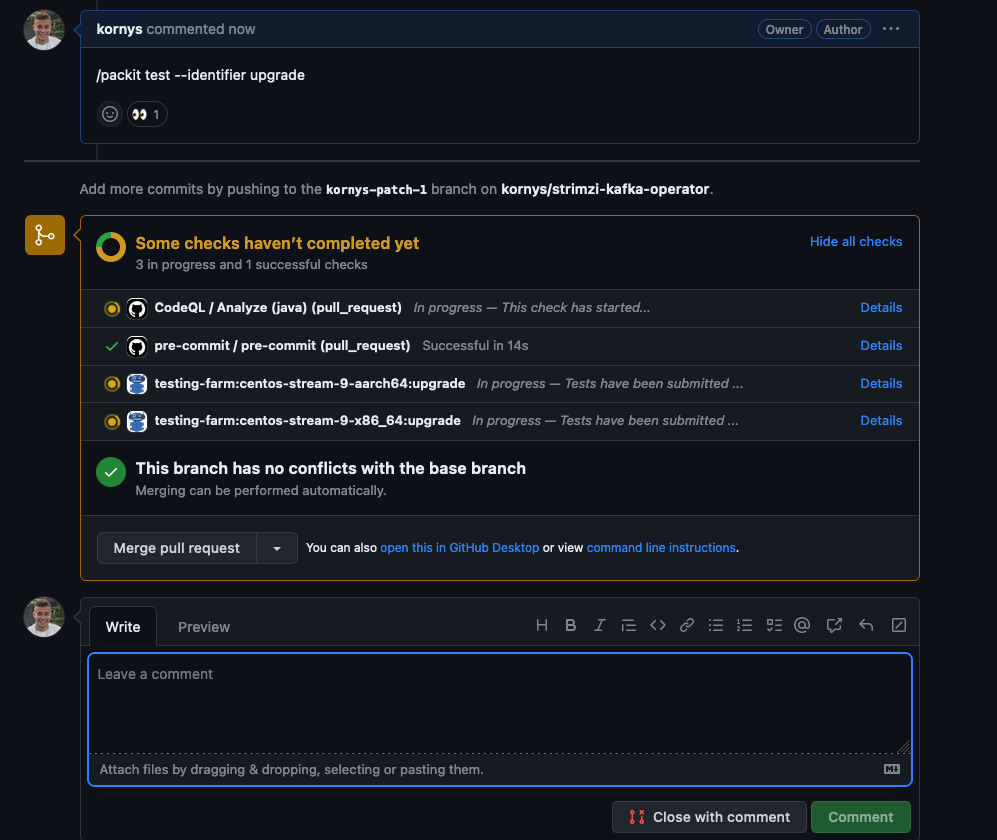
There are now two options to trigger a specific job. The first one is to trigger the job based on an identifier. If the user specifies identifier: test-1 in the job configuration, Packit comment command for execution of the tests will look like this /packit test –identifier test1. This command will execute jobs with the specific identifier (test-1) and nothing else.

An example how to trigger testing-farm test job via Packit with --identifier parameter.

The second option for triggering specific jobs allows you to execute more than one job based on their identifiers. You can use multiple identifiers in a comma-separated list but it might be cumbersome to specify long lists of identifiers every time. To add a better user experience we’ve introduced the labels configuration that allows grouping together multiple jobs. The command /packit test –labels upgrade,regression will trigger all jobs that contain upgrade or regression in the list of labels in the job configuration.

An example how to trigger testing-farm test job via Packit with --labels parameter.

Conclusion

If you hesitated to utilize Packit due to the limitation of missing manual triggering of the jobs or missing labeling, you can start now! As mentioned, Packit is an open-source service and these improvements were done as contributions from outside of the Packit team, everyone can contribute so if you are missing some features, feel free to open a pull request!

For more information about newly added options you should check the documentation. In case you are new to Packit you can also view the talk from the Packit team from DevConf 2023 or DevConf Mini 2023. ​

Posted on Leave a comment

Fedora Linux editions part 4: Alt Downloads

Fedora Alt Downloads is a remarkable resource provided by the Fedora Project, offering alternative distribution options for users seeking specific requirements or unique use cases. This article will delve into the diverse selection of Fedora Alt Downloads, highlighting their significance and how they cater to different needs within the Fedora community. You can find an overview of all the Fedora Linux variants in my previous article Introduce the different Fedora Linux editions.


Network Installer

The Fedora Network Installer is an efficient and flexible tool for installing Fedora Linux. This is Fedora’s online installer. Unlike the baked-in Live images that the main editions use, this installer allows you to customize which software packages will be installed at installation time. However, because the packages to be installed are not baked into this installer image, network access will be required at installation time to download the selected packages.

Don’t confuse this with network booting which is a method of initiating an operating system or operating system installer from a small Preboot Execution Environment. (Though it is possible for that sort of bootloader to chain-load Fedora’s network installer.)


Torrent Downlods

Fedora Torrent Downloads utilize the BitTorrent protocol, which is a peer-to-peer file sharing protocol. Instead of relying on a central server for downloads, BitTorrent enables users to download Fedora Linux images from multiple sources simultaneously. This decentralized approach enhances download speeds and reduces strain on individual servers, resulting in a faster and more reliable download experience. Fedora Torrent Downloads offer a fast, reliable, and community-driven method for obtaining Fedora Linux images. By harnessing the power of the BitTorrent protocol, Fedora leverages the collective bandwidth and resources of users worldwide, resulting in faster downloads and improved reliability.

Details are available at this link: https://torrent.fedoraproject.org/


Alternate Architectures

Fedora Alternate Architectures is an initiative by the Fedora Project that aims to expand the compatibility of the Fedora Linux operating systems by offering a range of architecture options. In addition to the standard x86_64 architecture, Fedora Alternate Architectures provides support for alternative architectures, including ARM AArch64, Power, and s390x. This initiative allows you to select the architecture that best suits their hardware requirements, enabling Fedora Linux to run on a diverse range of devices and systems. Whether you have a Raspberry Pi, a server with Power processors, or other specialized hardware, Fedora Alternate Architectures ensures that you have a tailored Fedora Linux experience that meets your specific needs.

Details are available at this link: https://alt.fedoraproject.org/alt/


Fedora Cloud

After I wrote my initial post in this series that introduced the main Fedora Linux editions, Fedora Cloud was restored to full edition status. There are still some links to the Fedora Cloud images on the Fedora Alt Downloads page. But they will be removed soon. The correct place to get the latest Fedora Cloud images is now https://fedoraproject.org/cloud/download/.

Fedora Cloud images are a collection of images provided by the Fedora Project for use in cloud environments. Fedora Cloud images are specifically designed to run applications in the cloud with efficiency and optimal performance. By using Fedora Cloud images, you can quickly deploy and run applications in the cloud without the need to spend time configuring the operating system from scratch. Fedora Cloud images also provide flexibility in terms of scalability, allowing you to easily adjust the size and capacity of resources according to the needs of your applications.


Testing Images

Fedora Testing Images are a collection of specialized system images designed for testing and contributing to the development of Fedora Linux. These images allow you to test the latest features, explore the recent changes in Fedora Linux, and report any issues encountered. By using Fedora Testing Images, you can actively participate in the development of Fedora Linux by providing valuable feedback and contributions.

Your participation in testing and contributing to Fedora Testing Images plays a vital role in maintaining and improving the quality and reliability of Fedora Linux. By reporting issues, testing software, and providing feedback, you can assist Fedora developers in fixing bugs, enhancing performance, and identifying areas for further improvement and development. Fedora Testing Images provide an easy and secure way for you to engage directly in the development of Fedora Linux, strengthening the community and resulting in a better and more reliable operating system for all Fedora users.


Rawhide

Fedora Rawhide is the development branch of the Fedora Linux operating system. It provides a continuously evolving and cutting-edge version of the Fedora Linux OS. It serves as a testing ground for new features, enhancements, and software updates that are targeted for inclusion in future stable releases of Fedora Linux. Fedora Rawhide offers early access to the latest software packages, allowing users to stay at the forefront of technology and contribute to the testing and refinement of Fedora Linux.

Using Fedora Rawhide comes with both benefits and considerations. On one hand, it provides a platform for early adopters, developers, and contributors to test and provide feedback on upcoming features and changes. This helps identify and address issues before they are included in stable releases. On the other hand, since Fedora Rawhide is constantly under development, it may encounter bugs, instability, and compatibility issues. Therefore, it is recommended only for experienced users who are comfortable with troubleshooting and actively contributing to the Fedora community.

Details are available at this link: https://docs.fedoraproject.org/en-US/releases/rawhide/


Conclusion

Fedora Alt Downloads provides an impressive array of alternative distributions, catering to diverse needs within the Fedora community. Whether it’s through Fedora Spins, Fedora Labs, Fedora Remixes, Fedora Silverblue, or ARM editions, users can find specialized distributions that suit their requirements, preferences, and use cases. This versatility and community-driven approach makes Fedora Alt Downloads a valuable resource for Fedora Linux enthusiasts, fostering innovation, and customization within the Fedora ecosystem. You can find complete information about Fedora Alt Downloads at https://alt.fedoraproject.org/

Posted on Leave a comment

Contribute at the Fedora Linux Test Week for Kernel 6.4

The kernel team is working on final integration for Linux kernel 6.4. This version was just recently released, and will arrive soon in Fedora Linux. As a result, the Fedora Linux kernel and QA teams have organized a test week from Sunday, July 09, 2023 to Sunday, July 16, 2023. The wiki page in this article contains links to the test images you’ll need to participate. Please continue reading for details.

How does a test week work?

A test week is an event where anyone can help ensure changes in Fedora Linux work well in an upcoming release. Fedora community members often participate, and the public is welcome at these events. If you’ve never contributed before, this is a perfect way to get started.

To contribute, you only need to be able to do the following things:

  • Download test materials, which include some large files
  • Read and follow directions step by step

The wiki page for the kernel test day has a lot of good information on what and how to test. After you’ve done some testing, you can log your results in the test day web application. If you’re available on or around the days of the event, please do some testing and report your results. We have a document which provides all the necessary steps.

Happy testing, and we hope to see you on one of the test days.

Posted on Leave a comment

The Community Platform Engineering F2F 2023 Experience – Part II

20 Mar 2023 – 23 Mar 2023

– Barcelona, Spain

Intro

If you have not already – now is the best time to read through the first part of the event report before getting into the second part here.

From left to right – Actually, never mind – there are too many people there.

Day 2
Wednesday, 22nd March 2023
The team members decided to start a bit late on the second day to ensure that everyone gets enough rest after the adventurous first day. Once the joint breakfast was completed in the hotel restaurant, the members started heading off to the office by 10 in the morning. They were were gracefully served Catalonian snacks by Lenka Segura, Japanese souvenirs by David Kirwan, and German sweets by Julia Bley for the duration of the meeting. Matthew Miller started the second day with his talk about the Fedora Project strategy and how Community Platform Engineering fits into the picture. This talk was followed by the one by Tomas Hrcka about how the Fedora Release Engineering team addresses its responsibilities. The team took a short break after the first couple of sessions, before heading into the next set.

From left to rightLenka Segura Matthew Miller Adam Samalik Troy Dawson

After a short break, the team continued with three lightning talks delivered about OpenShift operators by David Kirwan, Packit by Frantisek Lachman and Laura Barcziova, and Pulp by Miroslav Suchy. Miroslav Suchy delivered a thought-provoking talk about the scope of tooling for the Community Platform Engineering team, and how it contributes to Fedora Linux. With that, the folks dispersed into small groups for lunch. Once they were back in the office, Hunor Csomortáni delivered a talk about revisiting source-git and the plans for unifying package sources in the pipeline. This was followed by a talk by Carl George about the EPEL 10 plans for improvements that would be coming very soon. The final interesting talk of the day was delivered by Brian Stinson about the expectations of RHEL from Fedora Linux and CentOS Stream.

From left to rightEmma Kidney David Fan Michal Konecny Akashdeep Dhar Samyak Jain David Kirwan

In the evening, at around 19:00, the team members left for a regional burger restaurant, Tio Joe’s. This had been booked in advance and was near the hotel premises . With toasts made to the team members that were now united after a long time, they not only enjoyed the appetizing food that was served but also the company of the friends that they had bonded with over the course of the last couple days.

Once the dinner was over, at around 21:30, some folks headed back to the hotel for a respite. The remainder went to the Trompos Karaoke Bar to participate in the fun karaoke night session organized by Aurelien Bompard. People queued up their songs and soon began to collaborate in performing their favorite songs in duos and in choirs. This was a fitting end to the night, as late as 02:00, and a fun look at their singing preferences.

Day 3
Thursday, 23rd March 2023

This was the day of departure for a lot of people. Since they would miss out on the sessions on this third day, it was incredibly light in terms of the agenda and activities. Many of the team members checked out of their hotel rooms after breakfast at 09:00 and left their luggage with the hotel before leaving for the office.

Stefan Mattejiet started off the last day with his discussion session about CPE Futurespective, and understanding what direction the team should head in the coming times. The interesting discussion felt a lot inspired by the established logic model planning structure used for Fedora Council community initiatives. This structure starts off with planning the general objectives first and then going back to the implementation details later. 

From left to rightFabian Arrotin James Antill Adam Saleh Carl George Tomas Hrcka

The next session was hosted by Aoife Moloney who kicked off an interesting discussion about the limited-scope projects that the team undertakes and the maintainers for the applications that the team takes care of. The members participated in pointing out the things that currently work great and those that could use some improvements. This was the last planned session for the day and the group assembled to be a part of the “Community Platform Engineering family picture”. After that, they dispersed into small groups to have their lunches in their preferred places.

With no more planned talks after lunchtime, the team members were divided into smaller groups for breakout rooms to participate in more detailed discussions. Michal Konecny lead the one for the infrastructure and release engineering team. 

From left to rightMichal Konecny Carl George Akashdeep Dhar David Kirwan Nils Philippsen Fabian Arrotin Troy Dawson Diego Herrera

The team started slowly thinning down even more in the late afternoon, with the members bidding farewell to each other in the office and returning to the hotel. Some members decided to stay longer to explore Barcelona a bit more. Others began collecting their luggage from the hotel and leaving for the airport. With “goodbyes” waved to teammates and “resolves” about the next thing, the members departed from the face-to-face meeting with a new zeal and energy to contribute in an even better way to the community.

Even with minor hiccups and some teammates not being able to join the event, the meeting event turned out to be a grand success – both in uniting the members and in strategizing the team’s efforts. The members of the team surely look forward to the next time they get together. 

Posted on Leave a comment

Trying different desktop environments using “rpm-ostree rebase”

Fedora Linux Workstation features a GNOME desktop environment which is an easy to use, intuitive, and efficient desktop environment. But this is not the only option if you would like to use Fedora Linux. There are other spins that provide alternative desktop environments like KDE, XFCE, Cinnamon, etc. This article describes how you can try different desktop environments if you are using an OSTree based Fedora Linux spins.

Main version of Fedora Workstation

If you installed a non-OSTree Fedora Workstation or one of the Spins and would like to try different desktop environment, you have some possibilities:

  • install different desktop environment using dnf
  • dual boot multiple spins of Fedora

If you choose the first option, you have to install another desktop environment by using the dnf install command. This technique enables you to select which desktop environment you would like to use on the login screen after system boots. Using this method will pull in a lot of dependencies. This is especially true when you have a GTK based desktop environment (like GNOME) and install a QT based (like KDE), or vice-versa. It can be difficult to completely uninstall one of the installed desktop environment if you are not satisfied with them.

Another issue with this is that system apps may be doubled in the application menu on each environment. For example, if you have installed GNOME and install KDE, you have Nautilus and Dolphin for browsing files, GNOME Terminal and Konsole for terminal emulation, etc. You have to remember which app to use on which environment, because apps from KDE behave worse on GNOME and vice-versa.

If you choose the second option, you have to make some free unpartitioned space on your hard drive to install another Fedora spin alongside one you are currently using. In this way, the systems are separated from each other and the system apps will not be doubled. You can decide to share the /home partition between them. This technique enables you select the system to use in the bootloader menu before system boots. But if you use this method, you have to maintain these systems separately (for example installing updates) and it consumes a lot of free space on the hard drive.

OSTree based version of Fedora Workstation

Some variants of Fedora Linux are OSTree based. OSTree provides immutability and transactional upgrades with the possibility of rollback in case something goes wrong. You can read more about it in this great article. Right now, we have three OSTree based Fedora Workstation variants:

  • Silverblue – provides GNOME desktop environment
  • Kinoite – provides KDE Plasma desktop environment
  • Sericea – provides Sway window manager (not recommended for beginners)

If you are running one of these variants of Fedora Linux, you can easily switch your system to another OSTree compatible one to try different desktop environment. This process is similar to doing a system upgrade. OSTree guarantees that the operation is transactional (finishes successfully or nothing is changed) and you are able to rollback if you are not satisfied with the change. The operation does not consume much space on the hard drive, and system apps are not doubled.

How to use OSTree rebase to switch to a new variant

To start, I recommend executing the following command to pin the current deployment. This makes certain it will not be deleted automatically in the future and provides the ability to roll back to it.

$ sudo ostree admin pin 0

If you have a pending update, the command may fail with the message:

error: Cannot pin staged deployment

In this case, reboot your system to apply pending updates, and try again.

After pinning the deployment, execute:

$ ostree remote refs fedora

It outputs a list of all available branches that you can rebase into. Every branch has an architecture, version, and the name of the variant. Select carefully. In the following examples I assume you would like to rebase into the current stable version of Fedora for x86_64 (version 38).

  • for Fedora Silverblue, use fedora:fedora/38/x86_64/silverblue
  • for Fedora Kinoite, use fedora:fedora/38/x86_64/kinoite
  • for Fedora Sericea, use fedora:fedora/38/x86_64/sericea

Choose the branch you wish to rebase into and execute the following command (change the branch name provided in the example if necessary):

$ rpm-ostree rebase fedora:fedora/38/x86_64/kinoite

When this command succeeds, restart the system to begin using the new desktop environment. If it fails, the system should continue to work unmodified thanks to transactional updates provided by OSTree.

Undo the rebase into an OSTree variant

If you are not satisfied with the new environment the following command will return you to your original variant:

rpm-ostree rollback

Restart your system once again to switch back to the previous variant of Fedora.

Posted on Leave a comment

New AWS storage type for Fedora Linux

If you filter Fedora Linux AWS images using a script, you might notice a change in the image names. The Fedora Cloud SIG recently updated the image publishing configuration to use the latest generation storage option and simplify the image listings.

This involves two changes:

  • Replacing gp2 storage with gp3 storage by default for new images
  • Removing standard storage from new images

What’s the benefit of these changes?

The gp3 storage type appeared in 2020 and switching to that storage type for Fedora Linux users means more consistent performance for a lower cost. (For more details, read Corey Quinn’s helpful blog post.)

Removing standard storage from new image uploads means we’re creating half the AMIs we created before and it reduces the number of images you need to review when launching an instance. Finding the right Fedora Linux image for your deployment should be a little easier.

What if I really like the other storage types?

When you launch your instance, you can choose any storage type that is compatible with your instance in your preferred region. Although Fedora Linux images will have gp3 set as the default, you can choose from any other storage type at launch time.

How should I adjust my scripts that look for Fedora Linux images on AWS?

The format of the image names remains the same, but you’ll notice a new string in the storage type portion of the image name. As an example, here’s what you would see before the change was made:

Fedora-Cloud-Base-Rawhide-20230503.n.0.aarch64-hvm-us-east-1-standard-0
Fedora-Cloud-Base-Rawhide-20230503.n.0.aarch64-hvm-us-east-1-gp2-0
Fedora-Cloud-Base-Rawhide-20230503.n.0.x86_64-hvm-us-east-1-standard-0
Fedora-Cloud-Base-Rawhide-20230503.n.0.x86_64-hvm-us-east-1-gp2-0

After the change, there is only one image per release and architecture:

Fedora-Cloud-Base-Rawhide-20230504.n.0.aarch64-hvm-us-east-1-gp3-0
Fedora-Cloud-Base-Rawhide-20230504.n.0.x86_64-hvm-us-east-1-gp3-0

Why was this change made?

The Fedora Cloud SIG wants to make the Fedora Linux cloud experience the best it can possibly be on every public cloud platform. This change gives Fedora Linux a better performing default storage option at a lower cost, reduces the overhead from creating AMIs on AWS, and simplifies the Fedora Linux image listings.

Read the Fedora change proposals for removing standard storage and switching the default to gp3 for a lot more detail. As always, you can find members of the Fedora Cloud SIG and join our group on Fedora Matrix or on Libera IRC in #fedora-cloud.

Posted on Leave a comment

Contribute at the Fedora Linux Test Week for Kernel 6.3

The kernel team is working on final integration for Linux kernel 6.3. This version was just recently released, and will arrive soon in Fedora Linux. As a result, the Fedora Linux kernel and QA teams have organized a test week from Sunday, May 07, 2023 to Sunday, May 14, 2023. Refer to the wiki page in this article for links to the test images you’ll need to participate. Please continue reading for details.

How does a test week work?

A test week is an event where anyone can help make sure changes in Fedora Linux work well in an upcoming release. Fedora community members often participate, and the public is welcome at these events. If you’ve never contributed before, this is a perfect way to get started.

To contribute, you only need to be able to do the following things:

  • Download test materials, which include some large files
  • Read and follow directions step by step

The wiki page for the kernel test day has a lot of good information on what and how to test. After you’ve done some testing, you can log your results in the test day web application. If you’re available on or around the days of the event, please do some testing and report your results. We have a document which provides all the necessary steps.

Happy testing, and we hope to see you on one of the test days.

Posted on Leave a comment

Anaconda Installer Partitioning and Storage Survey Results

Back in late January, we distributed a survey focusing on partitioning preferences for Anaconda Installer (OS Installer for RHEL, CentOS, and Fedora). We were able to get 1269 responses! Thank you to all who participated. The data we collected will help the Anaconda team continue to provide an installer that best suits the majority’s needs. 

Given the high participation rate, we’re excited to share the main results and findings with you!

Who are our users?

First, we wanted to understand who the users are. The most common answers to demographic-style questions gave us the following results:

  • 96% (of 1138 responses) are desktop/workstation Linux users
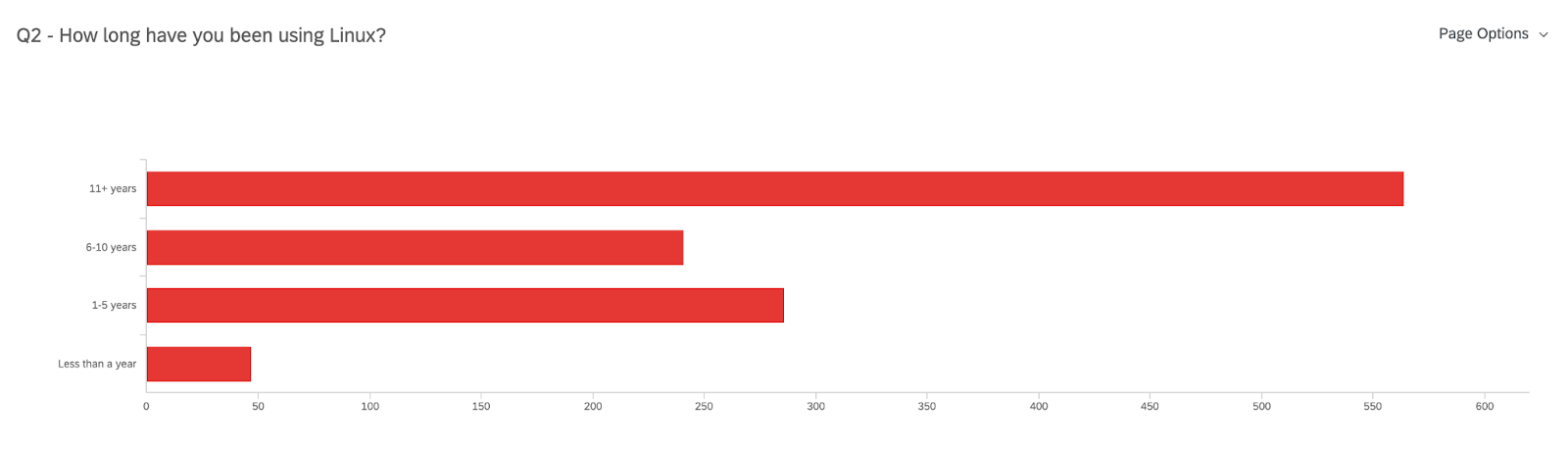
  • Have 11+ years of experience using Linux (50% of 1138 responses)
  • 90% use Fedora (sometimes in combination with RHEL, CentOS, Ubuntu, or Debian)

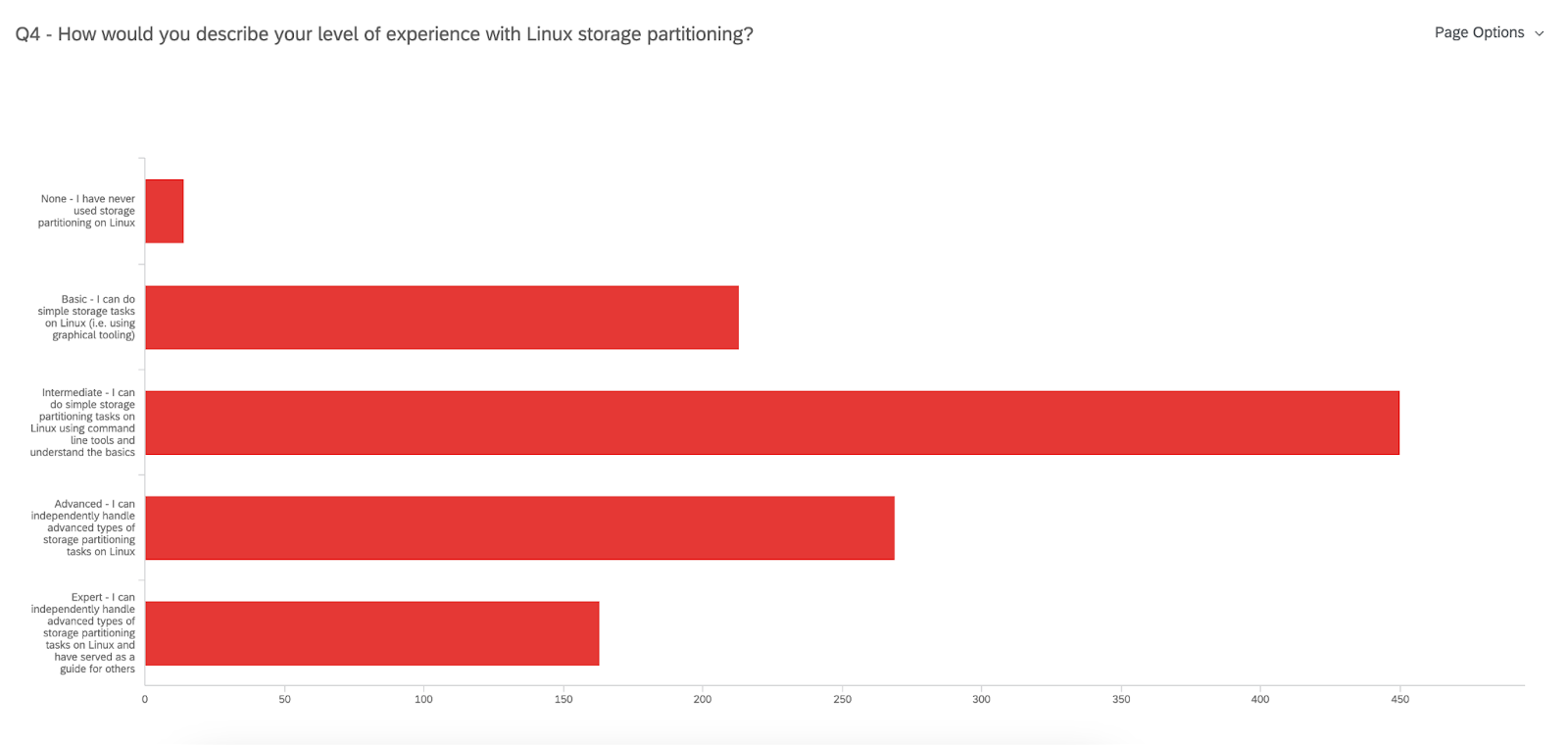
450 users identify as having an Intermediate level of expertise with Linux storage partitioning

n=1138

n=1109

These data points mean that most of you have been using Linux with Fedora (not exclusively) on a desktop/workstation for over a decade! That’s impressive! But when it comes to Linux storage partitioning there is still quite a bit to learn – and we are here to make that easier. 

What storage and partitioning is used?

Storage

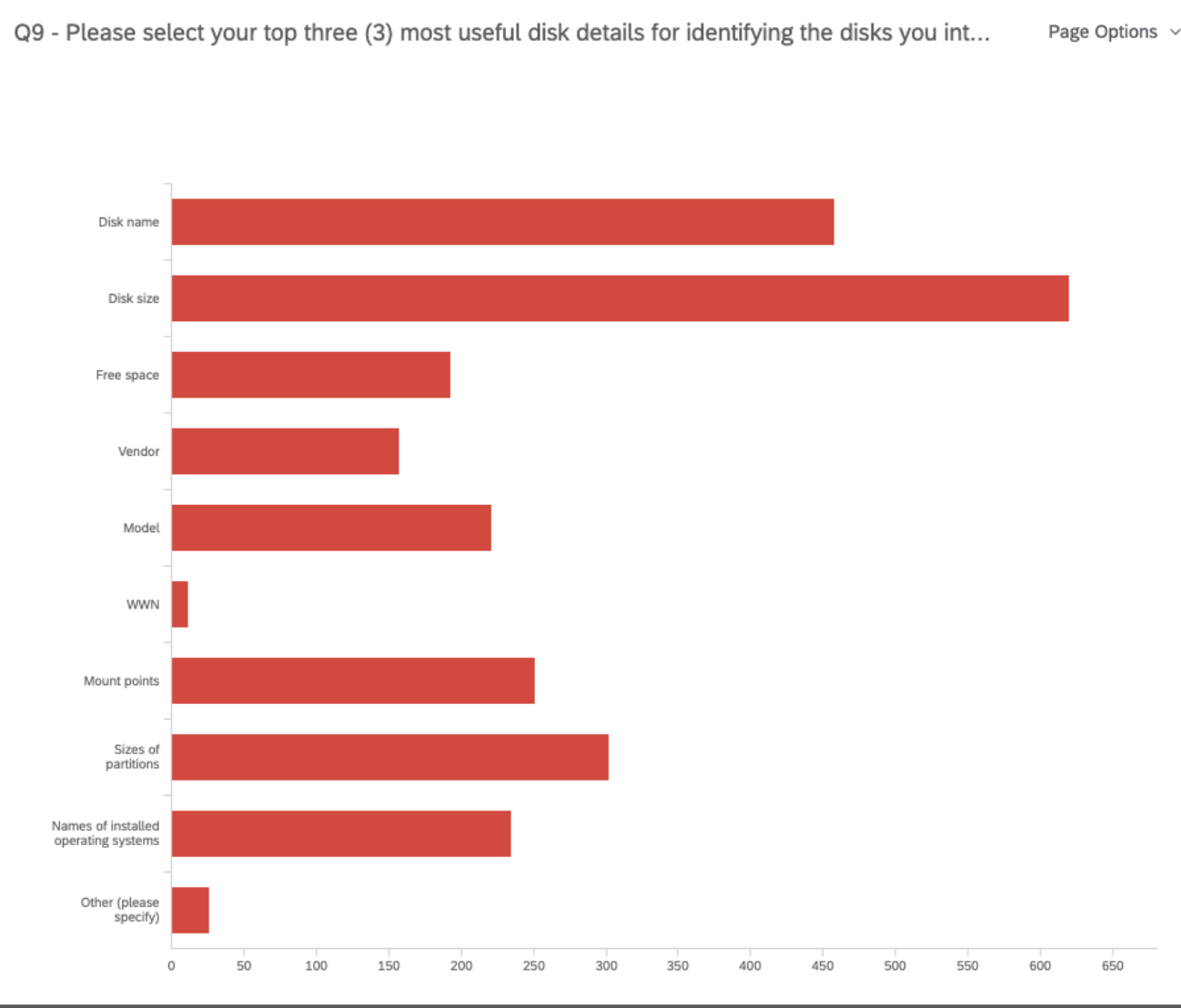
Once we got a better picture of who our participants were, we asked questions regarding your current storage and partitioning set up. For example, we uncovered that when it comes to identifying the disks you will use for your installation, most of you are mainly interested in the disk name, size, and the sizes of partitions. This helps the team decide which data is more helpful to present on the disk selection screen. 

n=969

Partitioning

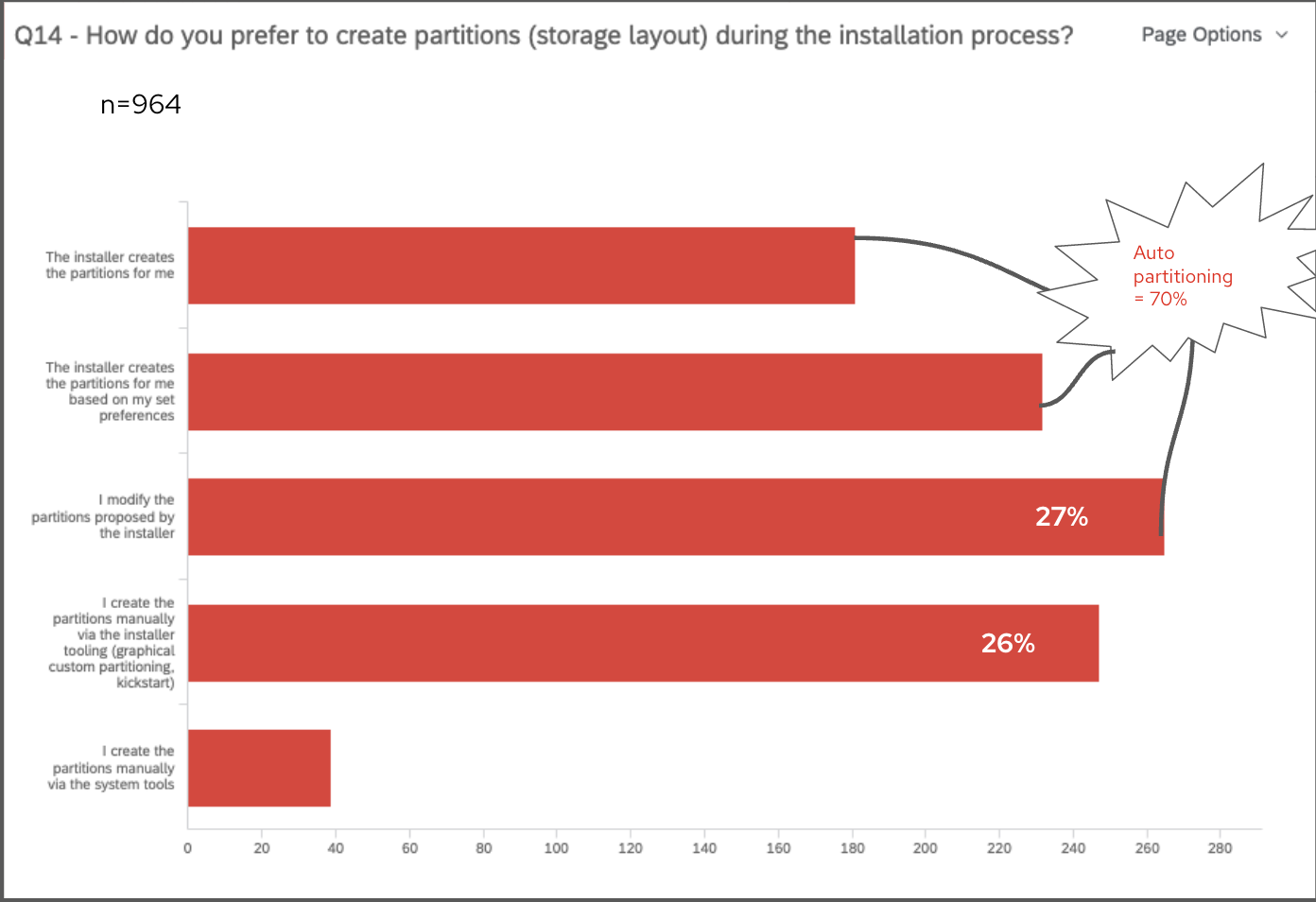
Then, we asked questions about your preferences and expectations regarding partitioning. From studies in the past, we kept seeing an almost even preference for auto-partitioning and custom partitioning because of the different needs they each fulfill. However, this survey clarified that there is a slightly stronger preference for auto-partitioning, but many of you made it clear that you need the Installer to allow some customizations to partitioning. The team is certainly keeping this in mind. In fact, we asked you “How do you prefer to create partitions (storage layout) during the installation process?” and most of the multiple-choice responses were split between “Installer creates the partitions for me”, “Installer creates partitions based on my set preferences”, or “I modify the partitions proposed by the installer”. These three options indicate some form of auto-partition, leading to the combined 70% of 964 responses preferring auto-partitioning. 

Next steps for Anaconda

Finally, we wanted your input on what the next steps for Anaconda should be. The team has been considering a few different approaches, and most of you ranked the “Ability to select pre-defined partitioning configuration options with streamlined steps” as your #1 choice, closely followed by “Ability to customize details of partitioning”. This tells us that you are expecting a more guided experience for partitioning, especially given that most of you also feel there is a lot left to learn about Linux storage partitioning. Be on the lookout for what’s next with Anaconda!

Thanks to all who participated

Again, thank you to all who took the time to fill out the survey. You have provided the team with plenty of data to consider for the future of Anaconda Installer. 

Posted on Leave a comment

Changes to the ELN kernel RPM NVR

Red Hat is excited to announce significant changes to ELN kernel RPM NVR in the kernel-ark project.  This change will be to limited to the kernel-ark ELN RPMs and does not impact Fedora.  If you don’t use Fedora ELN builds you can likely stop reading as this change won’t affect you. 

What is the kernel-ark project?

The kernel-ark project is an upstream kernel-based repository from which the Fedora kernel RPMs are built (contributions welcomed!).  This project is also used by the Centos Stream and Red Hat Enterprise Linux (RHEL) maintainers to implement, test, and verify code that is destined to be used in Centos Stream and RHEL. In other words, the kernel-ark repository contains code that is enabled to build several different kernels which may contain unique code for different use cases.  The kernel RPMs used for CentOS Stream and RHEL are commonly referred to as the ‘ELN’ (Enterprise Linux Next) RPMs.

Why are there ELN RPMs?  Why can’t Centos Stream and Red Hat use Fedora RPMs?

While Fedora Linux is the source of a lot of code that lands in CentOS Stream and later RHEL, the kernel configuration used in each operating system is unique.  Fedora Linux is configured to achieve its specific goals and targets.  CentOS Stream and RHEL do the same but for a slightly different set of goals and targets.

The differences are significant enough that the Fedora Linux, Centos Stream, and RHEL kernel maintainers recognized the need for separate RPMs targeted for Fedora and those targeted for Centos Stream and RHEL.  Examples of these differences are BTRFS is enabled in Fedora Linux but not in ELN and there are some specific devices that are disabled in ELN but are enabled in Fedora Linux.

Red Hat uses kernel-ark’s ELN RPMs to continuously test upstream changes with a Red Hat specific configuration.  This enables Red Hat to monitor performance and resolve issues before they make it into a Red Hat Enterprise Linux (RHEL) release.  In accordance with Red Hat’s long established ‘upstream first’ policy, all fixes and suggestions for improvements are sent back to the upstream kernel community.  This benefits the entire Linux community with improvements due to issues resolved in ELN.

This structure also allows Red Hat to test and make changes without affecting the Fedora Linux kernel except in a positive or desired way, such as through bug fixes.  Fedora Linux, CentOS Stream, and RHEL have the opportunity to accept or reject changes easily.

What ELN NVR changes are being made?

Before explaining the changes to the ELN kernel rpm NVR, it is important to understand what an NVR is.  All RPMs have Name, Version, and Release (NVR) directives that describe the RPM package.  In the case of the Fedora Linux kernel RPMs the Name is ‘kernel’ and the Version is the kernel’s uname (aka UTSNAME or the kernel version).  The last field, the Release, contains additional upstream tagging information (release candidate tags), a monotonically increasing build number, and a distribution tag.  The NVR is separate from the kernel’s uname and the uname is not generated from it.  Instead, we have traditionally generated the NVR from the uname.

For example, for a recent Fedora Linux kernel build,

$ rpm -qi kernel-6.3.0-0.rc5.42.fc39.src.rpm

Name: kernel
Version: 6.3.0
Release: 0.rc5.42.fc39

In the next few weeks, the Centos Stream and RHEL maintainers will introduce ELN RPMs that have new kernel Name, Version, and Release (NVR) directives that are unique to the ELN builds.  This change has no impact on the kernel uname.  The net result of the change is that the version number will have more meaning to CentOS Stream and RHEL builds, instead of being solely based on the kernel uname.  For example, an ELN kernel may have NVR kernel-redhat-1.0.39.eln which packages a kernel with a kernel uname of 6.3.0-39.eln.

We have already decided that the new ‘Name’ directive for the ELN kernel NVR will be changed from ‘kernel’ to ‘kernel-redhat’. More information on the Version and Release directive changes will be released in the following months as they are finalized by the Centos Stream and RHEL kernel maintainers.  You can follow these discussions on the Fedora Kernel Mailing List.

Why is the ELN NVR being changed?

The new ELN NVR will allow for better coordination of feature introduction, bug fixes, and CVE resolutions in future versions of Centos Stream and RHEL.  More information on these improvements to the Centos Stream and RHEL ecosystems will be released in the upcoming months. 

How is Fedora Linux impacted?

Fedora Linux is not impacted by these changes.  

Since the inception of the kernel-ark project, the Fedora Linux, Centos Stream, and RHEL maintainers have been extraordinarily careful to ensure that Fedora Linux kernel builds are not impacted by ELN kernel builds (and vice-versa) in the kernel-ark project.  The commitment to prevent cross-OS issues is strictly enforced by the maintainers.  Due to the maintainers continued diligence, there is no impact to Fedora Linux.

How can I obtain Fedora Linux or ELN kernels?

Fedora Linux and ELN kernels can be downloaded from Fedora Project’s koji instance.

Posted on Leave a comment

What’s new in Fedora Workstation 38

Fedora Workstation 38 is the latest version of the leading-edge Linux desktop OS, made by a worldwide community, including you! This article describes some of the user-facing changes in this new version of Fedora Workstation. Upgrade today from GNOME Software, or use dnf system-upgrade in a terminal emulator!

GNOME 44

Fedora Workstation 38 features the newest version of the GNOME desktop environment. GNOME 44 features subtle tweaks and revamps all throughout, most notably in the Quick Settings menu and the Settings app. More details about can be found in the GNOME 44 release notes.

File chooser

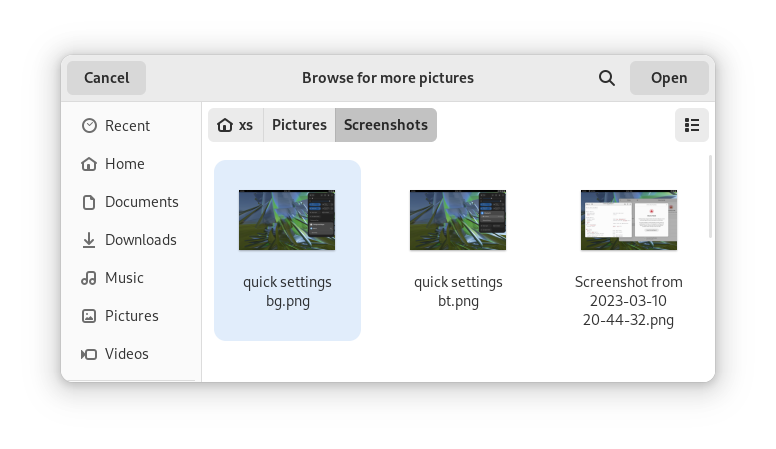
Most of the GNOME applications are built on GTK 4.10. This introduces a revamped file chooser with an icon view and image previews.

GTK 4.10's new file chooser, showing the icon view with image previews.
Icon view with image previews, new in GTK 4.10

Quick Settings tweaks

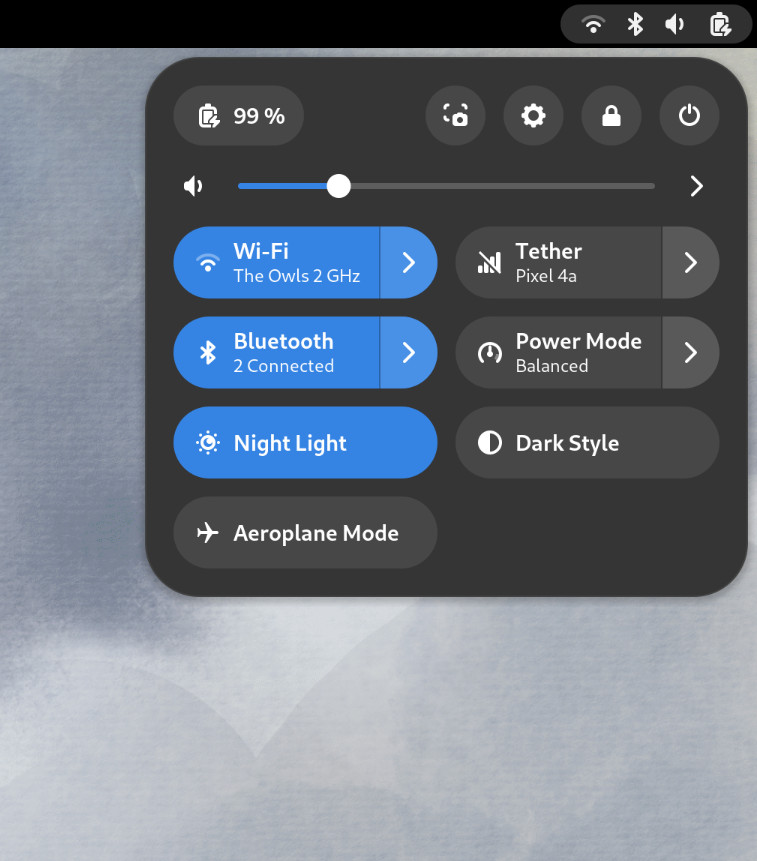
For GNOME 44 There have been a number of improvements to the Quick Settings menu. The new version includes a new Bluetooth menu, which introduces the ability to quickly connect and disconnect known Bluetooth devices. Additional information is available in each quick settings button, thanks to new subtitles.

The Bluetooth menu can now be used to connect to known devices

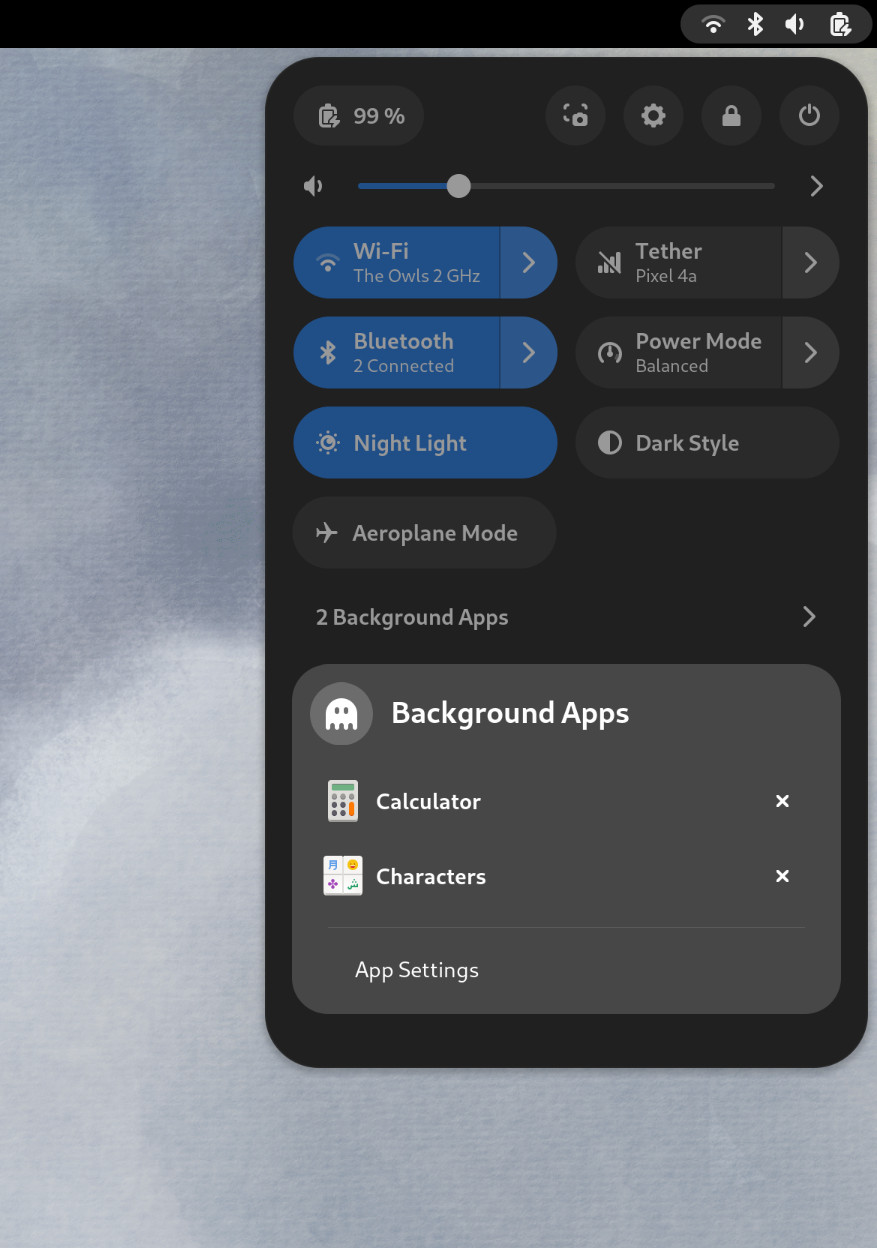
Also in the quick settings menu, a new background apps feature lists Flatpak apps which are running without a visible window.

Background Apps lets you see sandboxed apps running without a visible window and close them

Core applications

GNOME’s core applications have received significant improvements in the new version.

Settings has seen a round of updates, focused on improving the experience in each of the settings panels. Here are some notable changes:

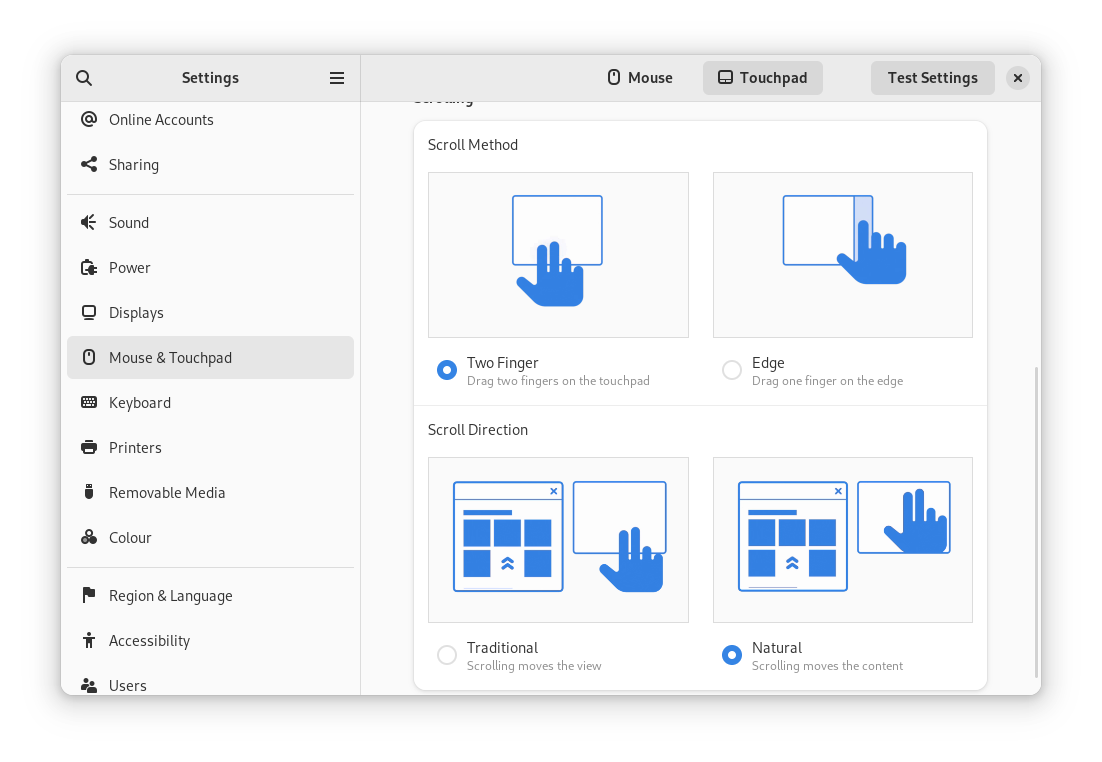
  • Major redesigns of Mouse & Touchpad and Accessibility significantly improves usability.
  • Updated Device Security now uses clearer language.
  • Redesigned sound now includes new windows for the volume mixer and alert sound.
  • You can now share your Wi-Fi credentials to another device through a QR code.
The Mouse & Touchpad panel in the GNOME Settings app, showing the Touchpad settings.
The revamped Mouse & Touchpad panel in Settings

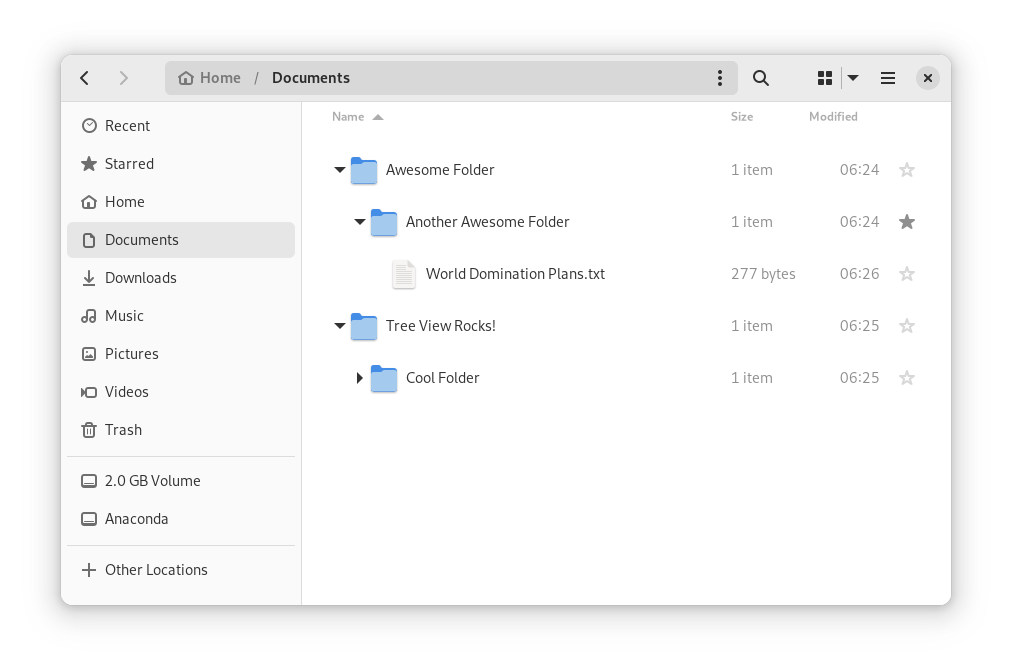
In Files, there is now an option to expand folders in the list view.

The tree view can be turned on in Files’ settings

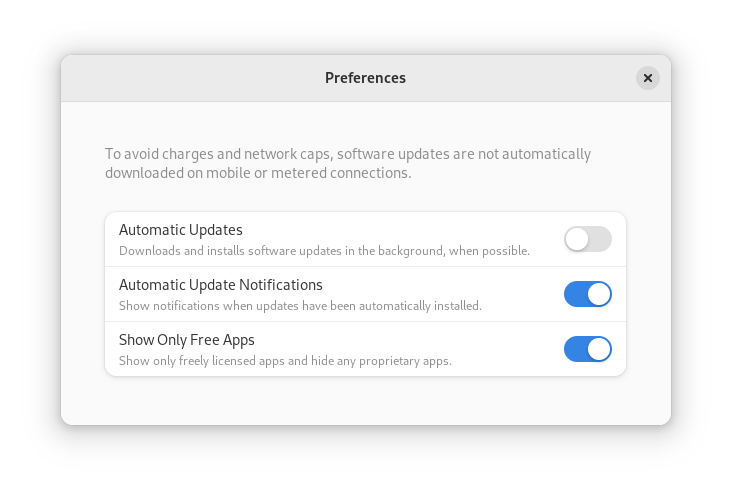
GNOME Software now automatically checks for unused Flatpak runtimes and removes them, saving disk space. You can also choose to only allow open source apps in search results.

In Contacts, you can now share a contact through a QR code, making it super easy to share a contact from your desktop to your phone!

Third-party repositories

Fedora’s third-party repositories feature makes it easy to enable a selection of additional software repos. Previous versions included a filtered version of Flathub, which included a small number of apps. For Fedora 38, filtering of Flathub content no longer occurs. This means that the third party repos now provide full access to all of Flathub.

The third party repos must still be manually enabled, and individual repositories may be disabled from the GNOME Software settings. If you want to keep proprietary apps from showing up in your search results, you can also do that in GNOME Software’s preferences menu.

You are in control.

Under-the-hood changes throughout Fedora Linux 38

Fedora Linux 38 features many under the hood changes. Here are some notable ones:

  • The latest Linux kernel, version 6.2, brings extended hardware support, bug fixes and performance improvements.
  • The length of time that system services may block shutdown has been reduced. This means that, if a service delays your machine from powering off, it will be much less disruptive than in the past.
  • RPM now uses the Rust-written Sequoia OpenGPG parser for better security.
  • The Noto fonts are now the default for Khmer and Thai. The variable versions of the Noto CJK fonts are now used for Chinese, Japanese, and Korean. This reduces disk usage.
  • Profiling will be easier from Fedora 38, thanks to changes in its default build configuration. The expectation is that this will result in performance improvements in future versions.

Also check out…

Official spins for the Budgie desktop environment and Sway tiling Wayland compositor are now available!