Posted on Leave a comment

Test GitHub projects with GitHub Actions and Testing Farm

Every project on GitHub that’s destined for Red Hat Enterprise Linux (RHEL), Fedora Linux, CentOS 7, CentOS Stream 8, and CentOS Stream 9, should be tested before its changes are synced into a Git distribution repository (dist-git). It’s important to catch problems before delivering software to customers, and help quality assurance teams catch errors. We should implement Shift Left into our workflows process.

Introduction

Testing Farm is an open-source testing system offered as a service. Testing Farm’s idea is similar to Compile Farms, but with a focus on executing automated tests. Its mission is to provide a reliable and scalable service for executing automated tests from various users, such as Fedora CI, Packit, and others. The entry point for our users is an HTTP-based API. Testing Farm scales across many infrastructures, including private and public clouds. Using the composite testing-farm-as-a-github-action, currently available on the GitHub Marketplace, allows you to test your project efficiently.

GitHub Marketplace and advantages of publishing actions here

GitHub Marketplace is a place where developers can find, among other elements, all published GitHub Actions, in one place. Anyone is authorized to publish an action on the GitHub Marketplace.

An action, in order to be published, must reside in its own GitHub repository.

The advantage of publishing an action on the Marketplace, in addition to publishing it in a public GitHub repository, is the visibility of written actions for other users.

Testing Farm as GitHub Action

Testing-farm-as-a-github-action, shortly TFaGA, is a composite GitHub action, intended to be used from other GitHub Actions. 

Its main purpose is scheduling tests on the Testing Farm infrastructure triggered by an event that occurs in a GitHub repository and, optionally, displaying the results of executed tests.

NOTE:  It is important to have the tested code reviewed by an authorized person, like an owner or member, in order to avoid running malicious code on the Testing Farm infrastructure.

Any kind of test which can be described with a TMT plan, can be executed. The testing environment can be chosen from Fedora Linux, CentOS, including CentOS Stream, or RHEL. We need to test our software as soon as possible.

For whom is testing-farm-as-github-action intended

The TFaGA can be used by developers or maintainers, generally, anyone who wants to test a repository located on GitHub. Anyone who would like to add software to the distributions mentioned above should guarantee that it delivers working software. Customers love software that is working and tested.

Action inputs

TFaGA input is highly configurable but there only two inputs that are without default values and are required to be inserted by the user. These are:

  • api_key – API key for Testing Farm
  • git_url – URL to a repository with TMT plans

NOTE: You can obtain api_key from [email protected]. For more information see the onboarding site.

The minimal example of using the TFaGA (on an already checkouted repository) will look similar to this:

- name: Schedule tests Testing Farm uses: sclorg/testing-farm-as-github-action@v1 with: api_key: ${{ secrets.TF_API_KEY }} git_url: <URL to a TMT plan>

All other input values are optional and have preassigned default values.

The inputs are divided into logical groups:

  • Testing Farm
    • contains options for configuring the testing farm itself. Configurable items can be the API key, URL to TF’s API, and the scope of the used TF – public, or private
  • TMT metadata
    • contains options for configuring the TMT specification, such as URL for the Git repository with the TMT plan, or regex for selecting the plan.
  • Test environment
    • contains options for configuring the operating system and architecture and where the test would be run. Supported Linux distributions are Fedora Linux, and CentOS, including CentOS Stream, RHEL7, and RHEL8.  Moreover, the secrets and environment variables needed for the test execution can be specified with options belonging to this group.
  • Test artifacts
    • contains settings for additional artifacts to install in the test environment. For more information see Rest API documentation.
  • Miscellaneous
    • contains settings for various miscellaneous options, such as, whether the PR should be updated with test results after finishing the job or what should be written in it.

More information about the inputs can be found in the README.md.

Action outputs

TFaGA action provides, as output, a request_id and a request_url of a scheduled testing farm request. Combining request_url and request_id together, the user obtains a URL address pointing to a log artifactory. Test logs and test results are collected here in text form from the Testing Farm. 

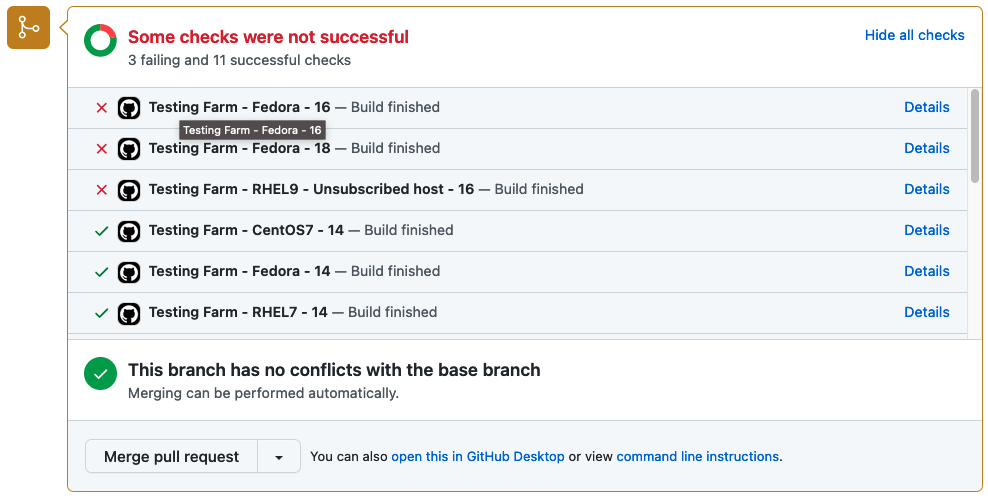
Optionally, if the event which triggers the Testing Farm action is related to a Pull Request, the user can enable a Pull Request status update. Enabling this option ensures that test results are summarized in a graphical form directly in the PR. An example of the graphical output is displayed in the picture below.

Status of tests delivered by Testing Farm as GitHub Action

How to use a Testing Farm as GitHub Action in your repository?

As TFaGA is a composite GitHub action, it is supposed to be embedded in other user-specified GitHub actions.

Example of action, triggered by commenting on a PR

The following example demonstrates, how the TFaGA can be used in a GitHub project. The whole example can be found in sclorg repositories.

NOTE: It is important to check the contents of the tested PR so that no malicious code will be run on the Testing Farm infrastructure. For this reason, only members and owners of the repository should be able to run the tests, as shown in the example below.

The test in this specific example would be triggered with a created comment on a PR by a member or owner of a specific repository. The comment has to include the string ‘[test]’.

name: upstream tests at Testing Farm
on: issue_comment: types:
Created
jobs: build: name: A job run on explicit user request run-ons: ubuntu-20.04 if: | github.event.issue.pull_request && contains(github.event.comment.body, '[test]') && contains(fromJson('["OWNER", "MEMBER"]'), github.event.comment.author_association)

Clone and checkout repository to a proper pull request branch:

- name: Checkout repo uses: actions/checkout@v2

The following shows scheduled tests on Testing Farm by the GitHub Action. This will pass to a testing-farm-as-a-github-action an api_key, stored in the repository secrets, the URL to a TMT plan, and the environment variables that are required by the triggered tests. The chosen testing OS is CentOS7.

- name: Schedule tests on external Testing Farm uses: sclorg/testing-farm-as-github-action@v1 with: api_key: ${{ secrets.TF_API_KEY }} git_url: "https://github.com/sclorg/sclorg-testing-farm" variables: "REPO_URL=$GITHUB_SERVER_URL/$GITHUB_REPOSITORY;REPO_NAME=$GITHUB_REPOSITORY;PR_NUMBER=${{ github.event.issue.number }};OS=centos7;TEST_NAME=test" compose: "CentOS-7"

Test results are, by default, displayed as a status directly within a Pull Request with GitHub statuses API.

Summary

Why use this GitHub action in your project? It will eliminate caring about testing the infrastructure environment, writing a lot of new GitHub Action workflows, and handling Pull Request statuses. 

When using TFaGA, you get the whole testing infrastructure according to your needs simply by providing a TMT test plan and an API key. The pool of available testing environments is composed of many processor architectures and Linux distributions.

Your tests are triggered simply by an action you specify in the configuration file. Logs and results from test execution are collected, reported, and stored in text form and optionally also transparently displayed in the Pull Request status. 

Your action is only to get the ‘api_key’ from the Testing Farm team and write a simple GitHub workflow to use our GitHub Action.

So let’s test project changes as soon as possible before the project goes out to the customers!

Posted on Leave a comment

With GitHub, Canadian company TELUS aims to bring ‘focus, flow and joy’ to developers

Katie Peters could have used an advocate as she embarked on her tech career.

In her first year at the University of British Columbia, Peters’ computer science classes were split almost evenly along gender lines. But most of her female classmates soon switched majors, and by Peters’ final year there were typically only two or three women in those classes. She felt increasingly isolated and was uncomfortable asking for help.

After graduating with a computer science degree in 2012, Peters took a job as a software developer for TELUS, a Canadian telecommunications company. Joining an organization with more than 90,000 employees, Peters initially found it challenging to make her way around its procedures and structure. So when the position of staff developer opened on TELUS’ new engineering productivity team last fall, Peters jumped at the opportunity.

“I wanted to be the person that I wish could have helped me,” says Peters, who started in the role last October. “There are so many complicated processes in a company as large as TELUS and it’s really difficult to navigate. You end up feeling stupid a lot of the time and you have to ask lots of questions. I don’t want other people to have to experience that. I want to make that better.”

Katie Peters, staff developer for TELUS, sitting at a conference desk in the company’s headquarters, sky and mountains reflected in the desk’s glossy surface.
Peters is ‘a brilliant developer and a brilliant technologist,’ says Justin Watts, head of TELUS’ engineering productivity team.

Peters is now helping lead an initiative aimed at changing TELUS’ culture to better empower its developers. Much of that effort is focused on encouraging widespread adoption of Microsoft’s code-hosting platform GitHub to help automate software development at TELUS and make it easier for the company’s roughly 4,000 developers to collaborate. TELUS recently made GitHub available companywide and signed an agreement with Microsoft to help manage its enterprise-level use of the platform and provide GitHub training to developers.

Justin Watts, head of developer experience for TELUS, says Peters’ experience as both a developer and a previous member of TELUS’ enterprise architecture team makes her ideally suited to help redefine the company’s approach to software development.

“This is all being driven by Katie and the vision she has,” says Watts, who heads the engineering productivity team. “Katie is great at capturing that relationship with the developer and what our goals are. She is a brilliant developer and a brilliant technologist.

“She’s seen as a really senior, influential mind in the company.”

Justin Watts, head of the engineering productivity team at TELUS.
Justin Watts.

Peters is already shaking things up. Drawing inspiration from “The Unicorn Project,” a 2019 novel by Gene Kim about a group of renegade developers seeking to overthrow the existing order and make work more fulfilling, Peters has replaced the usual staid presentation decks with ones featuring swirling designs, pink and purple tones and cartoon unicorns, and adopted the book’s mantra of bringing “focus, flow and joy” to developers.

Transform recently chatted with Peters over Microsoft Teams from her home in Vancouver, where she lives with her husband and 2-year-old daughter. The interview has been condensed for clarity and length.

TRANSFORM: Why was the engineering productivity team formed and what is its mission?

PETERS: We’ve been transitioning to the cloud for software development for a while, but it’s challenging. It greatly simplifies very complicated operations activities and turns those things into code. So instead of needing an ops professional to manually create a bespoke server for the developer to host their application, the definition of that server is standardized and codified in a way that can be stored and managed alongside the application code.

That makes it easier for a developer to manage it themselves, but they’re now expected to own that server definition, where sometimes they’ve never previously had exposure to the ops side of software development. That’s a really difficult transition for people. And a lot of legacy processes haven’t caught up to cloud development yet. We’re giving developers a lot more freedom, but it’s also a lot more responsibility in different areas than they might not have had experience in before. So we have to make that not a burden for them.

Our team exists to help developers make that cloud transition and to update all of that legacy process baggage to align with the new cloud paradigm.

TRANSFORM: Why did TELUS see a need to change how software development is done?

PETERS: We need to stay innovative and creative. We need to be able to react quickly to the market, and if we want to be able to do that, we need to give developers the time and the space and the safety to do that while also making sure that what they’re building is secure and reliable.

Streetscape photo showing the exterior of TELUS' headquarters in Vancouver, B.C.
TELUS’ headquarters in downtown Vancouver, British Columbia.

To enable us to move quickly without sacrificing security and reliability, we need to really make that developer experience our focus. I treat it as the developers are my customers, and what experiences can I give them so that they are inspired to keep pushing and keep innovating, and just unblock them as much as I can, to make it as simple and fast as I can so that they can keep innovating.

TRANSFORM: What role can GitHub play in helping developers shift to this new cloud paradigm?

PETERS: GitHub used to be just for storing the source code, but now it has a lot of other features. When you’re writing code, for example, you need to be able to plan that work and distribute it to people. We can use GitHub projects for that.

After you’ve developed code, there are tools you can use to tell you if there are problems with how you’ve written it. In the past, we would wait until we were trying to release that code to our customers before we would run those tests. So when things went wrong, it was really costly. Now, developers can push their code back to the public repository on GitHub for the rest of the team to see. Then we can run all of these automated tests and security scans, so it’s easier to make fixes right then, whereas in the old world, it was potentially months later they would get that feedback.

With GitHub taking over that developer lifecycle, that allows us to build in a lot of automation so we have end-to-end visibility on where developers are spending their time and what they’re doing. That’s good for metrics on how we can improve that experience and make it better for people.

TRANSFORM: GitHub is ultimately a tool. What other components are you thinking about in driving this cultural shift at TELUS?

PETERS: As a big company, TELUS can be a little formal. It’s hard for people to ask for help. We really wanted to change that culture. We wanted to be open and approachable and let people vent to us in a psychologically safe place to share their problems. That way, we can understand all the little things that add up to so much toil.

Photo of Katie Peters working at a computer in TELUS' headquarters and showing a slide with a unicorn from one of her signature presentation decks.
Peters draws inspiration from ‘The Unicorn Project,’ a novel about a group of renegade developers.

We have a lot of really creative people at TELUS, a lot of talented developers, and they come up with really interesting ways to deal with the status quo that don’t actually fix the problem for anyone else — it’s just a workaround that they’ve developed. We need people to feel safe coming to us with their problems and trust that we can help them solve them, so that we can then bring that to everybody and drive that improvement across the board.

TRANSFORM: How did your interest in computers start?

PETERS: My parents really wanted me to be interested in computers, so they bought me my own computer when I was a kid. They got me into robot building camps and software development camps and all sorts of stuff.

I started playing video games when I was 4 years old. I played Putt-Putt Goes to the Moon and Fatty Bear’s Birthday Surprise. I loved all sorts of video games. Morrowind was another big game for me. They had a modding community, and I learned a lot about computers in general by participating in that community. (Modding refers to the practice of altering content or creating new content for video games.)

I wanted to work in the video game industry, but when I was applying for co-op placements during university, I got into Sierra Wireless (a Canadian IoT solutions provider). As I was exposed to that industry, I liked the consistency and stability of the telco industry and the feeling that you’re contributing to something important. Providing internet to people is really important.

TRANSFORM: You said you felt at times like you have imposter syndrome. Did you feel that way particularly as a female developer?

PETERS: I’ve always had a lot of imposter syndrome, which I think is true for a lot of software developers. I’m not unique in that way. I do think it’s worse as a woman, but I think it’s just common in software development to have those kinds of feelings. The industry is kind of steeped in this mythology of like, really smart geeks who live and breathe computer science and build Google or Microsoft in their basement, and they’re all geniuses and always know everything about everything.

Photo taken at TELUS headquarters in Vancouver, B.C., showing two interior offices with chairs grouped around tables and views out windows.
TELUS, which employs around 4,000 developers, is using GitHub to transform its approach to software development.

There are really high expectations in the software industry in general, and I think everybody experiences that, but I think it’s amplified for a woman. Because the expectation, I think, at least when I started in the industry, was that I don’t actually know what I’m doing. I’m a poseur and I just got my place because I’m a woman. So I had to work really hard to appear extra smart. 

TRANSFORM: Is it important to you, as a woman in this role, to attract more female developers to the field? 

PETERS: Absolutely. When you’re the only woman, it can be really challenging. And when you have one or two women in a large group, sometimes you can be forced into this weird sense of competition with them. People are always comparing you to the other women.

But when there’s a critical mass of women, you really get to be comfortable working with other women who typically come from the same kinds of experiences. You get to open up a little bit in a way that you might not have been able to otherwise. Most women I encounter in computer science are so supportive and friendly.

It always makes me happy to see more women in the industry. Any opportunity I have to try to make that easier for somebody or to help somebody go in that direction, I’m very happy to be able to do that.

Top photo: Katie Peters stands on a deck at TELUS’ headquarters in Vancouver, B.C. (Justin Watts photo courtesy of Justin Watts; all other photos by Jennifer Gauthier)

Posted on Leave a comment

GitHub to the rescue for developers facing ‘too many options’

Abel

Abel

By Isaac Levin & Abel Wang

Let’s face it, as the demands of writing software increase, more pressure is put on devs to be as productive as humanly possible. And with this demand, the landscape for being a developer has never been more challenging.

With increased responsibilities and technology options, developers are asked to not just worry about the code they write, but all other aspects of the application development life cycle.

The plethora of tools at a developer’s disposal has also made developer responsibilities even more challenging. Determining what tools and platforms to develop on and with have caused a “too many options” scenario in lots of cases.

GitHub To The Rescue

As challenging as this landscape is, there are solutions. One thing that’s abundantly clear, GitHub is the place where developers go to learn and collaborate with the community.

GitHub has enabled developers to have the power of the entire Open-Source community at their disposal and the freedom to learn from the work of others to better themselves as a developer. GitHub has unveiled many tools aside from hosting source code to make the ecosystem as comfortable as possible.

One of those tools I am fired up about is “GitHub Actions”. Look, as you all know, I’m a DevOps guy , and I think about DevOps every time I put on my developer hat. I believe that no matter the app, if you are going to send it somewhere that isn’t your local machine, that app deserves to have some continuous integration and continous delivery (CI/CD), simple as that.

The question becomes, if my code is already in GitHub, what is the easiest way to hook CI/CD into my app? The answer is GitHub Actions.

GitHub Actions allow us to easily configure custom workflows, using a bounty of existing community-created workflows to fulfill the needs of our app. It isn’t just starting from scratch as there are workflows to do nearly everything, and your goal is to just build your Action in the way YOU need it. With GitHub Actions, getting your app to the Cloud is super easy.

But What About Developing My App?

Talking about where it goes before I write and compile my app seems non-sensical, but I believe that thinking about these things early will allow us to choose the technology/tools we need to be most productive.

In my opinion, one of the best tools to write the code that powers our software is Visual Studio Code. Visual Studio Code is a cross-platform, multi-language editor that provides extensive extensibility to create the perfect environment to write code.

Whether you are writing express apps in Node.js, multi-thread highly scalable applications in Go, or writing cutting-edge modules on your Raspberry Pi with Python, VS Code gives you the ability to work in the way that benefits you the most.

The best part, VS Code offers deep integrations with GitHub, which allows you to clone/pull/push your repositories as well as manage your work on issues and pull requests, without leaving the editor, HOW COOL IS THAT! Once you have your repo in VS Code, the editor gives you access to an oversupply of Open-Source extensions to do everything from configure your experience, down to your font and background of choice. Nearly anything is possible with VS Code, and with first-class GitHub support, it truly is one of the best options.

Image 0cba4698daf913f579a3813f30b25634441b96a73f1e47c167cbe9ea5bea6d9e

What Should Host My App?

With our code being built in VS Code and stored in GitHub and DevOps’d with GitHub Actions, the last thing we need to think about is now what?

Personally, I think Azure is the ultimate Cloud for GitHub. There is no other Cloud that best enables developers to be the most productive, and with integrations to VS Code AND GitHub, you truly have “best of breed” capabilities at your disposal.

Let’s start with VS Code Integrations, and boy there are a ton of them. Existing extensions enable developers to seamlessly connect to their Azure tenants and have full management capability of the resources in their subscriptions, including creation, scaling, configuration, debugging and if we want, even deployment!

Microsoft has built an extension pack called “Azure Tools” which includes extensions to manage every major Azure resource type as well as Azure CLI support AND Docker. There are also other extensions published by Microsoft that connect and manage nearly every Azure Resource. This means when new features come to the platform, they will be coming to the Microsoft published extensions.

Image b056a547a020c75ed168a0979c936e5d85d2d1e20cbae33d3a122aa39fa194af

Azure Loves GitHub

Finally, it is safe to say that Azure loves GitHub and the integrations are plentiful. From Azure Portal authentication with GitHub Ids, to individual services interfacing with GitHub (one great example of this is Azure Static Web Apps, which allow CI/CD to be configured on creation of the resource).

There is no better integration story between GitHub and Azure than “GitHub Actions for Azure” a set of pre-built GitHub Action workflows that helps you automate your app’s story on Azure, from deployment to monitoring and everything in between.

The team has built over 30 of these workflows and they are documented in a way that you will be able to use them without hesitation. One of my favorite examples is container image scan which allows you to scan the container images you are using for known vulnerabilities as well as linting to ensure you are using best practices.

Image 249fb6aa4e0898e90bff8aaa2072d956d527cf2db64defa0290507db862365b7

GitHub Universe 2020

This is the messaging we’re delivering at GitHub Universe 2020. Check out our booth video:

Conclusion

GitHub + Visual Studio Code + Azure ensures you as a developer can just trust the tools and get your work done. There are tons of more features that I didn’t talk about here, so please take a look at some of the resources below to get started enhancing your developer productivity.

More Resources

GitHub Actions for Azure | Create workflows to build, test, package, release and deploy to Azure

GitHub Actions for Azure | Microsoft Docs

Automate your workflow with GitHub Actions | Microsoft Learn

Visual Studio Code Azure Extensions

Create free services with Azure free account | Microsoft Docs

Posted on Leave a comment

Microsoft to help 25 million people worldwide acquire new digital skills needed for the COVID-19 economy

REDMOND, Wash. — June 30, 2020 — Microsoft Corp. on Tuesday announced a new global skills initiative aimed at bringing more digital skills to 25 million people worldwide by the end of the year.

The announcement comes in response to the global economic crisis caused by the COVID-19 pandemic. Expanded access to digital skills is an important step in accelerating economic recovery, especially for the people hardest hit by job losses.

This initiative, detailed on the Official Microsoft Blog, includes immediate steps to help those looking to reskill and pursue an in-demand job and brings together every part of the company, combining existing and new resources from LinkedIn, GitHub and Microsoft. This includes:

  • The use of data to identify in-demand jobs and the skills needed to fill them.
  • Free access to learning paths and content to help people develop the skills these positions require.
  • Low-cost certifications and free job-seeking tools to help people who develop these skills pursue new jobs.

This is a comprehensive technology initiative that will build on data and digital technology. It starts with data on jobs and skills from the LinkedIn Economic Graph. It provides free access to content in LinkedIn Learning, Microsoft Learn and the GitHub Learning Lab, and couples those with Microsoft Certifications and LinkedIn job seeking tools. These resources can all be accessed at a central location, opportunity.linkedin.com, and will be broadly available online in four languages: English, French, German and Spanish.

In addition, Microsoft is backing the effort with $20 million in cash grants to help nonprofit organizations worldwide assist the people who need it most. One-quarter of this total, or $5 million, will be provided in cash grants to community-based nonprofit organizations that are led by and serve communities of color in the United States. The company is also pledging to make stronger data and analytics — including data from the LinkedIn Economic Graph — available to governments around the world so they can better assess local economic needs.

Microsoft will use its voice to advocate for public policy innovations that will advance skilling opportunities needed in the changed economy.

Microsoft also announced it is creating a new learning app in Microsoft Teams designed to help employers skill and upskill new and current employees as people return to work and as the economy adds jobs.

“COVID-19 has created both a public health and an economic crisis, and as the world recovers, we need to ensure no one is left behind,” said Microsoft CEO Satya Nadella. “Today, we’re bringing together resources from Microsoft inclusive of LinkedIn and GitHub to reimagine how people learn and apply new skills — and help 25 million people facing unemployment due to COVID-19 prepare for the jobs of the future.”

“The biggest brunt of the current downturn is being borne by those who can afford it the least,” said Microsoft President Brad Smith. “Unemployment rates are spiking for people of color and women, as well as younger workers, people with disabilities and individuals with less formal education. Our goal is to combine the best in technology with stronger partnerships with governments and nonprofits to help people develop the skills needed to secure a new job.”

“Creating opportunity for every member of the global workforce drives everything we do at LinkedIn,” said LinkedIn CEO Ryan Roslansky. “As a part of the Microsoft ecosystem, we have the unique ability to help job seekers around the world — especially those who have been disproportionately disadvantaged during the COVID-19 crisis — gain the skills and find the jobs they deserve. We’re proud to be bringing the right data about what the jobs and skills of the future will be to create the right learning paths to help 25 million job seekers find their next opportunities. We’re making it all available at opportunity.linkedin.com.”

More information can be found at the Microsoft microsite news.microsoft.com/skills.

Microsoft (Nasdaq “MSFT” @microsoft) enables digital transformation for the era of an intelligent cloud and an intelligent edge. Its mission is to empower every person and every organization on the planet to achieve more.

For more information, press only:

Microsoft Media Relations, WE Communications, (425) 638-7777, [email protected]

Note to editors: For more information, news and perspectives from Microsoft, please visit the Microsoft News Center at http://news.microsoft.com. Web links, telephone numbers and titles were correct at time of publication, but may have changed. For additional assistance, journalists and analysts may contact Microsoft’s Rapid Response Team or other appropriate contacts listed at https://news.microsoft.com/microsoft-public-relations-contacts.