
Various engineers that work on the Fedora Linux product line are brewing up a storm again. To find out more about their plans for world domination, check out this video!
Various engineers that work on the Fedora Linux product line are brewing up a storm again. To find out more about their plans for world domination, check out this video!

We recently interviewed Ben Cotton on how he uses Fedora. This is part of a series on the Fedora Magazine. The series profiles Fedora users and how they use Fedora to get things done. Contact us on the feedback form to express your interest in becoming an interviewee.
If you follow the Fedora’ Community Blog, there’s a good chance you already know who Ben is.
Ben’s Linux journey started around late 2002. Frustrated with some issues on using Windows XP, and starting a new application administrator role at his university where some services were being run on FreeBSD. A friend introduced him to Red Hat Linux, when Ben decided it made sense to get more practice with Unix-like operating systems. He switched to Fedora full-time in 2006, after he landed a job as a Linux system administrator.
Since then, his career has included system administration, people management, support engineering, development, and marketing. Several years ago, he even earned a Master’s degree in IT Project Management. The variety of experience has helped Ben learn how to work with different groups of people. “A lot of what I’ve learned has come from making mistakes. When you mess up communication, you hopefully do a better job the next time.”
Besides tech, Ben also has a range of well-rounded interests. “I used to do a lot of short fiction writing, but these days I mostly write my opinions about whatever is on my mind.” As for favorite foods, he claims “All of it. Feed me.”
Additionally, Ben has taste that spans genres. His childhood hero was a character from the science fiction series “Star Trek: The Next Generation”. “As a young lad, I wanted very much to be Wesley Crusher.” His favorite movies are a parody film and a spy thriller: “‘Airplane!’ and ‘The Hunt for Red October’” respectively.
When asked for the five greatest qualities he thinks someone can possess, Ben responded cleverly: “Kindness. Empathy. Curiosity. Resilience. Red hair.”
Ben wearing the official “#action bcotton” shirt
As a talented writer who described himself as “not much of a programmer”, he selected the Fedora Docs team in 2009 as an entry point into the community. What he found was that “the Friends foundation was evident.” At the time, he wasn’t familiar with tools such as Git, DocBook XML, or Publican (docs toolchain at the time). The community of experienced doc writers helped him get on his feet and freely gave their time. To this day, Ben considers many of them to be his friends and feels really lucky to work with them. Notably “jjmcd, stickster, sparks, and jsmith were a big part of the warm welcome I received.”
Today, as a senior program manager, he describes his job as “Chief Cat Herding Officer”- as his job is largely composed of seeing what different parts of the project are doing and making sure they’re all heading in the same general direction.
Despite having a huge responsibility, Ben also helps a lot in his free time with tasks outside of his job duties, like website work, CommBlog and Magazine editing, packaging, etc… none of which are his core job responsibilities. He tries to find ways to contribute that match his skills and interests. Building credibility, paying attention, developing relationships with other contributors, and showing folks that he’s able to help, is much more important to him than what his “official” title is.
When thinking towards the future, Ben feels hopeful watching the Change proposals come in. “Sometimes they get rejected, but that’s to be expected when you’re trying to advance the state of the art. Fedora contributors are working hard to push the project forward.“
As a longtime member of the community, Ben has various notions about the Fedora Project that have been developed over the years. For starters, he wants to make it easier to bring new contributors on board. He believes the Join SIG has “done tremendous work in this area”, but new contributors will keep the community vibrant.
If Ben had to pick a best moment, he’d choose Flock 2018 in Dresden. “That was my first Fedora event and it was great to meet so many of the people who I’ve only known online for a decade.”
As for bad moments, Ben hasn’t had many. Once he accidentally messed up a Bugzilla query resulting in accidental closure of hundreds of bugs and has dealt with some frustrating mailing list threads, but remains positive, affirming that “frustration is okay.”
To those interested in becoming involved in the Fedora Project, Ben says “Come join us!” There’s something to appeal to almost anyone. “Take the time to develop relationships with the people you meet as you join, because without the Friends foundation, the rest falls apart.”


One issue he finds challenging is a lack of documentation. “I’ve learned enough over the years that I can sort of bumble through making code changes to things, but a lot of times it’s not clear how the code ties together.” Ben sees how sparse or nonexistent documentation can be frustrating to newcomers who might not have the knowledge that is assumed.
Another concern Ben has is that the “interesting” parts of technology are changing. “Operating systems aren’t as important to end users as they used to be thanks to the rise of mobile computing and Software-as-a-Service. Will this cause our pool of potential new contributors to decrease?”
Likewise, Ben believes that it’s not always easy to get people to understand why they should care about open source software. “The reasons are often abstract and people don’t see that they’re directly impacted, especially when the alternatives provide more immediate convenience.”
For work, Ben has a ThinkPad X1 Carbon running Fedora 33 KDE. His personal server/desktop is a machine he put together from parts that runs Fedora 33 KDE. He uses it as a file server, print server, Plex media server, and general-purpose desktop. If he has some spare time to get it started, Ben also has an extra laptop that he wants to start using to test Beta releases and “maybe end up running rawhide on it”.
Ben has been a KDE user for a decade. A lot of his work is done in a web browser (Firefox for work stuff, Chrome for personal). He does most of his scripting in Python these days, with some inherited scripts in Perl.
Notable applications that Ben uses include:

We recently interviewed Ankur Sinha on how he uses Fedora. This is part of a series on the Fedora Magazine. The series profiles Fedora users and how they use Fedora to get things done. Contact us on the feedback form to express your interest in becoming an interviewee.
Ankur is a Computational Neuroscientist and has just started his first post-doctoral fellowship at University College London and a FLOSS enthusiast trying to spread the message of FOSS and evidence based science. Ankur started using Linux a decade ago, when he was introduced to Linux in a LUG doing an install fest during his undergraduate degree.
Ankur loves reading:
“I read a lot and tend to get attached to characters from books quite easily. Holmes, Poirot (I’m a detective fiction fan), Francisco D’Anconia (fan of the book Atlas Shrugged, but not so much Ayn Rand’s philosophy), lots of random characters from books I’d read. I also read lots of Hindi comics as a child—Doga, Super commando Dhruv, Naagraj, and Chacha Chaudhary—loved them all!”.
As far as all time favorite movies go, Swades comes to his mind. His favorite genre is science fiction thrillers (think “The Prestige” and ” Predestination”). When not busy working or engaging people on IRC channels, he enjoys listening to podcasts and classic rock.
Ankur’s favorite food is his mother’s Chhole Bhature. Otherwise, if he’s away from home, his go-tos are Butter chicken, Butter Naan, and Chilli Chicken from North Indian restaurants.
Ankur found about Fedora after a distro hopping phase in 2008, and since then he has been a fedora user. His first memory of the Fedora community is an IRC workshop on packaging fonts that the Fedora India community had organised back in 2008.
Talking to and meeting other community members has been one of the most exciting parts of the Fedora community for him. “I found this great bunch of people to hang out and geek out with! It was so much fun, and extremely educational both in terms of technical knowledge and the social/philosophical side of FOSS and life in general.”
When asked what he would change in the Fedora Project if he could change one thing, he said that he prefers “Smaller tweaks” since “Smaller tweaks also allow work to be spread out, and that really helps”. Specifically, he would like to see more discussion on the philosophy and nuances of FOSS in the community.
"Perhaps we all know it so well that we take it for granted and focus on the work that needs to be done. It’s so easy to get bogged down in the work, though, that I worry that we forget the bigger picture sometimes. The end for us is to promote FOSS, and everything we do is the means to this end. So, I worry that the means sometimes becomes the end for us — that we focus so
much on producing deliverables that we forget why we produce them."
Since he works in academia and science, Ankur would like the Fedora community (and FOSS in general) to get more involved with academic/scientific communities.
“I think we have an excellent platform to enable education and research. NeuroFedora is a start in this direction.”
He wishes that other people knew that the Fedora community are not just OS developers, but a global community, and he’d like folks to just hang out and communicate even if they’re not contributing in the traditional sense of the word.
Ankur tries to help wherever he can, especially if newbies are involved. Nowadays, he tries to focus more on NeuroFedora as it fits well for his day-job and there’s so much to do in this Field + Open Science.
Ankur learnt most of the things from his >10 years of experience in Fedora and FOSS. He had learned theories of software development at undergrad but got to experience practical implementations from his colleagues in the community. He is a firm believer of “No question is a stupid question”. He adds that Fedora is perfect because it gets better as you start working with it.
His piece of advice for anyone thinking of getting involved in Fedora is to just go ahead and start. One doesn’t need to know anything at all. All of it can be learned over time. Secondly, don’t focus on tasks. Yes, that’s a good way of learning, but it is far more important to get to know the people of Fedora! As one meets more people, one learns more about how Fedora works and one has way more fun working and learning!!
Just like a lot of our community members, Ankur struggles from time constraints. His new challenge is to find more time to work on FOSS and Fedora. During his college years, it was to learn more and more.
One of the challenges Ankur faces about promoting open source is to explain to non-FOSS people that Windows/Mac aren’t the only OSes present. He thinks that having Fedora shipped with Lenovo systems will give a start for the community. It makes Fedora and FOSS more "official".
Ankur has three machines and runs Fedora 32 on each of them:
Fedora 32 workstation, and server on the MacPro.
– Workstation/Gnome3 with a few extensions: caffeine, pomodoro,
– byobu with tmux: multiple sessions: default, work, fedora
– taskwarrior, vit, timewarrior, gnome-pomodoro, gnome-calendar/evolution for calendars
– neomutt with msmtp + offlineimap + notmuch for e-mail
– vim for *everything* possible – vimrc link
– qutebrowser, weechat, zathura, vimiv
– syncthing + dropbox + git for syncing/version control
For research work:
– NEST + lots of python and Gnuplot for analysis, LaTeX for writing
(stuff from NeuroFedora!)
– inkscape + gimp + dia + freemind for figures/mind mapping
– jabref for bibliography management
Other bits: – occasional gamer?
– Oad + endless sky + openttd!

Editor’s comment: The format of this article is different from the usual article that Fedora Magazine has published: a Fedora origins story told from the point of view of a Fedora user. The author has chosen to tell a story, since to simply present the bare facts is akin to just reading the wiki page about it.
Hello, I am… no, I’m not going to give my real name. Let’s say I’m female, probably shorter and older than you. I used to go by the nick of Isadora, more on that later.
Now some context. Back in the late ’90s, internet became popular and PCs started to be a thing. However, most people didn’t have either because it was very expensive and often you could do better with the traditional methods. Yes, computers were very basic back then. I used to play with these pocket games that were fascinating at the time, but totally lame now. Monochrome screens with pixelated flat animations. Not going to dive there, just giving an idea how it was.
In the mid-90s a company named Red Hat emerged and slowly started to make a profit of its own by selling its own business-oriented distribution and software utilities. The name comes from one of its founders, Marc Ewing, who used to wear a red lacrosse in university so other students could spot him easily and ask him questions.
Of course, as it was a business-oriented distribution, and I was busy with multiple other things, I didn’t pay much attention to it. It lacked the software I needed and since I wasn’t a customer, I was nobody to ask for additions. However, it was Linux and as such Open Source. People started to package stuff for RHL and put it in repositories. I was invited to join the community project, Fedora.us. I promptly declined, misunderstanding the name. It was the second time I got invited that I asked ‘what is with the “US” there (in the name)?` Another user explained it was ‘us’ as in ‘we’ not as in the ‘United States.’ They explained a bit about how the community worked and I decided to give it a go.
Then my studies got in the way, and I had to shelve it.

By the time I came back to Fedora.us it had changed its name to Fedora Project and was actively being worked on from within Red Hat. Now, I wasn’t there so my direct knowledge of how this happened is a bit foggy. Some say that Fedora existed separately and Red Hat added/invited them, some say that Fedora was completely RH’s idea, some say they existed independently and at some point met or joined. Choose the version you like, I’ll put some links down there so you can know more details and decide for yourself. As far as I’m concerned, they worked together.
Well, as usual someone dropped some CDs with ISOs for me. If I had an euro for every ISO I’ve been offered, or had tossed at my desk, for me to try it, I would be rich. As a matter of fact, I’m not rich but I do have a big rack full of old distros.
Anyways…
Now it’s the early 2000s and things have changed dramatically. Computers’ prices have dropped and internet speed is increasing, plus a set of new technologies make it cheaper and more reliable. Computers now can do so much more than just a decade ago, and they’re smaller too. Screens are bigger, with better colors and resolution. Laptops are starting to become popular though still expensive and less powerful than desktop PCs.
During this time, I tried both Fedora and Red Hat. Now, as has been said before, Red Hat focuses on businesses and companies. Their main concern is having exactly the software their customers need, with the features their customers need, delivered as rock solid stability and a reliable update & support cycle. A lot of customization, variety of options and many cool new features are not their main core. More software means more testing and development work and bigger chances of things failing. Yet the technology industry is constantly changing and innovating. Sticking too much to older versions or proven formulas can be fatal for a company.
So what to do? Well, they solved it with Fedora. Fedora Project would be the innovative, looking ahead test bed, and Red Hat Enterprise Linux was the more conservative, rock solid operating system for businesses. Yes, they changed the name from Red Hat Linux to Red Hat Enterprise Linux. Sounds better, doesn’t it?
Unsurprisingly, Fedora had a fame of being difficult, unstable and for “hackers only”. Whenever I said I was using Fedora, they would give me odd looks or say something like “I want something stable” or “I’m not into that” (meaning they didn’t fancy programming/hacking activities). Countless individuals suggested I might want to use one of the other, beginner-friendly distributions, without themselves even giving Fedora a try! Many would disregard Linux as a whole as an amateur thing, only valid for playing but not good for serious work and companies. To each their own, I suppose.

Those early versions were called Fedora Core and had a very uncertain release pattern. The six months cycle came much later. Fedora Core got its name because there were two repositories, Core and Extras. Core had the essentials, so to speak, and was maintained by Red Hat. Extras was, well, everything else. Any software that most users would want or need was included there, and it was maintained by a wide range of contributors.
From the beginning, one of the most powerful reasons for me to use it was the community and its core values. The Four Foundations of Fedora, Freedom, Features, First & Friends were lived and breathed and not just a catchy line on a website or a leaflet. Fedora Project strove (and still does) to deliver the newest features first, caring for freedom (of choice and software) and keeping a good open community, making friends as we contribute to the project.
I also liked the fact that Fedora, as its purpose was testing for Red Hat, delivered a lot of new software and technologies; it was like opening the window to see the future today.
The downside was its unreliable upgrade cycle. You could get a new version in a few months or next year… nobody knew, there was no agreed schedule.

Fedora Core kept this name up to the sixth version. From the start, it was meant to be a distribution you could use right after installing it, so it came with Gnome 2, KDE 3, OpenOffice and some browser I forgot, possibly Firefox.
I remember it being the first to introduce SELinux and SystemD by default, and to replace LILO with GRUB. I also remember the hardware requirements were something at the time, although they now sound laughable: Pentium II 400MHz, 256MB RAM (yes, you read it right) and 2GB of space in disk. It even had an option for terminal only! This would require only 64MB RAM and Pentium II 200MHz. Amazing, isn’t it?
It had codenames. Not publicly, but it had, and they were quite peculiar. Fedora Core 1 was code named «Yarrow» which is a medium size plant with yellow or white crown-like flowers. Core 2 was Tettnang which is a small town in Baden-Württemberg, Germany. Not sure about Core 3, I think it was Heidelberg, but maybe I’m mixing with later releases. Core 4 was Stentz, if I recall correctly (no idea what it means), Core 5 was a colour, I think Bordeaux, and Core 6 was Zod that I think it was a comic character but I could be wrong. If there was a method in their madness I have no idea. I thought the names amusing but didn’t give a second thought to it as they didn’t affect anything, not even the design of each release.

Well, of course, Fedora Project has evolved from where we have stopped. But that’s for later articles or this one will be too long. For now, I leave you with an extract of an interview with Matthew Miller, current Project Leader and some links in case you want to know more.
Extracts to interview with Matthew Miller, Project Leader.
Matthew Miller tells about the beginnings in Eduard Lucena’s podcast (transcription here): “Fedora started about 15 years ago, really. It actually started as a thing called Fedora.us.” Back in those days, there was Red Hat Linux.” “Meanwhile, there was this thing called Fedora.us which was basically a project to make additional software available to users of Red Hat Linux. Find things that weren’t part of Red Hat Linux, and package them up, and make them available to everybody. That was started as a community project.”
“Red Hat (then) merged with this Fedora.us project to form Fedora Project that produces an upstream operating system that Red Hat Enterprise Linux is derived from but then moves on a slower pace.”
“We were then two parts, Fedora Core, which was basically inherited from the old Red Hat Linux and only Red Hat employees could do anything with and then Fedora Extras, where community could come together to add things on top of that Fedora Core. It took a little while to get off the ground but it was fairly successful”
“Around the time of Fedora Core 6, those were actually merged together into one big Fedora where all of the packages were all part of the same thing. There was no more distinction of Core and Extras, and everything was all together and, more importantly, all the community was all together.
They invited the community to take ownership of the whole thing and for Red Hat to become part of the community rather than separate. That was a huge success.”
Links of interest
Fedora, a visual history
https://www.phoronix.com/scan.php?page=article&item=678&num=1
Red Hat Videos – Fedora’s anniversary
https://youtu.be/DOFXBGh6DZ0
Red Hat Videos – Default to open
https://youtu.be/vhYMRtqvMg8
Fedora’s Mission & Foundations
https://docs.fedoraproject.org/en-US/project/
A short history of Fedora
https://youtu.be/NlNlcLD2zRM

Where do you turn when you have a fleet of public workstations to manage? If you’re the Czech National Library of Technology (NTK), you turn to Fedora. Located in Prague, the NTK is the Czech Republic’s largest science and technology library. As part of its public service mission, the NTK provides 150 workstations for public use.
In 2018, the NTK moved these workstations from Microsoft Windows to Fedora. In the press release announcing this change, Director Martin Svoboda said switching to Fedora will “reduce operating system support costs by about two-thirds.” The choice to use Fedora was easy, according to NTK Linux Engineer Miroslav Brabenec. “Our entire Linux infrastructure runs on RHEL or CentOS. So for desktop systems, Fedora was the obvious choice,” he told Fedora Magazine.
Changing an operating system is always a little bit risky—it requires user training and outreach. Brabenec said that non-IT staff asked for training on the new system. Once they learned that the same (or compatible) software was available, they were fine.
The Library’s customers were on board right away. The Windows environment was based on thin client terminals, which were slow for intensive tasks like video playback and handling large office suite files. The only end-user education that the NTK needed to create was a basic usage guide and a desktop wallpaper that pointed to important UI elements.
Although Fedora provides development tools used by the Faculty of Information Technology at the Czech Technical University—and many of the NTK’s workstation users are CTU students—most of the application usage is what you might expect of a general-purpose workstation. Firefox dominates the application usage, followed by the Evince PDF viewer, and the LibreOffice suite.
NTK first deployed the workstations with Fedora 28. They decided to skip Fedora 29 and upgraded to Fedora 30 in early June 2019. The process was simple, according to Brabenec. “We prepared configuration, put it into Ansible. Via AWX I restarted all systems to netboot, image with kickstart, after first boot called provisioning callback on AWX, everything automatically set up via Ansible.”
Initially, they had difficulties applying updates. Now they have a process for installing security updates daily. Each system is rebooted approximately every two weeks to make sure all of the updates get applied.
Although he isn’t aware of any concrete plans for the future, Brabenec expects the NTK to continue using Fedora for public workstations. “Everyone is happy with it and I think that no one has a good reason to change it.”

We recently interviewed Taz Brown on how she uses Fedora. This is part of a series on the Fedora Magazine. The series profiles Fedora users and how they use Fedora to get things done. Contact us on the feedback form to express your interest in becoming a interviewee.
Taz Brown is a seasoned IT professional with over 15 years of experience. “I have worked as a systems administrator, senior Linux administrator, DevOps engineer and I now work as a senior Ansible automation consultant at Red Hat with the Automation Practice Team.” Originally Taz started using Ubuntu, but she started using CentOS, Red Hat Enterprise Linux and Fedora as a Linux administrator in the IT industry.
Taz is relatively new to contributing to open source, but she found that code was not the only way to contribute. “I prefer to contribute through documentation as I am not a software developer or engineer. I found that there was more than one way to contribute to open source than just through code.”
Her childhood hero is Wonder Woman. Her favorite movie is Hackers. “My favorite scene is the beginning of the movie,” Taz tells the Magazine. “The movie starts with a group of special agents breaking into a house to catch the infamous hacker, Zero Cool. We soon discover that Zero Cool is actually 11-year-old Dade Murphy, who managed to crash 1,507 computer systems in one day. He is charged for his crimes and his family is fined $45,000. Additionally, he is banned from using computers or touch-tone telephones until he is 18.”
Her favorite character in the movie is Paul Cook. “Paul Cook, Lord Nikon, played by Laurence Mason was my favorite character. One of the main reasons is that I never really saw a hacker movie that had characters that looked like me so I was fascinated by his portrayal. He was enigmatic. It was refreshing to see and it made me real proud that I was passionate about IT and that I was a geek of sorts.”
Taz is an amateur photographer and uses a Nikon D3500. “I definitely like vintage things so I am looking to add a new one to my collection soon.” She also enjoys 3D printing, and drawing. “I use open source tools in my hobbies such as Wekan, which is an open-source kanban utility.”
Taz first started using Linux about 8 years ago. “I started using Ubuntu and then graduated to Fedora and its community and I was hooked. I have been using Fedora now for about 5 years.”
When she became a Linux Administrator, Linux turned into a passion. “I was trying to find my way in terms of contributing to open source. I didn’t know where to go so I wondered if I could truly be an open source enthusiast and influencer because the community is so vast, but once I found a few people who embraced my interests and could show me the way, I was able to open up and ask questions and learn from the community.”
Taz first became involved with the Fedora community through her work as a Linux systems engineer while working at Mastercard. “My first impressions of the Fedora community was one of true collaboration, respect and sharing.”
When Brown talked about the Fedora Project she gave an excellent analogy. “America is an melting pot and that’s how I see open source projects like the Fedora Project. There is plenty of room for diverse contributions to the Fedora Project. There are so many ways in which to get and stay involved and there is also room for new ideas.”
When we asked Brown about what she would like to see improved in the Fedora community, she commented on making others more aware of the opportunities. “I wish those who are typically underrepresented in tech were more aware of the amazing commitment that the Fedora Project has to diversity and inclusion in open source and in the Fedora community.”
Next Taz had some advice for people looking to join the Fedora Community. “It’s a great decision and one that you likely will not regret joining. Fedora is a project with a very large supportive community and if you’re new to open source, it’s definitely a great place to start. There is a lot of cool stuff in Fedora. I believe there are limitless opportunities for The Fedora Project.”
Taz uses an Lenovo Thinkserver TS140 with 64 GB of ram, 4 1 TB SSDs and a 1 TB HD for data storage. The server is currently running Fedora 30. She also has a Synology NAS with 164 TB of storage using a RAID 5 configuration. Taz also has a Logitech MX Master and MX Master 2S. “For my keyboard, I use a Kinesis Advantage 2.” She also uses two 38 inch LG ultrawide curved monitors and a single 34 inch LG ultrawide monitor.
She owns a System76 laptop. “I use the 16.1-inch Oryx Pro by System76 with IPS Display with i7 processor with 6 cores and 12 threads.” It has 6 GB GDDR6 RTX 2060 w/ 1920 CUDA Cores and also 64 GB of DDR4 RAM and a total of 4 TB of SSD storage. “I love the way Fedora handles my peripherals and like my mouse and keyboard. Everything works seamlessly. Plug and play works as it should and performance never suffers.”
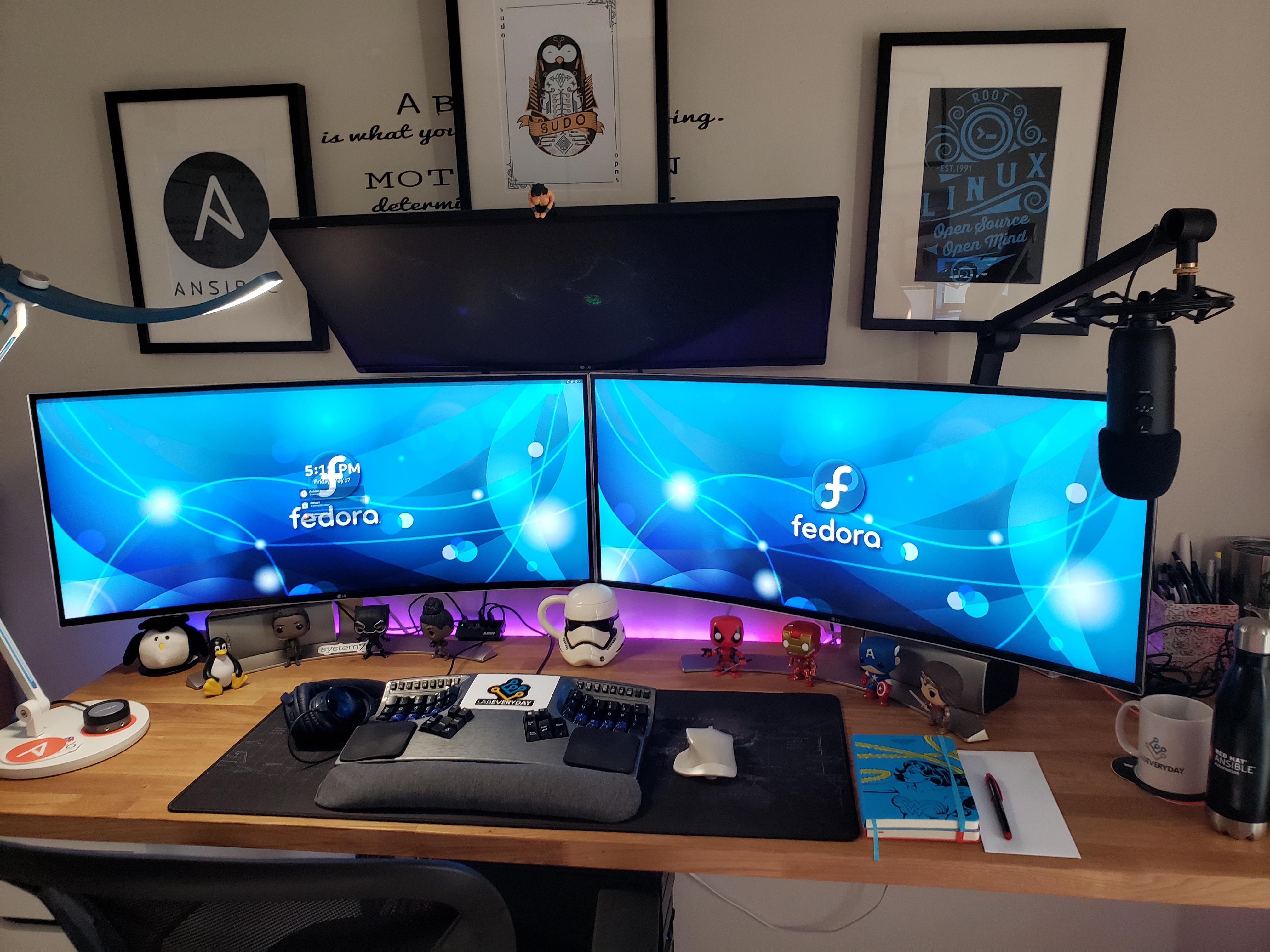
Brown is currently running Fedora 30. She has a variety of software in her everyday work flow. “I use Wekan, which is an open-source kanban, which I use to manage my engagements and projects. My favorite editor is Atom, though I use to use Sublime at one point in time.”
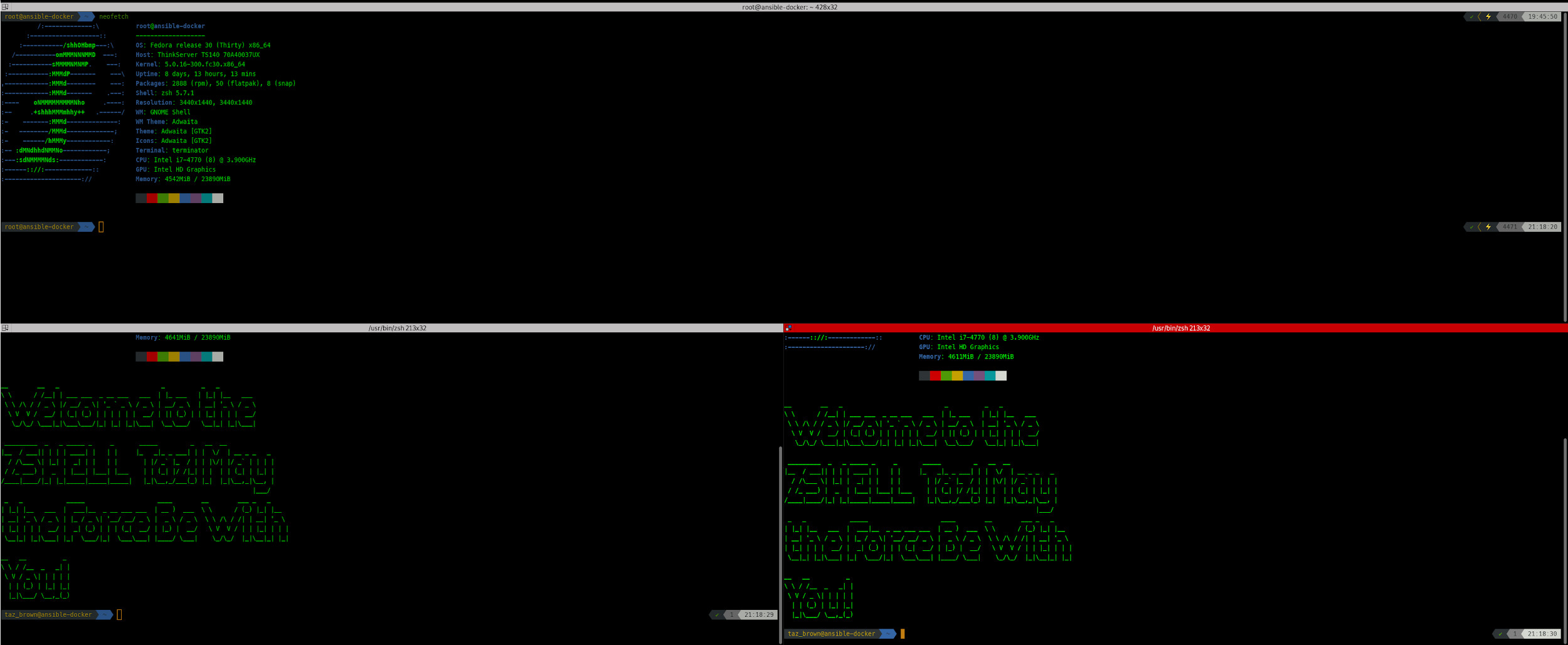
And as for terminals? “I use Terminator as my go-to terminal because of grid arrangement as well as it’s many keyboard shortcuts and its tab formation.” Taz continues, “I love using neofetch which comes up with a nifty fedora logo and system information every time I log in to the terminal. I also have my terminal pimped out using powerline and powerlevel9k and vim-powerline as well.”

We recently interviewed Akash Angle on how he uses Fedora. This is part of a series on the Fedora Magazine. The series profiles Fedora users and how they use Fedora to get things done. Contact us on the feedback form to express your interest in becoming a interviewee.
Akash is a Linux user who ditched Windows some time ago. An avid Fedora user for the past 9 years, he has tried out almost all the Fedora flavors and spins to get his day to day tasks done. He was introduced to Fedora by a school friend.
Akash uses a Lenovo B490 at work. It is equipped with an Intel Core i3-3310 Processor, and a 240GB Kingston SSD. “This laptop is great for day to work like surfing the internet, blogging, and a little bit of photo editing and video editing too. Although not a professional laptop and the specs not being that high end, it does the job perfectly,” says Akash.
He uses a Logitech basic wireless mouse and would like to eventually get a mechanical keyboard. His personal computer — which is a custom-built desktop — has the latest 7th-generation Intel i5 7400 processor, and 8GB Corsair Vengeance RAM.

Akash is a fan of the GNOME 3 desktop environment. He loves most of the goodies and bells and whistles the OS can throw in for getting basic tasks done.
For practical reasons he prefers a fresh installation as a way of upgrading to the latest Fedora version. He thinks Fedora 29 is arguably the the best workstation out there. Akash says this has been backed up by reviews of various tech evangelists and open source news sites.
To play videos, his go-to is the VLC video player packaged as a Flatpak, which gives him the latest stable version. When Akash wants to make screenshots, the ultimate tool for him is Shutter, which the Magazine has covered in the past. For graphics, GIMP is something without which he wouldn’t be able to work.
Google Chrome stable, and the dev channel, are his most used web browsers. He also uses Chromium and the default version of Firefox, and sometimes even Opera makes its way into the party as well.
All the rest of the magic Akash does is from the terminal, as he is a power user. The GNOME Terminal app is the one for him.
One of his favorite wallpapers originally coming from Fedora 16 is the following one:

And this is the one he currently uses on his Fedora 29 Workstation today:


We recently interviewed Khaled Monsoor on how he uses Fedora. This is part of a series that profiles Fedora users and how they use Fedora to get things done. Contact us on the feedback form to tell of us about someone you think we should interview, or to express interest in being interviewed.
Khaled Monsoor was born and raised in Dhaka, the capital of Bangladesh. After graduating with a degree in computer science and engineering, he worked in several different business sectors. Monsoor started a masters in Bioinformatics, but decided to not pursue it.
Monsoor currently works at Augmedix Inc., a Silicon Valley medicare startup, as a research engineer. started using Linux in 2002 and got involved with the Fedora Project in 2005. He believes balancing the demands of a full-time job and family is the biggest challenge to contributing to open source projects.
His heroes are the Thundercats, Captain Planet and MacGyver. Khaled’s favorite movies are The Matrix and Interstellar. “During my youth, The Matrix [shook] my whole concept of reality. Is what we see and feel really real, or just sort of simulation or just a test? That sort of thing. In Interstellar, it’s the twisted human lives with advanced technology mesmerized me. I think the father in me cried, like a baby, with Matthew McConaughey in the hospital meeting scene.”
Monsoor also enjoys photography. He like to use his Nikon D7100, but admits the best camera is the one you have on hand. “I like magnificent nature pictures that takes me to that place, travel & street pictures of same spirit, and honest portraits that makes a close feelings of that person’s real life.”

More of Monsoor’s photos can be found on his Flickr page.
Monsoor’s first interaction with the Fedora Community left him impressed with its energy and passion about aesthetics. While there are many Linux distributions to choose from, he chose Fedora due to its “system stability, community support and Konsole terminal.” He would like to see more attention paid to Fedora’s overall visual aesthetics.
For work, Monsoor uses Fedora 27 on an HP Probook 470 G3 laptop. The laptop is equipped with an Intel Core i7-6500U Processor and 16 GB RAM. It has a hybrid graphics solution utilizing Intel and AMD GPUs. The hybrid graphics is not very useful due to driver issues in Linux. Monsoor replaced the 500GB hard drive with a 128GB SSD drive to boost performance. “The big 17″ display is a huge plus for software development.”
Monsoor has repetitive pain injury (RSI) pain in his wrists so he uses a special mouse. “I use an Anker vertical wireless mouse to ease the stress on my wrist.”
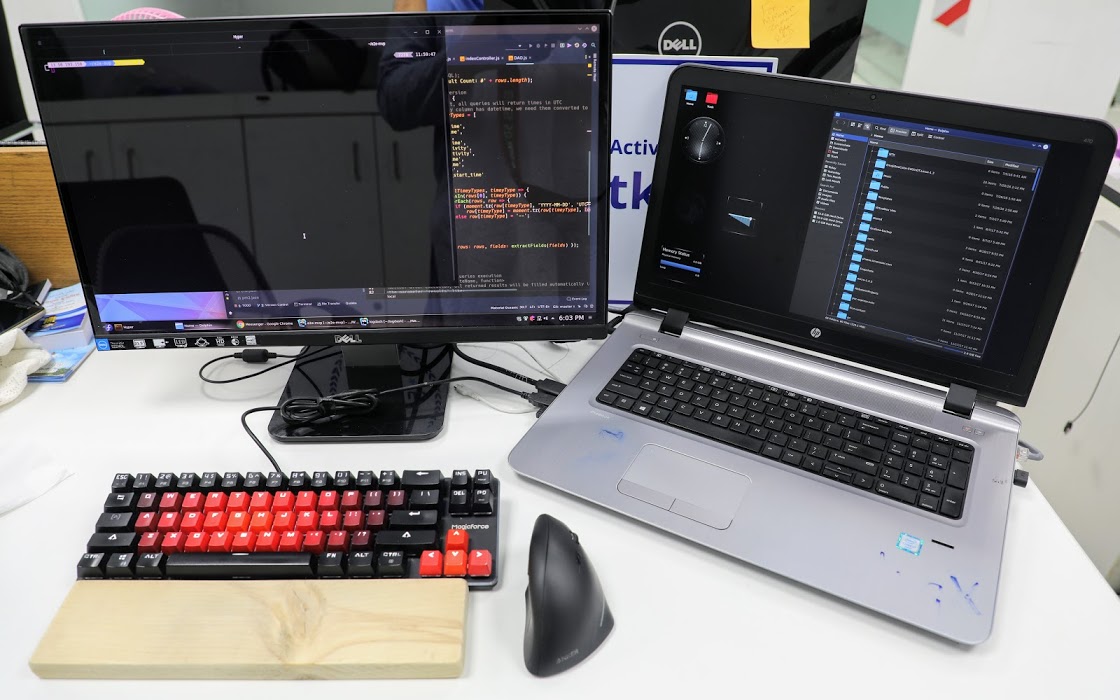
Monsoor prefers KDE Plasma for his desktop. He also makes use of Kate, Konsole, Kalc, Dolphin file manager and Kdenlive. For non-KDE software he uses Gimp, Pinta, Shotwell, Hyper Terminal, VS Code, PostgreSQL, Firefox and Libre Office.
When asked about why he prefers KDE he said, “I’m not sure, exactly. Possibly, it gives me a feeling of control. In charge of something very capable, waiting for directions and just works. Not forced over-simplistic, or trying to hide the complexities it handles, rather gives a grip on them. Or, just that its name begins with the same character (K) as my name.”
He prefers Konsole because “it shares the philosophy of KDE. Stable, capable and highly-configurable, just what power users needs. Not too dumb-looking, not too nerdy.”