Posted on Leave a comment

Build resilient applications with Kubernetes on Azure

Welcome to KubeCon EU 2020, the virtual edition. While we won’t be able to see each other in person at KubeCon EU this year, we’re excited that this new virtual format of KubeCon will make the conference more accessible than ever, with more people from the amazing Kubernetes community able to join and participate from around the world without leaving their homes.

With everything that has been happening, the last year has been an up and down experience, but through it all I’m incredibly proud of the focus and dedication from the Azure Kubernetes team. They have continued to iterate and improve our Kubernetes on Azure that provides enterprise-grade experience for our customers.

Kubernetes on Azure (and indeed anywhere) delivers an open and portable ecosystem for cloud-native development. In addition to this core promise, we also deliver a unique enterprise-grade experience that ensures the reliability and security your workloads demand, while also enabling the agility and efficiency that business today desires. You can securely deploy any workload to Azure Kubernetes Service (AKS) to drive cost-savings at scale across your business. Today, we’re going to tell you about even more capabilities that can help you along on your cloud-native journey to Kubernetes on Azure.

Improving latency and operational efficiency

One of the key drivers of cloud adoption is reducing latency. It used to be that it took days to get physical computers and set them up in a cluster. Today, you can deploy a Kubernetes cluster on Azure in less than five minutes. These improvements benefit the agility of our customers. For customers who want to scale and provision faster, we are announcing a preview of ephemeral OS disk support which makes responding to new compute demands on your cluster even faster.

Latency isn’t just about the length of time to create a cluster. It’s also about how fast you can detect and respond to operational problems. To help enterprises improve their operational efficiency, we’re announcing preview integration with Azure Resource Health which can alert you if your cluster is unhealthy for any reason. We’re also announcing the general availability of node image updates which allow you to upgrade the underlying operating system to respond to bugs or vulnerabilities in your cluster while staying on the same Kubernetes version for stability.

Finally, though Kubernetes has always enabled enterprises to drive cost savings through containerization, the new economic realities of the world during a pandemic mean that achieving cost efficiency for your business is more important than ever. We’ve got a great exercise that can help you learn how to optimize your costs using containers and the Azure Kubernetes Service.

Secure by design with Kubernetes on Azure

One of the key pillars of any enterprise computing platform is security. With market-leading features like policy integration and Azure Active Directory identity for Pods and cloud-native security have always been an important part of the Azure Kubernetes Service. I’m excited about some new features we’ve added recently to further enhance the security of your workloads running on Kubernetes.

Though Kubernetes has built-in support for secrets, most enterprise environments require a more secure and more compliant implementation. In the Azure Kubernetes Service, being enterprise-grade means providing integration between Azure Key Vault and the Azure Kubernetes service. Using Key Vault with Kubernetes enables you to securely store your credentials, certificates, and other secrets in state of the art, compliant secret store, and easily use them with your applications in an Azure Kubernetes cluster.

It’s even more exciting that this integration is built on the back of an open Container Storage Interface (CSI) driver that the Azure team built and open sourced for the entire Kubernetes community. Giving back to open source is an important part of what it means to be a community steward, and it was exciting to see our approach get validated as it was picked up and used by the HashiCorp Vault team for their secrets integration. Our open source team has been hard at work on improving many other parts of the security ecosystem. We’ve enhanced the CSI driver for Windows, and worked on cgroups v2 and containerd. If you want to learn more about how to secure your cloud-native workloads and make sure that your enterprise is following Microsoft’s best practices, check out our guide to Kubernetes best practices. They will teach you how to integrate firewalls, policy, and more to ensure you have both security and agility in your cloud-native development.

Next steps and KubeCon EU

I hope that you have an awesome KubeCon EU. As you go through the conference and learn more about Kubernetes, you can also learn more about Kubernetes on Azure with all of the great information online and in our virtual booth. If you’re new to KubeCon and Kubernetes and wondering how you can adopt Kubernetes for workloads from hobbyist to enterprise, we’ve got a great Kubernetes adoption guide for you.

Posted on Leave a comment

Using the Quarkus Framework on Fedora Silverblue – Just a Quick Look

Quarkus is a framework for Java development that is described on their web site as:

A Kubernetes Native Java stack tailored for OpenJDK HotSpot and GraalVM, crafted from the best of breed Java libraries and standards

https://quarkus.io/ – Feb. 5, 2020

Silverblue — a Fedora Workstation variant with a container based workflow central to its functionality — should be an ideal host system for the Quarkus framework.

There are currently two ways to use Quarkus with Silverblue. It can be run in a pet container such as Toolbox/Coretoolbox. Or it can be run directly in a terminal emulator. This article will focus on the latter method.

Why Quarkus

According to Quarkus.io: “Quarkus has been designed around a containers first philosophy. What this means in real terms is that Quarkus is optimized for low memory usage and fast startup times.” To achieve this, they employ first class support for Graal/Substrate VM, build time Metadata processing, reduction in reflection usage, and native image preboot. For details about why this matters, read Container First at Quarkus.

Prerequisites

A few prerequisites will need to configured before you can start using Quarkus. First, you need an IDE of your choice. Any of the popular ones will do. VIM or Emacs will work as well. The Quarkus site provides full details on how to set up the three major Java IDE’s (Eclipse, Intellij Idea, and Apache Netbeans). You will need a version of JDK installed. JDK 8, JDK 11 or any distribution of OpenJDK is fine. GrallVM 19.2.1 or 19.3.1 is needed for compiling down to native. You will also need Apache Maven 3.53+ or Gradle. This article will use Maven because that is what the author is more familiar with. Use the following command to layer Java 11 OpenJDK and Maven onto Silverblue:

$ rpm-ostree install java-11-openjdk* maven

Alternatively, you can download your favorite version of Java and install it directly in your home directory.

After rebooting, configure your JAVA_HOME and PATH environment variables to reference the new applications. Next, go to the GraalVM download page, and get GraalVM version 19.2.1 or version 19.3.1 for Java 11 OpenJDK. Install Graal as per the instructions provided. Basically, copy and decompress the archive into a directory under your home directory, then modify the PATH environment variable to include Graal. You use it as you would any JDK. So you can set it up as a platform in the IDE of your choice. Now is the time to setup the native image if you are going to use one. For more details on setting up your system to use Quarkus and the Quarkus native image, check out their Getting Started tutorial. With these parts installed and the environment setup, you can now try out Quarkus.

Bootstrapping

Quarkus recommends you create a project using the bootstrapping method. Below are some example commands entered into a terminal emulator in the Gnome shell on Silverblue.

$ mvn io.quarkus:quarkus-maven-plugin:1.2.1.Final:create \ -DprojectGroupId=org.jakfrost \ -DprojectArtifactId=silverblue-logo \ -DclassName="org.jakfrost.quickstart.GreetingResource" \ -Dpath="/hello"
$ cd silverblue-logo

The bootstrapping process shown above will create a project under the current directory with the name silverblue-logo. After this completes, start the application in development mode:

$ ./mvnw compile quarkus:dev

With the application running, check whether it responds as expected by issuing the following command:

$ curl -w '\n' http://localhost:8080/hello

The above command should print hello on the next line. Alternatively, test the application by browsing to http://localhost:8080/hello with your web browser. You should see the same lonely hello on an otherwise empty page. Leave the application running for the next section.

Injection

Open the project in your favorite IDE. If you are using Netbeans, simply open the project directory where the pom.xml file resides. Now would be a good time to have a look at the pom.xml file.

Quarkus uses ArC for its dependency injection. ArC is a dependency of quarkus-resteasy, so it is already part of the core Quarkus installation. Add a companion bean to the project by creating a java class in your IDE called GreetingService.java. Then put the following code into it:

import javax.enterprise.context.ApplicationScoped; @ApplicationScoped
public class GreetingService { public String greeting(String name) { return "hello " + name; } }

The above code is a verbatim copy of what is used in the injection example in the Quarkus Getting Started tutorial. Modify GreetingResource.java by adding the following lines of code:

import javax.inject.Inject;
import org.jboss.resteasy.annotations.jaxrs.PathParam; @Inject GreetingService service;//inject the service @GET //add a getter to use the injected service @Produces(MediaType.TEXT_PLAIN) @Path("/greeting/{name}") public String greeting(@PathParam String name) { return service.greeting(name); }

If you haven’t stopped the application, it will be easy to see the effect of your changes. Just enter the following curl command:

$ curl -w '\n' http://localhost:8080/hello/greeting/Silverblue

The above command should print hello Silverblue on the following line. The URL should work similarly in a web browser. There are two important things to note:

  1. The application was running and Quarkus detected the file changes on the fly.
  2. The injection of code into the app was very easy to perform.

The native image

Next, package your application as a native image that will work in a podman container. Exit the application by pressing CTRL-C. Then use the following command to package it:

$ ./mvnw package -Pnative -Dquarkus.native.container-runtime=podman

Now, build the container:

$ podman build -f src/main/docker/Dockerfile.native -t silverblue-logo/silverblue-logo

Now run it with the following:

$ podman run -i --rm -p 8080:8080 localhost/silverblue-logo/silverblue-logo

To get the container build to successfully complete, it was necessary to copy the /target directory and contents into the src/main/docker/ directory. Investigation as to the reason why is still required, and though the solution used was quick and easy, it is not an acceptable way to solve the problem.

Now that you have the container running with the application inside, you can use the same methods as before to verify that it is working.

Point your browser to the URL http://localhost:8080/ and you should get a index.html that is automatically generated by Quarkus every time you create or modify an application. It resides in the src/main/resources/META-INF/resources/ directory. Drop other HTML files in this resources directory to have Quarkus serve them on request.

For example, create a file named logo.html in the resources directory containing the below markup:

<!DOCTYPE html>
<!--
To change this license header, choose License Headers in Project Properties.
To change this template file, choose Tools | Templates
and open the template in the editor.
-->
<html> <head> <title>Silverblue</title> <meta charset="UTF-8"> <meta name="viewport" content="width=device-width, initial-scale=1.0"> </head> <body> <div> <img src="fedora-silverblue-logo.png" alt="Fedora Silverblue"/> </div> </body>
</html>

Next, save the below image alongside the logo.html file with the name fedora-silverblue-logo.png:

Now view the results at http://localhost:8080/logo.html.

Testing your application

Quarkus supports junit 5 tests. Look at your project’s pom.xml file. In it you should see two test dependencies. The generated project will contain a simple test, named GreetingResourceTest.java. Testing for the native file is only supported in prod mode. However, you can test the jar file in dev mode. These tests are RestAssured, but you can use whatever test library you wish with Quarkus. Use Maven to run the tests:

$ ./mvnw test

More details can be found in the Quarkus Getting Started tutorial.

Further reading and tutorials

Quarkus has an extensive collection of tutorials and guides. They are well worth the time to delve into the breadth of this microservices framework.

Quarkus also maintains a publications page that lists some very interesting articles on actual use cases of Quarkus. This article has only just scratched the surface of the topic. If what was presented here has piqued your interest, then follow the above links for more information.

Posted on Leave a comment

Using Kubernetes ConfigMaps to define your Quarkus application’s properties

So, you wrote your Quarkus application, and now you want to deploy it to a Kubernetes cluster. Good news: Deploying a Quarkus application to a Kubernetes cluster is easy. Before you do this, though, you need to straighten out your application’s properties. After all, your app probably has to connect with a database, call other services, and so on. These settings are already defined in your application.properties file, but the values match the ones for your local environment and won’t work once deployed onto your cluster.

So, how do you easily solve this problem? Let’s walk through an example.

Create the example Quarkus application

Instead of using a complex example, let’s take a simple use case that explains the concept well. Start by creating a new Quarkus app:

$ mvn io.quarkus:quarkus-maven-plugin:1.1.1.Final:create

You can keep all of the default values while creating the new application. In this example, the application is named hello-app. Now, open the HelloResource.java file and refactor it to look like this:

@Path("/hello") public class HelloResource { @ConfigProperty(name = "greeting.message") String message; @GET @Produces(MediaType.TEXT_PLAIN) public String hello() { return "hello " + message; } } 

In your application.properties file, now add greeting.message=localhost. The @ConfigProperty annotation is not in the scope of this article, but here we can see how easy it is to inject properties inside our code using this annotation.

Now, let’s start our application to see if it works as expected:

$ mvn compile quarkus:dev

Browse to http://localhost:8080/hello, which should output hello localhost. That’s it for the Quarkus app. It’s ready to go.

Deploy the application to the Kubernetes cluster

The idea here is to deploy this application to our Kubernetes cluster and replace the value of our greeting property with one that will work on the cluster. It is important to know here that all of the properties from application.properties are exposed, and thus can be overridden with environment variables. The convention is to convert the name of the property to uppercase and replace every dot (.) with an underscore (_). So, for instance, our greeting.message will become GREETING_MESSAGE.

At this point, we are almost ready to deploy our app to Kubernetes, but we need to do three more things:

  1. Create a Docker image of your application and push it to a repository that your cluster can access.
  2. Define a ConfgMap resource.
  3. Generate the Kubernetes resources for our application.

To create the Docker image, simply execute this command:

$ docker build -f src/main/docker/Dockerfile.jvm -t quarkus/hello-app .

Be sure to set the right Docker username and to also push to an image registry, like docker-hub or quay. If you are not able to push an image, you can use sebi2706/hello-app:latest.

Next, create the file config-hello.yml:

apiVersion: v1 data: greeting: "Kubernetes" kind: ConfigMap metadata: name: hello-config 

Make sure that you are connected to a cluster and apply this file:

$ kubectl apply -f config-hello.yml

Quarkus comes with a useful extension, quarkus-kubernetes, that generates the Kubernetes resources for you. You can even tweak the generated resources by providing extra properties—for more details, check out this guide.

After installing the extension, add these properties to our application.properties file so it generates extra configuration arguments for our containers specification:

kubernetes.group=yourDockerUsername kubernetes.env-vars[0].name=GREETING_MESSAGE kubernetes.env-vars[0].value=greeting kubernetes.env-vars[0].configmap=hello-config

Run mvn package and view the generated resources in target/kubernetes. The interesting part is in spec.containers.env:

- name: "GREETING_MESSAGE"   valueFrom:   configMapKeyRef:     key: "greeting"    name: "hello-config"

Here, we see how to pass an environment variable to our container with a value coming from a ConfigMap. Now, simply apply the resources:

$ kubectl apply -f target/kubernetes/kubernetes.yml

Expose your service:

kubectl expose deployment hello --type=NodePort

Then, browse to the public URL or do a curl. For instance, with Minikube:

$ curl $(minikube service hello-app --url)/hello

This command should output: hello Kubernetes.

Conclusion

Now you know how to use a ConfigMap in combination with environment variables and your Quarkus’s application.properties. As we said in the introduction, this technique is particularly useful when defining a DB connection’s URL (like QUARKUS_DATASOURCE_URL) or when using the quarkus-rest-client (ORG_SEBI_OTHERSERVICE_MP_REST_URL).

Share

The post Using Kubernetes ConfigMaps to define your Quarkus application’s properties appeared first on Red Hat Developer.

Posted on Leave a comment

CodeReady Workspaces devfile, demystified

With the exciting advent of CodeReady Workspaces (CRW) 2.0 comes some important changes. Based on the upstream project Eclipse Che 7, CRW brings even more of the “Infrastructure as Code” idea to fruition. Workspaces mimic the environment of a PC, an operating system, programming language support, the tools needed, and an editor. The real power comes by defining a workspace using a YAML file—a text file that can be stored and versioned in a source control system such as Git. This file, called devfile.yaml, is powerful and complex. This article will attempt to demystify the devfile.

A Java Maven example

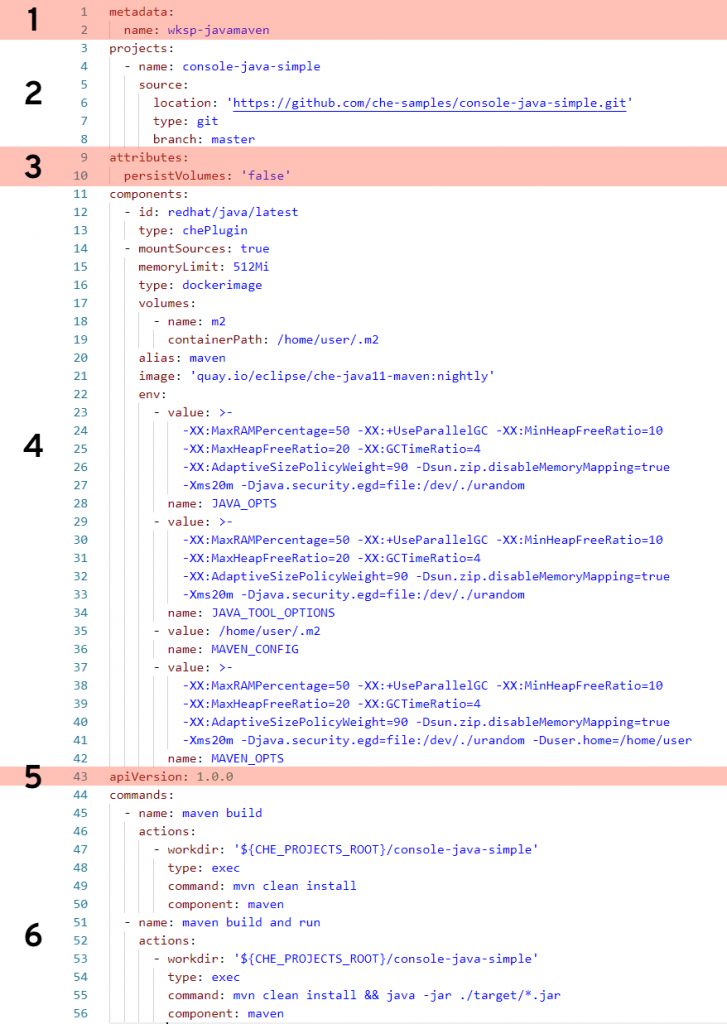
The following devfile defines a workspace that has Java language support, includes the Maven build tool, and has two custom commands.

Let’s break this down.

Section 1: metadata

This section is required, and in this case name is specified as the name of this workspace (wksp-javamaven). You also have the option of a name prefix, in which case the system will generate the rest of the name (e.g., generateName: javamaven-). Using generateName means a user can have multiple instances of this workspace at the same time. This is an important distinction and one which must be addressed by management.

Section 2: projects

This section is optional (but probably a very good idea) and tells the workspace where to find the project that will be included. In this case, we’re pointing to the master branch of a Git repository located on GitHub. You can specify multiple projects for a workspace, and the type can be a zip file as well. While the name of the project does not need to match the name of the repo it’s, again, probably a very good idea. If you make them different, well … then that’s a create opportunity to add confusion and really mess things up.

Section 3: attributes

This part is optional and can pretty much define anything you wish. In this example, it’s specifying that any values stored in any specified volumes are not stored. This will likely be the value you’ll always want. The idea is that, unless you commit your changes to the Git repo, any work done will be lost. Think of it this way: Whereas on your local PC you perform a File –> Save command to keep your work, you’ll instead do git commit. In “devfile-speak,” persistVolumes: false makes the data ephemeral. This setting, false, also makes the workspace perform better.

Section 4: components

This is the heaviest part of this example, where we specify what bits and pieces make up our workspace.

The first component is a Che Plugin, identified at redhat/java/latest. You can see the description of this plug on this GitHub page.

The next component is a type dockerimage that is the maven support for this workspace. Of special note is the setting mountSources: true, which makes the source code available to the container that is running this image. In this particular case, we want our Maven build to have access to the source code—which makes sense.

The volumes: setting defines a directory within the container that is available to this workspace. This is used, for example, to give the workspace access to a needed directory that would otherwise be outside the container and blocked by lack of permissions. In other words, if you run a command in a workspace and get an error message because you are denied access to a directory, you can get around that by defining that directory here, in your devfile, that will be created inside your container.

The remaining settings associated with this component are related to memory limits, security, etc.

Section 5: apiVersion

This section is required and is how you specify which API version you are using. This is pretty much boilerplate text.

Section 6: commands

This is the fun part. In this section, you can define custom commands that are available to the user. Typically, this is where you’ll specify command-line commands that can be run from within the IDE rather than dropping to the command line and typing what may be a lengthy command. The properties here will look pretty much self-explanatory. Note that a macro can be used instead of hard-coded value for the project root directory (e.g., ${CHE_PROJECTS_ROOT}).

Start exploring

There are many settings and variations of devfiles. If you have the ability, I suggest going into your CRW 2.0 instance and exploring any existing workspaces’ devfiles. Take an existing devfile, clone it, then change it and implement it to see what happens. Like any good developer, make changes until you break things, then gain understanding.

Share

The post CodeReady Workspaces devfile, demystified appeared first on Red Hat Developer.

Posted on Leave a comment

Brendan Burns: Empowering cloud-native developers on Kubernetes anywhere

Hello KubeCon and welcome to San Diego! It’s fantastic to have the chance to get some warm California sun, as well as the warmth of the broader Kubernetes community. From the very first community meeting, through the first KubeCon and on to today, it’s been truly amazing to have been able to watch and help the Kubernetes community grow. As KubeCon arrives, I’m excited to note how we are continuing to innovate and empower cloud-native developers on Kubernetes anywhere.

In the spirit of innovation, I’m thrilled to announce our new open source effort to enable trusted execution environments for Kubernetes. Trusted execution environments or “enclaves” are a hardware-backed secure execution environment that can ensure processes and their memory are secure while they execute. Today, we’re enabling trusted computing on Kubernetes anywhere via the Open Enclave SDK.

We’re also releasing a resource plugin that makes Encrypted Page Cache RAM a resource that the Kubernetes scheduler can use to make scheduling decisions. The number of enclaves on a CPU is limited, and this plugin ensures that Pods that need enclaves will be guaranteed to land on a node with an enclave available. This scheduler support is critical to running trusted compute environments in cloud-native applications via Pods.

Beyond these innovations for secure computing, I’m incredibly proud of the work that the Helm community has done to build and release Helm 3.0 last week. The vast majority of workloads deployed to Kubernetes are deployed via Helm, and Helm 3 is the next step in this journey. Over the past few years, the Helm team has carefully listened to user feedback about what was working and where changes were needed.

Of the many fixes and improvements, the most popular is probably the removal of Tiller from the cluster, making Charts more Kubernetes native and more secure by default. Speaking of security, the recent glowing independent security review of the Helm code base shows how dedicated and careful the Helm community has been in building a tool that is not just incredibly useful, but also secure as well. Many congratulations to the Helm community on this important milestone.

Just like the Helm team, in Azure, our open source work begins by listening to our customers. In particular, our customers in IoT and telecommunications. This feedback led us to understand how important it was for Kubernetes to support both IPv4 and IPv6 addresses for the same Pods in Kubernetes. Major kudos are due to Kal Henidak for his dedicated and tireless work in engineering both the code and design changes necessary to support multiple addresses per Pod. As you might imagine this change required careful work and coordination across the entire Kubernetes code base and community. Kal’s hard work in collaboration with the SIG-Networking community is being recognized with a shared keynote with Tim Hockin. Plan on attending the keynote to learn more about IPv4 and IPv6 in Kubernetes!

Finally, by combining both open source community and innovation we have a remarkable collection of open source projects reaching important milestones at KubeCon. The newly announced Buck (Brigade Universal Controller for Kubernetes) project shows how Cloud Native Application Bundles (CNAB) with Brigade radically simplify the development of new operators. The Kubernetes-based Event-driven Autoscaling (KEDA) has shown incredible community interest. It’s a great collaboration between Azure Functions, Red Hat, and others. Here at KubeCon, the KEDA community is hitting the 1.0 milestone and is stable and ready for production use. I also want to congratulate the Cloud Events community on their recent 1.0 release and I’m excited that Azure Event Grid has correspondingly added support for the 1.0 version of Cloud Events. Cloud Events is a CNCF project for an open and portable API for event-driven programming and it’s awesome that it is available in a managed environment in Azure.

Of course, containers and DevOps are a year-round focus for my teams beyond KubeCon. We’ve been busy this fall.

In the four weeks since we launched the Distributed Application Runtime (Dapr) project, we have seen strong interest from the community and have been listening to the many stories of how people are using Dapr in their projects, including modernizing Java code, building games, and integrating with IoT solutions. The breadth across different industries is amazing to see. The interest in the Dapr runtime repo has grown beyond our expectations. It’s been awesome to see the community come together and continue the momentum. We are excited to announce the release of Dapr v0.2.0, focusing on community-driven components, fixes across the Dapr runtime and CLI, updates to documentation, samples, and the addition of an end-to-end testing framework. You can find out more about the v0.2.0 release at the Dapr repo.

Just building distributed systems isn’t enough, you need to be able to observe how they are running in production, and the CNCF Prometheus project has emerged as a de-facto standard for exposing metrics on all sorts of servers. But it’s still easier to integrate with cloud-based monitoring rather than run your own metrics server. To enable this, Azure Monitor for containers can scrape the metrics exposed from Prometheus end-points so you can quickly gather failure rates, response per secs, and latency. From Log Analytics, you can easily run a Kusto Query Language (KQL) query and create your custom dashboard in the Azure portal dashboard. For many customers using Grafana to support their dashboard requirements, you can visualize the container and Prometheus metrics in a Grafana dashboard. Azure monitoring combines the best of open technology with the reliability of a cloud service.

In the last few years, KubeCon has grown from a single-track to many tracks and thousands of people. For me personally, and the community in general, it’s been an incredible journey. I’m excited to see people in San Diego – please stop by the Azure booth and say hello!

Posted on Leave a comment

Kubernetes on Fedora IoT with k3s

Fedora IoT is an upcoming Fedora edition targeted at the Internet of Things. It was introduced last year on Fedora Magazine in the article How to turn on an LED with Fedora IoT. Since then, it has continued to improve together with Fedora Silverblue to provide an immutable base operating system aimed at container-focused workflows.

Kubernetes is an immensely popular container orchestration system. It is perhaps most commonly used on powerful hardware handling huge workloads. However, it can also be used on lightweight devices such as the Raspberry Pi 3. Read on to find out how.

Why Kubernetes?

While Kubernetes is all the rage in the cloud, it may not be immediately obvious to run it on a small single board computer. But there are certainly reasons for doing it. First of all it is a great way to learn and get familiar with Kubernetes without the need for expensive hardware. Second, because of its popularity, there are tons of applications that comes pre-packaged for running in Kubernetes clusters. Not to mention the large community to provide help if you ever get stuck.

Last but not least, container orchestration may actually make things easier, even at the small scale in a home lab. This may not be apparent when tackling the the learning curve, but these skills will help when dealing with any cluster in the future. It doesn’t matter if it’s a single node Raspberry Pi cluster or a large scale machine learning farm.

K3s – a lightweight Kubernetes

A “normal” installation of Kubernetes (if such a thing can be said to exist) is a bit on the heavy side for IoT. The recommendation is a minimum of 2 GB RAM per machine! However, there are plenty of alternatives, and one of the newcomers is k3s – a lightweight Kubernetes distribution.

K3s is quite special in that it has replaced etcd with SQLite for its key-value storage needs. Another thing to note is that k3s ships as a single binary instead of one per component. This diminishes the memory footprint and simplifies the installation. Thanks to the above, k3s should be able to run k3s with just 512 MB of RAM, perfect for a small single board computer!

What you will need

  1. Fedora IoT in a virtual machine or on a physical device. See the excellent getting started guide here. One machine is enough but two will allow you to test adding more nodes to the cluster.
  2. Configure the firewall to allow traffic on ports 6443 and 8472. Or simply disable it for this experiment by running “systemctl stop firewalld”.

Install k3s

Installing k3s is very easy. Simply run the installation script:

curl -sfL https://get.k3s.io | sh -

This will download, install and start up k3s. After installation, get a list of nodes from the server by running the following command:

kubectl get nodes

Note that there are several options that can be passed to the installation script through environment variables. These can be found in the documentation. And of course, there is nothing stopping you from installing k3s manually by downloading the binary directly.

While great for experimenting and learning, a single node cluster is not much of a cluster. Luckily, adding another node is no harder than setting up the first one. Just pass two environment variables to the installation script to make it find the first node and avoid running the server part of k3s

curl -sfL https://get.k3s.io | K3S_URL=https://example-url:6443 \
K3S_TOKEN=XXX sh -

The example-url above should be replaced by the IP address or fully qualified domain name of the first node. On that node the token (represented by XXX) is found in the file /var/lib/rancher/k3s/server/node-token.

Deploy some containers

Now that we have a Kubernetes cluster, what can we actually do with it? Let’s start by deploying a simple web server.

kubectl create deployment my-server --image nginx

This will create a Deployment named “my-server” from the container image “nginx” (defaulting to docker hub as registry and the latest tag). You can see the Pod created by running the following command.

kubectl get pods

In order to access the nginx server running in the pod, first expose the Deployment through a Service. The following command will create a Service with the same name as the deployment.

kubectl expose deployment my-server --port 80

The Service works as a kind of load balancer and DNS record for the Pods. For instance, when running a second Pod, we will be able to curl the nginx server just by specifying my-server (the name of the Service). See the example below for how to do this.

# Start a pod and run bash interactively in it
kubectl run debug --generator=run-pod/v1 --image=fedora -it -- bash
# Wait for the bash prompt to appear
curl my-server
# You should get the "Welcome to nginx!" page as output

Ingress controller and external IP

By default, a Service only get a ClusterIP (only accessible inside the cluster), but you can also request an external IP for the service by setting its type to LoadBalancer. However, not all applications require their own IP address. Instead, it is often possible to share one IP address among many services by routing requests based on the host header or path. You can accomplish this in Kubernetes with an Ingress, and this is what we will do. Ingresses also provide additional features such as TLS encryption of the traffic without having to modify your application.

Kubernetes needs an ingress controller to make the Ingress resources work and k3s includes Traefik for this purpose. It also includes a simple service load balancer that makes it possible to get an external IP for a Service in the cluster. The documentation describes the service like this:

k3s includes a basic service load balancer that uses available host ports. If you try to create a load balancer that listens on port 80, for example, it will try to find a free host in the cluster for port 80. If no port is available the load balancer will stay in Pending.

k3s README

The ingress controller is already exposed with this load balancer service. You can find the IP address that it is using with the following command.

$ kubectl get svc --all-namespaces
NAMESPACE NAME TYPE CLUSTER-IP EXTERNAL-IP PORT(S) AGE
default kubernetes ClusterIP 10.43.0.1 443/TCP 33d
default my-server ClusterIP 10.43.174.38 80/TCP 30m
kube-system kube-dns ClusterIP 10.43.0.10 53/UDP,53/TCP,9153/TCP 33d
kube-system traefik LoadBalancer 10.43.145.104 10.0.0.8 80:31596/TCP,443:31539/TCP 33d

Look for the Service named traefik. In the above example the IP we are interested in is 10.0.0.8.

Route incoming requests

Let’s create an Ingress that routes requests to our web server based on the host header. This example uses xip.io to avoid having to set up DNS records. It works by including the IP adress as a subdomain, to use any subdomain of 10.0.0.8.xip.io to reach the IP 10.0.0.8. In other words, my-server.10.0.0.8.xip.io is used to reach the ingress controller in the cluster. You can try this right now (with your own IP instead of 10.0.0.8). Without an ingress in place you should reach the “default backend” which is just a page showing “404 page not found”.

We can tell the ingress controller to route requests to our web server Service with the following Ingress.

apiVersion: extensions/v1beta1
kind: Ingress
metadata:
name: my-server
spec:
rules:
- host: my-server.10.0.0.8.xip.io
http:
paths:
- path: /
backend:
serviceName: my-server
servicePort: 80

Save the above snippet in a file named my-ingress.yaml and add it to the cluster by running this command:

kubectl apply -f my-ingress.yaml

You should now be able to reach the default nginx welcoming page on the fully qualified domain name you chose. In my example this would be my-server.10.0.0.8.xip.io. The ingress controller is routing the requests based on the information in the Ingress. A request to my-server.10.0.0.8.xip.io will be routed to the Service and port defined as backend in the Ingress (my-server and 80 in this case).

What about IoT then?

Imagine the following scenario. You have dozens of devices spread out around your home or farm. It is a heterogeneous collection of IoT devices with various hardware capabilities, sensors and actuators. Maybe some of them have cameras, weather or light sensors. Others may be hooked up to control the ventilation, lights, blinds or blink LEDs.

In this scenario, you want to gather data from all the sensors, maybe process and analyze it before you finally use it to make decisions and control the actuators. In addition to this, you may want to visualize what’s going on by setting up a dashboard. So how can Kubernetes help us manage something like this? How can we make sure that Pods run on suitable devices?

The simple answer is labels. You can label the nodes according to capabilities, like this:

kubectl label nodes <node-name> <label-key>=<label-value>
# Example
kubectl label nodes node2 camera=available

Once they are labeled, it is easy to select suitable nodes for your workload with nodeSelectors. The final piece to the puzzle, if you want to run your Pods on all suitable nodes is to use DaemonSets instead of Deployments. In other words, create one DaemonSet for each data collecting application that uses some unique sensor and use nodeSelectors to make sure they only run on nodes with the proper hardware.

The service discovery feature that allows Pods to find each other simply by Service name makes it quite easy to handle these kinds of distributed systems. You don’t need to know or configure IP addresses or custom ports for the applications. Instead, they can easily find each other through named Services in the cluster.

Utilize spare resources

With the cluster up and running, collecting data and controlling your lights and climate control you may feel that you are finished. However, there are still plenty of compute resources in the cluster that could be used for other projects. This is where Kubernetes really shines.

You shouldn’t have to worry about where exactly those resources are or calculate if there is enough memory to fit an extra application here or there. This is exactly what orchestration solves! You can easily deploy more applications in the cluster and let Kubernetes figure out where (or if) they will fit.

Why not run your own NextCloud instance? Or maybe gitea? You could also set up a CI/CD pipeline for all those IoT containers. After all, why would you build and cross compile them on your main computer if you can do it natively in the cluster?

The point here is that Kubernetes makes it easier to make use of the “hidden” resources that you often end up with otherwise. Kubernetes handles scheduling of Pods in the cluster based on available resources and fault tolerance so that you don’t have to. However, in order to help Kubernetes make reasonable decisions you should definitely add resource requests to your workloads.

Summary

While Kubernetes, or container orchestration in general, may not usually be associated with IoT, it certainly makes a lot of sense to have an orchestrator when you are dealing with distributed systems. Not only does is allow you to handle a diverse and heterogeneous fleet of devices in a unified way, but it also simplifies communication between them. In addition, Kubernetes makes it easier to utilize spare resources.

Container technology made it possible to build applications that could “run anywhere”. Now Kubernetes makes it easier to manage the “anywhere” part. And as an immutable base to build it all on, we have Fedora IoT.