Posted on Leave a comment

Python Regex Flags

In many functions, you see a third argument flags. What are they and how do they work?

Flags allow you to control the regular expression engine. Because regular expressions are so powerful, they are a useful way of switching on and off certain features (e.g. whether to ignore capitalization when matching your regex).

For example, here’s how the third argument flags is used in the re.findall() method:

re.findall(pattern, string, flags=0)

So the flags argument seems to be an integer argument with the default value of 0. To control the default regex behavior, you simply use one of the predefined integer values. You can access these predefined values via the re library:

Syntax Meaning
re.ASCII If you don’t use this flag, the special Python regex symbols \w, \W, \b, \B, \d, \D, \s and \S will match Unicode characters. If you use this flag, those special symbols will match only ASCII characters — as the name suggests.
re.A Same as re.ASCII
re.DEBUG If you use this flag, Python will print some useful information to the shell that helps you debugging your regex.
re.IGNORECASE If you use this flag, the regex engine will perform case-insensitive matching. So if you’re searching for [A-Z], it will also match [a-z].
re.I Same as re.IGNORECASE
re.LOCALE Don’t use this flag — ever. It’s depreciated—the idea was to perform case-insensitive matching depending on your current locale. But it isn’t reliable.
re.L Same as re.LOCALE
re.MULTILINE This flag switches on the following feature: the start-of-the-string regex ‘^’ matches at the beginning of each line (rather than only at the beginning of the string). The same holds for the end-of-the-string regex ‘$’ that now matches also at the end of each line in a multi-line string.
re.M Same as re.MULTILINE
re.DOTALL Without using this flag, the dot regex ‘.’ matches all characters except the newline character ‘\n’. Switch on this flag to really match all characters including the newline character.
re.S Same as re.DOTALL
re.VERBOSE To improve the readability of complicated regular expressions, you may want to allow comments and (multi-line) formatting of the regex itself. This is possible with this flag: all whitespace characters and lines that start with the character ‘#’ are ignored in the regex.
re.X Same as re.VERBOSE

How to Use These Flags?

Simply include the flag as the optional flag argument as follows:

import re text = ''' Ha! let me see her: out, alas! he's cold: Her blood is settled, and her joints are stiff; Life and these lips have long been separated: Death lies on her like an untimely frost Upon the sweetest flower of all the field. ''' print(re.findall('HER', text, flags=re.IGNORECASE))
# ['her', 'Her', 'her', 'her']

As you see, the re.IGNORECASE flag ensures that all occurrences of the string ‘her’ are matched—no matter their capitalization.

How to Use Multiple Flags?

Yes, simply add them together (sum them up) as follows:

import re text = ''' Ha! let me see her: out, alas! he's cold: Her blood is settled, and her joints are stiff; Life and these lips have long been separated: Death lies on her like an untimely frost Upon the sweetest flower of all the field. ''' print(re.findall(' HER # Ignored', text, flags=re.IGNORECASE + re.VERBOSE))
# ['her', 'Her', 'her', 'her']

You use both flags re.IGNORECASE (all occurrences of lower- or uppercase string variants of ‘her’ are matched) and re.VERBOSE (ignore comments and whitespaces in the regex). You sum them together re.IGNORECASE + re.VERBOSE to indicate that you want to take both.

Posted on Leave a comment

Python re.findall() – Everything You Need to Know

When I first learned about regular expressions, I didn’t really appreciate their power. But there’s a reason regular expressions have survived seven decades of technological disruption: coders who understand regular expressions have a massive advantage when working with textual data. They can write in a single line of code what takes others dozens!

This article is all about the findall() method of Python’s re library. The findall() method is the most basic way of using regular expressions in Python: If you want to master them, start here!

So how does the re.findall() method work? Let’s study the specification.

How Does the findall() Method Work in Python?

The re.findall(pattern, string) method finds all occurrences of the pattern in the string and returns a list of all matching substrings.

Specification:

re.findall(pattern, string, flags=0)

The re.findall() method has up to three arguments.

  • pattern: the regular expression pattern that you want to match.
  • string: the string which you want to search for the pattern.
  • flags (optional argument): a more advanced modifier that allows you to customize the behavior of the function. Want to know how to use those flags? Check out this detailed article on the Finxter blog.

We will have a look at each of them in more detail.

Return Value:

The re.findall() method returns a list of strings. Each string element is a matching substring of the string argument.

Let’s check out a few examples!

Examples re.findall()

First, you import the re module and create the text string to be searched for the regex patterns:

import re text = ''' Ha! let me see her: out, alas! he's cold: Her blood is settled, and her joints are stiff; Life and these lips have long been separated: Death lies on her like an untimely frost Upon the sweetest flower of all the field. '''

Let’s say, you want to search the text for the string ‘her’:

>>> re.findall('her', text)
['her', 'her', 'her']

The first argument is the pattern you look for. In our case, it’s the string ‘her’. The second argument is the text to be analyzed. You stored the multi-line string in the variable text—so you take this as the second argument. You don’t need to define the optional third argument flags of the findall() method because you’re fine with the default behavior in this case.

Also note that the findall() function returns a list of all matching substrings. In this case, this may not be too useful because we only searched for an exact string. But if we search for more complicated patterns, this may actually be very useful:

>>> re.findall('\\bf\w+\\b', text)
['frost', 'flower', 'field']

The regex ‘\\bf\w+\\b’ matches all words that start with the character ‘f’.

You may ask: why to enclose the regex with a leading and trailing ‘\\b’? This is the word boundary character that matches the empty string at the beginning or at the end of a word. You can define a word as a sequence of characters that are not whitespace characters or other delimiters such as ‘.:,?!’.

In the previous example, you need to escape the boundary character ‘\b’ again because in a Python string, the default meaning of the character sequence ‘\b’ is the backslash character.

Where to Go From Here?

This article has introduced the re.findall(pattern, string) method that attempts to match all occurrences of the regex pattern in a given string—and returns a list of all matches as strings.

Python is growing rapidly and the world is more and more divided into two classes: those who understand coding and those who don’t. The latter will have larger and larger difficulties participating in the era of massive adoption and penetration of digital content. Do you want to increase your Python skills on a daily basis without investing a lot of time?

Then join my “Coffee Break Python” email list of tens of thousands of ambitious coders!

Posted on Leave a comment

Best of 2019: Fedora for developers

With the end of the year approaching fast, it is a good time to look back at 2019 and go through the most popular articles on Fedora Magazine written by our contributors.

In this article of the “Best of 2019” series, we are looking at developers and how to use Fedora to be a great developer workstation

Make your Python code look good with Black on Fedora

Black made quite a big impact in the Python ecosystem this year. The project is now part of the Python Software Foundation and it is used by many different projects. So if you write or maintain some Python code and want to stop having to care about code style and code formatting you should check out this article.

How to run virtual machines with virt-manager

Setting up a development environment, running integration tests, testing a new feature, or running an older version of software for all these use cases being able to create and run a virtual machine is a must have knowledge for a developer. This article will walk you through how you can achieve that using virt-manager on your Fedora workstation.

Jupyter and data science in Fedora

With the rise of Data science and machine learning, the Jupyter IDE has become of very popular choice to share or present a program and its results. This article goes into the details of installing and using Jupyter and the different libraries and tools useful for data science.

Building Smaller Container Images

Fedora provides different container images, one of which is a minimal base image. The following article demonstrate how one can use this image to build smaller container images.

Getting Started with Go on Fedora

In 2019 the Go programming language turned 10 year old. In ten years the language has managed to become the default choice for cloud native applications and the cloud ecosystems. Fedora is providing an easy way to start developing in Go, this article takes you through the first step needed to get started.

Stay tuned to the Magazine for other upcoming “Best of 2019” categories. All of us at the Magazine hope you have a great end of year and holiday season.

Posted on Leave a comment

What’s new in Red Hat Dependency Analytics

We are excited to announce a new release of Red Hat Dependency Analytics, a solution that enables developers to create better applications by evaluating and adding high-quality open source components, directly from their IDE.

Red Hat Dependency Analytics helps your development team avoid security and licensing issues when building your applications. It plugs into the developer’s IDE, automatically analyzes your software composition, and provides recommendations to address security holes and licensing problems that your team may be missing.

Without further ado, let’s jump into the new capabilities offered in this release. This release includes a new version of the IDE plugin and the server-side analysis service hosted by Red Hat.

Support for Python applications

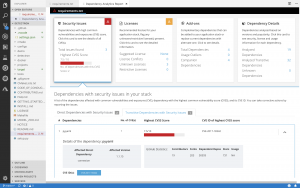
Along with Java (maven) and JavaScript (npm), Dependency Analytics now offers its full set of capabilities for Python (PyPI) applications. From your IDE, you can perform the vulnerability and license analysis of the “requirements.txt” file of your Python application, incorporate the recommended fixes, and generate the stack analysis report for more details.

Software composition analysis based on current vulnerability data

An estimated 15,000 open source packages get updated every day. On average, three new vulnerabilities get posted every day across JavaScript (npm) and Python (PyPi) packages. With this new release, the server-side analysis service hosted by Red Hat automatically processes the daily updates to open source packages that it is tracking. The hosted service also automatically ingests new vulnerability data posted to National Vulnerability Database (NVD) for JavaScript and Python packages. This allows the IDE plugin and API calls to provide source code analysis based on current vulnerability and release data.

Analyze transitive dependencies

In addition to the direct dependencies included in your application, Dependency Analytics now leverages the package managers to discover and add the dependencies of those dependencies, called “transitive” dependencies, to the dependency graph of your application. Analysis of your application is performed across the whole graph model and recommendations for fixes are provided across the entire set of dependencies.

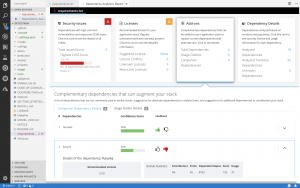
Recommendations about complementary open source libraries

With this release, Dependency Analytics looks to recommend high-quality open source libraries that are complementary to the dependencies included in your application. The machine learning technology of the hosted service collects and analyzes various statistics on GitHub to curate a list of high-quality open source libraries that can be added to the current set of dependencies to augment your application. You can provide your feedback about the add-on libraries by clicking on the “thumbs-up” or “thumbs-down” icons shown for each recommendation. Your feedback is automatically processed to improve the quality of the recommendations.

IDE plugin support

The Dependency Analytics IDE plugin is now available for VS Code, Eclipse Che, and any JetBrains IDE, including IntelliJ and PyCharm.

We will continuously release new updates to our Dependency Analytics solution so you can minimize the delays in delivery of your applications due to last-minute security and licensing related issues.

Stay tuned for further updates; we look forward to your feedback about Dependency Analytics.

Share

The post What’s new in Red Hat Dependency Analytics appeared first on Red Hat Developer.

Posted on Leave a comment

Use sshuttle to build a poor man’s VPN

Nowadays, business networks often use a VPN (virtual private network) for secure communications with workers. However, the protocols used can sometimes make performance slow. If you can reach reach a host on the remote network with SSH, you could set up port forwarding. But this can be painful, especially if you need to work with many hosts on that network. Enter sshuttle — which lets you set up a quick and dirty VPN with just SSH access. Read on for more information on how to use it.

The sshuttle application was designed for exactly the kind of scenario described above. The only requirement on the remote side is that the host must have Python available. This is because sshuttle constructs and runs some Python source code to help transmit data.

Installing sshuttle

The sshuttle application is packaged in the official repositories, so it’s easy to install. Open a terminal and use the following command with sudo:

$ sudo dnf install sshuttle

Once installed, you may find the manual page interesting:

$ man sshuttle

Setting up the VPN

The simplest case is just to forward all traffic to the remote network. This isn’t necessarily a crazy idea, especially if you’re not on a trusted local network like your own home. Use the -r switch with the SSH username and the remote host name:

$ sshuttle -r username@remotehost 0.0.0.0/0

However, you may want to restrict the VPN to specific subnets rather than all network traffic. (A complete discussion of subnets is outside the scope of this article, but you can read more here on Wikipedia.) Let’s say your office internally uses the reserved Class A subnet 10.0.0.0 and the reserved Class B subnet 172.16.0.0. The command above becomes:

$ sshuttle -r username@remotehost 10.0.0.0/8 172.16.0.0/16

This works great for working with hosts on the remote network by IP address. But what if your office is a large network with lots of hosts? Names are probably much more convenient — maybe even required. Never fear, sshuttle can also forward DNS queries to the office with the –dns switch:

$ sshuttle --dns -r username@remotehost 10.0.0.0/8 172.16.0.0/16

To run sshuttle like a daemon, add the -D switch. This also will send log information to the systemd journal via its syslog compatibility.

Depending on the capabilities of your system and the remote system, you can use sshuttle for an IPv6 based VPN. You can also set up configuration files and integrate it with your system startup if desired. If you want to read even more about sshuttle and how it works, check out the official documentation. For a look at the code, head over to the GitHub page.


Photo by Kurt Cotoaga on Unsplash.

Posted on Leave a comment

Make your Python code look good with Black on Fedora

The Python programing language is often praised for its simple syntax. In fact the language recognizes that code is read much more often than it is written. Black is a tool that automatically formats your Python source code making it uniform and compliant to the PEP-8 style guide.

How to install Black on Fedora

Installing Black on Fedora is quite simple. Black is maintained in the official repositories.

$ sudo dnf install python3-black

Black is a command line tool and therefore it is run from the terminal.

$ black --help

Format your Python code with Black

Using Black to format a Python code base is straight forward.

$ black myfile.py
All done! ✨ 🍰 ✨ 1 file left unchanged.
$ black path_to_my_python_project/
All done! ✨ 🍰 ✨
165 files reformatted, 24 files left unchanged.

By default Black allows 88 characters per line, meaning that the code will be reformatted to fit within 88 characters per line. It is possible to change this to a custom value, for example :

$ black --line-length 100 my_python_file.py

This will set the line length to allow 100 characters.

Run Black as part of a CI pipeline

Black really shines when it is integrated with other tools, like a continuous integration pipeline.

The –check option allows to verify if any files need to be reformatted. This is useful to run as a CI test to ensure all your code is formatted in consistent manner.

$ black --check myfile.py
would reformat myfile.py
All done! 💥 💔 💥
1 file would be reformatted.

Integrate Black with your code editor

Running Black during the continuous integration tests is a great way to keep the code base correctly formatted. But developers really wants to forget about formatting and have the tool managing it for them.

Most of the popular code editors support Black. It allows developers to run the format tool every time a file is saved. The official documentation details the configuration needed for each editor.

Black is a must-have tool in the Python developer toolbox and is easily available on Fedora.

Posted on Leave a comment

Python 3.8 alpha in Fedora

The Python developers have released the first alpha of Python 3.8.0 and you can already try it out in Fedora! Test your Python code with 3.8 early to avoid surprises once the final 3.8.0 is out in October.

Install Python 3.8 on Fedora

If you have Fedora 29 or newer, you can install Python 3.8 from the official software repository with dnf:

$ sudo dnf install python38

As more alphas, betas and release candidates of Python 3.8 will be released, the Fedora package will receive updates. No need to compile your own development version of Python, just install it and have it up to date. New features will be added until the first beta.

Test your projects with Python 3.8

Run the python3.8 command to use Python 3.8 or create virtual environments with the builtin venv module, tox or with pipenv. For example:

$ git clone https://github.com/benjaminp/six.git
Cloning into 'six'...
$ cd six/
$ tox -e py38
py38 runtests: commands[0] | python -m pytest -rfsxX
================== test session starts ===================
platform linux -- Python 3.8.0a1, pytest-4.2.1, py-1.7.0, pluggy-0.8.1
collected 195 items

test_six.py ...................................... [ 19%]
.................................................. [ 45%]
.................................................. [ 70%]
..............................................s... [ 96%]
....... [100%]
========= 194 passed, 1 skipped in 0.25 seconds ==========
________________________ summary _________________________
py38: commands succeeded
congratulations 🙂

What’s new in Python 3.8

So far, only the first alpha was released, so more features will come. You can however already try out the new walrus operator:

$ python3.8
Python 3.8.0a1 (default, Feb 7 2019, 08:07:33)
[GCC 8.2.1 20181215 (Red Hat 8.2.1-6)] on linux
Type "help", "copyright", "credits" or "license" for more information.
>>> while not (answer := input('Say something: ')):
... print("I don't like empty answers, try again...")
...
Say something:
I don't like empty answers, try again...
Say something: Fedora
>>>

And stay tuned for Python 3.8 as python3 in Fedora 31!